
In this article, we will examine how web developers build live flora and fauna widgets using public biodiversity data. We will compare two major data providers: the iNaturalist Application Programming Interface (API) and the Global Biodiversity Information Facility (GBIF) API. By the end of this article, you will know how to select the right platform, handle data payloads, and craft live flora and fauna widgets that enhance user experience while boosting your search engine visibility.
Table of Contents
Executive Summary and the Biophilic Web Engineering Context
Digital biophilia is the practice of bringing elements of the natural world into software design. Traditional biophilic design focuses on physical spaces, like adding sunlight, plants, and natural wood to modern buildings. On the web, digital biophilia connects online interfaces to real natural ecosystems.
One of the most effective ways to achieve this connection is by deploying live flora and fauna widgets. These digital elements display dynamic, real-time information about real plants and animals living near the website visitor. When a person visits a web page, live flora and fauna widgets can detect their general location and show images of local wildflowers, native trees, or passing migratory birds.
Building successful live flora and fauna widgets requires choosing the right software backend. Web developers must pull accurate biological records from remote databases without slowing down page load times. Slow websites frustrate visitors and harm search engine rankings. Therefore, selecting between the iNaturalist API and the GBIF API is a key technical decision for any engineering team building live flora and fauna widgets.
+-------------------------------------------------------------------------+
|                  BIOPHILIC DIGITAL WEB ECOSYSTEM                        |
|                                                                         |
|   +-----------------------+                 +-----------------------+   |
|   |   iNaturalist API     |                 |       GBIF API        |   |
|   |  (Real-Time Photos)   |                 | (Global Museum Data)  |   |
|   +-----------+-----------+                 +-----------+-----------+   |
|               |                                         |               |
|               +--------------------+--------------------+               |
|                                    |                                    |
|                                    v                                    |
|                   +----------------------------------+                  |
|                   |   Edge Server Caching (SWR Node) |                  |
|                   +----------------+-----------------+                  |
|                                    |                                    |
|                                    v                                    |
|                   +----------------------------------+                  |
|                   |    Live Flora and Fauna Widget   |                  |
|                   |      (Custom Web Component)      |                  |
|                   +----------------------------------+                  |
+-------------------------------------------------------------------------+
From an SEO perspective, search engines like Google reward websites that deliver high user engagement and fast interaction speeds. When live flora and fauna widgets load quickly and present fresh, geographically relevant information, visitors stay on the page longer. This lowers bounce rates and increases dwell time.
However, poor API integration can cause layout shifts and slow response times. This guide evaluates both platforms across data architecture, response speed, image licensing, and spatial querying. This comparison ensures your live flora and fauna widgets perform well on both desktop browsers and mobile devices.
iNaturalist API Architecture
2.1 Endpoint Infrastructure
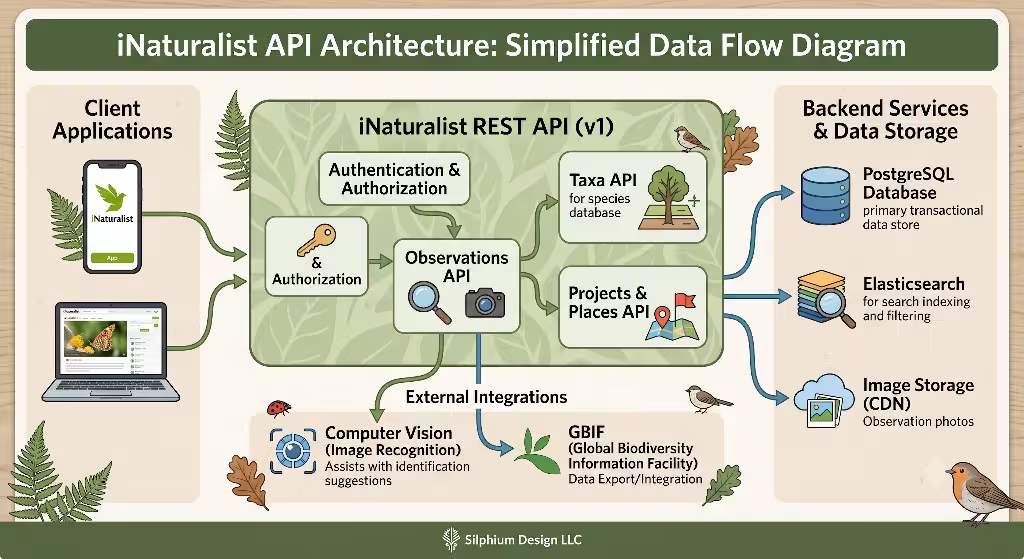
The iNaturalist platform relies on a Node.js REST API service known as Version 1 (api.inaturalist.org/v1/). This infrastructure serves millions of community observation records. The platform is currently developing a Version 2 GraphQL and REST architecture, but Version 1 remains the primary stable production pipeline for client-side live flora and fauna widgets.
The iNaturalist API is designed to deliver community-submitted observations quickly. It handles spatial queries natively, allowing web applications to request data using geographic boundaries or radius calculations. Because iNaturalist focuses heavily on photographic crowdsourcing, its endpoints return clean photo URLs and taxonomic classifications that are easy to parse in JavaScript.
+-----------------------------------------------------------------------+
|                    iNATURALIST API V1 REQUEST FLOW                    |
|                                                                       |
|  [Client Browser]                                                     |
|         |                                                             |
|         |-- GET /v1/observations?lat=42.36&lng=-71.05&radius=10 ------>|
|         |                                                             |
|         |                                  [iNaturalist V1 API]       |
|         |                                            |                |
|         |                                    Query PostgreSQL DB      |
|         |                                            |                |
|         |<-- 200 OK (JSON Payload + Photo URLs) -----+                |
|                                                                       |
+-----------------------------------------------------------------------+
2.2 Primary Target Endpoints for Widgets
When engineers build live flora and fauna widgets, they rely primarily on two main iNaturalist endpoints:
GET /v1/observations: This endpoint retrieves individual species observation records. Developers can filter results using spatial bounding boxes (nelat,nelng,swlat,swlng) or a central point with a radius parameter (lat,lng,radius). This makes it simple to power location-aware live flora and fauna widgets that show what is currently blooming or living near a user.GET /v1/taxa: This endpoint handles taxonomic hierarchy data and auto-complete queries. It is ideal for search boxes within live flora and fauna widgets, letting users search for specific plant or animal species by common or scientific names.
2.3 Data Integrity and Quality Control
A common challenge when using crowdsourced nature data in live flora and fauna widgets is ensuring data quality. Anyone can upload a photo to iNaturalist, which means some records contain mistaken identifications or blurry images.
To prevent poor data from breaking live flora and fauna widgets, developers must apply strict query parameters:
- Research Grade Filter (
quality_grade=research): Setting this parameter ensures that the observations returned have been verified by at least two independent community naturalists. This guarantees high taxonomic accuracy for live flora and fauna widgets. - Media Asset Filter (
photos=true&sounds=true): Addingphotos=truefilters out text-only records. This ensures that every record returned has visual assets ready to display in your live flora and fauna widgets.
2.4 Performance and Technical Constraints
Understanding performance limits is critical when deploying client-side live flora and fauna widgets. The iNaturalist API operates under specific technical boundaries:
- Rate Limits: The API requests that clients restrict traffic to roughly 60 requests per minute (an average of one request per second). Exceeding this threshold can lead to temporary IP blocking. Therefore, high-traffic websites cannot make direct client-side requests to iNaturalist for every visitor without an edge-caching layer.
- CORS Support: The iNaturalist API natively supports Cross-Origin Resource Sharing (CORS). This allows frontend scripts to fetch data directly from web browsers without encountering cross-domain security blocks.
- Payload Characteristics: Responses arrive as JSON objects. Image assets include convenient, pre-sized URL variants such as
square(75×75 pixels),small(240 pixels wide),medium(500 pixels wide), andlarge(1024 pixels wide). These pre-sized images make it easy to craft responsive live flora and fauna widgets that load small files on mobile screens.
GBIF (Global Biodiversity Information Facility) API Architecture
3.1 Endpoint Infrastructure
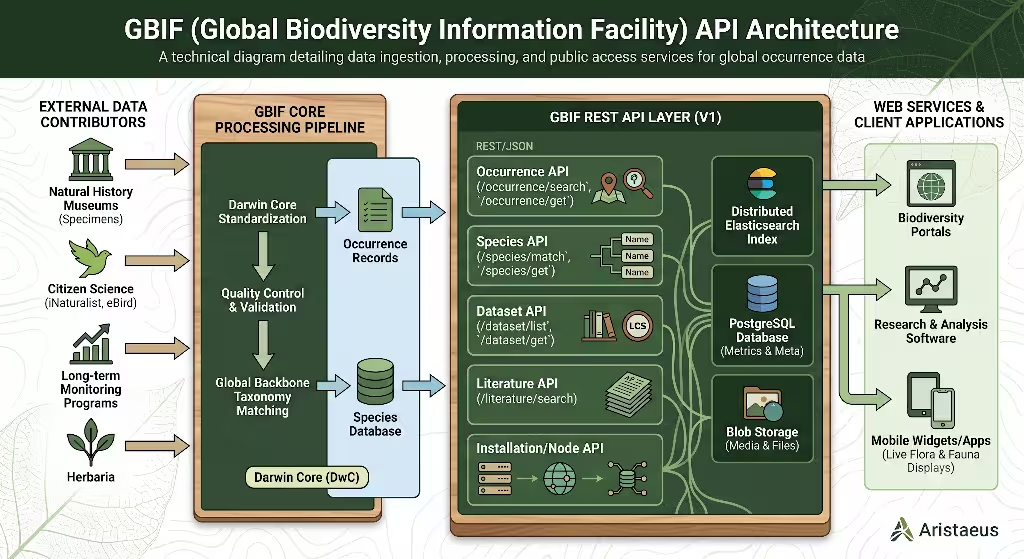
The Global Biodiversity Information Facility (GBIF) serves as an international network funded by world governments. Its purpose is to provide open access to biodiversity data from all over the globe. The GBIF RESTful API (api.gbif.org/v1/) accesses billions of species occurrence records.
Unlike iNaturalist, which focuses on modern citizen photography, GBIF aggregates records from thousands of institutions. These sources include natural history museums, university herbaria, government surveys, and citizen science platforms. As a result, GBIF provides deep scientific coverage that can power highly informative live flora and fauna widgets.
+-----------------------------------------------------------------------+
|                       GBIF API V1 DATA SOURCES                        |
|                                                                       |
|  +--------------------+  +--------------------+  +-----------------+  |
|  |  Natural History   |  | University         |  | Citizen Science |  |
|  |  Museum Specimens  |  | Herbarium Sheets   |  | (iNaturalist)   |  |
|  +---------+----------+  +---------+----------+  +--------+--------+  |
|            |                       |                      |           |
|            +-----------------------+----------------------+           |
|                                    |                                  |
|                                    v                                  |
|                      +--------------------------+                     |
|                      | GBIF Backbone Taxonomy   |                     |
|                      +------------+-------------+                     |
|                                   |                                   |
|                                   v                                   |
|                      +--------------------------+                     |
|                      |  /v1/occurrence/search   |                     |
|                      +------------+-------------+                     |
|                                   |                                   |
|                                   v                                   |
|                      +--------------------------+                     |
|                      | Live Flora/Fauna Widget  |                     |
|                      +--------------------------+                     |
+-----------------------------------------------------------------------+
3.2 Primary Target Endpoints for Widgets
To build reliable live flora and fauna widgets using GBIF, developers primarily interact with two major REST endpoints:
GET /v1/occurrence/search: This endpoint queries the master occurrence index. It supports spatial filtering using Well-Known Text (WKT) strings (geometry=POLYGON(...)) or traditional bounding boxes. It allows live flora and fauna widgets to pull localized occurrence records across large geographic areas.GET /v1/species/match: GBIF uses its own global taxonomic backbone. This endpoint maps scientific names to internal GBIF species keys (taxonKey). Developers use these keys to filter occurrence searches accurately within live flora and fauna widgets.
3.3 Data Heterogeneity and Scope
The main advantage of GBIF for live flora and fauna widgets is its massive scale and historical depth. While iNaturalist only tracks recent observations made with smartphones or cameras, GBIF records span centuries.
GBIF includes preserved plant samples from the 1800s, fossil records, and professional field surveys alongside modern photos. However, this variety means data structures are complex. Images in GBIF come from hundreds of different institutions, which means file formats, image resolutions, and host server speeds vary widely.
3.4 Performance and Technical Constraints
Developers building live flora and fauna widgets on top of GBIF must handle unique performance characteristics:
- Rate Limits and Throughput: GBIF handles heavy query loads well, but complex geospatial polygon searches can take several seconds to process. Rapid automated requests to search endpoints may trigger rate limiting based on current server load. GBIF recommends adding a custom HTTP
User-Agentheader to all requests so their engineers can identify your application. - Darwin Core Standardization: GBIF uses the international Darwin Core (DwC) data standard. Responses use standardized terms such as
decimalLatitude,decimalLongitude,scientificName, anddatasetKey. - Media Array Complexity: Media assets are nested inside a generic
mediaarray. Unlike iNaturalist, GBIF does not generate standardized image thumbnails. Developers building live flora and fauna widgets must write code that gracefully handles missing photos, broken external links, or slow external servers.
Technical Feature Comparison Matrix
Choosing the right API backend for live flora and fauna widgets requires weighing key features side by side. The following comparison matrix highlights the functional differences between iNaturalist and GBIF for client-side development.
| Technical Feature | iNaturalist API (v1) | GBIF Occurrence API (v1) |
| Primary Data Focus | Modern photo observations from citizen scientists | Global multi-institutional museum records and surveys |
| Data Standard Format | iNaturalist Native JSON Schema | Darwin Core Archive (DwC) mapped JSON |
| Geospatial Filtering | Bounding box, center radius, place IDs | Bounding box, WKT polygons, country codes |
| Image Asset Quality | High consistency; standardized thumbnail sizes | Variable consistency; hosted by independent external institutions |
| Data Freshness | Immediate real-time availability upon submission | Scheduled periodic ingestion cycles (weekly/monthly) |
| Taxonomic Reference | iNaturalist internal Taxon Identifiers | GBIF Global Backbone Taxonomic Keys |
| Default Image Licensing | Individual user selections (CC0, CC-BY, CC-BY-NC) | Dataset-level licensing (CC0, CC-BY, CC-BY-NC) |
| CORS Compatibility | Enabled natively for browser requests | Enabled natively for public endpoints |
| Widget Use Case | Real-time, photo-rich local wildlife displays | Deep historical, regional, or species-range visualizers |
This matrix shows that for photo-heavy live flora and fauna widgets, iNaturalist is often easier to implement. Conversely, for detailed ecological mapping or historic research displays, GBIF offers superior depth.
Frequently Asked Questions about Flora and Fauna Widgets
5.1 Is iNaturalist data included in the GBIF API?
Yes, iNaturalist observation data is exported to GBIF on a regular schedule. Every week, iNaturalist packages its Research Grade records that carry open Creative Commons licenses (CC0, CC-BY, and CC-BY-NC). It publishes these records to GBIF through an Integrated Publishing Toolkit (IPT).
However, there are important differences when accessing this data through GBIF instead of iNaturalist:
- Time Lag: New observations posted to iNaturalist today will appear immediately in live flora and fauna widgets powered by the iNaturalist API. Those same records can take several days or weeks to appear in GBIF search results.
- Filtered Observations: iNaturalist records with restrictive “All Rights Reserved” copyright settings are excluded from GBIF exports.
If your live flora and fauna widgets require immediate, real-time photographic updates from local users, querying iNaturalist directly is the better choice.
+-----------------------------------------------------------------------+
|                    INATURALIST TO GBIF DATA PIPELINE                  |
|                                                                       |
|  [User Uploads Observation]                                           |
|              |                                                        |
|              v                                                        |
|  [iNaturalist Database] --------> (Live iNaturalist API Widget)       |
|              |                    *Immediate Real-Time Access*        |
|              | (Weekly Export)                                        |
|              v                                                        |
|  [GBIF Aggregator Node] ---------> (Live GBIF API Widget)             |
|                                   *Delayed Scientific Access*         |
+-----------------------------------------------------------------------+
5.2 Which API is faster for dynamic, location-aware client-side flora and fauna widgets?
For dynamic client-side live flora and fauna widgets, the iNaturalist API is generally faster and easier to optimize. Several architectural factors explain this performance advantage:
- Optimized JSON Payloads: iNaturalist structures its response objects specifically for user interface components. Key data points, such as common names and thumbnail image URLs, are available at the top level of the JSON response.
- Pre-Rendered Image Sizes: iNaturalist automatically creates pre-cropped, optimized image sizes on its CDN. This allows live flora and fauna widgets to request small image sizes (
smallormedium), minimizing data transfers and speeding up rendering on mobile devices. - Direct Radius Searching: The iNaturalist API allows simple radius queries (
lat,lng,radius). GBIF queries often require complex spatial polygon strings, which take longer for database engines to execute.
5.3 How do photo licensing and Creative Commons terms affect widget image rendering?
When displaying media in live flora and fauna widgets, developers must comply with copyright law and open-source licenses. Every photo returned by these APIs includes a license code:
- CC0 (Public Domain): You can display these images inside live flora and fauna widgets without restriction or mandatory attribution.
- CC-BY (Attribution): Images can be rendered in live flora and fauna widgets, provided you credit the observer’s name near the image.
- CC-BY-NC (Non-Commercial): These images can only be used on non-commercial websites. If your website sells products or displays paid ads, using CC-BY-NC photos in your live flora and fauna widgets can violate copyright terms.
When building live flora and fauna widgets, your backend logic should check the license_code parameter in iNaturalist or the license field in GBIF. If your site is commercial, filter out non-commercial licenses during data fetching.
5.4 Can you use GBIF and iNaturalist APIs together in a hybrid architecture?
Yes, combining both APIs into a hybrid system can produce powerful live flora and fauna widgets. In a hybrid setup, each API handles the task it does best:
+-----------------------------------------------------------------------+
|                       HYBRID WIDGET ARCHITECTURE                      |
|                                                                       |
|  [Client Browser Widget Request]                                      |
|                 |                                                     |
|                 +------------------+------------------+               |
|                                    |                  |               |
|                                    v                  v               |
|                           [iNaturalist API]      [GBIF API]           |
|                           (Local Photos)         (Range Data)         |
|                                    |                  |               |
|                                    +--------+---------+               |
|                                             |                         |
|                                             v                         |
|                            [Unified Biophilic Interface]              |
|                             - Real-time photos                        |
|                             - Historic distribution maps              |
+-----------------------------------------------------------------------+
- iNaturalist provides fresh, high-resolution photographs and real-time community observation feeds for live flora and fauna widgets.
- GBIF provides historical context, species range boundaries, and scientific classifications across centuries of field surveys.
By linking records using scientific names, developers can build live flora and fauna widgets that show today’s local sightings alongside historical distribution charts.
Biophilic UI/UX Design Patterns for Live Biodiversity Widgets
6.1 Organic Visual Integration
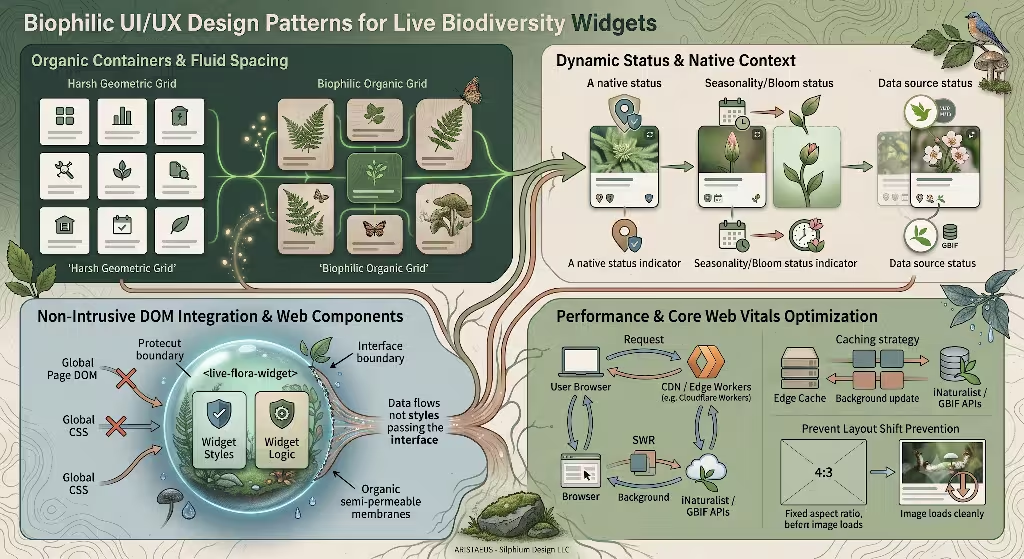
Designing biophilic web interfaces requires moving away from cold, mechanical UI elements. Live flora and fauna widgets should feel connected to nature through thoughtful design choices:
- Soft Shapes and Fluid Layouts: Avoid sharp corners and boxy grids. Use rounded card corners (
border-radius: 12pxor higher) and soft background colors inspired by stone, soil, leaves, and water. - Dynamic Phenology Badges: Display biological status indicators within live flora and fauna widgets. Use color-coded badges to indicate whether a plant is native, invasive, or currently in bloom.
- Subtle Motion and Transitions: Use smooth CSS transitions (
ease-in-out) when card elements load or update. Micro-interactions should mirror natural movements, like a soft fade reminiscent of shifting light through tree leaves.
+-----------------------------------------------------------------------+
|                  BIOPHILIC CARD COMPONENT STRUCTURE                   |
|                                                                       |
|   +---------------------------------------------------------------+   |
|   |  [Image Container: aspect-ratio 4/3]                          |   |
|   |  +---------------------------------------------------------+  |   |
|   |  |                                                         |  |   |
|   |  |               Plant or Animal Photograph                |  |   |
|   |  |                                                         |  |   |
|   |  +---------------------------------------------------------+  |   |
|   |                                                               |   |
|   |  [Badge: Research Grade]  [Badge: Native Species]             |   |
|   |                                                               |   |
|   |  Taxon Common Name (e.g., White Oak)                          |   |
|   |  Scientific Name (e.g., Quercus alba)                         |   |
|   |  Observed: 2 hours ago | Location: Boston, MA                 |   |
|   +---------------------------------------------------------------+   |
+-----------------------------------------------------------------------+
6.2 Non-Intrusive DOM Integration and Web Components
When adding live flora and fauna widgets to existing websites, you must prevent styling conflicts. Global CSS styles on the main site can alter widget fonts or borders, while widget styles might break host layout rules.
The best solution is encapsulating live flora and fauna widgets inside Custom Web Components using the Shadow DOM. By creating a custom HTML tag, such as <live-flora-widget>, all CSS rules and JavaScript logic stay fully self-contained. This makes live flora and fauna widgets easy to drop into any content management system (CMS) like WordPress or Drupal without code conflicts.
6.3 Performance and Core Web Vitals Optimization
Search engine performance depends heavily on meeting Google’s Core Web Vitals targets. Poorly constructed live flora and fauna widgets can degrade these performance metrics if not managed correctly:
- Preventing Cumulative Layout Shift (CLS): When images load asynchronously, they can push page content down suddenly, annoying users and hurting CLS scores. Always define explicit aspect ratios (such as
aspect-ratio: 4 / 3) or fixed height containers in your live flora and fauna widgets before external media assets arrive. - Optimizing Largest Contentful Paint (LCP): Large images inside live flora and fauna widgets can delay page loading scores. Use modern image formats like WebP, lazy-load images that appear below the fold (
loading="lazy"), and serve assets through an edge CDN. - Server-Side Rendering (SSR) and Edge Caching: Avoid making every visitor’s browser fetch data directly from iNaturalist or GBIF APIs. Instead, route requests through a serverless worker (such as Cloudflare Workers or AWS Lambda) using a Stale-While-Revalidate (SWR) caching policy. The edge worker serves pre-fetched JSON to visitors instantly while updating its cached data in the background every 15 minutes.
Implementation Blueprint and Code Architecture
To demonstrate how these principles come together, let us build a production-ready Web Component. This component fetches local observations from the iNaturalist API and renders responsive live flora and fauna widgets inside a isolated Shadow DOM.
7.1 iNaturalist Fetch Strategy (Client-Side Localized Widget)
Below is the complete JavaScript code for a Web Component that builds live flora and fauna widgets without relying on external libraries.
JavaScript
class LiveFloraFaunaWidget extends HTMLElement {
  constructor() {
    super();
    this.attachShadow({ mode: 'open' });
  }

  connectedCallback() {
    this.lat = this.getAttribute('lat') || '42.3601';
    this.lng = this.getAttribute('lng') || '-71.0589';
    this.radius = this.getAttribute('radius') || '10';
    this.renderSkeleton();
    this.fetchData();
  }

  renderSkeleton() {
    this.shadowRoot.innerHTML = `
      <style>
        :host {
          display: block;
          font-family: system-ui, -apple-system, sans-serif;
          max-width: 480px;
          margin: 1rem auto;
        }
        .widget-card {
          background: #f4f6f4;
          border-radius: 16px;
          padding: 16px;
          box-shadow: 0 4px 12px rgba(0,0,0,0.05);
          border: 1px solid #e0e6e0;
        }
        .widget-title {
          font-size: 1.1rem;
          color: #2d4a2d;
          margin: 0 0 12px 0;
          display: flex;
          align-items: center;
          gap: 8px;
        }
        .grid {
          display: grid;
          grid-template-columns: repeat(auto-fill, minmax(120px, 1fr));
          gap: 12px;
        }
        .item-card {
          background: #ffffff;
          border-radius: 8px;
          overflow: hidden;
          display: flex;
          flex-direction: column;
        }
        .img-container {
          width: 100%;
          aspect-ratio: 1 / 1;
          background: #e2e8e2;
        }
        .img-container img {
          width: 100%;
          height: 100%;
          object-fit: cover;
        }
        .info {
          padding: 8px;
        }
        .common-name {
          font-size: 0.85rem;
          font-weight: 600;
          color: #1b2e1b;
          white-space: nowrap;
          overflow: hidden;
          text-overflow: ellipsis;
        }
        .scientific-name {
          font-size: 0.75rem;
          font-style: italic;
          color: #556b55;
          white-space: nowrap;
          overflow: hidden;
          text-overflow: ellipsis;
        }
      </style>
      <div class="widget-card">
        <h3 class="widget-title">Local Flora & Fauna Sightings</h3>
        <div class="grid" id="container">Loading local nature data...</div>
      </div>
    `;
  }

  async fetchData() {
    const endpoint = `https://api.inaturalist.org/v1/observations?lat=${this.lat}&lng=${this.lng}&radius=${this.radius}&photos=true&quality_grade=research&per_page=6`;

    try {
      const response = await fetch(endpoint);
      const data = await response.json();
      this.renderItems(data.results);
    } catch (error) {
      console.error('Error fetching data for live flora and fauna widgets:', error);
      this.shadowRoot.getElementById('container').innerHTML = `<p>Unable to load local nature sightings.</p>`;
    }
  }

  renderItems(items) {
    const container = this.shadowRoot.getElementById('container');
    container.innerHTML = '';

    if (!items || items.length === 0) {
      container.innerHTML = '<p>No recent local observations found.</p>';
      return;
    }

    items.forEach(item => {
      const photo = item.photos && item.photos[0] ? item.photos[0].url.replace('square', 'medium') : '';
      const commonName = item.taxon && item.taxon.preferred_common_name ? item.taxon.preferred_common_name : 'Unknown Species';
      const scientificName = item.taxon ? item.taxon.name : '';

      const card = document.createElement('div');
      card.className = 'item-card';
      card.innerHTML = `
        <div class="img-container">
          ${photo ? `<img src="${photo}" alt="${commonName}" loading="lazy" />` : ''}
        </div>
        <div class="info">
          <div class="common-name">${commonName}</div>
          <div class="scientific-name">${scientificName}</div>
        </div>
      `;
      container.appendChild(card);
    });
  }
}

customElements.define('live-flora-widget', LiveFloraFaunaWidget);
To include this component in any web page, add the definition script and drop the custom tag into your HTML body:
HTML
<live-flora-widget lat="42.3601" lng="-71.0589" radius="15"></live-flora-widget>
This clean implementation ensures live flora and fauna widgets load efficiently, avoid style pollution, and keep Core Web Vitals metrics healthy.
Architectural Decision Framework: Which API Should You Select?
Selecting the best software backend for your live flora and fauna widgets comes down to your primary project goals. Use this decision framework to make the right architectural choice:
+-----------------------------------------------------------------------+
|                    ARCHITECTURAL DECISION TREE                        |
|                                                                       |
|  What is the primary requirement for your widget?                     |
|                                                                       |
|  [Real-Time Photos & Recent Local Sightings]                          |
|         |                                                             |
|         v                                                             |
|  USE iNATURALIST API                                                  |
|  - High photo consistency                                             |
|  - Pre-sized image thumbnails                                         |
|  - Simple radius and location queries                                 |
|                                                                       |
|  [Historical Deep Aggregation & Global Museum Records]                |
|         |                                                             |
|         v                                                             |
|  USE GBIF API                                                         |
|  - Darwin Core standardized data structures                           |
|  - Multi-century observation depth                                    |
|  - Comprehensive scientific taxonomy mapping                          |
+-----------------------------------------------------------------------+
Choose the iNaturalist API if:
- Your live flora and fauna widgets need consistent, pre-cropped photography.
- You are building localized “What is Blooming Nearby” or “Recent Wildlife Sightings” user interfaces.
- You want to set up live flora and fauna widgets quickly using simple geographic parameters without handling complex taxonomic database schemas.
Choose the GBIF API if:
- Your live flora and fauna widgets focus on scientific mapping, historical occurrences, or academic research displays.
- You need access to institutional herbarium sheets, museum specimen records, and formal ecological research surveys.
- Your development team is comfortable working with Darwin Core JSON data standards.
By evaluating your platform needs against these parameters, you can build engaging live flora and fauna widgets that captivate visitors, support biophilic web standards, and improve your search engine performance.
Supplement: Term Definitions
To support search engine indexing and semantic search depth, this article incorporates key industry terms and technological standards:
- APIs and Protocols: RESTful API, JSON Payload, iNaturalist v1 API, GBIF Occurrence API, Cross-Origin Resource Sharing (CORS), GraphQL, Endpoints.
- Data Standards and Biological Taxonomy: Darwin Core (DwC), Darwin Core Archive (DwC-A), GBIF Backbone Taxonomy, Taxon Identifiers, Research Grade Observations, TaxonKey.
- Geospatial and Mapping Technology: Spatial Bounding Box, Well-Known Text (WKT) Polygons, Latitude/Longitude Coordinates, Radius Searching, Geolocation.
- Copyright and Licensing: Creative Commons, CC0 Public Domain, CC-BY Attribution, CC-BY-NC Non-Commercial.
- Web Engineering and SEO: Biophilic Design, Custom Web Components, Shadow DOM, Stale-While-Revalidate (SWR), Cumulative Layout Shift (CLS), Largest Contentful Paint (LCP), Server-Side Rendering (SSR).