
Table of Contents
Digital Biophilia Meets Generative AI
We spend most of our working hours staring at flat glowing glass. Our eyes scan clean boxes, sharp lines, and plain white cards. This setup works well for basic machines, but our bodies and brains did not grow up in sterile rooms. For millions of years, the human visual system grew alongside the rich patterns of living forests, winding rivers, rough stone walls, and dappled sunlight. When we strip these natural patterns away, our brains have to work harder to stay focused.
This issue brings us to the growing field of digital biophilia. Biophilic design means bringing natural shapes, behaviors, and environmental cues into human-made spaces. In physical architecture, this means adding sunlight, indoor courtyards, living plant walls, and raw wooden beams. In digital spaces, it means something deeper than slapping a photo of a green fern into a hero section.
Modern screen design relies heavily on biophilic textures to make software feel alive, calm, and grounded. When we talk about biophilic textures, we mean surface patterns, gradients, and graphic structures created with biological math. Instead of uniform gray backgrounds, biophilic textures recreate the delicate surfaces found in living systems.
Generative artificial intelligence has changed how we create these designs. In the past, creating high-resolution, seamless biophilic textures required hours of manual painting or complex 3D math. Today, machine learning models can study real-world botanical and geological surfaces, learn their core structural rules, and generate fresh biophilic textures on demand. These generative tools allow us to create biophilic textures that fit every screen size, load quickly, and keep the user comfortable during long work sessions.
Bringing together nature and machine learning is not just a visual trend. It represents a major step forward in user interface design. By using balanced biophilic textures, web designers can lower cognitive strain, lengthen dwell time, and guide the eye without shouting. This guide explores the science, visual patterns, and coding practices behind modern biophilic textures on the web.
Foundational Patterns: Translating Nature into Digital Textures
Biomorphic Forms and Patterns
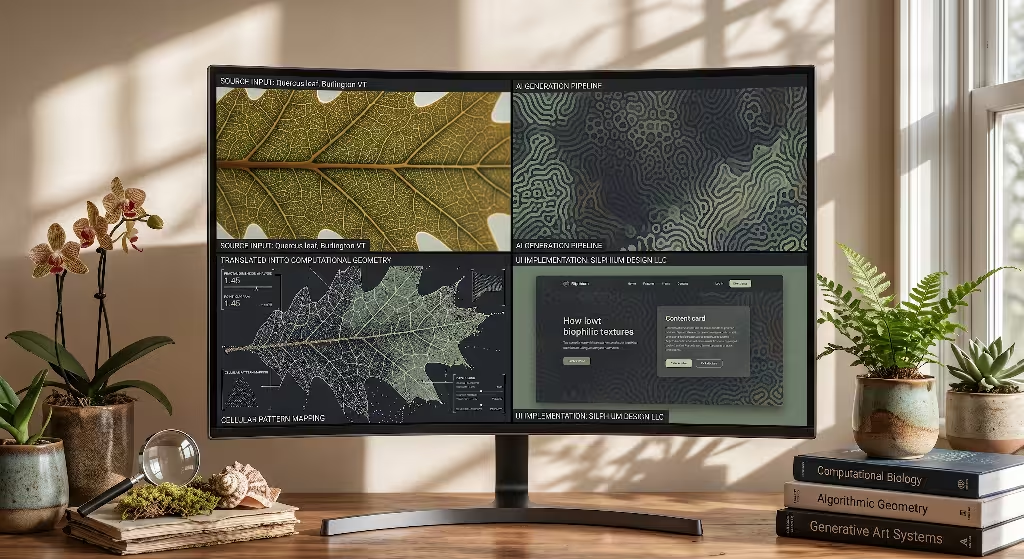
Nature rarely builds in pure squares or perfect right angles. If you look at a cross-section of a stem, a dried mud bed, or a honeycomb, you will see recurring mathematical rules. The most famous rule is the Fibonacci sequence, which creates the golden spiral seen in sunflowers, pinecones, and nautilus shells.
When we translate these rules into UI design, biomorphic forms become the visual skeleton of our surfaces. Adding biomorphic patterns into biophilic textures gives interfaces a sense of rhythm. A plain rectangular card can feel cold and rigid. But if that card carries biophilic textures shaped by the gentle curves of plant tissues, the human eye relaxes as it moves across the screen.
In generative models, we can direct the software to follow natural growth rules like reaction-diffusion or cellular division. These models build biophilic textures that mimic the surface of leaves or river beds, giving users an organic surface that feels balanced and predictable.
Material Connection with Nature
In the physical world, materials tell stories through their surfaces. Wood has grain, stone has pores and mineral veins, and raw paper has fine fibers. These surfaces soften reflections and scatter light gently.
Flat digital design stripped away this tactile richness. For years, buttons looked like flat digital stickers. Bringing material connection into web design means using biophilic textures that carry subtle, natural tactile qualities.
When we use biophilic textures that emulate clay, linen, limestone, or bark, we are not trying to fool users into thinking they can physically touch wood. Instead, these biophilic textures provide micro-contrasts that make digital spaces feel warm and grounded. The brain recognizes the visual signatures of real materials, which immediately makes the interface feel safe, durable, and human.
The Computational Biology Angle
Why do our brains prefer biophilic textures over flat plastic colors? The answer lies in how our optic nerves process information.
In nature, scenery follows a visual pattern known as natural spatial frequencies, or one-over-f scaling. This means that whether you look at a forest from three miles away or look at a patch of moss from three inches away, the ratio of large shapes to small details stays roughly the same. Our eyes evolved to scan this exact balance with very little effort.
When a website displays a stark, blank background with harsh edges, the brain must spend energy filtering out the artificial contrast. On the other hand, well-designed biophilic textures match the statistical patterns of natural scenes. The visual cortex processes these biophilic textures with lower metabolic energy. Designers call this visual fluency. By using biophilic textures that match natural frequencies, we give the user’s mind a break, allowing them to focus on the text and core tasks without getting visual fatigue.
Six Concrete Examples of Biophilic Textures
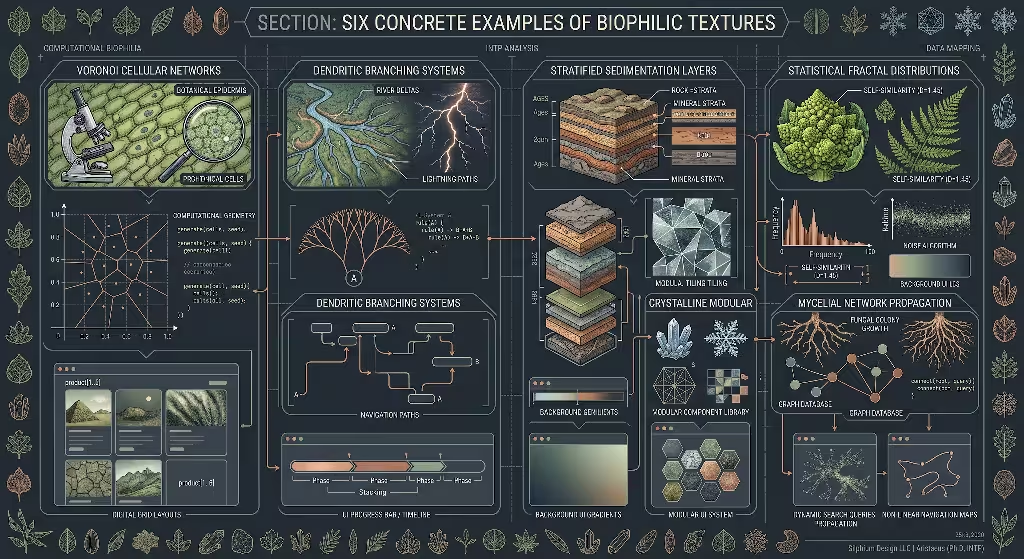
To see how these concepts work in practice, let us look at six distinct styles of biophilic textures that can be generated with modern AI tools and integrated into modern websites.
+-----------------------------------------------------------------------------+
|                     CORE TAXONOMY OF BIOPHILIC TEXTURES                     |
+------------------------------------+----------------------------------------+
| Texture Category                   | Primary Interface Application          |
+------------------------------------+----------------------------------------+
| 1. Cellular & Morphogenetic        | Card containers, modals, loading bars  |
| 2. Dendritic & Branching           | Section dividers, dynamic flowcharts   |
| 3. Lichen & Bryophyte Micro-Surfaces| Ambient backdrops, low-glare dark mode |
| 4. Geological & Mineral Layers     | Headers, cards, tactile button bases   |
| 5. Hydrological & Fluid Striations | Hero sections, directional guides      |
| 6. Mycelial & Hyphal Filaments     | Interactive graphs, node-based tools   |
+------------------------------------+----------------------------------------+
1. Cellular and Morphogenetic Textures
Cellular patterns appear everywhere in the living world. You find them in the cross-sections of plant stems, the skin of fruit, the structure of honeycomb, and the wings of dragonflies. These patterns are often called Voronoi diagrams or reaction-diffusion patterns. They are built from tiny cells that grow until they meet their neighbors, creating organic webs of flexible shapes.
In digital design, cellular biophilic textures work wonderfully inside container cards, modals, and skeleton loading screens. Instead of a sterile gray box showing where content will appear, a subtle cellular texture can softly pulse. When designed with low contrast, these biophilic textures add structural depth without stealing attention from text.
AI image generators can build these biophilic textures by studying botanical cell walls under a microscope. By keeping the lines soft and the fills slightly uneven, designers get biophilic textures that feel alive and responsive.
2. Dendritic and Branching Textures
Dendritic structures follow the physics of fluid transport and structural efficiency. You can see these branching networks in the veins of a maple leaf, the path of lightning, the layout of river deltas, and the arrangement of human blood vessels. These shapes start from a strong primary trunk and divide into smaller and smaller paths.
Dendritic biophilic textures are fantastic tools for directing a user’s attention. Because the eye naturally follows lines from thick bases to thin tips, these biophilic textures can serve as visual signposts across a page. They can divide sections, guide the eye down a long landing page, or frame a sign-up box.
Using generative models, designers can create seamless dendritic biophilic textures that carry a clear fractal dimension. By blending these biophilic textures into the margins of a layout, you turn empty white space into an active, pleasant visual pathway.
3. Lichen and Bryophyte Micro-Surfaces
Lichen and mosses create intricate, crinkled surfaces that grow across rocks and tree trunks. They have a complex mix of soft velvety fields, rough crusted borders, and miniature cups. These surfaces absorb direct sunlight and break it into thousands of tiny, soft shadows.
On the screen, lichen-inspired biophilic textures provide an ideal answer for dark mode interfaces. Pure black screens paired with pure white text often create bright, stinging halos that hurt the eyes. By using dark, slate-toned biophilic textures based on lichen surfaces, you introduce a gentle visual grain.
These biophilic textures absorb the harshness of high-contrast typography. When applied to sidebars, footers, or ambient backgrounds, lichen-style biophilic textures bring a sense of natural quiet that makes long reading sessions far more comfortable.
4. Geological and Mineral Stratification
Look closely at a cut slab of sandstone, a wall of layered shale, or the edge of weathered granite. You will see fine bands of color, gentle waves from ancient sediment, and tiny flecks of crystalline minerals. These geological patterns show time, pressure, and stability.
In website layouts, geological biophilic textures are perfect for establishing trust, permanence, and reliability. Financial platforms, educational hubs, and health organizations benefit from these patterns because stone patterns feel solid and unshakable.
AI-generated stone biophilic textures can be rendered as depth maps or gentle wash backgrounds for hero headers. Unlike glossy 3D buttons, stone-inspired biophilic textures offer a soft, matte finish that gives web elements weight without feeling dated.
5. Hydrological Flow and Fluid Striations
Water is never completely still. Even in a quiet pond, gentle ripples create winding caustics of light. In rivers, water forms long, smooth streams that weave around rocks, leaving soft lines in the sand below.
Hydrological biophilic textures use the gentle, curving lines of moving water to create movement in digital layouts. Because water patterns are smooth and wave-like, these biophilic textures are great for guiding users through multi-step journeys.
For example, an onboarding screen can use horizontal fluid biophilic textures to softly pull the eye from left to right. When rendered in light tints of sky blue, sage green, or warm sand, these biophilic textures make websites feel fresh, open, and easy to navigate.
6. Mycelial Network and Hyphal Filaments
Fungi build sprawling underground webs called mycelium. These threads branch out, connect with plant roots, share nutrients, and build resilient communication webs. Visually, mycelium looks like a fine lace of interconnected threads that move through soil in all directions.
In user interface design, mycelial biophilic textures are ideal for data visualizations, network graphs, and interactive canvas tools. Standard digital network diagrams often look like rigid spiderwebs made of plain circles and straight sticks.
By applying mycelial biophilic textures to these data points, we transform cold technical diagrams into living systems. These biophilic textures help users understand complex connections intuitively, showing how different pieces of information relate, support, and feed into one another.
Common Questions Answered about Biophilic Textures
What are biophilic textures in web design?
Biophilic textures are digital visual assets, background patterns, and surface treatments that copy the math, structures, and surface behaviors of the natural world. Instead of using flat colors or synthetic patterns like checkerboards and digital grids, biophilic textures borrow from leaf veins, rock layers, cellular arrangements, bark, and water ripples.
In web design, these patterns are used on website canvases, content cards, buttons, and section dividers. The goal of using biophilic textures is to reduce screen fatigue, improve visual comfort, and create an emotional sense of calm and clarity for people using digital tools.
How do you create seamless AI biophilic textures for website backgrounds?
Creating seamless biophilic textures using modern artificial intelligence requires a careful mix of prompt engineering and image processing. Most generative models allow you to add specific tiling commands. For instance, using a tiling modifier tells the model to align the top edge of the image with the bottom edge, and the left edge with the right edge.
Once the initial image is generated, you should bring it into an image editor or a procedural shader tool to confirm there are no hard seams. You then convert the image into a high-performance web format like AVIF or WebP.
Finally, you can tile the image using CSS background repeat rules or wrap it into a canvas element using WebGL. The trick is to keep the pattern scale natural so that when the biophilic textures repeat across large desktop monitors, the repetition remains invisible to the user.
Can biophilic design improve user engagement and conversion rates?
Yes, practical research shows that biophilic design can boost key business metrics like engagement and conversions. The underlying reason comes from a concept called Attentional Restoration Theory. When a website looks harsh, visually noisy, or sterile, visitors experience mental fatigue faster. This fatigue causes them to leave pages early, which raises bounce rates.
By introducing balanced biophilic textures into headers and landing page backgrounds, you lower visual stress. When users feel comfortable, they spend more time reading, exploring, and engaging with content.
This extra time gives your message more space to connect, leading to longer session times and higher conversion rates on forms and sign-up flows. Designers have found that using subtle biophilic textures behind product pricing tables or checkout flows helps keep users calm during critical buying decisions.
Are AI-generated textures bad for website speed and Core Web Vitals?
They can hurt performance if they are handled poorly, but they do not have to be a problem. If a designer exports an uncompressed five-megabyte PNG file and loads it as a full-screen background, it will damage the website’s Largest Contentful Paint score and slow down page rendering.
However, when you optimize biophilic textures properly, they have virtually zero negative impact on site speed. Modern web design teams convert AI-generated biophilic textures into modern file formats like AVIF or WebP, which compress complex organic details into tiny file sizes.
You can also turn high-contrast organic edges into lightweight vector SVG files. When you combine modern compression, responsive image tags, and browser caching, biophilic textures load almost instantly without hurting performance metrics or search engine rankings.
Technical Implementation: Prompt Engineering and Generation Pipelines
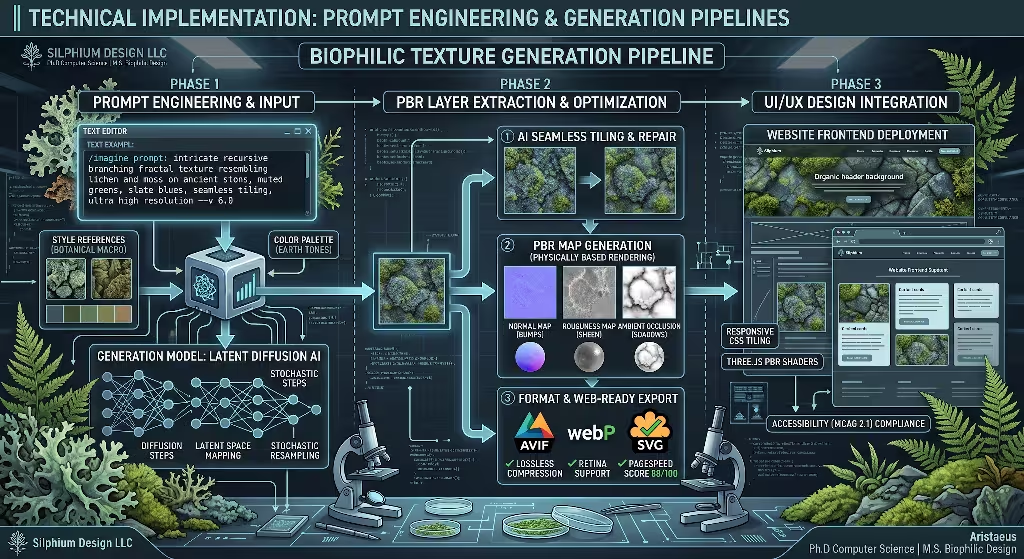
Building production-ready biophilic textures requires a structured process. You cannot just type “make a nature texture” into an AI tool and expect a clean, usable web asset. You need a systematic workflow that produces consistent, accessible, and easily tiled biophilic textures.
+-----------------------------------------------------------------------------+
|                      GENERATIVE PIPELINE ARCHITECTURE                       |
+-----------------------------------------------------------------------------+
|                                                                             |
|  [ Prompt Engineering ] ---> Biological subject + Microscale terms + Tile    |
|             |                                                               |
|             v                                                               |
|  [ AI Diffusion Model ] ---> Latent image generation with matched bounds    |
|             |                                                               |
|             v                                                               |
|  [ Post-Processing ]   ---> Contrast check, seam verification, compression  |
|             |                                                               |
|             v                                                               |
|  [ Map Extraction ]    ---> Normal maps, roughness maps, ambient occlusion  |
|             |                                                               |
|             v                                                               |
|  [ Front-End Delivery ] ---> WebP/AVIF images or WebGL procedural shaders    |
|                                                                             |
+-----------------------------------------------------------------------------+
Prompt Syntax Archetypes
To build high-grade biophilic textures, your AI prompts should include four clear pieces:
- The biological subject
- The microscopic or surface scale
- The geometric or mathematical modifier
- The technical rendering instructions
Here is an example prompt structure:
macro photograph of dried desert clay and cellular lichen structures,
delicate Voronoi tessellation, low contrast, top-down flat perspective,
soft natural diffuse lighting, neutral slate and sand tones,
physically based rendering surface, seamless tiling texture --tile
Notice how this prompt avoids emotional words like “beautiful” or “stunning.” Instead, it uses concrete, structural words. Specifying “top-down flat perspective” prevents the model from generating confusing angles or dramatic lighting that would break the illusion when placed behind flat UI text. Specifying “low contrast” ensures that your finished biophilic textures will not clash with typography.
Normal, Roughness, and Ambient Occlusion Maps
In top-tier web design, biophilic textures do not have to stay static 2D images. By extracting Physically Based Rendering maps from your AI-generated art, you can create interactive surfaces that react gently to mouse movements.
- Normal Maps: These image files tell the browser how light bounces off microscopic bumps and dips without adding extra 3D polygons.
- Roughness Maps: These files define which parts of the surface look matte and which parts have a soft sheen, just like real stone or wood.
- Ambient Occlusion Maps: These files add soft, realistic micro-shadows into tiny crevices, giving biophilic textures realistic depth.
You can feed your generated biophilic textures into map-generation software to split them into these three layers. With WebGL libraries like Three.js, you can build cards where a soft light follows the user’s cursor. This gives the card the subtle physical depth of real stone or plant tissue, turning ordinary biophilic textures into an interactive experience.
Solving Seam and Edge Artifacts
Even when an AI tool includes a tiling setting, generated images often have small visual seams. A dark shadow on the far-left edge might not match a bright highlight on the far-right edge, creating an obvious line when repeated across a wide screen.
To fix these issues in biophilic textures, follow this simple procedure:
- Open the image in an editing tool and apply an offset filter by fifty percent horizontally and vertically. This moves the outer edges into the center of the canvas.
- Inspect the center lines. If you see a visible seam, use an organic clone brush or AI inpainting brush to blend the textures together.
- Check the image histogram. Make sure the average brightness across all four corners matches the brightness of the center.
This process guarantees that your biophilic textures can tile endlessly across ultra-wide monitors without creating distracting repeating grids.
Performance Engineering and SEO Optimization
A website can have stunning visuals, but if it loads slowly, visitors will bounce and search engines will lower its rank. High-end design must always respect technical performance. When adding biophilic textures to an enterprise website, you must apply strict optimization techniques.
+-----------------------------------------------------------------------------+
|                     PERFORMANCE OPTIMIZATION CHECKLIST                      |
+-----------------------------------------------------------------------------+
| [ ] Convert all source assets to modern AVIF and WebP formats.              |
| [ ] Set explicit aspect ratios to avoid Cumulative Layout Shift (CLS).      |
| [ ] Apply fetchpriority="high" only to visible hero section textures.       |
| [ ] Use native loading="lazy" for all biophilic textures below the fold.    |
| [ ] Test body copy contrast against the texture to ensure a 4.5:1 ratio.     |
| [ ] Wrap dynamic canvas patterns in prefers-reduced-motion queries.         |
| [ ] Attach ImageObject schema data to help search engines index the assets. |
+-----------------------------------------------------------------------------+
Core Web Vitals Strategy
Google’s Core Web Vitals measure real-world user experience, focusing on three areas: loading speed, visual stability, and responsiveness. Rich graphical backgrounds can cause issues if not managed properly.
To protect your Largest Contentful Paint metric, never use giant uncompressed files for hero biophilic textures. Convert all assets into modern AVIF files. AVIF provides cleaner compression than JPEG or PNG, especially on subtle natural gradients, while cutting file sizes by up to seventy percent.
For critical hero backgrounds, preload the image using priority hints:
HTML
<link rel="preload" fetchpriority="high" as="image" href="/textures/lichen-surface.avif" type="image/avif">
To protect your Cumulative Layout Shift metric, ensure that the containers holding your biophilic textures have clear aspect ratios or fixed dimensions in your CSS. If the browser knows the exact container size before the image loads, the page will not jump around, keeping your layout rock-solid.
Semantic SEO and Schema Architecture
Search engines crawl images, and biophilic textures can support your organic search visibility when tagged with clean semantic HTML.
Do not hide your most important biophilic textures inside generic, anonymous division tags with inline styles. When an image provides genuine educational or branding value, use semantic figure elements:
HTML
<figure class="biophilic-showcase">
  <img src="/textures/cellular-sandstone.webp"
       alt="High-resolution biophilic texture showing cellular sandstone patterns"
       loading="lazy"
       width="1200"
       height="800">
  <figcaption>Example of cellular sandstone biophilic textures used for UI backdrops.</figcaption>
</figure>
You can also include structured ImageObject schema markup on your pages. This markup helps search engines understand the exact subject of your biophilic textures, which makes them eligible to appear in rich search results and image packs:
JSON
{
  "@context": "https://schema.org",
  "@type": "ImageObject",
  "contentUrl": "https://example.com/textures/cellular-sandstone.webp",
  "license": "https://example.com/license",
  "acquireLicensePage": "https://example.com/licensing",
  "creditText": "Silphium Design Lab",
  "creator": {
    "@type": "Organization",
    "name": "Silphium Design LLC"
  },
  "copyrightNotice": "Silphium Design LLC",
  "description": "Macro-scale biophilic textures showing cellular Voronoi growth patterns for web backgrounds."
}
Accessibility and WCAG Compliance
The most common mistake web designers make with biophilic textures is hurting text readability. A background pattern that looks lovely on its own can easily make overlying text impossible to read.
The Web Content Accessibility Guidelines require a minimum contrast ratio of 4.5:1 for regular text and 3:1 for large headings. When placing text over biophilic textures, follow these clear rules:
- Use a Translucent Color Overlay: Place a solid color layer with eighty to ninety percent opacity between your biophilic textures and your text. This keeps the organic pattern visible while ensuring the background stays uniform enough for easy reading.
- Inspect Local Contrast: Natural patterns have light and dark spots close together. Check the contrast of your text against both the brightest and darkest points of your biophilic textures.
- Respect Motion Preferences: If you use WebGL or CSS to animate your biophilic textures, always include a reduced-motion media query:
CSS
@media (prefers-reduced-motion: reduce) {
  .animated-biophilic-canvas {
    animation: none;
    transform: none;
  }
}
This simple rule ensures that users who experience motion sickness or vestibular issues can browse your website safely and comfortably.
Future Trajectory: Real-Time Generative Biophilia
Client-Side Neural Rendering with WebGPU
Right now, most web designers use static image files for their biophilic textures. They prompt an AI tool, download a picture, optimize it, and load it on the site. But browser technology is evolving quickly.
With the rollout of WebGPU, modern web browsers can now run machine learning code and complex shaders directly on the user’s graphics card. This means we will soon generate real-time biophilic textures directly inside the browser.
Instead of downloading static images, a website will run a tiny script that calculates organic growth patterns on the fly. The resulting biophilic textures can adapt in real time to how the user interacts with the page, generating fresh cellular or fluid details as they scroll.
Circadian-Reactive Interfaces
In physical biophilic architecture, indoor lighting changes throughout the day to match the sun outside. Morning light is cool and bright, midday light is neutral, and evening light is warm and dim. This helps keep our natural sleep and wake cycles in balance.
Websites can apply this same principle using dynamic biophilic textures. By reading the user’s local time, a website can slowly change the color, shadow depth, and roughness of its biophilic textures.
+-----------------------------------------------------------------------------+
|                   CIRCADIAN-REACTIVE UI CYCLE OVER 24 HOURS                 |
+-----------------------------------------------------------------------------+
|                                                                             |
|   08:00 AM (Morning)   --> Crisp lighting, light lichen and sand tones       |
|                                                                             |
|   01:00 PM (Midday)    --> High clarity, cool water ripples, sharp focus    |
|                                                                             |
|   07:00 PM (Evening)   --> Warm sandstone, amber undertones, soft shadows   |
|                                                                             |
|   11:00 PM (Night)     --> Dark slate moss, low contrast, minimal glare     |
|                                                                             |
+-----------------------------------------------------------------------------+
During morning hours, the interface can display crisp, light-toned biophilic textures that encourage focus. As evening arrives, the styles shift to warm, low-contrast stone or moss biophilic textures. This approach bridges the gap between software and the natural world, creating digital spaces that feel completely in tune with human biology.
Practical Implementation: Writing Clean Code for Biophilic Textures
To see how these concepts come together in code, let us look at a clean implementation using modern CSS and accessible markup. This example shows how to layer subtle biophilic textures behind a content card while maintaining high contrast, fast loading speeds, and responsive design.
HTML Structure
HTML
<article class="organic-card">
  <div class="organic-card-surface" aria-hidden="true"></div>
  <div class="organic-card-content">
    <span class="category-badge">Biomorphic Architecture</span>
    <h2>Understanding Cellular Growth Patterns</h2>
    <p>
      Discover how natural Voronoi networks create structurally sound,
      visually relaxing containers in modern enterprise software.
    </p>
    <a href="/articles/cellular-growth" class="read-more-link">
      Read Technical Case Study
    </a>
  </div>
</article>
CSS Styling
CSS
.organic-card {
  position: relative;
  max-width: 540px;
  border-radius: 16px;
  overflow: hidden;
  box-shadow: 0 12px 32px rgba(0, 0, 0, 0.06);
  border: 1px solid rgba(220, 225, 220, 0.6);
  background-color: #f7f9f6;
}

.organic-card-surface {
  position: absolute;
  top: 0;
  left: 0;
  width: 100%;
  height: 100%;
  z-index: 1;
  opacity: 0.12;
  background-image: url("/assets/textures/cellular-leaf-pattern.avif");
  background-repeat: repeat;
  background-size: 280px 280px;
  pointer-events: none;
}

.organic-card-content {
  position: relative;
  z-index: 2;
  padding: 36px 32px;
  color: #1a221b;
}

.category-badge {
  display: inline-block;
  font-size: 0.8125rem;
  font-weight: 600;
  text-transform: uppercase;
  letter-spacing: 0.05em;
  color: #2d5a37;
  margin-bottom: 12px;
}

.organic-card-content h2 {
  font-size: 1.5rem;
  line-height: 1.35;
  margin: 0 0 14px 0;
  color: #111812;
}

.organic-card-content p {
  font-size: 1rem;
  line-height: 1.6;
  margin: 0 0 24px 0;
  color: #3b463e;
}

.read-more-link {
  display: inline-flex;
  align-items: center;
  font-weight: 600;
  color: #1e4a27;
  text-decoration: none;
}

.read-more-link:hover,
.read-more-link:focus {
  text-decoration: underline;
}
In this code, notice three critical technical decisions:
- The texture is held in an empty element with
aria-hidden="true". This prevents screen readers from treating the background texture as informative content. - The texture layer has
pointer-events: none. This ensures users can select text, click links, and drag elements through the texture without any issues. - The opacity is locked at a subtle twelve percent (
0.12). This keeps the background light enough that dark body copy maintains a contrast ratio well above the required 4.5:1 threshold.
By following this approach, you can weave biophilic textures into any digital design system cleanly, safely, and effectively.
Summary Checklist for Designers and Developers
When planning your next digital project, use this quick checklist to make sure your biophilic textures deliver real value without causing technical headaches:
- Start with Biological Math: Base your patterns on proven growth systems like Voronoi cells, Fibonacci spirals, river branching, or lichen clusters.
- Prioritize Text Readability: Never sacrifice contrast for pattern richness. Always test your text against your patterns with a contrast checker.
- Optimize File Formats: Convert all raster patterns into AVIF or WebP files, and aim for file sizes under fifty kilobytes per texture tile.
- Eliminate Pattern Seams: Test your tiling carefully to make sure there are no visible repeating lines across large monitors.
- Protect Core Web Vitals: Set explicit container dimensions to avoid layout shifts, and preload above-the-fold textures.
- Keep Interactions Gentle: If you animate your textures or make them react to user cursors, keep the movements subtle and support reduced-motion user preferences.
Biophilic design is not a fleeting stylistic fad. It is an intentional, scientifically backed way to make our digital environments calmer, clearer, and more sustainable for the human mind. By using well-crafted biophilic textures, we can turn the websites we use every day into spaces that feel natural, balanced, and alive.