
Table of Contents
Natural systems hold answers to our modern digital problems. When people browse the web today, they look at thousands of square, rigid boxes. Most websites and social media platforms force human eyes into stark grids, harsh neon colors, and artificial shapes. This causes visual fatigue and mental strain. Human brains did not evolve in sterile cubic environments. Our visual systems evolved over millions of years inside living ecosystems full of trees, water, stone, and sunlight.
In this comprehensive guide, we will cover the science, math, and practical art of visual communication inspired by the living world. We will look closely at how you can transform data into living imagery, with a special focus on high-traffic platforms like Pinterest.
The Computational Biology of Visual Attention: Why Biophilic Infographics Perform
Visual attention is not infinite. Every time a person opens a screen, their brain uses energy to filter out useless noise. When visual graphics are too harsh, users look away. When graphics reflect biological forms, the human eye rests while learning.
A. Cognitive Load and Attention Restoration Theory (ART)
To understand why nature-based visuals work so well on human viewers, we must examine Attention Restoration Theory. Psychologists Stephen and Rachel Kaplan discovered that human attention falls into two clear types: directed attention and involuntary attention.
Directed attention takes hard mental work. You use directed attention when you balance your checkbook, read a spreadsheet, or drive through heavy traffic in the rain. Directed attention tires the brain. It causes mental fatigue, irritability, and mistakes.
Involuntary attention happens without effort. It occurs when you watch clouds pass across the sky, look at flames dance in a fire, or watch river water ripple over polished stones. The Kaplans named this soft fascination. Soft fascination lets your mind rest and rebuilds your directed attention.
Most graphic design relies on directed attention. It uses loud arrows, harsh neon boxes, and sharp edges that demand attention. This exhausts the viewer. When you adopt biophilic infographic design, you tap into soft fascination.
A well-crafted biophilic infographic design uses visual elements that humans naturally love to observe. By using smooth curves, organic spacing, and realistic lighting, you reduce cognitive load. The viewer takes in complex data without getting tired. Tests consistently show that readers retain information better when they study diagrams built on natural forms. The brain does not need to waste energy fighting unnatural shapes. Instead, it absorbs the core facts quickly and remembers them days later.
+-------------------------------------------------------------+
|                 ATTENTION RESTORATION IN UI                 |
+-------------------------------------------------------------+
|  ARTIFICIAL / RIGID GRAPHICS   |  BIOPHILIC VISUAL GRAPHICS |
|  - Sharp 90-degree corners     |  - Gentle biomorphic curves|
|  - High-saturation neon fills  |  - Earth-balanced palettes |
|  - Overloaded visual noise     |  - Generous refuge buffers |
|  - Result: Directed fatigue    |  - Result: Soft fascination|
+-------------------------------------------------------------+
B. Algorithmic Synergy with Pinterest’s Visual Graph
Pinterest is not simply a social media channel. It functions as a visual search engine. Every day, millions of users search for ideas, home improvement layouts, sustainable architecture, and wellness routines. Pinterest runs an artificial intelligence system called Pinterest Lens. This visual engine breaks uploaded images down into core components: dominant color tones, high-contrast visual edges, texture gradients, and shapes.
When you create a biophilic infographic design for Pinterest, you give the platform visual features that its neural networks categorize cleanly. The Pinterest visual graph looks for relationships between visual objects. A pin that features natural textures, leaf-vein patterns, or biological hierarchies easily connects to searches around wellness, architecture, sustainability, and healthy living.
Human user behavior drives this algorithmic loop. Pinterest users actively look for calm, inspiring visuals that feel grounded. Pinners save images that offer a sense of beauty and organization. Because biophilic infographic design naturally uses balance, soft fascination, and grounded colors, users pin, save, and click these images more often than loud, flat corporate posters.
When your pin earns high engagement, Pinterest notices. The system pushes your biophilic infographic design to the top of search feeds, boards, and recommended pins. This creates an ongoing stream of free organic traffic to your website.
Foundational Biophilic Design Principles for Vertical Canvases
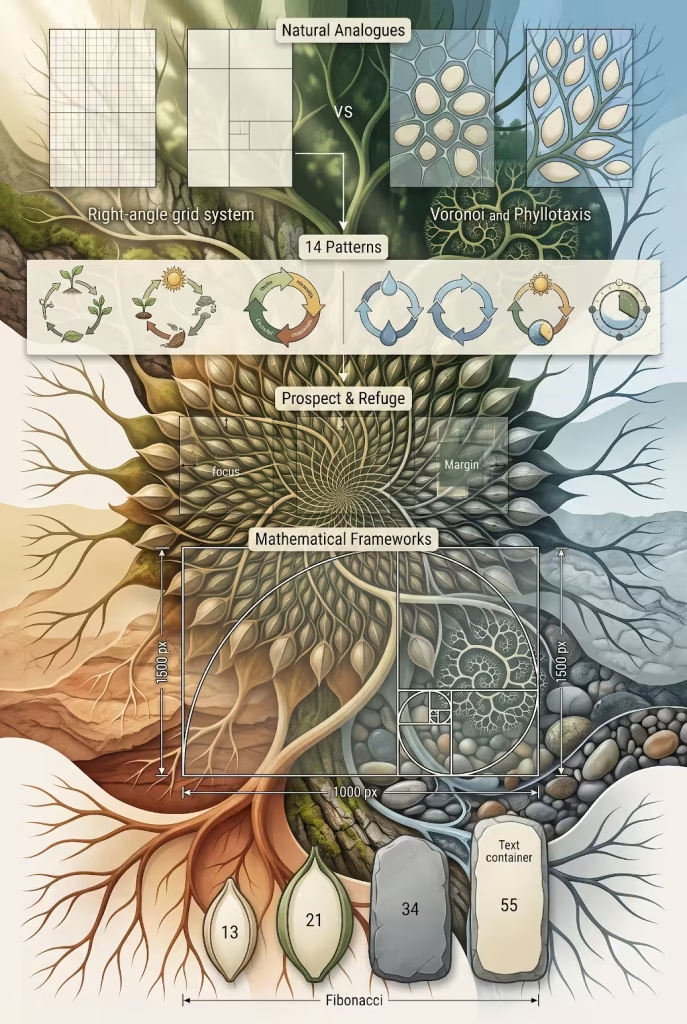
Designing for vertical platforms requires clear planning. The canvas is tall and narrow, matching the human smartphone screen. To turn a regular graphic into a living communication piece, you must apply the basic laws of biology to two-dimensional design.
A. Translating the 14 Patterns into 2D Infographics
In environmental architecture, experts often rely on the 14 Patterns of Biophilic Design, developed by Terrapin Bright Green. These patterns explain how living things respond to built spaces. We can take these exact architectural principles and translate them straight into 2D graphic design.
+-----------------------------------------------------------------+
|                THE 14 PATTERNS IN 2D GRAPHICS                   |
+-----------------------------------------------------------------+
| ARCHITECTURAL PATTERN          | DIGITAL INFOGRAPHIC EQUIVALENT |
+--------------------------------+--------------------------------+
| Visual Connection with Nature  | Organic textures, life cycles  |
| Biomorphic Forms and Patterns  | Branching paths, cell modules  |
| Dynamic and Diffuse Light      | Soft radial shadow drops       |
| Prospect and Refuge            | Strong data cards with buffers |
+-----------------------------------------------------------------+
1. Visual Connection with Nature
In architecture, this means having a direct view of trees, plants, or water. In biophilic infographic design, this pattern means showing real biological processes and living structures. Instead of relying on abstract geometric icons like plain circles and squares, you show how items relate in the physical world.
You can illustrate data through water cycles, tree rings, plant growth stages, or weather transitions. This anchors abstract business statistics into the tangible world we know.
2. Biomorphic Forms and Patterns
Nature rarely creates true straight lines or perfect right angles. Look at a river basin from an airplane, inspect the back of an oak leaf, or study a cross-section of bone tissue. You will find self-similar forms, branching paths, and soft curves.
In your biophilic infographic design work, replace rigid boxes with biomorphic shapes. Use soft organic containers to frame text. Group related facts into cellular nodes shaped like Voronoi patterns, similar to the cells of a leaf or the skin of a melon. Use branching pathways instead of boring right-angle arrows to show workflows and organizational trees.
3. Dynamic and Diffuse Light
Sunlight filters through trees in varied, beautiful ways. It casts dappled shadows, glows through morning fog, and shifts warmth from dawn until dusk. Standard flat graphics often use monotone, harsh blocks of bright color with no depth.
You can bring your work to life by adding soft, diffuse gradients that mimic natural atmospheric perspective. Use gentle drop shadows that feel like sunlight falling through a window. Layer your visual cards so that background items recede gently into a soft haze, while key information stands forward in clear focus.
4. Prospect and Refuge
Humans love spaces where they feel safe (refuge) while maintaining a wide, open view of their surroundings (prospect). Think of sitting comfortably under a covered porch while looking out across a rolling green pasture.
In a biophilic infographic design, refuge takes the form of clean, calm margins and generous negative space. This negative space gives the eye a quiet place to rest. Prospect is the bold, clear focal point: the primary statistic, the core insight, or the central illustration that commands attention.
When an infographic is packed wall-to-wall with tiny, screaming icons, it has zero refuge. It induces claustrophobia. A proper biophilic layout provides safe buffers of empty space around every critical cluster of information.
B. Mathematical Frameworks for Pinterest Aspect Ratios
Nature is not chaotic. Underneath the apparent wildness of a forest lies rigorous mathematics. To make your biophilic infographic design visually magnetic, you should build your layouts on these same mathematical laws.
                    THE GOLDEN RATIO CANVAS

           0                    618            1000 px
         0 +---------------------+---------------+
           |                     |               |
           |                     |   Refuge /    |
           |   Primary Data      |   Secondary   |
           |   Focus Card        |   Context     |
           |   (Prospect)        |   Area        |
           |                     |               |
       927 +---------------------+---------------+
           |  Summary, Source, and Brand Footprint|
      1500 +-------------------------------------+
1. The Golden Ratio on a 2:3 Canvas
The Golden Ratio, often represented by the Greek letter Phi, is an irrational mathematical constant approximately equal to 1.618. Throughout nature, from nautilus shells to the spiral arms of galaxies, shapes expand according to this constant proportion.
When you design for Pinterest, the standard canvas is 1000 pixels wide by 1500 pixels tall. This creates a clean 2:3 aspect ratio. We can use the Golden Ratio to divide this vertical space with precision:
- Take your total width of 1000 pixels and divide it by 1.618. You get roughly 618 pixels.
- This leaves a secondary section of 382 pixels.
- Take your total height of 1500 pixels and divide it by 1.618. You get roughly 927 pixels.
- This leaves a secondary section of 573 pixels.
By aligning your primary visual nodes, main titles, and focal points along these golden cut lines, your biophilic infographic design feels balanced to the human eye. The graphic appears organized and peaceful without the reader ever knowing why.
2. The Fibonacci Typographic Scale
Typographic hierarchy is often where designers stumble. They guess font sizes randomly, picking 16 pixels here, 24 pixels there, and 48 pixels for a headline. In nature, growth unfolds sequentially along the Fibonacci series, where each number is the sum of the two preceding numbers:
1, 1, 2, 3, 5, 8, 13, 21, 34, 55, 89, 144…
You can map your typography straight onto this sequence to create organic harmony:
- Metadata, citations, and footnotes: 13 pixels
- Body copy and supporting data notes: 21 pixels
- Section subheadings and callouts: 34 pixels
- Major category headers: 55 pixels
- Main hero title: 89 pixels
Because these font sizes grow at the exact mathematical rate that branching stems and pinecones grow, your text layout feels cohesive. The eye glides down the page easily, guided by a proportion system that matches the physical universe.
Curated Biophilic Infographic Design Examples for Pinterest
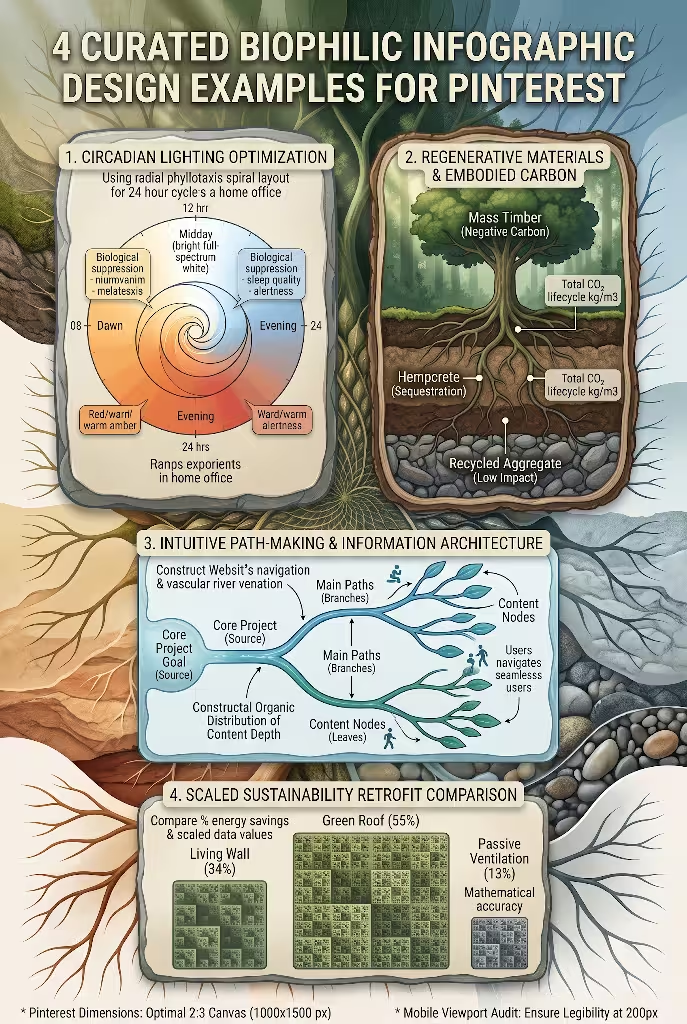
Let us explore four complete design systems. Each example uses real biological structures to organize complex data, giving you direct inspiration for your own projects.
A. Example 1: The Phyllotaxis Data Map (Circadian Rhythm Guide)
Phyllotaxis is the botanical term for how leaves, seeds, and petals arrange themselves around a central plant stem. Consider the seed head of a giant sunflower. The seeds do not grow in straight rows. They spiral outward from the center at an exact angle of roughly 137.5 degrees, known as the Golden Angle. This prevents seeds from crowding each other and maximizes surface area so every seed gets equal sunlight and moisture.
                  THE PHYLLOTAXIS DATA MAP
                       (CIRCADIAN WHEEL)

                              12 PM
                           Peak Focus
                      . - ~ ~ * ~ ~ - .
                  . '       |           ' .
                /           |    O Early    \
          9 AM *     O Late |   / Afternoon   * 3 PM
               | \    Morning   |             |
               |  \         |  /              |
               |   O--------+--------O        |
               |  /         |         \       |
               | / Awakening|  Evening \      |
          6 AM *            |           *     * 6 PM
                \           |          /     /
                  . _       |       _ .    '
                      ' - ~ * ~ - '
                           12 AM
                         Deep Rest
Visual Structure
In this biophilic infographic design, we display a 24-hour human circadian rhythm chart using a radial phyllotaxis spiral. The graphic begins at the center core, which represents midnight and deep restorative sleep. As the eye moves outward along the golden spiral tracks, each data point blooms like an individual sunflower seed.
Morning markers spread out along the first curve, detailing cortisol spikes, body temperature changes, and optimal hydration moments. Midday metrics occupy the wide outer arcs, marking peak physical strength and mental sharpness. The spiral rounds toward the edges for evening wind-down, showing the release of melatonin.
Because each data capsule sits at a natural Golden Angle offset, text labels never collide. Every data point gets ample breathing room.
Color and Lighting Calibration
The color palette follows the natural transition of daylight across the sky:
- Night / Deep Sleep: Midnight slate blue (
#1B263B) - Morning / Awakening: Warm sunrise ochre (
#E0A96D) - Midday / High Focus: Clear sky azure (
#4A90E2) - Evening / Recovery: Dusky terracotta (
#C86D51)
Subtle radial gradients connect the rings, reminding the viewer of how light filters through the morning sky.
Pinterest Performance Strategy
This layout excels in the wellness, productivity, and home workspace niches on Pinterest. Pinners look for self-care routines that do not feel clinical. Presenting medical and biological facts through a sunflower phyllotaxis model makes the graphic approachable and highly shareable. It transforms dry biological schedules into a stunning piece of visual wall art that users want to save to their personal boards.
B. Example 2: The Stratified Soil and Root System (Materials Lifecycle Breakdown)
In forest ecology, the soil profile is divided into rich horizons: the organic leaf litter layer at the very top, the dark nutrient-dense topsoil beneath it, the mineral subsoil lower down, and the solid bedrock at the base. Plant roots penetrate these layers, creating an intricate, branching network that stabilizes the earth.
+-------------------------------------------------------------+
|              STRATIFIED SOIL ECO-MATERIALS PIN              |
+-------------------------------------------------------------+
| [CANOPY]  Mass Timber, Green Roofs, Photovoltaics           |
|           Embodied Carbon: Negative / Net Neutral           |
| ~ ~ ~ ~ ~ ~ ~ ~ ~ ~ ~ ~ ~ ~ ~ ~ ~ ~ ~ ~ ~ ~ ~ ~ ~ ~ ~ ~ ~ ~ |
| [TOPSOIL] Rammed Earth, Straw Bale, Lime Plasters           |
|           Carbon Sequestration Phase                        |
| - - - - - - - - - - - - - - - - - - - - - - - - - - - - - - |
| [SUBSOIL] Recycled Aggregate, Geothermal Foundations        |
|           Low Impact Site Processing                        |
| = = = = = = = = = = = = = = = = = = = = = = = = = = = = = = |
| [BEDROCK] Deep Geological Geothermal, Structural Bedrock   |
|           Long-Term Environmental Anchoring                 |
+-------------------------------------------------------------+
Visual Structure
This vertical biophilic infographic design uses a cross-section of living earth to show the environmental impact of modern building materials. The top of the infographic acts as the open air and forest canopy. Here, we present light, regenerative materials like mass timber, bamboo framing, and green roofs.
As the reader scrolls down the 1000 by 1500 pixel image, they move underground through distinct geological layers.
- The upper horizon details carbon-sequestering biocomposites, like mycelium insulation and hempcrete blocks.
- The middle subsoil horizon holds medium-impact materials, like low-carbon concrete and rammed earth.
- The deep bedrock foundation layer displays high-energy materials, like structural steel, showing their long-term recycling lifecycles.
Instead of boring, straight boundary lines, each layer is separated by organic, undulating earth contours. Data points hang from root-like tendrils that dig into each stratum.
Color and Texture Integration
This design relies on warm, tactile earth tones:
- Forest Canopy: Deep moss green (
#2D5A27) - Rich Topsoil: Dark umber (
#3D2314) - Clay Horizon: Weathered terracotta (
#A0522D) - Deep Subsoil: Raw limestone gray (
#8B8589)
To make the graphic tactile on mobile screens, we layer micro-textures over the flat colors. A subtle grain over the soil horizons gives the impression of slate, peat, and stone. This texture catches the eye as pinners scroll through flat, featureless graphics.
Pinterest Performance Strategy
This pin targets architecture, interior design, home renovation, and sustainable building boards. High-end Pinterest users often search for green home building solutions. By organizing sustainable building products into a cross-section of the earth, this biophilic infographic design becomes an essential visual reference. It earns saves from professionals and homeowners who want actionable environmental guidance.
C. Example 3: The Dendritic Flowchart (UX Architecture Workflow)
Dendritic patterns are common in living organisms. You can see them in the branching of oak trees, the veins in maple leaves, the pathways of human blood vessels, and the flow of mountain rivers.
Physicist Adrian Bejan explained this universal phenomenon through Constructal Theory: for any flow system to survive, it must evolve to provide easier access to the currents that move through it. In nature, dendritic branching is the most efficient way to move energy, water, and nutrients from a single trunk into wide, open spaces.
                    THE DENDRITIC FLOW SYSTEM

                           [ Core Goal ]
                             /       \
                   [ Main Path ]   [ Context ]
                      /     \         /     \
                    Node    Node    Node    Node
                   / | \   / | \   / | \   / | \
                  *  *  * *  *  * *  *  * *  *  *
                  (Constructal Organic Distribution)
Visual Structure
Standard corporate flowcharts use harsh rectangular boxes connected by sharp right-angle pipes. They look like plumbing blueprints, not communication tools. In this biophilic infographic design, we map an organizational UX architecture workflow using a dendritic river system.
The primary project objective sits at the top as the headwaters of a mountain spring. As the decisions move forward, the path splits into major river channels. These secondary streams branch smoothly into smaller brooks, representing sub-tasks, user touchpoints, and technical implementation steps.
Each junction curves like the natural fork of a living tree limb or a river delta. Data points sit in curved pods shaped like smooth river stones, resting alongside the current.
Color and Movement
Water-inspired color ramps direct the eye down the page:
- Mountain Spring / Main Source: Alpine ice blue (
#E0F7FA) - Main Stream / High Priority: Vibrant ocean teal (
#00838F) - Minor Runnels / Secondary Tasks: Soft riverbed stone (
#78909C) - Target Terminus / Completed Project: Deep ocean navy (
#002F6C)
Gradients flow along the direction of the lines, drawing the reader’s eye naturally from top to bottom.
Pinterest Performance Strategy
This layout thrives on technology, web design, corporate strategy, and educational boards. Designers and software engineers love saving clean, innovative UX process diagrams. By replacing rigid flowcharts with a fluid river system, this biophilic infographic design stands out on Pinterest boards. It proves that technical business workflows can feel alive, organized, and beautiful.
D. Example 4: The Minimalist Fractal Hierarchy (Statistical Comparison Infographic)
Fractals are self-similar mathematical patterns that repeat at different scales. Look closely at a head of Romanesco broccoli, a fern frond, or a jagged mountain ridge. The small parts look almost identical to the whole structure.
In nature, fractals allow organisms to maximize their surface area within a compact space. Think of your lungs: your bronchial tubes branch into smaller tubes over and over again, allowing a huge amount of surface area for oxygen exchange to fit inside your chest.
                 THE MINIMALIST FRACTAL CONTAINER

         +---------------------------------------------+
         | LEVEL 1: Primary Ecological Footprint (100%)|
         | +-----------------------------------------+ |
         | | LEVEL 2: Energy & Operations (61.8%)    | |
         | | +-------------------------------------+ | |
         | | | LEVEL 3: Materials & Embodied (38.2%)| | |
         | | | +---------------------------------+ | | |
         | | | | LEVEL 4: Water Cycles (23.6%)   | | | |
         | | | +---------------------------------+ | | |
         | | +-------------------------------------+ | |
         | +-----------------------------------------+ |
         +---------------------------------------------+
Visual Structure
Statistical comparison infographics often fail because they overload the reader with identical bar graphs or unreadable pie charts. This biophilic infographic design organizes environmental data using self-similar fractal containers.
The main container represents the total planetary footprint of a business or city. Inside this container sits a sub-container, scaled down to match the golden ratio. Inside that sub-container sits another, and another, branching outward like the leaves of a fern.
Readers can see at a glance how the parts add up to the whole. Because the scale of each box matches the mathematical ratio of the underlying data, the visualization is both accurate and visually pleasing.
Color and Geometry
A minimalist color palette helps readers focus on the mathematical shapes:
- Large Container / Total System: Soft warm bone white (
#F8F9FA) - Secondary Sub-System: Sage green (
#8A9A86) - Tertiary Component: Deep evergreen (
#2F3E2E) - Core Statistic / Focal Metric: Bright coral flower accent (
#D9534F)
By keeping the lines clean and using plenty of negative space around each fractal cluster, the graphic stays readable even on small mobile screens.
Pinterest Performance Strategy
This infographic targets business analysts, data scientists, eco-conscious consumers, and educators. People love saving graphics that explain complex statistical relationships simply. The fractal structure allows this biophilic infographic design to present dense data without visual clutter, making it a favorite for educational saves and repins.
Pinterest-Specific Production and Technical Optimization Specs
A beautiful graphic means nothing if it fails on mobile screens or gets compressed into a blurry mess by platform algorithms. Let us walk through the technical rules for building top-performing pins.
A. Dimensional and Mobile-First Rendering Guidelines
Pinterest is built for smartphones. Over 80 percent of Pinterest users browse, search, and save pins using mobile apps. If your graphic is hard to read on a five-inch phone screen, it will fail.
+-------------------------------------------------------------+
|               PINTEREST FEED SIZING COMPARISON              |
+-------------------------------------------------------------+
| CANVAS FORMAT        | DIMENSIONS     | FEED PERFORMANCE    |
+----------------------+----------------+---------------------+
| Standard Golden Pin  | 1000 x 1500 px | Optimal 2:3 display |
| Long-Format Guide    | 1000 x 2100 px | Risk of feed cut    |
| Square Graphic       | 1000 x 1000 px | Wastes feed height  |
+-------------------------------------------------------------+
1. Canvas Dimensions
Always set your digital canvas to 1000 pixels wide by 1500 pixels tall. This guarantees the ideal 2:3 vertical aspect ratio recommended by Pinterest.
You can occasionally stretch your canvas to 1000 pixels wide by 2100 pixels tall for deep step-by-step guides. Be careful, however: if your pin is taller than a 1:2.1 aspect ratio, Pinterest may crop the bottom of your image in the main feed. Users will only see the rest if they tap the pin directly. For consistent, predictable results, stick to the 1000 by 1500 pixel canvas.
2. The 200-Pixel Mobile Viewport Audit
When your pin shows up in the Pinterest mobile home feed, it sits in a two-column grid. On most phones, your 1000-pixel-wide image is shrunk down to roughly 200 pixels wide.
Before you export any biophilic infographic design, zoom out on your screen until the graphic is only two inches wide. Can you still read your headline? Can you identify the primary visual focal point within three seconds?
If your headline turns into unreadable squiggles, your font is too small or your background is too busy. Make your main headline bold and clean, keep supporting text simple, and protect your margins.
B. Color Theory and Contrast Accessibility
Designing with natural colors does not mean your graphic must be a dull wash of muddy browns and pale greens. Nature uses brilliant, high-contrast colors: think of bright red berries against dark evergreen foliage, or a vibrant yellow orchid glowing on a mossy tree trunk.
+-------------------------------------------------------------+
|              ORGANIC PALETTE ACCESSIBILITY GRID             |
+-------------------------------------------------------------+
| COLOR NAME   | HEX CODE | ROLE           | WCAG COMPLIANCE  |
+--------------+----------+----------------+------------------+
| Deep Forest  | #1B3B2B  | Background     | Anchor base      |
| Raw Calcite  | #F5F3EF  | Primary Text   | AAA pass (12:1)  |
| Prairie Gold | #D4A359  | Accents        | AA pass (4.8:1)  |
| Canyon Rust  | #A64B2A  | Warnings/Alerts| AA pass (4.6:1)  |
+-------------------------------------------------------------+
1. Building an Organic Palette
Start with grounded, organic base tones:
- Deep Forest Green:
#1B3B2B - Rich Peat Loam:
#2E251E - Soft Mineral Gray:
#4A4E51 - Warm Calcite Stone:
#F5F3EF
Then pick an energetic accent color inspired by botanical blooms:
- Prairie Wildflower Gold:
#D4A359 - Ripe Persimmon:
#E06D44 - Clear Glacial Ice:
#58A4B0
2. Protecting WCAG Contrast
Accessibility matters for both human readers and search engine crawlers. Modern search engines run computer vision tools to confirm that text is readable against its background.
Always check your color combinations against Web Content Accessibility Guidelines (WCAG 2.1). Your body text must have a minimum contrast ratio of 4.5:1 against the background color. Large headlines must maintain at least a 3:1 ratio.
Never place thin, pale green text on an off-white background. If you use a dark moss background, use crisp mineral white or warm cream text. By ensuring high contrast, your biophilic infographic design will be easy to read for people with low vision and color blindness.
C. File Compression and Vector Quality
How you save and export your file plays a huge role in how it displays online. Pinterest compresses images to speed up page loads. If you upload a low-quality file, the platform’s compression tools will leave ugly, blurry artifacts around your text and lines.
- Always build your original graphics using vector tools like Adobe Illustrator, Figma, or Affinity Designer. Vector lines remain pin-sharp at any resolution.
- When exporting for Pinterest, save your artboards as 8-bit PNG files or high-quality WebP files at full 1000 by 1500 pixel resolution. PNG files preserve crisp edges along text letters and fine vector lines better than standard JPEG files.
- Keep your exported file size under 10 megabytes. This prevents upload errors while giving the platform plenty of visual detail to work with.
- If you host the infographic on your own website, serve it in next-generation WebP format. Provide an SVG vector file download link for educational and professional users who want to print or study your graphic.
Search Engine and Social Graph Optimization (Bridging Web and Pinterest)
A striking infographic needs smart technical SEO to reach its full audience. You must build an organic bridge between your website and your social media channels.
                  THE TECHNICAL SEO BRIDGE

        [ Pinterest Visual Ecosystem ]
                      |
                      | (Rich Pin Engine)
                      v
        +----------------------------+
        |   Webpage Hosting Pin      |
        |  - schema.org/TechArticle  |
        |  - Open Graph Image Tags   |
        |  - Descriptive Alt Copy    |
        +----------------------------+
                      |
                      | (Search Crawlers)
                      v
        [ Google Universal Search & Image Index ]
A. On-Page SEO for Infographic Hosting Pages
Do not just drop an infographic onto an empty web page and hope search engines figure out what it means. Search engine bots cannot read pixels the way human eyes do. You must give them structured, contextual text.
1. Rich Structured Data Schema
Add structured data to your webpage using JSON-LD format. Nest an ImageObject inside an Article or TechArticle schema. This explicitly tells search engines what the graphic shows:
JSON
{
  "@context": "https://schema.org",
  "@type": "TechArticle",
  "headline": "A Visual Guide to Biophilic Infographic Design",
  "image": {
    "@type": "ImageObject",
    "url": "https://example.com/images/biophilic-infographic-design.png",
    "width": "1000",
    "height": "1500",
    "caption": "Phyllotaxis circadian rhythm biophilic infographic design"
  },
  "author": {
    "@type": "Person",
    "name": "Aristaeus"
  },
  "publisher": {
    "@type": "Organization",
    "name": "Silphium Design LLC"
  }
}
This code tells Google that your image is an educational resource, which can help it show up in Google Images and featured snippets.
2. Descriptive Image Alt Text
Your image alt attribute should be clear, detailed, and helpful. Do not stuff keywords into the tag. Instead, describe the visual structure and content clearly:
- Weak Alt Text: “infographic design, biophilic design, pinterest pin”
- Strong Alt Text: “A vertical biophilic infographic design showing a 24-hour human circadian cycle using a sunflower phyllotaxis spiral layout.”
Screen readers can read this aloud to visually impaired visitors, and search bots can index the exact contents of your graphic.
B. Pinterest Visual SEO and Board Distribution Strategy
Treat every pin you publish as an evergreen search entry. The text you write around your pin tells Pinterest Lens where to display your work.
+-------------------------------------------------------------+
|                OPTIMAL PIN ANATOMY CHECKLIST                |
+-------------------------------------------------------------+
| FIELD           | SPECIFICATION                             |
+-----------------+-------------------------------------------+
| Title (100 ch)  | Primary keyword + primary value benefit   |
| Copy (500 ch)   | Natural description with secondary LSI    |
| Board Selection | Highly focused, topic-relevant boards     |
| Direct Link     | Clean URL straight to source article      |
+-------------------------------------------------------------+
1. Pin Titles That Win Searches
You have 100 characters for your pin title. Put your primary keywords right at the front. Follow them with a clear benefit:
Biophilic Infographic Design: 4 Circadian Layouts for Designers
Avoid vague, cutesy titles like “Nature Vibes” or “Pretty Green Poster.” Be direct, helpful, and specific.
2. Pin Descriptions That Inform and Guide
You have up to 500 characters for your pin description. Write natural sentences that explain what the reader will learn when they click through to your website:
Explore this biophilic infographic design breakdown based on natural phyllotaxis and forest root structures. Learn how to apply organic geometry, the golden ratio, and natural color palettes to your digital graphics. Click through to download our design templates and production guides.
Include two or three natural hashtags at the end, such as #BiophilicDesign, #InfographicDesign, or #VisualThinking.
3. Smart Board Organization
Do not save your pins to generic boards like “Stuff I Like.” Save your pins to focused, keyword-rich boards like:
- “Biophilic Design in Digital Media”
- “Sustainable Architecture Graphics”
- “Data Visualization and UI Systems”
- “Modern Graphic Design Tips”
When you save your pin to a focused board, Pinterest matches the board’s topic to your graphic, making it easier to show in related searches.
Addressing Common Implementation Pitfalls
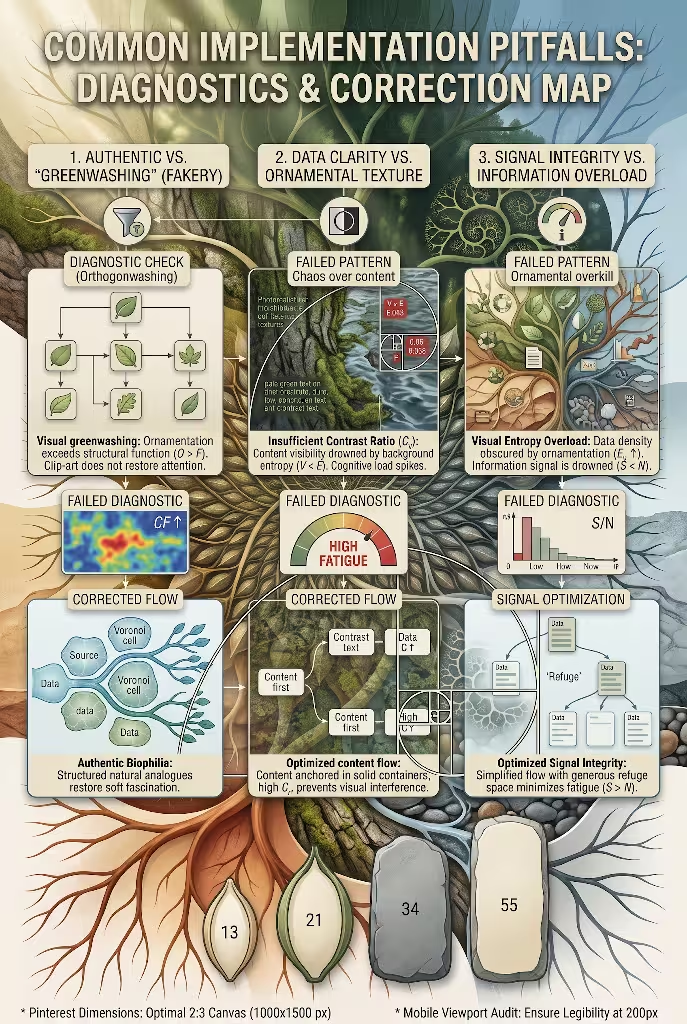
Moving from flat corporate graphics to organic visual systems takes practice. Let us look at common mistakes and how you can avoid them.
A. What Separates Authentic Biophilic Graphics from Decorative Greenwashing?
The most common mistake designers make is treating natural design as shallow decoration. This is visual greenwashing.
A designer takes a boring, boxy corporate flowchart, slaps some clip-art ivy leaves into the corners, tints the boxes light green, and calls it biophilic design. This does not work. Sticking random leaf stickers on an unnatural, rigid grid does not reduce cognitive fatigue. In fact, it adds visual clutter. The brain must work harder to ignore the decorative junk and find the data.
+-------------------------------------------------------------+
|             GREENWASHING VS. AUTHENTIC BIOPHILIC            |
+-------------------------------------------------------------+
| DECORATIVE GREENWASHING        | AUTHENTIC BIOPHILIC DESIGN |
| - Flat boxes with leaf clip-art| - Structural branching     |
| - Arbitrary neon greens        | - Mathematically tuned gap |
| - Decorative visual noise      | - Purposeful refuge space  |
| - High mental clutter          | - Calming soft fascination |
+-------------------------------------------------------------+
Authentic biophilic design runs much deeper. It builds the structure of the graphic on natural laws.
- The underlying layout uses natural spacing, like the Fibonacci sequence or the Golden Ratio.
- The way information moves down the page mirrors natural processes, like branching tree branches, river deltas, or cellular membranes.
- Colors reflect real atmospheric transitions and balanced earth tones.
- Negative space acts as a quiet refuge, giving the eye room to breathe.
If you remove all the plant illustrations from your layout, does the underlying structure still feel organic and balanced? If the answer is yes, you have created authentic biophilic design.
B. How Do You Maintain Data Clarity While Using Organic, Non-Linear Forms?
Another common trap is letting organic shapes overwhelm your data. Designers sometimes get carried away with curves, textures, and fluid shapes until the data points become impossible to read.
Remember: the data is the hero of the image. The biophilic framework exists to help the user understand the data faster, not to hide it.
To keep your graphics clean and clear:
- Keep your text horizontal. Never bend long lines of body text along winding, curved paths. Reading curved text strains the eyes and frustrates readers. Use curves for your paths, containers, and connector lines, but keep your typography level and easy to read.
- Keep your numeric data points bold, clear, and prominent. Use high-contrast fonts for your numbers so readers can understand the key points in seconds.
- Follow the rule of visual hierarchy: the more complex your organic background shapes are, the simpler your foreground data cards must be. If your background uses subtle, mossy textures, place your text on clean, calm containers so the letters never fight the background.
+-------------------------------------------------------------+
|              DATA INTEGRITY AUDIT GUIDELINES                |
+-------------------------------------------------------------+
| 1. Horizontal Text: Always orient body copy along flat axes |
| 2. Isolated Numbers: Make metrics high-contrast and clear   |
| 3. Clean Cards: Anchor dense copy inside smooth containers  |
| 4. Minimal Lines: Avoid tangled paths that confuse readers  |
+-------------------------------------------------------------+
Implementation Checklist and Design System Download
Before you export your pin and share it with the world, run it through this quality-control checklist.
A. The Pre-Flight Design Review
- Canvas Check: Is your image sized to an optimal 2:3 vertical aspect ratio (1000 by 1500 pixels)?
- The 200-Pixel Mobile Viewport Test: When you shrink the image down to two inches wide, can you still read the main title within three seconds?
- Contrast and Accessibility Check: Have you checked your text colors against WCAG 2.1 AA standards? Does body copy have at least a 4.5:1 contrast ratio against the background?
- Structural Review: Does your graphic use authentic natural geometry, like branching paths, phyllotaxis spirals, or the golden ratio, rather than shallow clip-art decorations?
- Prospect and Refuge Balance: Have you left plenty of clean negative space around your data points, giving the eye room to rest?
- Typographic Scale Check: Do your font sizes follow a natural sequence, like the Fibonacci scale, creating a clear visual order?
- Clean Export Quality: Is your file saved as a sharp, high-resolution PNG or WebP file without compression artifacts?
- SEO Metadata Audit: Have you written clear, descriptive alt text, focused pin titles, and natural pin copy that clearly explain the value of your visual resource?
+-------------------------------------------------------------+
|               PRE-FLIGHT COMPLIANCE CHECKLIST               |
+-------------------------------------------------------------+
| [ ] Canvas dimensions set to 1000 x 1500 pixels (2:3)       |
| [ ] Title and core message legible at 200px mobile width    |
| [ ] WCAG 2.1 AA 4.5:1 contrast ratio verified across text   |
| [ ] Structural layouts derived from natural mathematics     |
| [ ] Clear negative space buffers around all data points     |
| [ ] Typographic sizing mapped to Fibonacci scale intervals  |
| [ ] Lossless 8-bit PNG or WebP compression applied          |
| [ ] Structured schema tags and alt descriptions complete   |
+-------------------------------------------------------------+
B. Color Formula Quick Reference
Use these balanced hex codes in your design software:
Forest Canopy Palette:
- Deep Moss:      #2E4A3D
- Sprout Sage:    #7D9D85
- Calcite White:  #F7F6F2

Desert Earth Palette:
- Weathered Rust: #A64B2A
- Raw Ochre:      #D4A359
- Sandstone Buff: #EFECE6

Atmospheric River Palette:
- Midnight Slate: #1A2634
- Glacial Blue:   #689ABE
- River Pebble:   #DDE4E8
C. Recommended Tools and Design Systems
To speed up your workflow, build a collection of reusable biophilic layout components in your favorite design tool:
- Create pre-built Fibonacci vector grids for standard 1000 by 1500 pixel canvases.
- Save parametric Voronoi cell patterns to use as modular card layouts.
- Build radial phyllotaxis guides with anchor points placed along natural Golden Angles.
- Set up global typographic scales using Fibonacci numbers (13, 21, 34, 55, and 89 pixels).
By applying these mathematical foundations and natural patterns, your biophilic infographic design projects will stand out. You will move past the noisy, rectangular clutter of the modern web and create graphics that educate, inspire, and provide genuine visual relief.
Pinners will notice the harmony in your work. They will save your pins, share your resources, and visit your website, giving your ideas the long-lasting audience they deserve.