
We are creatures of the sun. It is a biological fact that humans are phototropic, meaning we naturally turn toward light. For millions of years, our eyes evolved to understand the world through the complex dance of photons bouncing off physical matter. Light tells us what is safe, what is far away, what is soft, and what is sharp. Yet, when we turn to our digital screens, we often find a flat and lifeless world. We see buttons that look like stickers and backgrounds that feel like walls. This disconnect confuses the brain. It creates a subtle cognitive load because our minds are constantly trying to find depth in a space that has none.
To create a truly biophilic web experience, one that feels natural and alive, we must stop treating the screen like a sheet of paper. We must treat it like a window. The principle of natural light in digital art is not just about making things look pretty. It is about simulation. It is about using code and pixels to mimic the way natural light interacts with dust, skin, water, and stone.
When we master these principles, we lower the barrier between the user and the machine. We create interfaces that feel intuitive because they follow the same laws of physics that govern the real world. By studying how natural light behaves, we can transform a cold website into a warm, inviting, and organic environment that respects the biology of the user.
Table of Contents
The Physics of Illumination: How Light Behaves
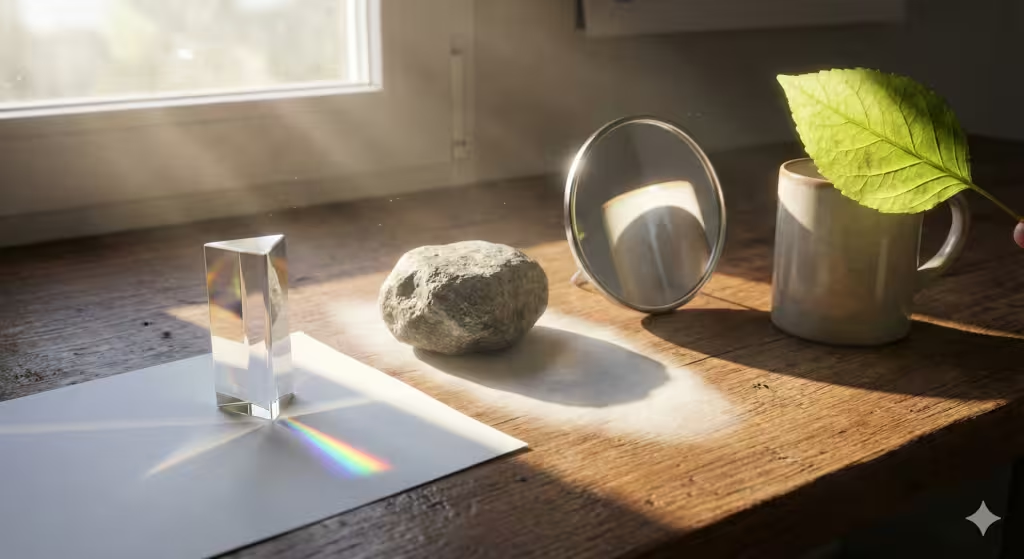
To mimic reality, you must first understand the source. In the physical world, natural light is rarely simple. It is a chaotic mix of rays traveling in straight lines until they hit something. When natural light strikes an object, it does not just stop. It bounces, scatters, and bends. If you want your digital art or website to feel real, you have to understand two main types of behavior: reflection and refraction.
Think of a mirror. When natural light hits a mirror, it bounces off in a perfect, straight line. This is called specular reflection. It is what makes things look wet, shiny, or polished. In digital design, we use this to make a “Call to Action” button look like it is made of glass or plastic. It catches the eye because it reflects a virtual source of natural light.
Now, think of a piece of paper or a dry stone. When natural light hits these surfaces, it doesn’t bounce straight back. It hits the rough texture and scatters in a million directions. This is called diffuse reflection. This soft, scattered natural light allows us to see the true color of an object without being blinded by glare. A biophilic website needs a balance of both. If everything is shiny, it looks fake. If everything is matte, it looks dead. You need the interplay of natural light hitting different textures to create a rich, organic feel.
The Anatomy of Shadow: More Than Just Darkness
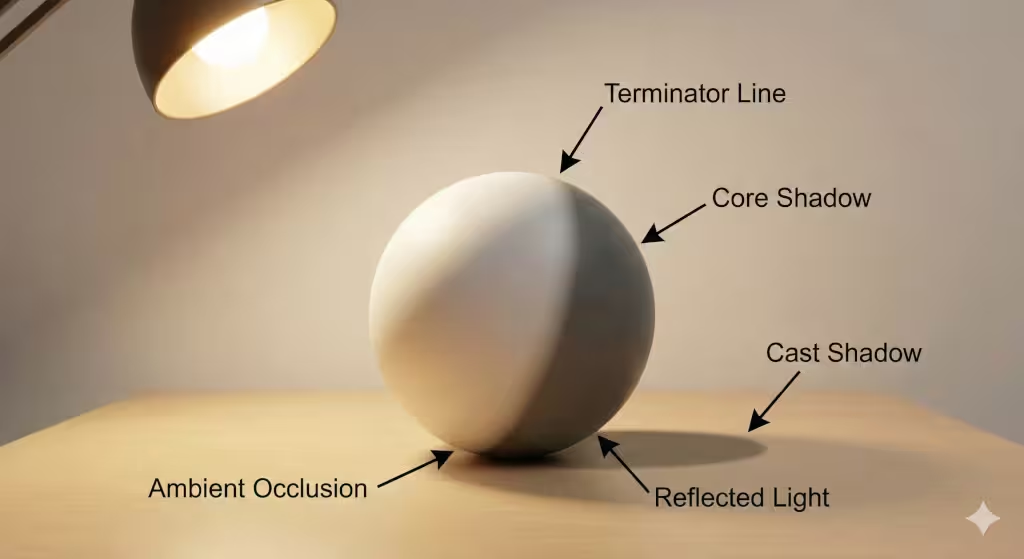
Shadow is not the enemy of light. Shadow is the anchor of light. Without shadow, objects in a digital space feel like they are floating. They have no weight. To use natural light effectively, you must become an expert in the dark. A shadow is not just a black shape; it is a complex structure with distinct parts.
First, look for the terminator line. This is the specific point on an object where the direct natural light cannot reach anymore. On a round object, like a sphere or a stone, this line is soft and gradual. On a square object, like a box or a building, this line is sharp. In web design, how you render this transition tells the user if a button is round and soft or square and hard.
Then there is the core shadow. This is the dark side of the object itself. It is usually the darkest part of the form. But even the core shadow is rarely 100% black. Why? Because of bounce light. In the real world, natural light hits the ground and bounces back up into the shadows. If you are standing on green grass, the bottom of your chin might have a tiny tint of green. If you are designing a digital scene, you should never use pure black shadows. You should mix in a little bit of the color from the surrounding environment. This mimics the way natural light fills every corner of our world.
Biophilic Application: Designing for the Circadian Clock

Biology runs on a clock. Every cell in the human body has a rhythm that is tied to the movement of the sun. This is called the circadian rhythm. For most of human history, our only source of light was the sun and fire. Natural light changes color throughout the day, and our bodies use those color changes to know when to wake up and when to sleep.
In the morning, natural light is blue and bright. This is “cool” light. It tells the brain to suppress melatonin (the sleep hormone) and wake up. It creates focus and alertness. In the evening, natural light turns amber, red, and warm. This tells the brain to relax and prepare for rest.
The problem with most websites and apps is that they blast the user with the same bright blue light at 11:00 PM as they do at 9:00 AM. This is bad biophilic design. It hurts our health. A truly intelligent design uses the principles of natural light to respect the user’s time.
We can use CSS and JavaScript to change the “temperature” of the website based on the time of day. During work hours, the white background can be crisp and cool, mimicking the midday sun. This helps with reading and focus. As the evening comes, the site should shift. The whites should become slightly cream or eggshell. The shadows should take on a warmer, orange tint. This mimics the setting sun.
This concept extends to “Prospect and Refuge.” In nature, humans like to have a view (prospect) but also a safe place to hide (refuge). We can use natural light to create this on a screen. Bright, illuminated areas draw the eye and invite action, this is the prospect. Darker, shadowed areas create a border or a container, this is the refuge. By balancing bright spots with shadowed borders, you make the user feel subconsciously safe and focused.
Technical Implementation: From Theory to Code
How do we take these biological rules and write them into code? We do not paint with brushes; we paint with math. There are several ways to render natural light in a browser, ranging from simple tricks to complex 3D engines.
For standard websites, we use CSS. The command box-shadow is your primary tool. However, a default shadow looks fake. To mimic natural light, you should never use just one shadow. You should layer them. In the real world, a shadow has a dark core and a soft edge. You can write CSS that creates three or four shadows for a single button: a tight, dark one near the object (ambient occlusion), and a wide, soft one further away (cast shadow). This layering effect tricks the brain into thinking the button is a physical object influenced by a source of natural light.
For more advanced digital art, we use technologies like WebGL and libraries like Three.js. These allow us to place a virtual sun in the digital scene. We can tell the computer exactly where the natural light is coming from. We can use a “Directional Light” to simulate the sun, which casts parallel rays. We can use a “Hemisphere Light” to simulate the soft light coming from the sky and the ground.
In high-end 3D rendering (like in video games or immersive web experiences), we use something called Ray Tracing. This is the holy grail of simulating natural light. The computer literally calculates the path of millions of individual rays of light. It figures out where they bounce, what color they pick up, and where they land. While this is heavy for a standard website, understanding the logic helps us design better static images. Even if you are just drawing a flat icon, thinking like a ray tracer, asking “where is the natural light bouncing?”—will make your design superior.
User Experience (UX) and SEO Implications
You might ask, “Why does natural light matter for SEO?” It matters because Google cares about how users interact with your page. This is called “User Experience” or UX. If a website is flat, confusing, and hard on the eyes, users leave. They “bounce.” If a website feels spacious, logical, and comfortable, they stay.
Lighting creates visual hierarchy. Humans are programmed to look at the brightest thing in the room. By using the principles of natural light, you can guide the user’s eye exactly where you want it. You can put a spotlight on the “Buy Now” button. You can put the less important legal text in the shadows. This makes the site easier to use.
When a site is easy to use, people stay longer. This improves your “Time on Page” metrics. Google sees that people are enjoying your content, and it ranks you higher. Furthermore, using specific keywords related to natural light and digital art can attract a very specific audience. People searching for “biophilic UI” or “realistic digital lighting” are looking for high-quality, professional content.
However, there is a balance. Simulating natural light with heavy code can slow down a website. Large images and complex shadow calculations can hurt your “Core Web Vitals.” As a designer, your job is to create the illusion of natural light without making the browser crash. This is the art of optimization. It is about using a few lines of smart CSS to create depth, rather than loading a massive 3D file.
Conclusion
Digital art does not have to be cold. The internet does not have to be a flat, sterile place. By looking at the world outside our window, by studying the leaves, the stones, and the sun, we can learn the principles of natural light and bring them inside the screen.
When we use natural light in our designs, we are doing more than just making things look 3D. We are speaking a language that the human brain has understood for millions of years. We are creating digital spaces that feel like home. Whether you are coding a website, painting a digital landscape, or designing an app, remember the sun. Let natural light be your guide. It is the most powerful design tool in the universe, and it is free for anyone who takes the time to notice it.
… Tips on Identifying Natural Light | Matt Smith …
This video is highly relevant as it moves beyond digital theory and focuses on the observation of natural light in the real world, specifically teaching you to see the temperature shifts (warm vs. cool) in shadows, which is essential for creating biophilic realism in digital art.