
Water is more than just a chemical compound we need to survive. It is a signal of life, safety, and calm. In my work at Silphium Design LLC, I often talk about a concept called biophilia. This is the idea that humans have an innate connection to nature. When we see plants, light, or water, our bodies actually change. We relax. Our heartbeat slows down. This is why bringing water effects into the digital world is so powerful.
There is a psychological theory called “Blue Mind.” It suggests that being near, in, on, or under water can make you happier and healthier. It lowers stress and anxiety. When we design websites, we are usually building rigid boxes and grids. This is very unlike nature. By adding water effects to a site, we break those rigid lines. We introduce soft, flowing movement. This triggers that “Blue Mind” state for the user, even if they are just looking at a screen in a busy office.
Another reason these effects work so well is something called “fractal fluency.” Nature is full of fractals, which are complex patterns that repeat at different sizes. Think of the way a wave breaks or how ripples spread in a pond. Our eyes are built to process these patterns easily. It takes less mental energy for your brain to look at a moving water surface than it does to look at a chaotic city street or a messy web page. When you use water effects on your website, you are giving the user’s brain a tiny vacation.
This creates a powerful hook. In the competitive world of the internet, you have seconds to grab someone’s attention. If a user moves their mouse and sees a ripple follow their cursor, they stop. They play. They are instantly engaged. This interactive element changes the website from a static brochure into a living toy. It increases the time they spend on your site, which is a huge signal to search engines that your content is valuable.
In this article, we will explore the full scope of these designs. We will look at simple tricks that work on any computer and advanced simulations that look like real life. We will cover how water effects can boost your search rankings and how to make sure they work for everyone, including people with disabilities.
Table of Contents
Core Technologies for Water Effects
When we want to build these features, we have a few different tools we can use. You do not need to be a master coder to understand how these water effects are built. There are three main ways we create them: CSS, JavaScript Canvas, and WebGL.
CSS-Only Techniques
The simplest way to create water effects is using CSS. CSS is the code that styles the web. It handles colors, fonts, and layouts. But it can also handle movement. There is a feature in CSS called SVG filters. You can use a filter called “turbulence” to distort an image. It makes the image look like it is being viewed through wavy glass. By animating this filter, you can make a background look like a gently flowing river. This is great because it is lightweight. It does not require a lot of computing power, so it loads fast on phones.
JavaScript & Canvas
If you want the user to interact with the water, you usually need JavaScript. This is the programming language that handles logic on a website. We often use the HTML5 Canvas for this. Think of the Canvas as a blank piece of digital paper. JavaScript acts as the artist. It draws lines and colors on the paper thousands of times per second.
To make ripples, the code uses math to calculate how a wave moves. When you click your mouse, the code drops a “stone” in the virtual water. It then calculates how the energy spreads out from that point. It creates a map of high points and low points, just like real waves. The Canvas then draws the image based on this map, distorting it where the waves are high. These water effects are very popular because they are interactive but still relatively easy to set up.
WebGL & Shaders
For the most realistic water effects, we use WebGL. This is a tool that lets the web browser talk directly to your computer’s graphics card. It is the same technology used to play video games in a browser. With WebGL, we can create 3D surfaces. We can simulate how light bounces off the water and how it bends when it goes through the water.
We use small programs called “shaders” to do this. A shader calculates the color of every single pixel on the screen. It can simulate complex fluid dynamics. This means the water splashes and flows exactly like real water would. Libraries like Three.js or generic WebGL fluid simulations allow us to create water effects that look like high-quality video, but they are fully interactive. You can drag your mouse through them and watch the currents swirl.
Design Considerations & Aesthetics
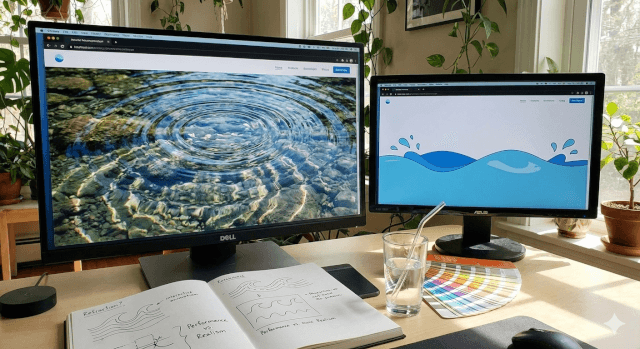
Creating good water effects is not just about the code. It is about the art. You have to balance realism with performance. If you make the water look too real, it might slow down the website. If it is too simple, it might look cheesy.
Visual Fidelity vs. Performance
You always have to ask yourself how much detail you need. A website for a high-end spa might need very slow, realistic, high-definition water effects to sell the feeling of luxury. A website for a children’s toy might want bright, cartoonish splashes that react quickly. The more realistic the effect, the more computer power it uses. You never want your beautiful design to make the user’s battery drain or their phone get hot. We have to optimize the code to ensure the water effects are smooth but efficient.
Refraction & Reflection
To make water look wet, you need two things: refraction and reflection. Reflection is easy to understand. It is the sky or the surroundings bouncing off the surface of the water. Refraction is what happens when light goes into the water and bends. This is why a straw looks broken in a glass of water.
In web design, we fake this. We take the image behind the water and shift the pixels around based on where the waves are. This trick creates the illusion of depth. When you move your mouse and create a ripple, the background image distorts. This specific type of visual feedback convinces the brain that it is looking at a liquid. These details are what separate average water effects from professional ones.
Caustics and Light
Have you ever looked at the bottom of a swimming pool on a sunny day? You see dancing lines of bright light. These are called caustics. They happen because the curved waves focus the sunlight into bright beams. Adding simulated caustics to your water effects adds a massive amount of realism. It makes the scene feel sunny and bright. It brings energy to the design. Even a subtle caustic layer can make a flat blue background feel like a tropical ocean.
Semantic SEO & User Intent
You might be wondering how visual tricks like water effects help with Search Engine Optimization (SEO). SEO is usually about words and keywords. But Google cares about how people use your site. They look at “user signals.”
Targeting High-Intent Queries
When we write about these topics or build pages with them, we can target specific search terms. People are looking for things like “interactive backgrounds” or “calm website designs.” By creating content that explains or showcases these features, you attract a specific audience.
But the bigger benefit is engagement. If a user clicks on your site and leaves immediately, that is called a “bounce.” A high bounce rate tells Google your site is not good. If you have interactive water effects, the user stays. They play with the ripples. They scroll down to see more. This increases “dwell time.” Google sees that people are staying on your page for two or three minutes instead of ten seconds. This tells the search engine that your page provides value, and it will rank you higher.
Contextual Usage
We can also use keywords related to water effects in the hidden parts of the website. We can put them in the “alt text” of images. We can use them in the captions. This helps search engines understand that the page is about visual design and interactivity. It helps match the content with what users are looking for.
Accessibility & Usability
As a designer, my core values are innovation and competence. Competence means making sure everyone can use what we build. Not everyone experiences the web the same way. Some people get motion sickness. Some people have low vision. When we implement water effects, we must be careful.
Motion Sensitivity
There is a group of users who suffer from vestibular disorders. This means that too much movement on a screen can make them feel dizzy or nauseous. Large, sweeping waves or fast-moving water effects can trigger this.
Modern browsers have a feature called “prefers-reduced-motion.” This allows a user to tell their computer that they do not want to see unnecessary movement. A competent developer will write code that checks for this setting. If the user has requested reduced motion, the website should automatically turn off the water effects. It should show a static, calm image instead. This is not just nice to do; it is essential for accessibility.
Contrast and Legibility
We also have to think about reading. If you have text floating over moving water effects, it can be hard to read. The ripples might distort the background and make the text blend in. This causes eye strain. To fix this, we often put a semi-transparent dark or light layer between the water and the text. This ensures the text always has high contrast. The water is there to create a mood, not to distract from the message. We want the user to feel the biophilic benefits of the water effects without struggling to read the content.
Performance Fallbacks
Not everyone has the newest computer. Some people are browsing on older phones with slow internet. High-end water effects can crash these devices. We need to build “fallbacks.” The code should check if the device is powerful enough. If it is not, it should disable the complex water simulation and just show a nice picture of water. This ensures that every visitor has a good experience, regardless of their hardware.
Step-by-Step Implementation Guide

Implementing these designs follows a logical process. It is like gardening; you have to prepare the soil before you plant the flowers.
Phase 1: Setting Up
First, you need a place for the water effects to live. In your HTML code, this is usually a <div> or a <canvas> element. You give it a specific ID so your code can find it. You also need to make sure it is positioned correctly, usually in the background so it sits behind your text and buttons.
Phase 2: The Code
Next, you bring in the engine. If you are using a library like Three.js or a jQuery plugin for water effects, you link that file to your website. If you are writing it yourself, you set up your animation loop. This is a piece of code that runs 60 times a second to update the picture.
Phase 3: Mapping Interaction
This is the fun part. You have to tell the computer to listen for the mouse or the finger. You add “event listeners.” When the mouse moves, the code gets the X and Y coordinates of the cursor. It sends these coordinates to the water engine. The engine then says, “Okay, the mouse is here, so I will create a ripple at this spot.” This connection between the user’s hand and the screen is what makes interactive water effects so magical.
Phase 4: Tuning the Physics
Finally, you act like a scientist. You have to tweak the numbers. You adjust the “viscosity,” which is how thick the water feels. Is it thin like water or thick like oil? You adjust the “damping,” which is how fast the waves die out. If the damping is low, the water effects will ripple for a long time. If it is high, the splash stops quickly. You tune these numbers until it feels natural and pleasing to the eye.
Commonly Asked Questions

When people search for these topics, they often have specific questions. Here are some common ones regarding water effects.
- How do I add a water ripple effect to my website? The easiest way is to use a pre-made JavaScript library. There are many free plugins available that you can just drop into your code. You upload a background image, add the script, and it automatically turns that image into a rippling surface.
- Does WebGL water effect slow down websites? It can if it is not done right. WebGL uses the graphics card, which is powerful. However, if you have too many lights or too high a resolution, it can slow things down. The key is optimization. You should also turn off the water effects when the user scrolls them off the screen so the computer doesn’t have to work when no one is watching.
- Can I use CSS for realistic water animations? CSS is great for stylized, cartoonish, or subtle abstract water effects. However, for truly realistic ripples that reflect light and distort images based on physics, CSS is not enough. You need JavaScript and WebGL for that level of realism.
- What is the best JavaScript library for fluid simulation? Three.js is the industry standard for 3D on the web and has great examples of water effects. PixiJS is another great one that is very fast for 2D distortions. There are also specialized, smaller scripts like jquery.ripples that do just this one thing very well.
The Future of Liquid Interfaces
We are moving away from the flat, boring internet of the past. We are moving toward an internet that feels organic and alive. Interactive water effects are a huge part of this shift. They bring the healing power of nature onto our screens. They reduce stress for the user and increase engagement for the business.
By understanding the technology, respecting the design principles, and caring about accessibility, we can build digital spaces that are not just functional, but restorative. I encourage every designer to experiment with these tools. Try adding a subtle wave to a header. Try a splash effect on a button. Watch how the users respond. You will likely find that a little bit of digital water goes a long way in making a website feel human.
The future of web design is not just about information; it is about experience. And few things provide a better experience than the timeless, mesmerizing beauty of water effects.