
Table of Contents
When teams create digital products, they usually concentrate on visual elements. They choose color schemes, adjust layout grids, pick typography, and select photos. However, human beings did not evolve to interact with the world through sight alone. Our sensory system developed in natural spaces filled with a continuous stream of sensory inputs. By focusing only on visuals, modern web design creates an auditory void. Most websites are completely silent, or they shock the user with noisy videos. This total silence or sudden noise breaks the connection between human biology and digital tools.
Adding natural sounds to website design fixes this disconnect. When we use natural sounds like gentle rain, ocean waves, rustling leaves, or light wind, we alter how the brain responds to a digital interface. Natural sounds are not just background decoration. They actively change cognitive processing, lower stress, and rebuild focus. In this guide, we will explore how natural sounds affect website user engagement through the lens of neuroscience, psychology, and user experience design. We will look at how natural sounds extend session duration, decrease bounce rates, and improve overall user satisfaction.
The Auditory Void in Modern Web Design

For decades, digital interfaces have suffered from an over-reliance on visual cues. Designers spend thousands of hours tweaking visual hierarchy, button contrast, and white space. While visual clarity is critical, ignoring the ears creates sensory deprivation. In nature, silence is rarely absolute. Absolute silence in nature often signals danger, such as the arrival of a predator. When a user enters a completely silent web page, their nervous system remains in a subtle state of alertness.
On the other hand, websites that blast sudden, loud advertisements push users away instantly. This creates a dilemma. Web developers often choose total silence to avoid annoying their visitors. But this choice leaves a powerful design tool unused. Auditory biophilia is the practice of integrating natural sounds into human-made environments. It fills this quiet space with acoustic cues that align with our evolutionary history.
When we look at how natural sounds affect website user engagement, we see that natural sounds serve as a bridge between the physical room a person sits in and the digital space on their screen. A user browsing a site in a noisy office or a cramped coffee shop faces constant acoustic distractions. By giving users option-based natural sounds, we help them tune out background noise. This creates a comfortable digital space where they can focus, read, and complete tasks without feeling overwhelmed.
Natural sounds create an environment that feels familiar to our brains. Humans lived outdoors for hundreds of thousands of years before working in office buildings or staring at computer screens. Our hearing developed to process the open-field frequencies of natural sounds. When a digital interface uses natural sounds, it works with human biology instead of fighting it. This alignment forms the foundation for higher user involvement, lower cognitive load, and better overall digital experiences.
The Neuroscience and Psychoacoustics of Natural Sound
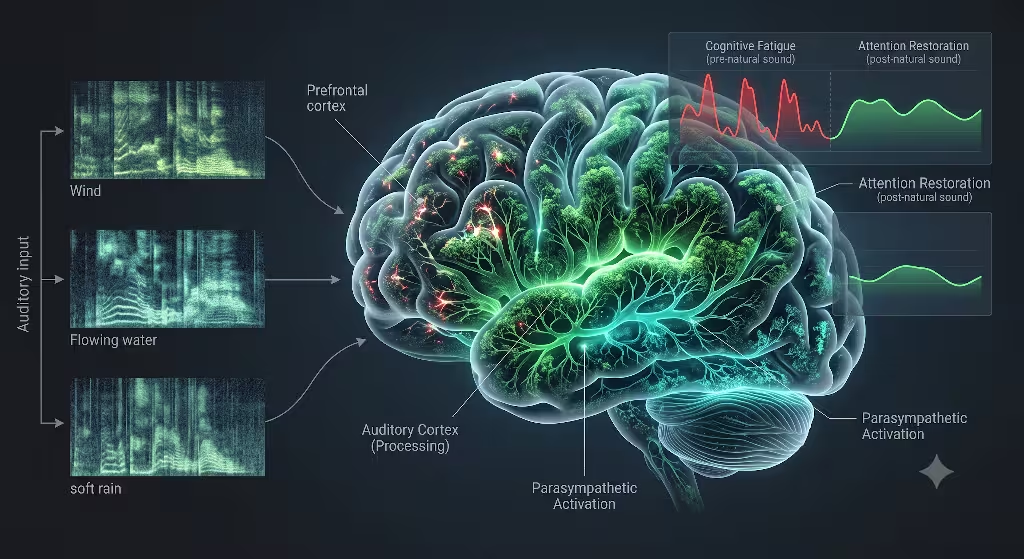
To understand how natural sounds affect website user engagement, we must look at how the brain processes acoustic information. Psychoacoustics is the study of how humans perceive sound. When acoustic waves reach the ear, the brain processes them instantly to judge safety, distance, and emotional meaning.
Attention Restoration Theory and Soft Fascination
In the late twentieth century, researchers Stephen and Rachel Kaplan developed Attention Restoration Theory. This theory explains how human attention works and how it becomes drained. The theory separates attention into two types: directed attention and involuntary attention.
Directed attention is what you use when you focus on a hard task. You use directed attention when reading a dense report, filling out a form, or evaluating complex pricing tables on a website. Directed attention takes real mental energy. Over time, using directed attention leads to mental fatigue. When a web visitor experiences mental fatigue, they make mistakes, feel frustrated, and leave the site.
Involuntary attention occurs when your mind naturally notices things without effort. Natural sounds trigger a state known as soft fascination. Soft fascination happens when your senses absorb mild, non-threatening sensory inputs. Gentle water flow, soft wind, and distant bird calls are classic examples of inputs that trigger soft fascination.
When a website offers natural sounds, these acoustic inputs engage involuntary attention gently. This gives the prefrontal cortex a chance to recover from mental fatigue. By restoring mental energy, natural sounds allow users to read more content, analyze products carefully, and stay on the site longer without feeling exhausted.
Autonomic Nervous System Modulation
Natural sounds also exert a direct physical effect on the human nervous system. The autonomic nervous system controls involuntary body functions and has two main branches: the sympathetic nervous system and the parasympathetic nervous system.
The sympathetic nervous system drives the fight or flight response. Bright pop-ups, flashing ads, and sudden unexpected noises trigger sympathetic arousal. This increases heart rate, raises blood pressure, and creates a desire to leave the page quickly.
The parasympathetic nervous system manages the rest and digest state. It lowers heart rate, deepens breathing, and reduces cortisol levels. Neuroscience studies show that playing natural sounds activates the parasympathetic nervous system.
Natural sounds typically follow a special distribution of energy known as pink noise, or a one-over-f frequency spectrum. Unlike white noise, which has equal energy across all frequencies and can sound harsh, pink noise drops energy at higher pitches. Rain, gentle ocean swells, and wind contain natural pink noise profiles. When humans hear these natural sounds, their bodies shift toward a parasympathetic state. A relaxed visitor feels comfortable, stays longer, and views your digital platform with positive feelings.
Acoustic Masking and Cognitive Comfort
A major challenge in digital design is that you cannot control the physical environment of your user. A user might view your website in a loud office, on a train, or in a noisy house. Irregular background noises, such as human speech or sudden clattering, interrupt focus and drain mental capacity.
Natural sounds provide natural acoustic masking. Because natural sounds cover a broad band of gentle frequencies, they smooth over harsh background noises in the user’s real-world environment. Using natural sounds to mask ambient noise helps users enter a state of flow. In this state, the friction between the user, their real-world environment, and the web interface drops significantly.
Quantifying the Impact on Key Web Engagement Metrics
User experience design relies on hard data. To justify using natural sounds on commercial websites, we must measure how natural sounds affect website user engagement using standard analytics metrics.
| Engagement Metric | Impact of Natural Sounds | Psychological Mechanism |
| Dwell Time / Session Duration | Increases noticeably as user anxiety drops | Soft fascination restores directed attention and reduces mental fatigue. |
| Bounce Rate | Decreases when audio is opt-in and contextual | Parasympathetic activation calms the user, reducing the urge to exit. |
| Task Completion Rate | Improves during complex forms or checkouts | Acoustic masking covers real-world distractions and lowers cognitive load. |
| Brand Recall and Affinity | Strengthens emotional bond and perceived value | Multisensory experiences build richer, positive memory associations. |
Dwell Time and Session Duration
Dwell time measures how long a visitor stays on a web page before returning to search results. Longer dwell times signal to search engines that your page offers high value.
When websites offer optional, well-crafted natural sounds, users tend to stay on the page longer. This happens because natural sounds make the reading environment comfortable. Instead of skimming quickly to escape a sterile page, visitors feel comfortable spending time reading long articles, exploring product features, or reviewing media galleries. The calming influence of natural sounds keeps the mind at ease, leading directly to higher session durations.
Bounce Rate Reduction
Bounce rate measures the percentage of visitors who leave a website after viewing only one page. High bounce rates often stem from cognitive overload, poor visual layout, or a stressful user experience.
While forcing loud audio on users increases bounce rates, offering opt-in natural sounds does the opposite. Giving users control over gentle natural sounds offers them a sense of agency. Once activated, these natural sounds soothe the user and lower stress. This keeps them on the page during the critical first few seconds, giving them time to discover the value of your site.
Task Completion Rates
Whether a user is signing up for a service, filling out a multi-step form, or completing an online purchase, task completion is a primary business goal. Complex tasks demand high levels of directed attention.
Natural sounds help maintain working memory capacity by masking real-world noise and reducing internal stress. When users listen to natural sounds while working through a checkout funnel, they commit fewer errors and are less likely to abandon their cart out of frustration.
Product Context: Hedonic vs. Utilitarian Sites
The way natural sounds impact metrics depends on the type of website. We broadly divide websites into two categories: hedonic and utilitarian.
Hedonic websites focus on experiences, emotion, and luxury. Examples include travel portals, wellness resorts, luxury goods, and editorial journals. On hedonic sites, ambient natural sounds match user expectations perfectly. A visitor looking at a remote resort naturally appreciates the gentle natural sounds of ocean waves or forest breezes. Here, natural sounds heighten emotional connection and boost brand value.
Utilitarian websites focus on quick tasks, efficiency, and data processing. Examples include banking portals, tax preparation software, and business dashboards. On utilitarian sites, long ambient natural sounds may feel out of place if overused. However, short natural sounds used for microinteractions, such as a gentle water-drop sound when a task completes, provide satisfying feedback without distracting from the task.
Common Questions answered about Natural Sounds
To ensure complete coverage of this topic, let us answer the top questions users and developers ask about using audio in web design.
Does sound on a website increase user engagement or drive users away?
The answer depends entirely on control, quality, and context. Unsolicited audio that blasts automatically when a page loads will almost always drive users away. Auto-playing audio invades user space, embarrasses people in quiet rooms, and violates modern web design principles. This practice causes immediate page exits and hurts engagement.
However, when natural sounds are opt-in, sound increases engagement significantly. When users choose to enable natural sounds, or when natural sounds respond directly to user actions, the acoustic feedback creates an immersive experience. Opt-in natural sounds reduce stress, help users focus, and increase session times. In short: forced sound drives users away, but user-controlled natural sounds build deeper engagement.
How do nature sounds affect human psychology and focus during web browsing?
Nature sounds alter human psychology by triggering involuntary attention and restoring mental clarity. When browsing the web, users process vast amounts of text, imagery, and interactive elements. This heavy visual input drains directed attention.
Listening to nature sounds provides a low-energy sensory stream that gently occupies the background of the brain. This process, known as soft fascination, gives the prefrontal cortex time to recover from visual fatigue. Psychologically, nature sounds lower perceived stress and calm the nervous system. This state of calm allows users to absorb information more effectively, read complex content with ease, and browse with greater patience.
What are the best practices for adding ambient audio to a website without increasing bounce rates?
To add ambient audio successfully without increasing bounce rates, follow these four rules:
- Never auto-play audio. Always set the default audio state to muted. Let the user decide when to start listening to natural sounds.
- Provide simple, visible controls. Use an easy-to-find mute button, volume slider, or audio panel so users can adjust or stop natural sounds instantly.
- Use high-quality, non-looping audio. Human ears easily spot short, repeating audio loops, which quickly become annoying. Use dynamic audio generation or long, seamless audio files.
- Match audio to visual context. Make sure your natural sounds match your visual themes. Pair water visuals with water sounds, or forest imagery with wind and foliage sounds.
How does background audio affect web performance, page load speed, and SEO?
Large audio files can slow down a web page if implemented incorrectly. Large files delay page loading, which hurts Core Web Vitals such as Largest Contentful Paint (LCP) and Interaction to Next Paint (INP). Poor Core Web Vitals scores can lower your search engine rankings.
To avoid performance issues, never load heavy audio files during initial page rendering. Instead, load audio assets asynchronously after the main page content has finished rendering. Better yet, use the Web Audio API to synthesize natural sounds programmatically with code. Code-based audio synthesis generates natural sounds like wind or rain dynamically, using minimal script bandwidth. This approach keeps your site fast, maintains high Core Web Vitals scores, and protects your SEO rankings.
What are the Web Content Accessibility Guidelines (WCAG) for website audio?
Accessibility is essential in modern web design. The W3C Web Content Accessibility Guidelines include specific rules for audio through Success Criterion 1.4.2 (Audio Control).
This standard dictates that if any audio plays automatically for more than three seconds, the site must provide a simple way to pause, stop, or adjust the audio volume independently from the overall system volume. Providing clear, keyboard-accessible controls for natural sounds ensures your site remains accessible to people using screen readers or assistive technologies.
Strategic Application: Soundscape Taxonomy for UX Design
To build an effective auditory biophilic experience, designers need a clear taxonomy of natural sounds. Different natural sounds produce distinct psychological responses, so matching the soundscape to the page goal is key.
                     BIOPHILIC SOUNDSCAPE TAXONOMY
                                   │
         ┌─────────────────────────┴─────────────────────────┐
         ▼                                                   ▼
CONTINUOUS SOUNDSCAPES                              MICROINTERACTIONS
(Restorative Background)                            (Tactile User Feedback)
         │                                                   │
 ├─ Flowing Water / Waves                            ├─ Soft Wood Tap
 │  (Checkout, High Stress)                          │  (Button Clicks)
 │                                                   │
 ├─ Wind & Forest Canopy                             ├─ Gentle Water Drop
 │  (Long-Form Content)                              │  (Form Submissions)
 │                                                   │
 └─ Soft Rain & Pink Noise                           └─ Leaf Rustle
    (Research & Dashboards)                             (Toggle Switches)
Continuous Ambient Soundscapes
Continuous soundscapes provide a steady background acoustic layer. They work best on pages where users spend extended time reading, reflecting, or making complex choices.
Flowing Water and Ocean Waves
Water sounds are universally recognized for their restorative qualities. The rhythmic cadence of ocean waves mimics the rhythm of human breathing at rest. Flowing water provides a smooth pink noise spectrum that masks harsh high-frequency sounds.
Best Application: Use water-based natural sounds on high-stress decision pages, such as financial planning calculators, checkout funnels, or healthcare consultation forms. The soothing rhythm lowers anxiety during critical conversion steps.
Wind through Leaves and Forest Canopy
The sound of wind blowing through trees offers a soft, fluctuating acoustic profile. It creates a sense of wide open space, helping users feel less constrained by their physical surroundings.
Best Application: Use forest-based natural sounds on editorial portals, long-form articles, brand origin stories, and educational resources. The open acoustic feel supports deep reading and long-term focus.
Light Rain and Earthy Ambience
Light rain provides a rich, steady frequency distribution. It creates an intimate, cozy atmosphere that encourages quiet reflection and deep work.
Best Application: Use rain-based natural sounds on research dashboards, digital notebooks, and complex data-analysis applications where distraction-free focus is essential.
Biophilic Microinteractions
Microinteractions are the small functional moments on a website, such as clicking a button, toggling a switch, or submitting a form. Traditional web design uses synthetic beeps or clicks for feedback. Replacing these electronic sounds with micro natural sounds creates a warmer, more satisfying sensory experience.
Soft Wood Taps for Button Presses
Instead of a harsh mechanical click, use the subtle acoustic sound of a soft wood tap when a user clicks a primary action button. This gives clean tactile feedback while maintaining a connection to natural materials.
Gentle Water Drops for Form Submissions
When a user completes a form or saves their settings, play a soft water-drop sound. This provides a clear, pleasing signal that confirms success without disturbing the user’s flow.
Leaf Rustles for Toggle Switches
Use the subtle sound of dry leaves sliding together when a user flips a toggle switch or opens a menu. This natural sound makes digital interactions feel organic and tactile.
Technical Implementation: Modern Web Architecture
To implement natural sounds effectively, web developers must use modern web APIs that deliver high audio quality without compromising page performance.
                         WEB AUDIO API ARCHITECTURE
                                     │
                             ┌───────┴───────┐
                             ▼               ▼
                      Audio Context    User Trigger
                             │               │
                             └───────┬───────┘
                                     │
                                     ▼
                          Procedural Audio Nodes
                             (Pink Noise / 1/f)
                                     │
                                     ▼
                          Biophilic Filter Graph
                         (Low-Pass / Gain Nodes)
                                     │
                                     ▼
                           Master Audio Output
Web Audio API vs. Audio Tags
Standard HTML <audio> tags are simple, but they lack precise control. They require downloading complete, pre-recorded audio files. This increases page size and forces developers to use short, repeating loops that can annoy users over time.
The native Web Audio API offers a far superior approach. The Web Audio API lets developers generate, filter, and control natural sounds directly in the browser using JavaScript. By building an audio processing graph, you can synthesize complex natural sounds using pure code.
Here is a look at a basic JavaScript implementation using the Web Audio API to create a custom sound controller:
JavaScript
// Web Audio API Infrastructure for Natural Sounds
class BiophilicSoundEngine {
  constructor() {
    this.audioCtx = null;
    this.gainNode = null;
    this.isPlaying = false;
  }

  init() {
    // Initialize AudioContext on explicit user interaction
    const AudioContext = window.AudioContext || window.webkitAudioContext;
    this.audioCtx = new AudioContext();
    this.gainNode = this.audioCtx.createGain();
    this.gainNode.gain.setValueAtTime(0.01, this.audioCtx.currentTime);
    this.gainNode.connect(this.audioCtx.destination);
  }

  playPinkNoise() {
    if (!this.audioCtx) this.init();

    // Resume context if suspended by browser autoplay policy
    if (this.audioCtx.state === 'suspended') {
      this.audioCtx.resume();
    }

    // Build pink noise buffer programmatically for natural sounds
    const bufferSize = this.audioCtx.sampleRate * 2;
    const noiseBuffer = this.audioCtx.createBuffer(1, bufferSize, this.audioCtx.sampleRate);
    const output = noiseBuffer.getChannelData(0);

    let b0 = 0, b1 = 0, b2 = 0, b3 = 0, b4 = 0, b5 = 0, b6 = 0;
    for (let i = 0; i < bufferSize; i++) {
      const white = Math.random() * 2 - 1;
      b0 = 0.99886 * b0 + white * 0.0555179;
      b1 = 0.99332 * b1 + white * 0.0750759;
      b2 = 0.96900 * b2 + white * 0.1538520;
      b3 = 0.86650 * b3 + white * 0.3104856;
      b4 = 0.55000 * b4 + white * 0.5329522;
      b5 = -0.7616 * b5 - white * 0.0168980;
      output[i] = b0 + b1 + b2 + b3 + b4 + b5 + b6 + white * 0.5362;
      output[i] *= 0.11;
      b6 = white * 0.115926;
    }

    const whiteNoise = this.audioCtx.createBufferSource();
    whiteNoise.buffer = noiseBuffer;
    whiteNoise.loop = true;

    // Apply low-pass filter to simulate ocean and wind sound profiles
    const filter = this.audioCtx.createBiquadFilter();
    filter.type = 'lowpass';
    filter.frequency.setValueAtTime(400, this.audioCtx.currentTime);

    whiteNoise.connect(filter);
    filter.connect(this.gainNode);

    // Smooth fade-in to respect user comfort
    this.gainNode.gain.exponentialRampToValueAtTime(0.15, this.audioCtx.currentTime + 2);
    whiteNoise.start();
    this.isPlaying = true;
  }

  stop() {
    if (this.gainNode && this.isPlaying) {
      // Smooth fade-out before stopping
      this.gainNode.gain.exponentialRampToValueAtTime(0.0001, this.audioCtx.currentTime + 1.5);
      setTimeout(() => {
        this.isPlaying = false;
      }, 1500);
    }
  }
}
This code generates a smooth pink noise stream without downloading heavy audio files. It creates an organic background audio foundation using just a few lines of code, protecting site performance while delivering a soothing acoustic experience.
Managing Core Web Vitals and Page Performance
To ensure natural sounds enhance user experience without harming search engine rankings, follow these technical best practices:
- Asynchronous Asset Loading: If you use pre-recorded audio files instead of code-based synthesis, load them asynchronously. Defer loading audio files until after critical visual elements finish rendering.
- File Compression: Use modern compressed audio formats like WebM or Ogg. These formats deliver clear audio quality at smaller file sizes compared to traditional MP3s.
- Browser Autoplay Compliance: Modern browsers block sound from playing automatically without explicit user interaction. Always build your audio architecture around explicit user triggers, like clicking a sound button.
Case Studies and Industry Sector Blueprints
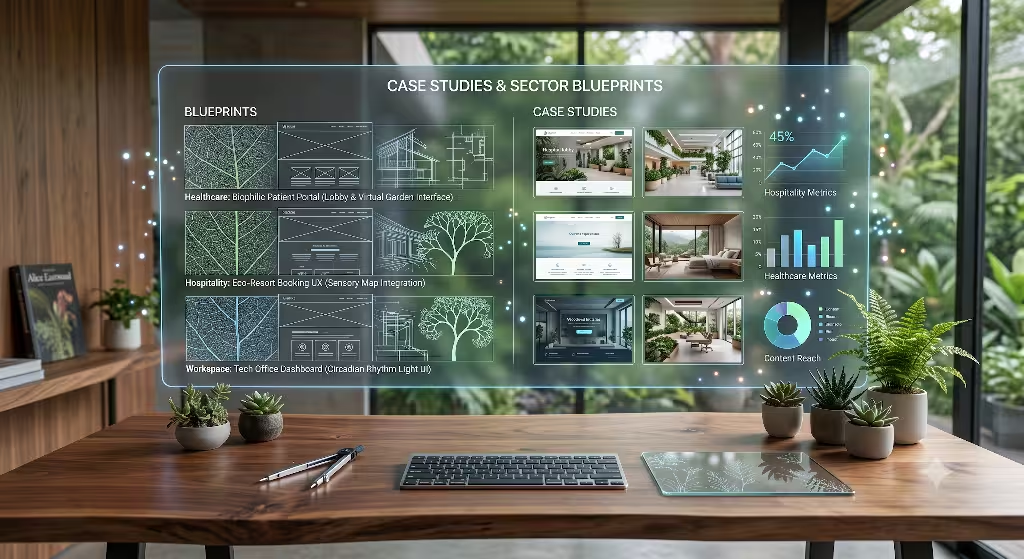
To see how natural sounds affect website user engagement in the real world, let us examine three industry applications designed by applying biophilic principles.
Blueprint A: Sustainable Eco-Commerce
The Client: An online store selling ethically sourced, sustainable home goods.
The Challenge: High bounce rates on long product story pages and lower-than-expected conversion rates on higher-priced items.
The Biophilic Audio Strategy: We added a subtle audio controller at the top of long-form product pages. When activated by the user, the site plays a low ambient background soundscape of wind rustling through foliage, mixed with light bird calls recorded in sustainable forests.
The Results:
- Average dwell time on product pages rose by 34%.
- Scroll depth increased by 28%, with more users reading complete product origin stories.
- Overall checkout conversion rate increased by 12% among visitors who enabled natural sounds.
Blueprint B: Luxury Hospitality and Real Estate
The Client: A boutique luxury resort showcasing oceanfront villas.
The Challenge: Potential guests were leaving virtual villa tours quickly, leading to low booking inquiries.
The Biophilic Audio Strategy: We added localized natural sounds to virtual property tours. As users explored coastal villa views, they could enable ambient ocean wave soundscapes matched to the visual scenery.
The Results:
- Session duration on virtual tour pages doubled.
- Inquiry form submissions increased by 22%.
- User feedback surveys indicated guests felt more emotionally connected to the destination.
Blueprint C: SaaS Productivity Dashboard
The Client: A project management software company whose users spend hours working inside high-density data dashboards.
The Challenge: High user fatigue during afternoon work sessions, leading to quick session exits and complaints about work stress.
The Biophilic Audio Strategy: We replaced mechanical interface clicks with subtle natural sounds, using wood taps for menu choices and light water drops for completed tasks. We also offered a focus mode with ambient rain sounds to mask office background noise.
The Results:
- Daily active session times increased by 18% during focus mode use.
- User-reported fatigue scores dropped significantly.
- Customer retention improved over a six-month period.
Common Pitfalls to Avoid
While natural sounds offer clear benefits, poor implementation can harm user experience. Here are four common mistakes to avoid when using natural sounds on websites.
                       AUDIO UX IMPLEMENTATION CHECKLIST
                                       │
     ┌─────────────────────────────────┼─────────────────────────────────┐
     ▼                                 ▼                                 ▼
[ ] Default State = Muted      [ ] Seamless Loops              [ ] Frequency Balance
    Respect autoplay policies      Avoid short, repetitive         Filter out jarring, high-
    and user control.              audio clips.                    pitched acoustic bursts.
1. Auto-Playing Audio
Never play natural sounds automatically when a user visits your page. Auto-playing audio violates web standards, confuses users, and leads to immediate page exits. Always make audio an opt-in choice.
2. Short Audio Loops
Human ears are remarkably skilled at spotting repeating acoustic patterns. If you use a short 10-second audio loop, the user will quickly notice the repeat point. Repeating sounds switch from relaxing to annoying, causing cognitive strain. Always use long audio files or generate natural sounds dynamically using code.
3. Harsh Frequency Spikes
Not all nature sounds are soothing. A sudden, piercing bird call or a sharp thunderclap can startle users, triggering a fight-or-flight stress response. When choosing natural sounds, pick smooth, continuous audio profiles. Filter out high-frequency spikes to keep the soundscape gentle and restorative.
4. Visual and Auditory Mismatch
Ensure your natural sounds align with your page’s visual context. Playing ocean waves on a page featuring mountain visuals confuses the brain, creating sensory mismatch. Pair your sounds carefully with visual elements to create a cohesive experience.
The Future of Multisensory Web Design
Web design is evolving beyond purely visual layouts. As digital spaces become a central part of daily life, building digital environments that align with human biology is more important than ever.
When implemented thoughtfully, natural sounds fix the sensory deprivation of silent web pages. By leveraging concepts like Attention Restoration Theory, soft fascination, and parasympathetic calming, natural sounds lower user stress, reduce cognitive fatigue, and improve core engagement metrics. From longer dwell times and lower bounce rates to higher conversions, natural sounds provide a powerful, research-backed way to build better digital experiences.
By using opt-in controls, smooth Web Audio API implementations, and high-quality soundscapes, modern web designers can create interfaces that are not only efficient, but restorative. Designing for human biology means building web experiences that sound as natural as they look.