
Table of Contents
The Friction of the Endless Loop
The endless feed on modern web pages is a major problem for the human mind and for mobile hardware. As computers became faster, web builders created a layout pattern called infinite scroll. This pattern automatically loads new content as a user moves down a page. This loop never ends. It creates a bottomless pit of photos, text, and videos.
When we look at this pattern from a biological view, we see that it breaks the natural laws of space and visual comfort. Human beings did not evolve to process endless streams of data without boundaries. In the physical world, every forest has an edge. Every river has a bank. Every mountain path has a peak where a traveler can stop and rest. The physical world gives us clear horizons and solid spatial landmarks. These visual clues tell our brains where we are and where we are going.
Infinite scroll removes all of these landmarks. It forces the human eye into an unnatural loop that never lets the brain rest. At Silphium Design LLC, we study how nature builds efficient systems. We use these natural systems to fix broken digital spaces. We focus heavily on creating biophilic alternatives to these endless loops. These biophilic alternatives replace the bottomless pit with clear digital boundaries. They bring natural patterns back to user experience design.
The Anti-Biophilic Nature of Infinite Scroll
The human brain needs physical boundaries to build memory maps. When you read a paper book, your brain tracks your progress using the weight of the pages in your hands. It tracks your place using the top, bottom, and corners of the physical page. This is called spatial orientation. It is the natural way our minds map out where information lives.
Infinite scroll destroys this mapping process completely. Because the screen never stops moving, there are no fixed corners or stable page ends. The text just floats upward into a digital void. This layout causes deep confusion in our spatial memory systems. Users quickly forget where they saw a specific piece of information. They feel lost because the digital environment has no stable horizon.
To fix this problem, we must study biophilic alternatives that respect our natural need for space. These biophilic alternatives restore fixed landmarks to the screen. When a design uses biophilic alternatives, it allows the human eye to track its location using natural, rhythmic intervals. The absence of these boundaries in infinite scroll causes users to feel trapped in a space that has no exit and no natural resting points.
The Psychological Toll
The mental impact of an endless stream of data is a major concern for modern designers. Infinite scroll uses an old psychological trick called a variable reward schedule. This is the exact same trick that makes slot machines so addictive. The user scrolls down, hoping to see something interesting. Most of the content is boring, but occasionally, something exciting appears. This unpredictable reward keeps the user moving their thumb down the screen for hours.
This behavioral loop triggers constant spikes of dopamine, a chemical in the brain linked to pleasure and anticipation. Over time, these endless spikes cause mental exhaustion. This state of mindless consumption is often called doomscrolling. It makes users feel passive, tired, and deeply disconnected from their original goals.
We can look to biophilic alternatives to break this unhealthy cycle. These biophilic alternatives are designed to promote wellness and calm. By choosing biophilic alternatives, we give users their agency back. Agency means the power to choose what to do next. Instead of being pushed down an endless stream by a machine, biophilic alternatives invite users to explore content at their own pace. This creates a peaceful digital space that feels like walking through a well-organized garden instead of being swept away by a digital flood.
The Engineering Bottleneck
Infinite scroll is not just bad for human psychology. It is also highly inefficient for web browsers and computer chips. When a web user scrolls down an endless page, the browser must constantly build new elements. These elements are called DOM nodes. The DOM, or Document Object Model, is the internal tree structure that a browser uses to organize a web page.
As the user scrolls further, the DOM tree grows larger and larger. The browser must keep all of those images and text blocks active in the device’s random access memory. This memory allocation never clears up because the page never reloads. On a mobile phone, this causes a major engineering bottleneck. The device runs out of memory, the battery drains quickly, and the page begins to lag. The screen may stutter, freeze, or crash entirely.
To solve this hardware crisis, developers are turning to biophilic alternatives that manage memory more naturally. These biophilic alternatives use clean coding practices to keep the DOM tree light and responsive. By using biophilic alternatives, we make sure that old content is properly cleared out when it is no longer needed. This mimics the natural cycle of renewal and decay found in real ecosystems. The result is a fast, clean website that saves battery life and keeps mobile devices running cool.
Structural Evaluation: Navigation Design Patterns Compared
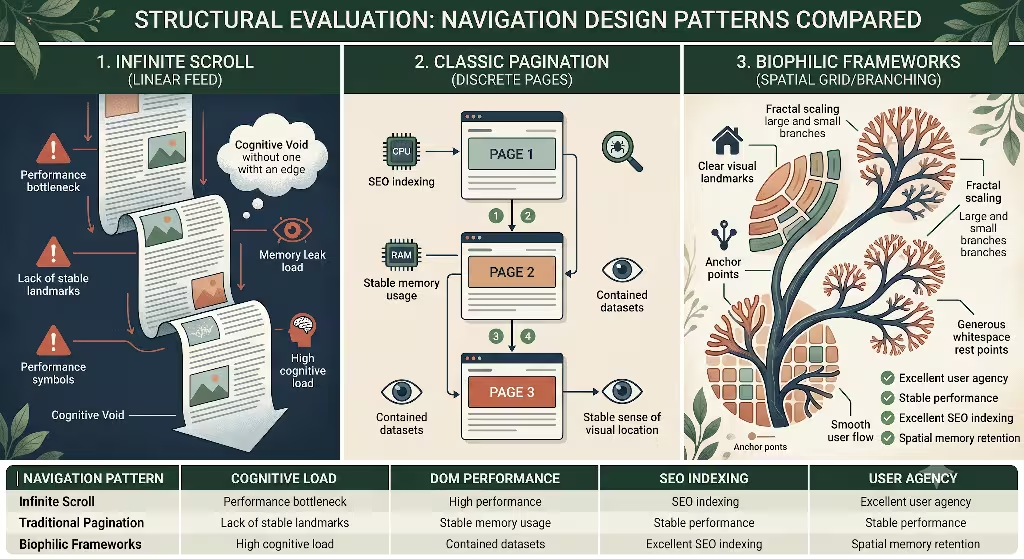
When we build web platforms, we must choose a navigation pattern that fits our goals. We can use standard pagination, infinite scroll, or advanced biophilic alternatives. Each choice has a massive impact on human focus, computer memory, and search engine discovery.
The following table breaks down how these different patterns perform across key areas. It compares how they affect the human brain, how much weight they put on the browser, how easily search engine bots can read them, and how much control they give back to the user.
| Navigation Pattern | Cognitive Load | DOM Performance | SEO Indexing | User Agency |
| Infinite Scroll | High (Causes passivity and saturation) | Degrades (Continuous memory allocation) | Poor (Hides deep text from search bots) | Low (Removes choice and visual endings) |
| Classic Pagination | Moderate (Requires active page clicks) | Stable (Loads isolated, light datasets) | Excellent (Clean URL structures per page) | High (Clear sense of location and endpoints) |
| Biophilic Frameworks | Low (Integrates natural, rhythmic pauses) | Stable (Utilizes asset virtualization) | Excellent (Maintains strict crawl paths) | High (Encourages intentional exploration) |
When you analyze this data, you can see why biophilic alternatives are superior for long-term site health. Infinite scroll fails in three out of four major categories. It creates a heavy mental load, harms the browser’s performance, and blocks search engine spiders from finding deeper content. Classic pagination is stable, but it can feel rigid and old-fashioned to a modern user.
By applying biophilic alternatives, we get the stability of pagination combined with a smooth, natural user flow. These biophilic alternatives treat data like a living landscape. They ensure that information is easy to find, fast to load, and gentle on the human mind. Choosing biophilic alternatives means you are optimizing your digital platform for both human biology and modern search engine algorithms.
High-Value Biophilic Alternatives to Infinite Scroll
To replace the bottomless feed, we must look at specific design frameworks that mimic natural shapes and rhythms. Nature has spent millions of years perfecting how energy and matter move through space. We can use these exact same blueprints to guide how information moves across a computer screen.
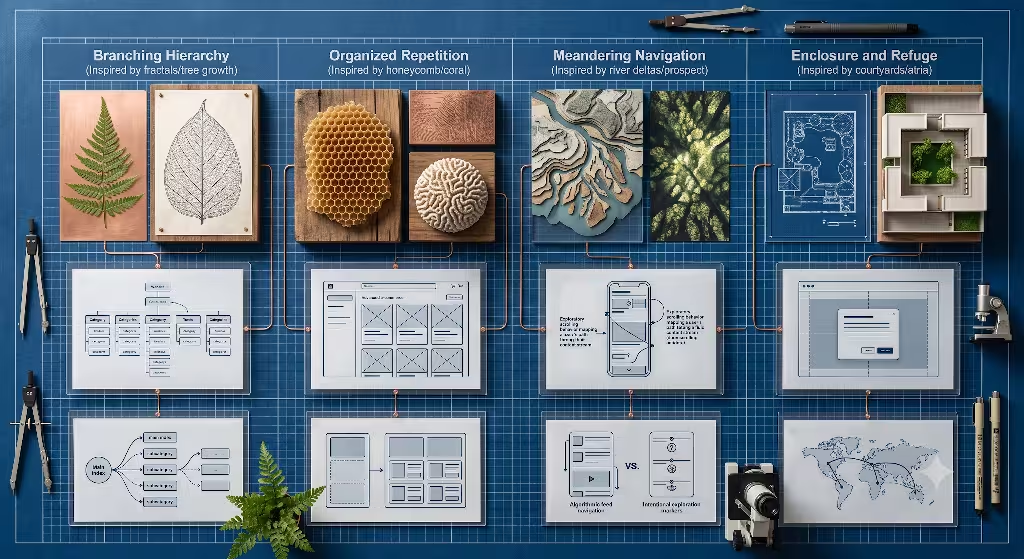
Let us look closely at four distinct biophilic alternatives that web designers can use today. Each of these biophilic alternatives addresses a specific flaw in the infinite scroll pattern, replacing digital stress with natural balance.
1. Fractal & Topographical Pagination
Fractals are repeating shapes that look the same whether you view them up close or from far away. You can see fractals in the branching of tree limbs, the veins of a fern leaf, and the paths of a river system. A large tree trunk splits into thick branches, which split into smaller twigs, which split into tiny leaf veins. This is nature’s way of organizing vast systems so that nutrients can travel efficiently without getting lost.
We can build biophilic alternatives that use this exact same branching structure. Instead of dumping thousands of items into one endless list, fractal pagination breaks information down into clear, nested groups. The main page acts like the tree trunk, offering a few broad categories. As the user selects a category, the interface smoothly branches out into more specific sub-categories.
This is one of the most effective biophilic alternatives because it matches how our brains naturally store memories. We do not store facts in long, flat lists. We store them in interconnected webs of meaning. When designers use these biophilic alternatives, users can easily understand the whole system at a glance. They can navigate deep into the site and always know exactly how to return to the center, just like an ant walking along a branch back to the main trunk.
2. The “Natural Pause” (Intentional Load More)
In the physical world, every action is followed by a moment of rest. Animals run, then they sit. Waves crash on the shore, then the water rolls back. Human lungs expand with air, then they contract. This breathing room is vital for survival. Without these rhythmic breaks, systems quickly burn out and fail.
Infinite scroll removes this natural rhythm by constantly forcing new data onto the screen without a break. We can design biophilic alternatives that restore this vital pause. A classic example is the intentional load-more button. When a user reaches the end of a content block, the page does not load more items automatically. Instead, it stops and displays a clean, beautiful button that invites the user to take action.
These types of biophilic alternatives act as a digital breath. They create an explicit choice. The user can stop, absorb what they just read, and decide if they want to keep reading or close the browser. By using these biophilic alternatives, we respect the user’s mental energy. We treat the user like a human guest rather than a resource to be harvested by an algorithm. This natural pause gives the brain a moment to process data, which greatly improves memory retention and reduces online stress.
3. Spatial Clustered Grids
When you walk through a natural landscape, you do not see a single, uniform line of plants. Instead, you see plants growing in distinct clusters. A group of ferns might grow near a fallen log. A cluster of wildflowers might gather in a sunny clearing. Between these clusters, there are wide areas of open soil, rock, or grass. This open space is called whitespace, and it is essential for the health of the ecosystem.
Many modern biophilic alternatives use this concept of spatial clustering to arrange web elements. Instead of stacking items in a tight, unending vertical column, spatial clustered grids group related pieces of content into distinct visual islands. These islands are separated by wide, clean bands of whitespace. This layout gives the human eye a clear place to rest as it moves across the screen.
Using these biophilic alternatives prevents a problem called visual crowding. When text and images are packed too closely together, the brain struggles to separate them, which increases mental fatigue. Spatial clustered grids act as biophilic alternatives that mimic the open clearings of a forest. They turn a messy wall of data into an orderly, beautiful layout that feels open, clean, and easy to explore.
4. Deep-Linked Enclosures
Animals in nature constantly look for spaces that offer safety and protection. In design science, this is known as the principle of refuge. A bird looks for a hollow in a tree. A fox looks for a hidden den. Having a secure enclosure allows an animal to rest and look out at the world without feeling threatened by open space.
We can apply this concept to web UX by building biophilic alternatives called deep-linked enclosures. When a user clicks on an article or product in a grid, the website should not throw them onto a completely new page or open a bottomless feed of related items. Instead, the item should open inside a clean, focused modal window or a smooth overlay container. This overlay acts as a visual refuge. It holds the chosen content in a clear, enclosed space while keeping the main background page visible underneath.
These biophilic alternatives are incredibly valuable for maintaining spatial awareness. The user never feels lost because they can clearly see their original location right behind the open window. When they are finished reading, they can easily close the enclosure and return to their exact spot on the main layout. This removes the fear of losing one’s place, which is a major source of frustration on websites that use infinite scroll.
Structural Precedents & Case Studies
To truly understand why biophilic alternatives are so important, we should look at real world data from major technology platforms. Many large corporations have tried using infinite scroll, thinking it would keep users on their platforms longer. However, many of these companies discovered that endless scrolling actually caused severe business problems and ruined the user experience.
By examining these corporate outcomes, we can see how the market is shifting toward biophilic alternatives that prioritize clear boundaries and human-scale design.
The Etsy Discovery
Etsy is a massive online marketplace where millions of people buy and sell handmade and vintage goods. Years ago, the engineering team at Etsy decided to replace their traditional paginated search results with a seamless infinite scroll system. They believed that by removing the friction of clicking a next-page button, users would browse more products and buy more items.
The results of this test shocked the design team. When Etsy implemented infinite scroll, the number of purchases dropped significantly. Even though users were technically seeing more items as they scrolled down the endless page, they were actually clicking on fewer products. The endless stream of items caused massive choice paralysis. Users became overwhelmed by the bottomless wall of products and stopped interacting entirely.
This famous case study proves why platforms need biophilic alternatives that offer clear endpoints. Without a boundary, a shopping trip turns into an exhausting chore. When Etsy saw their sales drop, they realized that users need physical stopping points to make decisions. Implementing biophilic alternatives that group products into clear, structured sections helps users feel confident enough to stop browsing and make a purchase.
The Google Bifurcation
Google provides a fascinating example of how navigation patterns must match human intent. For many years, Google used traditional pagination, the famous row of Os at the bottom of the search results, for its main text search engine. Later, they experimented with continuous scrolling on mobile devices, but they have constantly adjusted this balance based on how users process information.
Google splits its layout patterns depending on what the user is trying to accomplish. For regular text searches, where users are looking for a specific, accurate answer, Google relies on structured, bounded results. This layout acts like biophilic alternatives by providing clear, distinct pages. It allows users to evaluate a specific set of links, make an intentional choice, and remember where that link was located.
On the other hand, for Google Images, the company uses a continuous scroll layout. This is because scanning images requires much less mental energy than reading and analyzing text. This bifurcation, or splitting into two paths, shows that endless scrolling only works for casual, mindless browsing. When a user has a serious, goal-oriented task, they require the structured boundaries found in biophilic alternatives to keep their focus sharp and their search efficient.
Maximizing SEO and Structural Crawlability
A website must be easy for human beings to read, but it must also be easy for search engine spiders to explore. Search engine optimization, or SEO, depends entirely on how effectively a search bot can move through your website’s code and index your content.
Infinite scroll creates a massive barrier for these search bots. Spiders do not behave like human beings. They do not scroll down a page, wait for JavaScript to load new items, and keep scrolling. They read the raw HTML code of a page, follow the links they find, and move on. If your content is hidden behind an automated scroll trigger, search bots will never see it. This is why biophilic alternatives are essential for maintaining search visibility.
Technical SEO Best Practices
To make sure your website ranks well on Google, your biophilic alternatives must use clean, compliant HTML structure. Every category, cluster, and content card must be accessible through standard web links. These are called anchor tags, and they look like <a href="..."> in your site’s source code.
When you use biophilic alternatives like fractal pagination or spatial clustered grids, every single node in the network gets its own clean, unique URL. As a user or a search bot moves through the branching system, the website updates the address bar using browser history tools. This ensures that every page can be bookmarked by a human and crawled by a search spider.
HTML
<!-- Example of a clean, crawlable link structure used in biophilic alternatives -->
<nav class="biophilic-navigation" aria-label="Fractal branches">
  <a href="/category/plants/ferns" class="branch-link">Explore Ferns</a>
  <a href="/category/plants/mosses" class="branch-link">Explore Mosses</a>
</nav>
By setting up your site with these biophilic alternatives, you build a crystal-clear path for search engine crawlers. The bots can easily discover every article and product on your site without relying on complex scroll actions. This open architecture ensures that your deep content gets indexed correctly, which dramatically improves your search rankings and drives more natural traffic to your platform.
Core Web Vitals Impact
Google measures the technical quality of a website using a set of specific metrics called Core Web Vitals. These metrics track how fast a page loads, how stable the layout is, and how quickly the page responds when a user clicks a button. Platforms that ignore biophilic alternatives and stick with infinite scroll almost always score poorly on these tests.
One major metric is Cumulative Layout Shift, or CLS. This tracks whether elements on the screen move around unexpectedly while the page is loading. When infinite scroll automatically inserts new items at the bottom of the page, it often pushes the footer down and causes the entire layout to jump. This is highly frustrating for users and results in a poor CLS score.
[Traditional Infinite Scroll] -> Constant DOM insertion -> High Layout Shift (Bad CLS)
[Biophilic Alternatives]      -> Fixed Spatial Clustered Grids -> Zero Layout Shift (Good CLS)
Another critical metric is Interaction to Next Paint, or INP. This measures how long the browser takes to update the screen after a user interacts with it. Because infinite scroll fills the browser’s memory with thousands of DOM nodes, the entire page becomes slow and heavy. When a user tries to click a link, the overloaded browser lags, causing a terrible INP score.
By upgrading to biophilic alternatives, you keep your DOM tree small, light, and perfectly stable. The layout never jumps unexpectedly, and the page responds instantly to every single click. This guarantees excellent Core Web Vitals scores, which signals to Google that your website is healthy, fast, and worthy of a top search ranking.
Commonly Asked Questions about Biophilic Alternatives to Infinite Scroll
To build a truly authoritative resource, we must address the specific, practical questions that users type into search engines every single day. The following sections provide clear, direct answers to the most common questions regarding web navigation and performance.
What are the differences between infinite scrolling, pagination, and the “Load More” button?
The core difference between these three layout patterns lies in who controls the experience and how data is delivered to the device. Infinite scrolling is an automated system that monitors the user’s scroll position. When the user approaches the bottom of the visible screen, the website automatically fetches new content from the database and appends it to the page. This pattern requires zero active decisions from the user, creating a passive browsing loop.
Pagination is a traditional, highly structured pattern that divides a large dataset into separate, numbered pages. To view more content, the user must look at the bottom of the page, choose a specific number, and physically click a link. This action completely reloads the browser tab or updates the entire content area, resetting the user’s physical location and providing a clear endpoint.
The “Load More” button is a modern hybrid approach that acts as an excellent bridge to more natural biophilic alternatives. Like infinite scroll, it appends new items to the existing page without forcing a full browser reload. However, like pagination, it requires an active, intentional click to trigger the new data. This preserves the website’s footer and gives the human brain a vital moment to pause and choose what to do next.
How does infinite scroll affect page performance and device resources?
Infinite scroll acts like a slow leak in a boat, gradually dragging down device performance the longer a user stays on the page. In a standard web page, when you navigate away, the browser runs a process called garbage collection. This process wipes out old data from the device’s random access memory so that the phone can use that memory for other active tasks.
Because infinite scroll never reloads the page, garbage collection cannot run effectively. Every new photo, video post, and text box that loads as you scroll down is permanently stored in the active system memory. On mobile devices with limited hardware resources, this memory accumulation causes the processor to work significantly harder, generating excess heat and draining the battery rapidly.
Furthermore, the browser must constantly recalculate the exact visual position of every single element in the bloated DOM tree. This causes a heavy processing drag called layout thrashing. As the DOM tree reaches thousands of nodes, the frame rate drops significantly below the ideal sixty frames per second. The user experiences this technical lag as choppy scrolling, frozen screens, and unexpected browser crashes.
What is the impact of infinite scrolling on SEO?
Infinite scrolling has a major, often devastating impact on a website’s organic search rankings. Search engine spiders, such as Googlebot, are automated scripts designed to index the web at a massive scale. To save bandwidth and time, these bots do not mimic complex human interactions. They do not simulate scrolling actions, and they rarely execute the complex JavaScript events required to trigger an infinite scroll load.
When a search bot arrives on an infinite scroll page, it only reads the initial batch of content that loads on the screen during the first second. Any articles, products, or text blocks that require a scroll action to appear remain completely invisible to the bot. If those deeper items do not have their own dedicated, indexable URLs linked from a traditional sitemap or category menu, they will never appear in search engine results.
Additionally, infinite scroll completely destroys the value of a website’s footer. The footer is the visual anchor at the very bottom of a webpage. It typically contains critical business links, local SEO signals, contact pages, and structural site menus. Because infinite scroll constantly pushes the footer out of reach, search engine spiders struggle to map out the site’s hierarchy, and human users are blocked from accessing essential navigation links.
Why is infinite scroll considered disadvantageous for specific user intents?
The value of any user interface depends entirely on what the user is trying to achieve. Human web traffic generally falls into two distinct categories: casual browsing and goal-oriented searching. Infinite scroll is designed purely for casual browsing, where a user has no specific goal and simply wants to consume an endless stream of visual media for entertainment.
For goal-oriented searching, infinite scroll is incredibly frustrating and inefficient. When a user needs to find a specific piece of information, a previous order, or a particular product seen earlier, they rely heavily on relative visual positioning and mental bookmarks. Infinite scroll completely destroys these reference points because the page content is constantly shifting and expanding.
If a user clicks on an item in an infinite scroll feed and then clicks the browser’s back button, they are rarely returned to their exact previous location. Instead, the page often resets completely to the very top, forcing the user to scroll down for several minutes to find where they left off. This creates deep user fatigue and causes many people to abandon the website entirely in favor of platforms that offer stable, bounded biophilic alternatives.
The Sustainable Web Ahead
The golden age of the endless feed is coming to an end as users and developers realize the true cost of infinite scroll. What once seemed like a magical, frictionless feature has proven to be an addictive layout pattern that causes deep mental exhaustion, harms mobile battery life, and hides valuable content from search engines.
As we look toward the future of web design, we must prioritize digital environments that align with human biology and respect our finite mental capacity. By moving away from endless loops and embracing clean biophilic alternatives, we can build online spaces that feel stable, organized, and deeply restorative.
Whether you use fractal pagination to arrange complex categories, or spatial clustered grids to give the human eye breathing room, implementing these biophilic alternatives ensures your platform is optimized for both human wellness and technical search engine performance. Let us leave the bottomless digital void behind and build a sustainable, structured web that helps both businesses and human beings thrive.