
Table of Contents
The Cultural Event Website as a Living Ecosystem
The web is not just a collection of cold code. It is a living system. A great website should feel as natural as a walk in the woods. This is why we at Silphium Design focus on biophilic design. Biophilic design simply means design that connects people to nature.
To promote this goal, we want to help creators find the best tools to build websites for cultural events. When we design for cultural events, we are not just making a digital flyer. We are building a digital home for a community. These sites must host many different types of cultural events. They must display art, share music, and help people find their way. In this guide, we will look at how to build beautiful spaces for cultural events. We will review the top platforms and tools. These will help you design memorable online spaces for cultural events of all kinds.
When people search for cultural events, they want to feel excited. They want to feel connected. A standard e-commerce site feels stiff. A site for cultural events must feel alive. It needs to show the energy of the community. It needs to handle a lot of photos and videos. It must also guide the user easily. If a website is hard to use, people will not go to the physical cultural events. They will get frustrated and leave. That is why we must treat the website like an ecosystem. Every part must work together. The fonts, the colors, the maps, and the tickets must connect smoothly.
As web designers, we have a big job. We must make sure our sites for cultural events are fast and beautiful. We must make sure they work on tiny phone screens. We must make sure they are easy for everyone to use. We can use natural design ideas to make this happen. Nature has spent millions of years solving problems. We can copy those patterns in our work. In the following sections, we will look at the exact tools you need. We will cover everything from the first brainstorm to the final launch. We will show you how to build the ultimate web hub for cultural events.
Conceptualization, Visual Identity, & Biophilic Mood Boarding
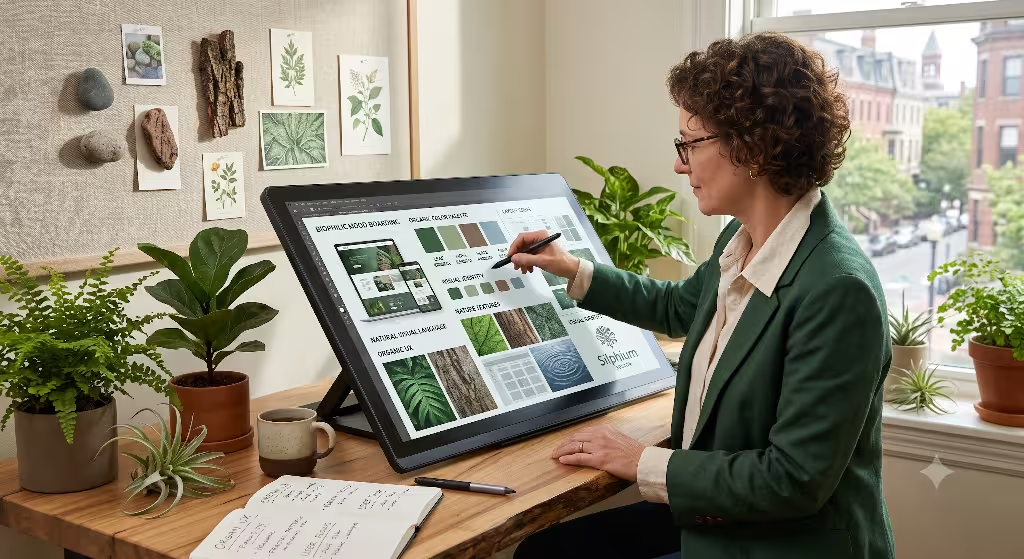
Before you write a single line of code, you must plan. You need to gather ideas for your cultural events website. This planning phase is like preparing the soil before you plant seeds. If the soil is rich, the plants will grow strong. If you plan well, your site for cultural events will succeed. We start this process by brainstorming. We need tools that let teams work together. We need to create a visual identity that matches the spirit of the cultural events. This is where we set the tone for the entire project.
To start, we use a tool called Miro. Miro is a digital whiteboard. It is perfect for mapping out ideas for cultural events. You can drag and drop pictures, write notes, and draw connections. It feels like a big table where everyone can gather. We use Miro to build the user journey. The user journey is the path a person takes through the site. We ask questions. How does a user find out about the cultural events? How do they buy a ticket? What information do they need first? By mapping this out, we keep the user from getting lost. It keeps the design simple and clean.
Next, we use Canva. Canva is a wonderful tool for quick graphic design. It helps us make visual assets for cultural events. We can make banner images, social media posts, and icons. Canva is great because it has many templates. But we do not just use any templates. We look for designs that feel organic. We want shapes that look like leaves, rivers, or stones. These natural shapes make the website feel friendly. They help users relax. When users feel relaxed, they spend more time reading about your cultural events. Canva makes it easy to keep these graphics consistent across the whole site.
Color is also very important for cultural events. Colors tell a story before the user reads a single word. We use a tool called Adobe Color. We also use Palette Explorer. These tools help us find colors that work well together. For cultural events, we often look to nature for color ideas. We might choose the deep green of a mossy forest. We might use the bright orange of a sunset. We might use the soft brown of autumn leaves. These colors are familiar to the human eye. They make the site for cultural events feel warm and welcoming. Adobe Color lets us save these palettes and share them with the whole design team.
Once we have our colors, we must choose our fonts. We use Google Fonts and Typekit. These tools give us access to thousands of typefaces. For cultural events, we need fonts that are easy to read. If a font is too fancy, older users might struggle to read the details about the cultural events. We like to pair a clean, modern font with a softer, organic font. This creates a nice balance. It is like a strong tree trunk with soft leaves. The clean font handles the important details like dates and times. The softer font handles the titles and stories. This balance keeps the page readable and beautiful.
Finally, we integrate biophilic patterns into our layouts. Biophilic design uses natural systems to guide visual layout. In nature, we see fractal patterns. Fractals are patterns that repeat at different scales. You can see them in ferns, Romanesco broccoli, and tree branches. We can use this idea on websites for cultural events. We can make sure our headers, text blocks, and images follow natural proportions. We use the golden ratio to size our content. This natural spacing feels right to our brains. It reduces stress. It makes the search for cultural events a joyful experience.
CMS Platforms: Striking the Balance Between Freedom & Performance
Once the planning is done, we must choose a Content Management System (CMS). A CMS is the software we use to build and run the website. This is the skeleton of our site for cultural events. It holds everything together. The platform you choose will affect how fast the site loads. It will affect how easy it is to update. This is a big decision for any web designer. You must balance design freedom with technical performance. You want a site that looks amazing but also loads in a blink of an eye.
What is the best platform for building a cultural event website?
The best platform depends on your technical skill and the scale of the events. Webflow is excellent for custom, visual designs. Headless WordPress is best for large, content-heavy sites. Wix Events is perfect for small, rapid setups.
Let us look at Webflow first. Webflow is a favorite tool for web designers who focus on cultural events. It gives you complete control over the design. You do not have to write code by hand, but Webflow writes clean code in the background. This is important because clean code makes pages load faster. Webflow lets us build custom animations. We can make images fade in gently like morning mist. We can make menus open smoothly like a flower blooming. These details make the site for cultural events feel polished and high-end. It is a great platform for unique, artistic projects.
For very large cultural events, we often use a headless WordPress setup. WordPress is the most popular website builder in the world. It is very strong and has been around for a long time. A headless setup means we separate the back end from the front end. The back end is where we store the event data. The front end is what the user sees. We use WordPress to manage the content for our cultural events. Then we use a modern tool like Next.js to display that content. This makes the website incredibly fast. It is also very secure. It is like having a strong, deep root system underground that supports a beautiful, fast-growing plant above.
Sometimes, we need to build a site for cultural events very quickly. In these cases, we might use Wix Events or Digitevent. These are no-code platforms. They are very easy to set up. They have built-in tools for booking tickets, mapping seats, and sending emails. This is helpful for smaller organizations. They might not have the budget for a custom Webflow site. Wix and Digitevent allow them to get their cultural events online in just a few days. The downside is that you have less design freedom. You have to use their pre-made layouts. But for simple projects, they are highly effective.
Whichever platform you choose, you must keep performance in mind. Websites for cultural events often have a lot of images. If these images are too large, the site will crawl. Users will get tired of waiting and close the tab. You should use modern image formats like WebP. You should also use lazy loading. Lazy loading means the website only loads images when they are about to appear on the screen. This keeps the initial load time very fast. It is like a tree only growing leaves where the sun is shining. It saves energy and keeps the system running smoothly.
Interactive Infrastructure: Ticketing, Schedules, & Community
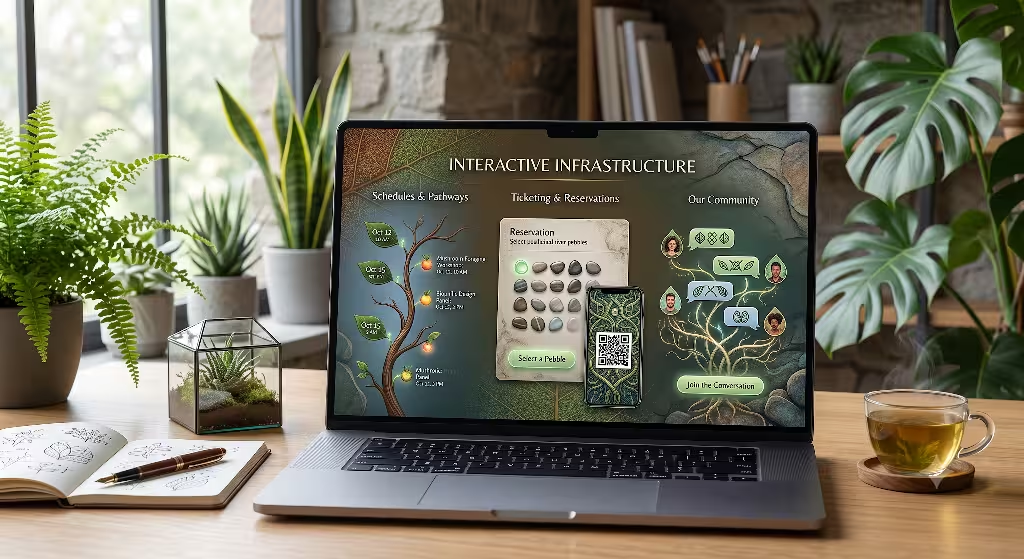
A website for cultural events must do more than just look pretty. It has to perform tasks. It must help people buy tickets. It must show them when and where performances happen. It should also help them feel like they belong to a community. We call this the interactive infrastructure. These are the tools that let users talk to the website. They turn passive readers into active participants. If these systems fail, the cultural events will suffer. People will not be able to attend.
What features should a cultural event website have?
A successful website must have secure online ticketing. It needs an easy-to-read, dynamic schedule. It should also have interactive maps, clear accessibility details, and simple ways for the community to connect.
Let us start with ticketing. We use ticketing Application Programming Interfaces (APIs). An API is a bridge that lets two different computer programs talk to each other. For cultural events, we connect our site to ticketing engines like Weezevent, Blackbaud, or Ticketmaster. This allows users to buy tickets without leaving our website. Keeping users on our site is very important. If they are sent to a clunky third-party site, they might get scared and cancel their purchase. We want the checkout process to feel safe, smooth, and simple. It should be as easy as picking fruit from a tree.
Next, we must design the schedule. Cultural events often have many things happening at the same time. There might be different stages, speakers, or workshops. We need dynamic schedule tools. Tools like BoomPop and Whova are excellent for this. They allow us to build interactive calendars. Users can filter the schedule by date, topic, or location. They can click on a speaker to read their biography. They can even build their own personal itinerary for the cultural events. This makes the information easy to digest. It prevents the user from feeling overwhelmed by too many choices.
We also want to build community around our cultural events. Cultural events are about bringing people together. The website should reflect that. We can build custom members’ areas on the site. We can include discussion forums where people can talk about the upcoming cultural events. We can also add feedback systems. This allows attendees to share their thoughts and photos after the cultural events are over. It keeps the conversation going all year long. It turns a one-time event into a lasting community hub.
To make all of this work, we must ensure our databases are clean. A database is where we store all the information about our cultural events. We store ticket prices, show times, artist names, and user accounts. We must organize this data carefully. Think of it like a library. If the books are piled on the floor, you cannot find anything. If they are on neat shelves with labels, you can find any book in seconds. A well-structured database makes the website fast and reliable. It ensures that when a user clicks “buy ticket,” the system works perfectly every time.
Spatial and Geographic Discovery Tools
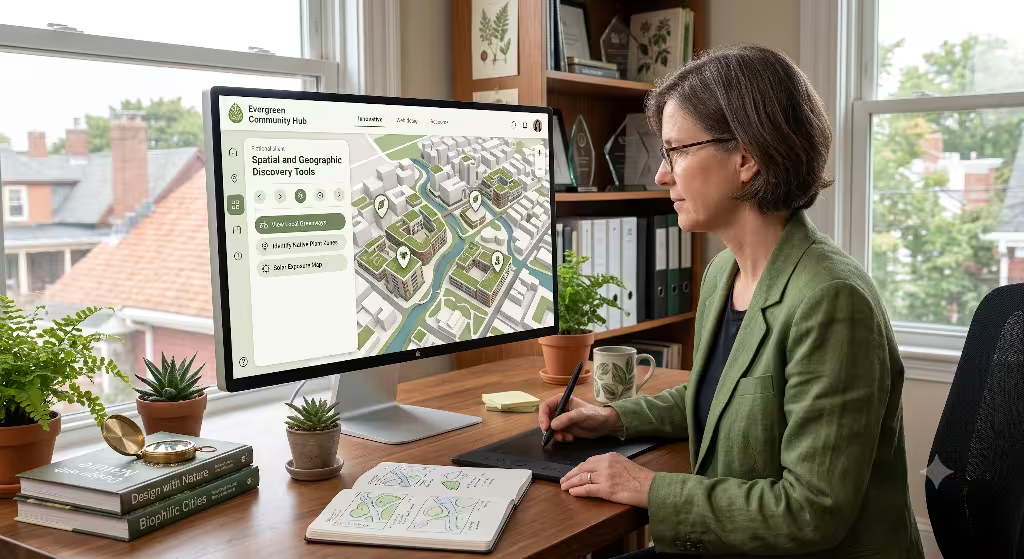
Many cultural events take place over large areas. A music festival might have ten stages in a park. An art walk might use twenty different galleries across a city. Users need to know how to get there. They need to know where to park, where the food trucks are, and where to find restrooms. We need spatial and geographic tools to help them. These tools bridge the gap between the digital website and the physical world where the cultural events happen.
To do this, we use tools like Mapbox GL JS and Leaflet. These are powerful JavaScript libraries. They let us build custom, interactive maps. We do not have to use the standard, boring Google Maps. We can design maps that match the visual style of our cultural events. We can use custom colors, unique icons, and artistic details. We can make the map look like an old hand-drawn scroll or a modern, clean blueprint. This keeps the user immersed in the artistic theme of the cultural events. It turns a simple utility into a beautiful part of the design.
Look at the custom 3D map above. This is how we can show a festival ground. It makes the physical space feel real to the user before they even arrive. They can see where the main stage is located. They can see the pathways and the trees. This visual guide helps reduce anxiety. It helps people plan their day. It makes the transition from their computer screen to the actual cultural events seamless and exciting. It feels natural and intuitive.
For indoor cultural events, we also need seat-mapping tools. If you are selling tickets for a theater or a concert hall, users want to choose their seats. We use vector seat-map designers. These tools let us build a digital version of the seating chart. Users can hover over a seat to see the price. They can see what the view of the stage looks like from that exact spot. This interactive experience builds trust. It helps users feel confident in their purchase. It makes the process of buying tickets for cultural events feel premium and personalized.
When we design these maps, we must think about mobile users. Most people will look at these maps on their phones while they are at the cultural events. This means the maps must load quickly on mobile networks. They must be easy to zoom and scroll with a thumb. The buttons must be large enough to tap easily. If a map is hard to use on a phone, it becomes useless. We must test our maps in real-world conditions. We must make sure they work when the user is standing in a crowded field, looking for the next performance.
Universal Design: Inclusivity, Accessibility, & Localization
Cultural events are for everyone. They should be open to people of all ages, backgrounds, and physical abilities. As web designers, we have a duty to make our sites accessible. This is called universal design. It means we design the website so that anyone can use it. If we ignore accessibility, we are locking people out of our cultural events. That is not acceptable. We must use the right tools to build an inclusive digital environment.
How do you design an accessible website for a cultural institution?
Use semantic HTML so screen readers can understand the page. Ensure high color contrast for visually impaired users. Use aria-attributes for dynamic elements, and test your site with tools like WAVE to catch errors.
To start, we use accessibility testing tools. WAVE (Web Accessibility Evaluation Tool) and Axe DevTools are two of the best. These tools scan our website for accessibility errors. They check if our text is large enough. They check if our colors have enough contrast. They also check if our images have alternative text. Alternative text is a short description of an image. Screen readers read this text aloud to blind users. This ensures they can still enjoy the visual elements of our cultural events website.
We must also use semantic HTML and aria-attributes. Semantic HTML means we use the correct code tags for each part of the page. We use header tags for headings, paragraph tags for text, and button tags for buttons. This might sound simple, but many designers use generic tags. This confuses screen readers. Aria-attributes are special code labels. They give extra information to assistive technologies. For example, they can tell a blind user if an interactive calendar is open or closed. This makes navigating our schedule of cultural events easy for everyone.
Another important part of universal design is localization. Many cultural events attract visitors from all over the world. This means our website must be available in different languages. We use translation tools like Weglot or the DeepL Pro API. These tools translate our website content automatically. But they also let us review and edit the translations. This is important because machine translations can sometimes miss cultural nuances. We want our message to be clear and respectful in every language. It helps global visitors feel welcome at our cultural events.
We must also think about users with slow internet connections. In many parts of the world, high-speed internet is a luxury. If our site for cultural events is too heavy, these users will not be able to access it. We must optimize our code. We must compress our files. We should aim to make our pages as lightweight as possible. This is also a form of accessibility. It ensures that no matter where someone is, or what kind of device they have, they can connect with our cultural events.
Search Engine Optimization (SEO) for Cultural Events
You can build the most beautiful website in the world, but it will not matter if no one can find it. You need people to discover your cultural events. This is where Search Engine Optimization (SEO) comes in. SEO is the practice of making your website easy for search engines like Google to find. It is like putting up clear signs on a forest trail. It helps searchers find exactly what they are looking for.
One of the most powerful SEO tools for cultural events is structured data. Specifically, we use JSON-LD Event Schema. Schema is a special type of code. It tells search engines exactly what our content means. Instead of just reading text, Google can see that “July 24th” is the date of our event. It can see that “$20” is the ticket price. It can see that “Central Park” is the location. This allows Google to display our cultural events directly in the search results as rich snippets. Rich snippets are eye-catching boxes that show event details right on the search page. This greatly increases the chance that people will click on our link.
To implement this, we use schema generator tools. These tools help us write the correct code without errors. We can also use Google’s Rich Results Test tool. This tool checks our code to make sure Google can read it properly. By using structured data, we make our cultural events highly visible. We help them stand out from the crowd. It is a critical step for any web designer working in this space.
We must also focus on local SEO. Many people search for cultural events in their specific city or region. They might search for “cultural events in Boston” or “art festivals near me.” To capture these searches, we must optimize our local presence. We make sure our website is connected to Google Maps. We ensure our name, address, and phone number are consistent across the web. We also list our cultural events on local directory sites. This builds local authority. It tells search engines that our site is a trusted resource for local cultural events.
Keyword research is another vital tool. We must find out what words people use when they search for cultural events. We use tools like Google Keyword Planner or Ahrefs. These tools show us how many people are searching for specific terms. For example, we might find that more people search for “neighborhood cultural events” than “local community gatherings.” We can then use those exact terms in our website text. This makes it easier for searchers to find us. It connects our content directly with the questions people are asking.
Finally, we must monitor our performance. We use Google Analytics and Google Search Console. These free tools show us how people find our site. They show us which pages are the most popular. They also show us if there are any technical problems. If we see that users are leaving our tickets page quickly, we know we need to fix it. This continuous monitoring is like checking the health of a garden. It helps us make small adjustments over time to keep our cultural events site growing and thriving.
Designing for Human Connection
In the end, web design is not about screens or code. It is about people. It is about bringing humans together to share experiences, stories, and art. The tools we have discussed are simply ways to help us achieve that goal. Whether we are using Miro to plan, Webflow to build, or Mapbox to guide, our ultimate purpose is to create connection. We want to make it as easy as possible for people to find and enjoy cultural events.
By using biophilic design, we can make our digital spaces feel more human. We can use natural colors, shapes, and patterns to create a sense of calm. We can build websites that are fast, accessible, and easy for everyone to navigate. This respectful approach builds trust with our users. It makes them feel welcome. It prepares them for the rich, real-world experiences they will have at our cultural events.
As web designers, we have a beautiful opportunity. We can use our technical skills to support culture, art, and community. We can build digital gateways that open doors to physical gathering spaces. Let us use these tools with care and intention. Let us design websites that are as resilient, diverse, and beautiful as the natural world around us. By doing so, we help our cultural events flourish and grow for generations to come.