
Table of Contents
When starting on the Fediverse one of the very first questions many people ask is simple: where are the numbers? Those coming from environments where every single click, glance, hover, and microsecond of screen time was logged into a centralized dashboard, the decentralized web felt like walking into a massive library where the doors were open, the conversations were lively, but nobody was taking attendance.
When you look at decentralized systems through both a technical lens and a human lens, you quickly realize that measuring engagement here does not mean you are flying blind. It means you must measure differently. You cannot rely on closed corporate platforms to hand you an algorithmic scorecard. Instead, you need a grounded approach to mastodon analytics that respects the open source architecture of the network while still giving your team real data to make smart business decisions.
Tracking engagement across an open social web requires unlearning old habits. The playbook that worked on centralized platforms will fail here because the incentives of the technology are completely different. When people first look for mastodon analytics, they often expect a simple plug-and-play dashboard that mirrors the surveillance tools of big tech. But real measurement on an open protocol means understanding how distributed instances talk to one another, how real people interact when an algorithm is not forcing content down their throats, and how to spot authentic interest.
In this comprehensive guide, we are going to examine and dissect the technical realities of mastodon analytics, examine the exact metrics that translate into genuine website traffic, evaluate the best software tools available today, and lay out an actionable strategy you can use to grow your presence sustainably.
The Fediverse Reality: Why Standard Algorithmic Tracking Playbooks Fail

To understand why mastodon analytics feels so distinct from traditional social tracking, you must look at how the traditional social media industry was built. On legacy networks, the platform owns the entire stack. They control the servers, the user database, the mobile app, and the feed sorting algorithm. Because a single company controls every layer of the infrastructure, they can track every action you take. They know if you paused over an image for two seconds. They know if you read a thread to the bottom. They pack all this data into massive corporate analytics suites designed to keep users hooked and sell targeted ad space.
The Fediverse rejects this surveillance model entirely. Mastodon does not run on a single corporate server. It operates as a federation of thousands of independent servers running open source software. These servers communicate using a shared protocol called ActivityPub. When you post a message from your account, your home server does not send your post to a central algorithmic engine. It simply routes the message out to the servers where your followers have accounts.
Because there is no centralized company sitting in the middle, traditional surveillance tracking simply does not exist here. There are no tracking pixels running in the background. There is no central tracking cookie following users from page to page. This is why standard marketing playbooks fail immediately on Mastodon. If your team relies on paying for boosted posts, targeting users by private demographic data, or tracking ad impressions, you will find that none of those mechanisms work here.
This absence of surveillance is not an accident or a technical limitation waiting to be fixed. It is an intentional design choice. The community built the network to escape commercial tracking and intrusive algorithmic manipulation. As a result, when you plan your mastodon analytics workflow, you have to shift your mindset. You are not measuring how well you tricked an algorithm into showing your post to passive users. You are measuring how actively real people choose to read, share, and discuss what you publish.
Understanding mastodon analytics starts with accepting that passive impressions are mostly meaningless. On centralized networks, millions of impressions often yield little real interaction because an algorithm merely flashed your post on a screen while someone scrolled past. On the Fediverse, an interaction is an intentional human act. When you use proper mastodon analytics, you are measuring voluntary human attention rather than programmatic exposure.
The Technical Disconnect: Decentralized Server Node Architecture and Missing Global Data
To build an effective mastodon analytics process, we need to dig into the underlying technology of decentralized server nodes. Understanding the engineering helps explain why data looks the way it does on your screen.
Imagine a traditional social network as a massive warehouse. Everyone enters the same building, talks in the same rooms, and the security team in the control room watches every single movement on closed-circuit television. If you want to know how many people saw a sign you hung on the wall, the control room pulls up the tape and gives you an exact count.
Now imagine Mastodon. Instead of one giant warehouse, imagine thousands of independent community centers spread across the world. Each community center has its own owner, its own rules, and its own local bulletin board. When you join a server, you are joining one specific community center. That server is your home instance.
+-------------------------------------------------------------+
|                      YOUR HOME INSTANCE                     |
|  - Authorizes your account via OAuth                        |
|  - Stores your original public outbox                       |
|  - Logs complete outbound replies, boosts, favourites       |
+------------------------------+------------------------------+
                               |
            Federated ActivityPub Message Broadcast
                               |
         +---------------------+---------------------+
         v                                           v
+-----------------------+                 +-----------------------+
|   REMOTE INSTANCE A   |                 |   REMOTE INSTANCE B   |
| - Caches post locally |                 | - Caches post locally |
| - Users view offline  |                 | - Users view in feed  |
| - Never sends back    |                 | - Never sends back    |
|   passive views       |                 |   passive views       |
+-----------------------+                 +-----------------------+
When you publish a post, your home server places that post into your public outbox. Your home server then looks at your follower list. If you have followers on three hundred different servers, your home server opens a connection to each of those three hundred servers and drops a copy of your post into their public inbox.
Once your post arrives on those remote servers, your home server no longer monitors it. When a user on a remote server opens their Mastodon app and reads your post, their local server serves up that cached post from its own local hard drive. That remote server never sends an alert back to your home server saying, “User Jane read this post at 2:15 PM.” Doing so would waste massive amounts of server bandwidth and violate the reader’s privacy.
This creates what engineers call the distributed data boundary. Your home server knows:
- Exactly how many accounts follow you.
- Every time someone sends a public reply to your post.
- Every time someone hits the boost button to re-share your post.
- Every time someone favourites your post.
Your home server does not know, and can never know:
- How many people scrolled past your post on their screen.
- How many seconds people spent reading your text.
- Which specific server timelines rendered your post without a user interacting with it.
Any mastodon analytics software must work within these real technical limits. When people ask why mastodon analytics tools do not show total impressions or reach estimates like old platforms did, this is why. A global impression metric simply cannot exist across a federated ActivityPub network without turning every server into a surveillance terminal. Accurate mastodon analytics focuses on what is verifiable: tangible actions, real engagement, and verifiable network velocity.
Ethical, Privacy Conscious Data Collection as a Superior Business Signal
Because the Fediverse lacks passive view metrics, some marketers assume that mastodon analytics cannot support serious business goals. That assumption is flatly wrong. In fact, ethical and privacy conscious data collection provides a far more reliable business signal than legacy platform metrics ever did.
For more than a decade, traditional digital marketing suffered from an obsession with vanity metrics. Social media teams celebrated millions of impressions and video views that lasted less than three seconds. Companies spent enormous budgets chasing these numbers, only to discover that massive impression counts rarely translated into actual software trials, newsletter signups, or qualified sales leads. Centralized platforms routinely inflated reach metrics to justify advertising rates, creating an environment where vanity metrics hid a complete lack of genuine human interest.
Privacy conscious mastodon analytics forces you to focus entirely on deep metrics. Because an open network does not reward superficial clicks or passive views, the data you collect through mastodon analytics reflects deliberate, high-intent user choices.
When someone interacts with your brand on Mastodon, they must take a conscious step. When someone boosts your post, they are not just reacting to an algorithm; they are intentionally putting your words into the chronological feeds of everyone who follows them on their home server. When someone leaves a reply, they are engaging in an open public dialogue.
By stripping away misleading impression counts, mastodon analytics delivers clean data. You measure real interest from real people. The numbers you see in a well designed mastodon analytics dashboard are smaller than the inflated numbers from legacy ad networks, but every single digit represents an actual human relationship. At Silphium Design LLC, our campaigns on Mastodon consistently yield higher conversion rates to our website resources because the audience engaging with our work is actually paying attention. Embracing ethical mastodon analytics means trading meaningless vanity metrics for actionable, authentic engagement.
How ActivityPub Handles Events: Public Inboxes, Outboxes, and Relays
To truly master mastodon analytics, it pays to take a closer look under the hood at how the ActivityPub protocol coordinates social interactions across different web domains.
ActivityPub is a World Wide Web Consortium standard. It treats social networking like email with extra features. In email, if you use one email provider and send a message to a colleague at another provider, your mail server talks directly to their mail server using a protocol called SMTP. ActivityPub works similarly, but uses modern web standards like JSON-LD and HTTP requests.
Every account on Mastodon has an actor profile. Attached to that actor profile are two critical endpoints:
- The Outbox: Where your published activities live.
- The Inbox: Where messages and activities from other people arrive.
When you write a post, your server generates an Activity object. In this case, it is a Create activity wrapping a Note object. Your server publishes this note to your outbox. Next, your server checks your list of followers and identifies every unique remote instance where those followers live. Your server’s job is to deliver that Create Note payload to the shared public inbox of each remote server.
JSON
{
  "@context": "https://www.w3.org/ns/activitystreams",
  "id": "https://mastodon.example/users/metis/statuses/10987654321",
  "type": "Create",
  "actor": "https://mastodon.example/users/metis",
  "object": {
    "id": "https://mastodon.example/users/metis/statuses/10987654321",
    "type": "Note",
    "published": "2026-09-14T12:00:00Z",
    "attributedTo": "https://mastodon.example/users/metis",
    "content": "<p>Exploring federated metrics and mastodon analytics today!</p>",
    "to": ["https://www.w3.org/ns/activitystreams#Public"]
  }
}
Now, what happens when a user on that remote server interacts with your post?
If that remote user clicks the favourite button, their server constructs a Like activity pointing back to your post’s unique web address. Their server then connects to your home server’s inbox and drops the Like activity inside. Your server processes that incoming message and increments your post favourite count by one.
If that remote user clicks the boost button, their server creates an Announce activity. Their server sends a copy of that Announce activity to your server’s inbox, while simultaneously delivering that same Announce activity to the inboxes of all their followers across the network.
Finally, what about relays? A relay is an optional public clearinghouse that small servers can join to discover content. If a server has only ten users, those users would normally only see posts from the accounts they personally follow. By connecting to a relay, that small server agrees to exchange public posts with a wider pool of servers, broadening what shows up on their federated timeline.
When you look at mastodon analytics, you are analyzing this exact flow of ActivityPub events. Every data point in your mastodon analytics report is the result of structured messages successfully delivered between distributed servers. Understanding this message architecture helps you spot delivery lags, plan the timing of your posts, and see why your engagement can continue to climb for days as messages spread naturally across server boundaries.
The Home Instance Data Boundary: Outbound Tracking and Federated Echoes

The distributed structure of the Fediverse creates what I call the home instance data boundary. Knowing what happens inside this boundary versus what happens outside it is essential for anyone running mastodon analytics.
Your home instance acts as your single source of truth for all outbound activities. Whenever you publish, edit, or delete a post, your home instance keeps an authoritative log of that action. It also records all direct incoming interactions that federated servers send back to you. When you query your server through third-party mastodon analytics software, you are pulling data from this home base.
Here is what your home instance captures with precision:
- The Follower Graph: The exact list of accounts following you, along with their home domains.
- Direct Notifications: Every reply, mention, boost, and favourite that targets your account.
- Bookmark Data: Posts that you have saved for yourself (though this is strictly private to your own account).
- Outgoing Follows: The accounts and hashtags that your profile follows across the Fediverse.
However, once a post leaves your home server, it generates what can be described as federated echoes. When someone boosts your post, their home server shares it with their followers. If one of their followers replies to that boost, that new conversation might unfold entirely on a remote server before your home server ever receives a copy of the thread.
Sometimes, if two servers experience network issues or if a remote server has blocked your server, parts of that conversation will not federate back to your home server. As a result, you might occasionally see small discrepancies in mastodon analytics numbers when looking across different instances.
A user viewing your post from an instance in Europe might see five replies, while a user on a North American instance sees seven replies. Each server only knows about the messages that its local software has successfully received and indexed.
When interpreting mastodon analytics, keep this federated reality in mind. Your home instance provides an accurate baseline of your account activity, but the broader conversation spreads outward like ripples in water. The best mastodon analytics workflows do not stress over minor differences between instances. Instead, they look at overall trends, interaction velocity, and sustained engagement patterns over time.
No Algorithmic Black Box: Measuring Chronological Feeds and Local Server Timelines
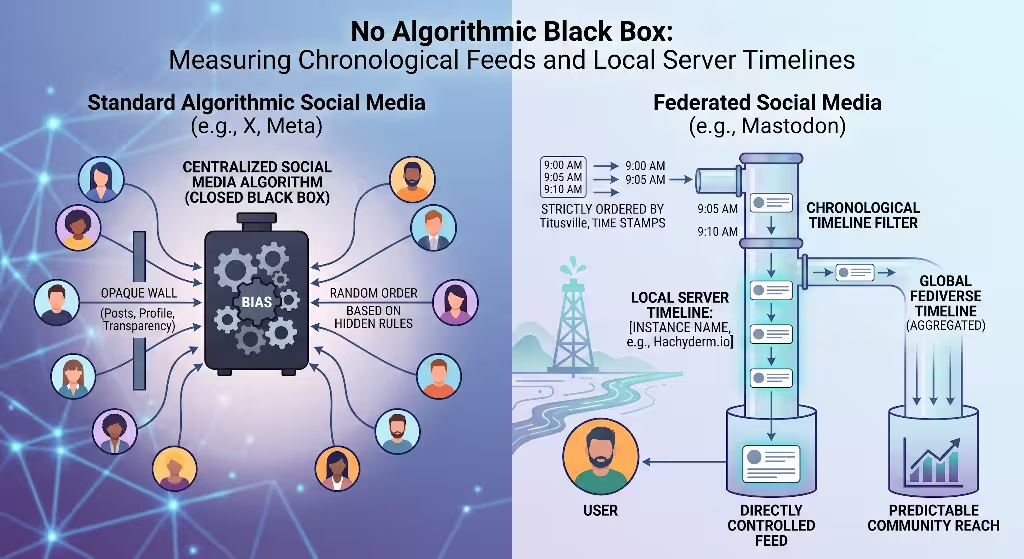
One of the greatest advantages of working on Mastodon is the complete absence of a secret algorithm deciding who gets to see your work. On traditional networks, the timeline is controlled by a proprietary machine learning model. That model looks at thousands of signals to decide which posts rise to the top and which posts get buried.
This creates what marketers call the algorithmic black box. One week your views are through the roof; the next week a silent platform update cuts your traffic in half. You are forced to spend time trying to appease the algorithm rather than serving your community.
Mastodon replaces the algorithmic black box with transparent, chronological timelines. This makes mastodon analytics much more straightforward and predictable to interpret.
On Mastodon, users browse three primary timelines:
| Timeline Type | Content Displayed | Core Measurement Metric |
| Home Timeline | Posts and boosts exclusively from followed accounts and hashtags | Core follower loyalty and direct subscriber engagement |
| Local Timeline | Public posts generated by members of that specific server | Niche community alignment and local instance culture |
| Federated Timeline | Public posts from any server known to that local instance | Broad discovery and cross-instance content resonance |
Because feeds are strictly chronological, when you post, your content appears at the top of your followers’ home feeds at that exact moment. There is no algorithm penalizing you for including an external link, nor is there an algorithm burying your post because you failed to use a trending audio track.
This chronological reality transforms how you use mastodon analytics. Instead of trying to crack an invisible algorithmic code, you analyze straightforward human timing and content relevance:
- Temporal Windows: What time of day are your followers active across different global time zones?
- Topic Resonance: Do your educational posts generate more replies than your project announcements?
- Content Lifespan: Because chronological feeds do not push old content unless it is boosted, how long does a post continue to earn reblogs across federated servers?
When you work with mastodon analytics in an algorithmic-free environment, your performance numbers become clear and interpretable. If a post does well, it is because actual people found it useful enough to read and pass along. If a post falls flat, you do not need to blame a mysterious algorithm update. You simply look at the message, the topic, the timing, and try a more helpful approach next time.
Main Metrics: What Really Drives Reach in the Fediverse
To get genuine value from your mastodon analytics, you need to understand which metrics actually drive reach and which ones are simple acknowledgments. On Mastodon, the two most common buttons—the Favourite and the Boost—serve completely different functional purposes.
+-------------------------------------------------------------+
|                      THE FAVOURITE (STAR)                   |
|  - Function: Private bookmark & personal appreciation       |
|  - Scope: Stays between you and the author                  |
|  - Impact on Reach: Zero algorithmic distribution           |
+-------------------------------------------------------------+

                               vs.

+-------------------------------------------------------------+
|                      THE BOOST (REBLOG)                     |
|  - Function: Organic amplification & community curation     |
|  - Scope: Injected directly into all follower feeds         |
|  - Impact on Reach: The sole organic engine of discovery    |
+-------------------------------------------------------------+
The Favorite (The Star)
On centralized platforms like X or LinkedIn, liking a post signals the recommendation algorithm to show that post to other users. A like acts as an amplifier.
On Mastodon, the favorite button does not amplify your post to anyone else. When a user clicks the star on your post, two things happen:
- A notification is sent to your account letting you know they appreciated the content.
- The post is added to that user’s private Favourites list so they can reference it later.
A favorite does not put your post onto anyone else’s feed. Therefore, in your mastodon analytics reports, a high favourite count indicates that your audience found the post valuable, informative, or personally resonant, but it did not directly expand your audience reach.
The Boost (The Reblog)
The boost is the true engine of organic growth on Mastodon. Because there is no discovery algorithm, the only way a post travels beyond your immediate followers is when someone chooses to boost it.
When an account boosts your post, your entire post is inserted directly into the chronological home feeds of everyone who follows that account, across whatever servers they use. If an account with five thousand followers boosts your post, your writing is instantly visible to those five thousand people. If three of those people boost it, the ripples continue to spread outward.
In mastodon analytics, the boost is your primary amplification metric. A post with fifty favourites and two boosts was appreciated privately by your existing fans. A post with five favourites and fifty boosts succeeded as a viral piece of community-shared content. When evaluating campaigns, prioritize boost ratios whenever your goal is audience acquisition and brand discovery.
Conversational Depth and Reply Ratios
Another critical metric in mastodon analytics is conversational depth. This measures the ratio of public replies to initial posts.
Mastodon users value authentic conversation over broadcast advertising. If a brand account publishes dozens of posts but receives zero replies, that account is simply broadcasting into the void. When your mastodon analytics show a healthy volume of replies, it tells you that your posts are encouraging genuine dialogue.
Tracking the number of back-and-forth interactions inside a thread helps you assess community retention. High conversational depth signals to both your team and the wider network that your presence is human, accessible, and worth following.
Hashtags, Discoverability, and Follower Retention
Because Mastodon does not offer full-text search across the entire federated network by default on all instances, hashtags play a central role in how new readers discover your work. Understanding how hashtags function is an indispensable part of mastodon analytics.
On many Mastodon instances, searching for an arbitrary phrase like “open source design tools” will only return posts that your specific home server has already indexed. However, searching for a specific hashtag like #OpenSourceDesign queries explicit metadata tags. Users can choose to follow specific hashtags directly, allowing any public post containing that tag to flow straight into their personal home feeds, even if they do not follow the author.
When reviewing your mastodon analytics, monitor which hashtags consistently deliver interaction:
- Hashtag Relevance: Are you using precise, topical tags that niche communities monitor, or are you cluttering your post with broad, spammy tags? (Using more than three or four hashtags is generally frowned upon in Fediverse culture and can actively harm your engagement).
- Trending Server Topics: Many servers display a list of trending hashtags on their explore page. Aligning your original content with relevant trending discussions is an effective way to earn natural boosts.
- Tag Ingestion: By tracking hashtag performance in your mastodon analytics tool, you can see which subject areas generate the highest follow-through back to your profile.
+-------------------------------------------------------------+
|               AUDIENCE RETENTION & MIGRATION                |
|                                                             |
|  Gross New Followers                                        |
|  - Natural Unfollows (Disinterest or topical shift)         |
|  - Server Closures (Instance shutdowns or domain moves)      |
|  - Defederation Churn (Server-level moderation disconnects) |
|  ---------------------------------------------------------  |
|  = True Net Audience Growth                                 |
+-------------------------------------------------------------+
Next, let us look at audience retention. In centralized systems, follower counts are simple: people tap follow, and your number climbs. On Mastodon, your follower count is dynamic because servers themselves change.
When analyzing audience growth in your mastodon analytics software, you must distinguish between three types of follower changes:
- Standard Unfollows: A user decides they no longer want your posts in their feed.
- Instance Shutdowns: A small volunteer-run server goes offline, causing all accounts hosted on that server to vanish from your follower list simultaneously.
- Server Defederation: If your server administrator blocks another server due to safety or spam issues (or vice versa), all follow connections between those two servers are severed at once.
A capable mastodon analytics strategy tracks net follower retention rather than panicking over short-term drops. When you see a sudden drop of twenty followers in a single hour, your mastodon analytics will often show that an entire remote server was simply defederated by your instance admin. Understanding these structural shifts keeps your reporting accurate and grounded.
The Privacy and Security Framework: Evaluating Analytics Software
Because privacy is the foundation of the Fediverse, choosing mastodon analytics software requires far more caution than selecting tools for old-school social networks. If you connect an unethical, invasive tool to your account, you risk alienating the very audience you are trying to reach.
When evaluating any mastodon analytics tool, use this evaluation framework:
OAuth 2.0 Scope Restrictions
Never provide your account password to any analytics platform. Legitimate tools authenticate exclusively through Mastodon’s built-in OAuth system.
When you authorize an application, Mastodon shows you the exact permissions the application wants. A privacy-respecting mastodon analytics platform will only ever request read-only permissions:
read:statuses(to look at your post history and interaction counts)read:accounts(to review your follower counts and public profile details)
If an analytics tool asks for write permissions, or worse, permission to read your direct messages (read:direct_messages), cancel the authorization immediately. An analytics suite has zero legitimate business reading your private communications or publishing posts without your direct review.
Zero PII Scraping and Covenant Compliance
The Mastodon Server Covenant is a set of rules that responsible server administrators follow to guarantee server stability, moderation standards, and privacy protections. Your mastodon analytics software should adhere to these same core principles.
Make sure the software you choose does not scrape or store Personally Identifiable Information (PII) belonging to users who interact with you. An ethical tool aggregates event counts (such as total boosts, reply volume, and hashtag clicks) without building private behavioral dossiers on the people replying to your threads.
Self-Hosted vs. Cloud SaaS Solutions
Consider whether your organization requires a self-hosted analytics stack or a managed cloud platform:
| Evaluation Dimension | Self-Hosted Analytics (FOSS) | Managed Cloud SaaS |
| Data Control | Complete; all data stays on your owned servers | Third party holds aggregated metrics |
| Security Auditability | High; code can be inspected line-by-line | Relies on vendor compliance and trust |
| Maintenance Burden | Requires internal engineering and server upkeep | Zero infrastructure management |
| Feature Velocity | Updates depend on community releases or internal dev | Frequent feature rollouts and polish |
For teams working in healthcare, law, or sensitive engineering fields, self-hosting your mastodon analytics software provides ironclad privacy guarantees. For marketing teams at growing companies, an established SaaS platform that uses strict read-only OAuth permissions offers convenience while staying well within Fediverse community standards.
Comprehensive Breakdown: Top Mastodon Analytics Software
Now let us look at the leading software platforms available for measuring performance on Mastodon. Each tool addresses different operational needs, ranging from simple post breakdowns to advanced multi-channel federated tracking.
Fedica
Fedica is one of the most mature platforms supporting the Fediverse. Originally built for multi-network publishing, it has developed deep features specifically for Mastodon and the broader social web.
- Primary Strengths: Fedica provides detailed demographic mapping and follower distribution data based strictly on public profile bios and server locations. It allows you to track follower growth, analyze when your audience is awake, and schedule posts across different time windows. It also provides clean visual charts that summarize your historical reach over months.
- Best Suited For: Agencies, brand marketing teams, and organizations that need clear visual reporting to share with stakeholders who are used to standard social media reports.
Analytodon
Analytodon is a dedicated, privacy-first tool designed specifically for Mastodon. It takes an uncompromising stance on ethical tracking.
- Primary Strengths: Analytodon focuses on post-level velocity and resonance without tracking personal user data. It helps you see which topics earn the highest boost rates, tracks how quickly your posts gain traction across federated instances, and surfaces your most effective hashtags. It does not scrape follower profiles, keeping your tracking footprint light and compliant with community norms.
- Best Suited For: Open source projects, privacy advocates, independent creators, and teams that want clear post metrics without touching unnecessary profile information.
Nuelink
Nuelink is primarily an automation and scheduling suite, but it has introduced focused mastodon analytics features that make it very convenient for content creators.
- Primary Strengths: Nuelink allows you to organize your posts into topical collections and tracks performance across each collection. This lets you see whether your technical guides perform better than your product updates. It provides clean engagement heatmaps and automated PDF exports that summarize your core metrics on a weekly or monthly schedule.
- Best Suited For: Small teams, solo founders, and busy social managers who want scheduling and essential mastodon analytics inside a single dashboard.
Custom API Pipelines (Python and Megalodon)
For technical teams that want complete control over their metrics without relying on any third-party provider, building a custom data pipeline using Mastodon’s open REST API is an excellent option.
Using libraries like Mastodon.py in Python or megalodon in TypeScript, your engineers can query your home instance directly. You can fetch status metrics, parse incoming activities, and pipe those figures directly into internal dashboards like Grafana, Metabase, or Tableau.
- Primary Strengths: Total data sovereignty, zero ongoing SaaS subscription costs, complete customization, and the ability to combine Fediverse metrics with your internal company databases.
- Best Suited For: Tech companies, instance administrators, data engineers, and organizations with strict internal data security policies.
Content Warnings and Accessibility: How They Impact Your Numbers
On the Fediverse, cultural norms directly influence how your content performs. Two areas where this is most evident in your mastodon analytics are the use of Content Warnings (CWs) and media accessibility descriptions (alt-text).
The Sociological Function of Content Warnings
In Mastodon, the Content Warning feature allows you to place a short summary label over your post, requiring the reader to click to reveal the full text.
+-------------------------------------------------------------+
| [CW: Discussion of corporate layoffs and workplace changes] |
|                                                             |
| [ Click to expand content... ]                              |
+-------------------------------------------------------------+
Many marketers coming from centralized platforms view Content Warnings as an obstacle that hurts click-through rates. In the Fediverse, the opposite is often true.
Content Warnings are used for:
- Sensitive topics (politics, trauma, medical discussions)
- Long technical deep-dives that would take up significant vertical screen space
- Spoilers for movies, books, or ongoing events
- Everyday topics that might overwhelm a casual reader
When you use a thoughtful CW, you are showing respect for your reader’s time and mental space. In our testing at Silphium Design LLC, posts that use an informative CW label for long technical topics often earn higher boost counts than bare walls of text. The label acts like an enticing article headline. When you review your mastodon analytics, compare posts that use informative CWs against posts that do not. You will often find that clear, respectful framing increases total engagement.
Alt-Text and the Accessibility Penalty
The Mastodon community places immense value on digital accessibility. Describing images using descriptive alt-text is an expected community standard.
In fact, many Mastodon users will actively refuse to boost any post that includes images without alt-text. There are even popular automated bots on the network that remind users when they share uncaptioned media.
If your mastodon analytics show a sudden drop in reblogs on an image-heavy post, check your alt-text immediately. Omitting image descriptions creates what can be called an accessibility penalty.
When you add thorough, accurate alt-text to your graphics, diagrams, and photos, you welcome visually impaired community members and signal that your organization takes inclusion seriously. Taking the time to write good image descriptions produces a noticeable, positive lift in your mastodon analytics metrics.
Driving and Measuring Conversions Off-Platform
Social media metrics only matter if they help you achieve real-world goals, such as driving readership to your blog, getting signups for your open source project, or earning sales for your business. Because Mastodon does not support invasive tracking scripts, measuring off-platform conversions requires clean, reliable methods.
Replacing Spyware with Privacy-Respecting Web Analytics
To understand what happens after a user clicks a link on Mastodon and lands on your website, you need web analytics software that aligns with Fediverse values.
If your website loads heavy third-party tracker scripts that collect personal data, many Fediverse users will block those scripts using browser extensions like uBlock Origin or Privacy Badger. That means standard tracking suites will often miscount or entirely miss traffic coming from Mastodon.
Instead, use lightweight, privacy-respecting analytics tools such as:
- Plausible Analytics: Open source, lightweight, does not use cookies, and fully compliant with privacy laws out of the box.
- Umami: A self-hostable, modern open source analytics platform that gives you complete ownership of your web traffic logs.
- Matomo: A comprehensive, feature-rich web analytics platform that can be configured for cookieless tracking and full data sovereignty.
These platforms record clean page visits, bounce rates, and conversion goals from Mastodon without harvesting visitor data, ensuring your conversion counts are accurate and untainted by ad-blocker dropouts.
UTM Parameters and Referrer Handling
When someone clicks an external link inside a Mastodon app, the web traffic arrives at your site with a referrer header. However, because Mastodon users view posts through dozens of different mobile apps, web browsers, and third-party desktop clients, that referrer header can vary widely.
A visitor might arrive from mastodon.social, hachyderm.io, a local desktop client, or simply show up as direct traffic if their client strips referrer headers for security.
To keep your mastodon analytics organized, use clean campaign tracking parameters (UTM parameters) on your links:
https://silphiumdesign.com/guide?utm_source=mastodon&utm_medium=social&utm_campaign=fediverse_analytics_guide
Keep your tracking clean:
- Avoid long, messy tracking strings that clutter the post.
- Use clean, readable parameter names.
- Rely on Mastodon’s natural link shortening (Mastodon automatically displays links cleanly while preserving the underlying address).
By reviewing your privacy-respecting website analytics alongside your mastodon analytics software, you can clearly trace how a post with fifty boosts directly generated newsletter subscribers, document downloads, or product inquiries on your own site.
Frequently Asked Questions about Mastodon Analytics
To help you troubleshoot common concerns when setting up your measurement systems, here are clear, direct answers to the most frequent questions people ask about tracking performance on the Fediverse.
Does Mastodon have built-in analytics?
No. Native Mastodon server software intentionally does not include built-in analytics dashboards for individual users. The official web interface and mobile apps deliberately omit view counts, click-through tallies, and profiling charts.
This design protects user privacy and prevents the addictive, numbers-obsessed behavior that algorithmic social platforms encourage. If you want to track your account performance over time, you must connect a dedicated third-party mastodon analytics tool or build a custom API pipeline using read-only access tokens.
Can you see who views your posts on Mastodon?
No. You cannot see who views your posts, nor can you see a total count of how many people saw your post on their screens.
Because Mastodon is a federated network running on the ActivityPub protocol, remote servers download and cache your posts locally for their users to read. Those remote servers do not report passive reading activity back to your home instance. You can only see active, deliberate interactions: boosts, favourites, replies, and public votes on polls.
How do you measure ROI on Mastodon without ad tracking?
You measure return on investment by tracking concrete, high-intent actions rather than vanity impressions.
Combine your mastodon analytics tool with privacy-respecting website analytics on your own domain. By using clean campaign links, you can track exactly how many visits, signups, document downloads, and purchases originate from your Fediverse posts. Because Fediverse users interact intentionally, traffic from Mastodon routinely exhibits lower bounce rates, longer session times, and higher conversion rates than traffic purchased through conventional ad networks.
Is using third-party Mastodon analytics tools safe?
Yes, provided that the tool connects using standard Mastodon OAuth authorization and only requests read-only permissions.
Never enter your account password into any third-party website. When authorizing a service, ensure it only asks to read your public statuses and profile data. As long as the software does not ask for write permissions or access to your private direct messages, using an analytics tool is completely safe and fully compliant with Fediverse security standards.
Step-by-Step Workflow for Connecting an Analytics Suite
Setting up a mastodon analytics workflow is straightforward. Follow this step-by-step procedure to connect an external tool safely and start gathering actionable data.
+-------------------------------------------------------------+
| STEP 1: Verify Instance Health and Rate Limits              |
+------------------------------+------------------------------+
                               |
+------------------------------v------------------------------+
| STEP 2: Authorize Application via Scoped Read-Only OAuth   |
+------------------------------+------------------------------+
                               |
+------------------------------v------------------------------+
| STEP 3: Run Baseline Ingestion Crawl (Past 30-90 Days)      |
+------------------------------+------------------------------+
                               |
+------------------------------v------------------------------+
| STEP 4: Configure Weekly and Monthly Automated Reports      |
+-------------------------------------------------------------+
Step 1: Verify Instance Health and API Limits
Before connecting any external tool, check that your home server allows API connections and has healthy uptime. Some heavily locked-down or private instances restrict external API access.
Visit your instance’s public about page ([https://yourinstance.example/about](https://yourinstance.example/about)) to confirm server policies. Be aware that all Mastodon instances enforce API rate limits (typically 300 requests per five-minute window per account) to protect server performance. A properly built mastodon analytics tool will respect these limits automatically and space out its requests.
Step 2: Authorize the Application via OAuth
- Open your chosen analytics platform (for example, Analytodon or Fedica).
- Enter the full domain name of your home server (e.g.,
mastodon.social,hachyderm.io, or your custom domain). - The platform will redirect you to your home server’s secure login screen.
- Review the requested permission scopes carefully. Confirm that the application only requests read access to public data.
- Click Authorize to grant access. Your server will issue a secure access token directly to the analytics platform without ever sharing your password.
Step 3: Run a Baseline Crawl
Once authorized, let the software pull in your historical post history. Most tools will look back over the past 30 to 90 days of activity.
During this initial ingestion, the tool maps:
- Your total published posts and replies
- Historical boost-to-favourite ratios
- Your top-performing hashtags
- Average response times and reply depth on active threads
This baseline data is critical. It gives you an objective foundation to compare all future campaigns against.
Step 4: Configure Scheduled Reporting
Set up regular reporting cadences so your team does not need to log into a dashboard every day:
- Weekly Reviews: Check post-level boost rates, identify which topics sparked the most thoughtful replies, and note any high-impact accounts that boosted your content.
- Monthly Reviews: Track your net follower trajectory, calculate long-term website referral traffic, and assess the return on investment from your content initiatives.
The Silphium Playbook: Turning Fediverse Metrics into Strategy
Having numbers in a spreadsheet is useless unless you translate those insights into day-to-day creative decisions. At Silphium Design LLC, we use our mastodon analytics findings to continually refine how we communicate, share knowledge, and build long-term relationships across the Fediverse.
Here is our practical playbook for turning data into sustainable growth:
1. Identify and Dissect Your Outlier Posts
Every month, use your mastodon analytics tool to isolate your top three performing posts based on boost counts.
Do not simply celebrate the numbers; dissect the mechanics:
- What specific problem did this post solve for the reader?
- Did it explain a complex concept in plain language?
- Was it formatted as an accessible thread with clear alt-text on every image?
- Did it avoid marketing buzzwords and offer useful, practical value upfront?
Take the core topic of an outlier post and turn it into a comprehensive long-form guide on your website, or build a multi-part educational series exploring related ideas.
2. Follow the Conversation Ratios
Look closely at your reply counts. When a post earns an unusually high number of thoughtful replies, it reveals an area where your community has questions, concerns, or deep passion.
Make it a rule to actively engage with those replies. When you participate warmly in the conversations your posts spark, your account transforms from a one-way announcement channel into a recognized community contributor.
3. Evaluate Your Server Home
Your choice of server matters. If your mastodon analytics show that your posts consistently resonate with a specific niche (such as open source development, digital privacy, or sustainable design), consider whether your current home instance is the best fit.
Migrating your account to a specialized, well-moderated industry server can immediately place your public posts onto local timelines where your target audience already spends time. Mastodon makes account migration painless, preserving your follower graph while improving your local discovery.
4. Focus on Real Value Over Frequent Posting
On centralized networks, posting five times a day is often necessary just to stay visible in fast-moving algorithmic feeds. On Mastodon, spamming the timeline will quickly get your account muted or unfollowed.
Your mastodon analytics will quickly prove that publishing one deeply researched, genuinely helpful post every two days performs far better than posting five shallow updates every day. The Fediverse rewards substance, clarity, and authenticity.
Summary Checklist for Mastodon Analytics Success
To keep your measurement strategy grounded, keep this reference checklist handy:
- [ ] Shift Mindsets: Move away from passive view counts and prioritize deliberate actions like boosts and replies.
- [ ] Focus on the Boost: Treat boosts as your primary engine for reach, discovery, and audience expansion.
- [ ] Read the Stars Correctly: Remember that favourites are private bookmarks that do not amplify content to other users.
- [ ] Protect User Privacy: Use only read-only OAuth connections and never collect personal data from followers.
- [ ] Prioritize Accessibility: Always write clear alt-text for every image to avoid the community accessibility penalty.
- [ ] Use Thoughtful Content Warnings: Use CW labels to frame long discussions, give context, and respect your readers’ feed space.
- [ ] Measure Clean Web Traffic: Pair your social tracking with cookieless, privacy-preserving web analytics like Plausible, Umami, or Matomo.
- [ ] Track Net Audience Trends: Look past temporary server outages and defederations to understand real, long-term community growth.
Tracking your performance on the decentralized web does not require compromising your ethics, invading your readers’ privacy, or chasing mysterious algorithmic black boxes. By embracing the open architecture of ActivityPub, respecting community standards, and using the right mastodon analytics tools, you can build a transparent, data-informed social media strategy that delivers real, measurable business results.