
Table of Contents
The Technical and Biological Ergonomics of Digital Horticulture
Designing website layouts for plant nurseries is very different from designing standard online stores. When you sell clothes or books online, the item stays the same while sitting in a dark box inside a warehouse. Living plants are completely different. A plant is a living organism that changes every day. It responds to light, water, air movement, temperature, and soil conditions.
When people shop online for live greenery, they feel uncertain. They wonder if the plant will survive the journey in a cardboard box. They wonder if their living room gets enough light for a tropical plant. They worry about whether the plant is safe for their cats or dogs.
Good website layouts for plant nurseries must address both technical store mechanics and plant biology at the same time. The visual design must answer living questions quickly. It must show exact plant dimensions, clear light needs of the plants, and current growth stages. At the same time, the design must load quickly on mobile phones and rank high on search engines. When we build website layouts for plant nurseries with these biological factors in mind, we build trust with the shopper.
The High-Stakes Nature of Online Plant Retail
Online plant stores face challenges that typical stores never experience. Living plants are perishable goods. If a plant stays in a delivery truck too long during a winter freeze or a summer heatwave, it can arrive dead or damaged. Shipping mistakes lead to costly refund requests, unhappy reviews, and lost inventory.
Because of these real-world risks, website layouts for plant nurseries need special conversion tools built into the shopping flow. The cart page must tell buyers how shipping works during bad weather. The layout needs clear warnings about heat packs or cold packs. The shop must show exact regional growing zones so customers do not buy outdoor plants that will freeze in their backyard.
Smart website layouts for plant nurseries reduce customer returns by giving buyers all the facts before they click the buy button. By making care requirements clear, website layouts for plant nurseries lower refund rates and build lasting customer loyalty.
The Biophilic Interface Paradox
Biophilic design means using elements of nature in visual design to make people feel calm, focused, and connected to the natural world. In website layouts for plant nurseries, we use natural colors, organic shapes, and calm transitions. However, there is a technical challenge here that I call the biophilic interface paradox.
If a web designer uses too many large leaf images, background videos, and heavy animations, the website will become slow to load. A slow website frustrates users and drops your rankings on search engines like Google. Search engines penalize slow pages, and shoppers leave sites that take more than two seconds to open.
The goal of effective website layouts for plant nurseries is to create a peaceful, nature-filled online experience while keeping code clean, simple, and fast. We want the user to feel like they are walking through a bright greenhouse, but the pages must open instantly on any mobile phone.
Core Objective
The main goal of this article is to give plant nursery owners, digital managers, and web designers a step-by-step roadmap for building online stores. We will examine structural frameworks, biophilic design rules, detailed product pages, custom search filters, and checkout setups.
By applying these principles to your website layouts for plant nurseries, you will create an online store that ranks high on Google, runs fast, and helps plant lovers feel confident buying living plants online.
Structural Layout Archetypes for Plant Nurseries
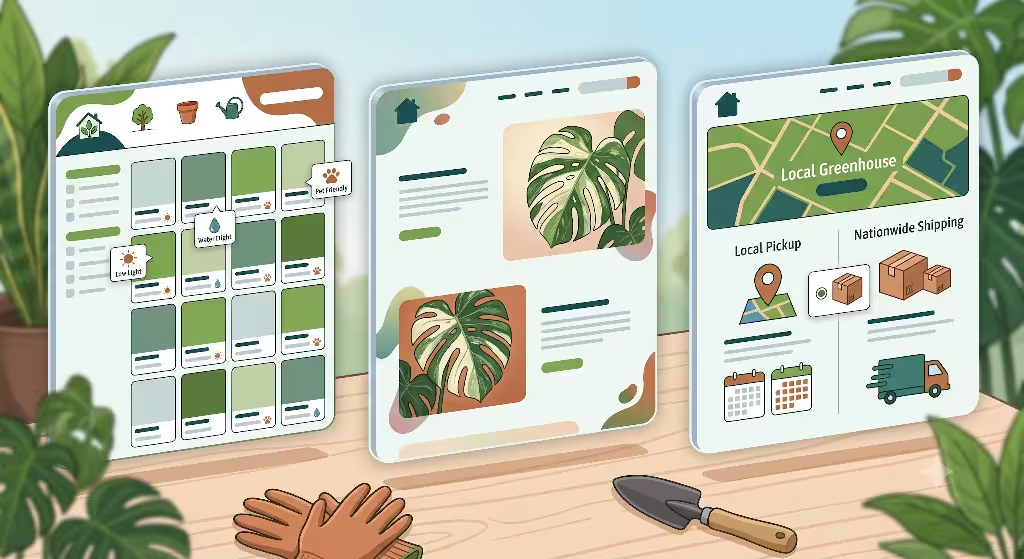
+-----------------------------------------------------------------------------------+
|                            NURSERY LAYOUT ARCHETYPES                              |
+-----------------------------------------------------------------------------------+
|  [ ARCHETYPE A ]               [ ARCHETYPE B ]             [ ARCHETYPE C ]        |
|  Modular Garden Grid           Editorial Boutique          Hybrid Regional Hub    |
|  - High SKU counts             - Rare & specimen plants    - Local pickup + shipping |
|  - Fast category filters       - Story-driven layouts      - Zip code zone tools  |
+-----------------------------------------------------------------------------------+
Archetype A: The Modular Garden Grid (Best for High SKU and Multi Category Nurseries)
The Modular Garden Grid is ideal for plant nurseries that sell hundreds of different plant species, pots, soils, and garden tools. When a store carries a large selection, shoppers can easily feel overwhelmed. The Modular Garden Grid uses clean visual blocks arranged in a flexible grid.
In website layouts for plant nurseries using this grid style, each product card shows key information right on the category page. The card displays a crisp photo of the plant, its common name, its scientific botanical name, its price, and quick badges for key facts like “Pet Friendly” or “Low Light.”
+---------------------------------------------------+
| [ Plant Photo ]                                   |
| Common Name (Botanical Name)                      |
| Price: $28.00                                     |
| Badges: [🐾 Pet Safe] [☀️ Indirect Light]          |
| [ Quick Add to Cart Button ]                      |
+---------------------------------------------------+
To keep website layouts for plant nurseries fast, this grid uses lazy loading. This means plant images only load as the user scrolls down the page. This keeps the initial page load quick, maintaining sub-1.2 second load times on mobile networks.
Instead of rigid, boxy squares, we use rounded corners and subtle background colors like warm cream or soft leaf green. This gives the grid an organic feel while keeping inventory organized.
Archetype B: The Editorial Boutique (Best for Rare Plants and Boutique Nurseries)
The Editorial Boutique layout works best for online nurseries that specialize in rare plants, tropical collector items, or high-end specimen plants. These stores usually have fewer total items, but each item has a higher price tag.
Website layouts for plant nurseries built around the Editorial Boutique style use large photos, split-screen displays, and story-driven text. One side of the screen might feature a high-resolution video showing light passing through the leaves of a rare Monstera adansonii, while the other side shares the history and care needs of that specific plant.
+-----------------------------------+-----------------------------------+
|                                   |  Monstera adansonii 'Archipelago' |
|                                   |  $145.00                          |
|  [ Full-Height Visual Display ]   |                                   |
|  Showcasing leaf fenestrations    |  A rare variegated specimen grown |
|  and stem structures.             |  in our studio greenhouse.        |
|                                   |                                   |
|                                   |  [ ADD TO CART ]                  |
+-----------------------------------+-----------------------------------+
This style treats every plant like a piece of art. High-quality image formats like WebP and AVIF are essential here. They compress large image files into small digital sizes, preserving leaf textures without slowing down the site.
Website layouts for plant nurseries using this boutique model focus on building emotional connections between the buyer and the plant, making higher prices feel justified.
Archetype C: The Hybrid Regional Hub (Best for Local Nurseries with Pickup and Delivery)
Many traditional brick and mortar nurseries sell both to local walk-in customers and to online mail-order shoppers. The Hybrid Regional Hub layout is engineered specifically for these dual-purpose nurseries.
Website layouts for plant nurseries using the Hybrid Regional Hub design feature an interactive store selector right at the top of the home page. When a visitor arrives, the site asks for their zip code or city.
Once entered, the page adjusts automatically. Local buyers see options for curbside pickup, local greenhouse workshops, and local delivery dates. Mail-order buyers see items available for nationwide shipping, along with climate warnings for their area.
By separating local services from mail-order shipping, website layouts for plant nurseries eliminate confusion and make buying easy for every visitor.
Biophilic UX Integration Principles
Visual Connection with Nature
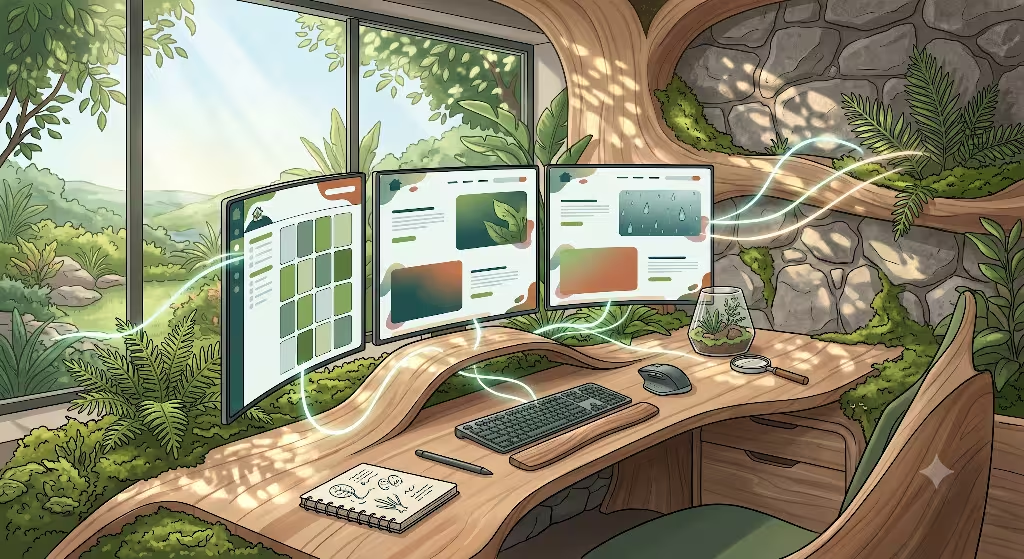
Biophilic UX design is about bringing natural visual patterns into digital screens. In website layouts for plant nurseries, color palettes play a critical role. Instead of harsh, bright artificial greens and stark pure whites, we use color tones found directly in natural environments. An example is the Landscape Design Studio website. While not strictly a plant nursery, it deals with similar products.
We use rich olive greens, moss tones, terracotta tile colors, warm stone grays, and soft sandy creams. However, high contrast remains essential for easy reading. All body text must maintain a contrast ratio of at least 4.5:1 against the background to meet standard accessibility guidelines (WCAG 2.1 AA). This ensures every customer, including older gardeners or those with visual impairments, can read care guides effortlessly.
| Color Type | Inspired By | Hex Code Example | Primary Purpose |
| Deep Forest Green | Canopy Foliage | #1E392A | Navigation headers, primary buttons |
| Terracotta | Clay Pottery | #C86D51 | Badges, callouts, sale notifications |
| Soft Linen Cream | Natural Fibers | #F9F7F1 | Page backgrounds, card containers |
| Slate Charcoal | Wet River Stone | #2C322E | Body text, readable typography |
In website layouts for plant nurseries, subtle background textures like grain patterns or soft stone shades add visual depth without taking attention away from plant images.
Natural Texture and Micro-Interactions
Micro-interactions are small animations that happen when a user interacts with a website. In standard online shops, buttons might simply change color when hovered over. In biophilic website layouts for plant nurseries, micro-interactions reflect natural physics and living movements.
For example, when a user hovers their cursor over a plant card, the leaf image can tilt slightly, mimicking a gentle breeze moving a branch. When an item is added to the cart, a small icon of a sprouting seed can grow into a green leaf.
These small movements make website layouts for plant nurseries feel responsive and alive. However, these animations must be coded using simple CSS transforms rather than heavy JavaScript files. This keeps system memory light and prevents screen stutter on mobile devices.
Spatial Variability in Digital Navigation
When walking through a physical greenhouse, you do not navigate through rigid, straight aisles alone. You discover open sunny spaces, shaded corners, hanging canopies, and benches filled with small succulents. Good website layouts for plant nurseries replicate this natural sense of spatial discovery on a digital screen.
Instead of long, boring drop-down text menus, biophilic website layouts for plant nurseries organize products into visual category clusters based on microclimates and plant habitats.
+-----------------------------------------------------------------------------------+
|                            VISUAL CATEGORY NAVIGATION                             |
+-----------------------------------------------------------------------------------+
|  [ ☀️ Sunny Ledges ]    [ 🪴 Low-Light Corners ]  [ 💧 High-Humidity Baths ]      |
|  Cacti & Succulents     Pothos & Snake Plants     Ferns & Calatheas               |
+-----------------------------------------------------------------------------------+
This spatial navigation guides shoppers intuitively, helping them find plants that thrive in their specific home spaces.
The Botanical Product Detail Page (PDP) Architecture
Above-the-Fold Spatial Hierarchy
The product detail page (PDP) is where buying decisions happen. In website layouts for plant nurseries, the area above the fold (the part of the screen visible before scrolling) must balance imagery with key purchasing options.
On the left side of the screen, place a multi-angle photo gallery. This gallery should include:
- A clear hero photo of the plant in a plain nursery pot.
- A photo showing the plant sitting next to common household items (like a chair or coffee cup) to show true size scale.
- A close-up shot showing healthy leaf fenestration, variegated patterns, or stem structure.
- A photo showing how the plant looks inside decorative planters.
+-------------------------------------+-------------------------------------+
| [ Main Plant Photo ]                | Snake Plant 'Laurentii'             |
|                                     | $34.00                              |
| [ Thumb 1 ] [ Thumb 2 ] [ Thumb 3 ] |                                     |
|                                     | Care: ☀️ Low to Bright | 💧 Monthly  |
|                                     |                                     |
|                                     | Pot Size: [ 4 Inch ] [ 6 Inch ]     |
|                                     | Planter Color: [ Terracotta v ]     |
|                                     |                                     |
|                                     | [ ADD TO CART - $34.00 ]            |
+-------------------------------------+-------------------------------------+
On the right side, keep purchasing options clean and sticky. As users scroll down to read detailed care notes, the “Add to Cart” button remains accessible at the bottom of mobile screens. Effective website layouts for plant nurseries place essential price and care facts right next to the buy button.
The Botanical Data Card (Structured Metadata Display)
Plant shoppers need factual care details before buying. Text-heavy paragraphs are hard to scan on mobile screens. Good website layouts for plant nurseries solve this by using a structured icon grid called a Botanical Data Card.
This card uses recognizable icons to communicate five key care metrics instantly:
- Light Needs: Icons showing Direct Sun, Bright Indirect Light, or Low Light tolerance.
- Watering Frequency: Icons showing Allow Soil to Dry, Keep Evenly Moist, or Water Weekly.
- Humidity Level: Metrics indicating Average Home (30-40%) or High Humidity (60%+).
- Pet Safety: ASPCA-aligned badges showing “Pet Safe” or “Toxic to Cats/Dogs.”
- Growth Rate: Clear labels showing Slow, Moderate, or Fast growth potential.
+-----------------------------------------------------------------------------------+
|                                BOTANICAL DATA CARD                                |
+-----------------------------------------------------------------------------------+
|  ☀️ LIGHT        |  💧 WATER       |  🌡️ TEMP       |  🐾 PET SAFETY |  🌱 GROWTH  |
|  Bright Indirect |  Every 2 Weeks  |  65°F - 85°F    |  Toxic if eaten|  Moderate   |
+-----------------------------------------------------------------------------------+
By organizing care details into visual cards, website layouts for plant nurseries help shoppers judge if a plant fits their living space in seconds.
Interactive Potting and Substrate Configurator
One of the easiest ways to increase Average Order Value (AOV) on nursery websites is by offering potting options right on the plant page. Most shoppers prefer receiving a plant already potted in a decorative vessel with proper drainage soil.
Website layouts for plant nurseries should include an interactive bundling step before adding items to the cart.
Step 1: Choose Plant Size  --->  [ 4-Inch Nursery Pot ]  [ 6-Inch Nursery Pot ]
Step 2: Select Planter      --->  [ Clay Terracotta ]     [ Matte Black Ceramic ]
Step 3: Add Organic Substrate ->  [ Premium Tropical Soil Mix +$8 ]
When users click different options, the main photo updates in real time to show the plant inside their chosen pot color. This interactive step turns a basic purchase into a custom product, raising order values while saving customers time.
Automated Care Guide and Guarantee Accordion
To address post-purchase anxiety, website layouts for plant nurseries must showcase plant guarantees and long-term support prominently.
Below the main buy section, place clean expandable accordions:
- 30-Day Live Arrival Guarantee: Explains how the nursery replaces plants damaged during transit if photos are sent within 30 days.
- Digital Care Guide: Downloadable PDF care guides and calendar reminders that integrate with Apple or Google Calendars.
- Shipping & Packaging Details: Clear descriptions of eco-friendly, plastic-free packaging that secures plant roots during shipping.
Taxonomy, Filtration, and Search UX Matrix
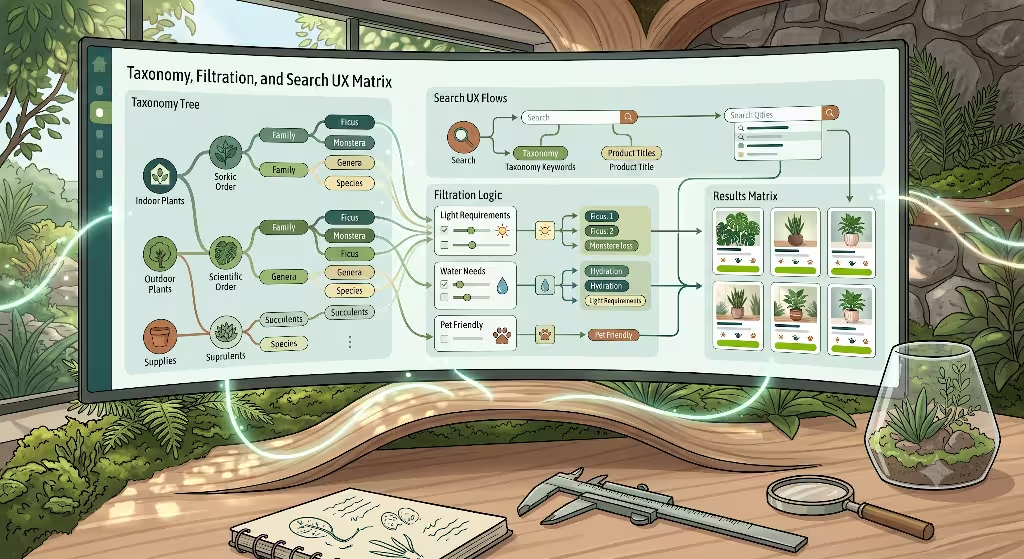
+-----------------------------------------------------------------------------------+
|                           PLANT TAXONOMY & SEARCH MATRIX                          |
+-----------------------------------------------------------------------------------+
|  [ PRIMARY USE ]    --->  Indoor, Outdoor, Patio, Office, Terrarium              |
|  [ LIGHT LEVEL ]    --->  Low Light, Medium Bright, Direct Sunlight              |
|  [ WATER NEED ]     --->  Drought Tolerant, Weekly, Keep Moist                    |
|  [ PET SAFETY ]     --->  Nontoxic to Cats & Dogs (ASPCA Standard)               |
|  [ BOTANICAL GENUS] --->  Philodendron, Ficus, Sansevieria, Calathea               |
+-----------------------------------------------------------------------------------+
Taxonomic Navigation Hierarchy
In traditional retail, products fit into standard categories like “Shirts” or “Shoes.” In plant retail, products fit into botanical classifications. Good website layouts for plant nurseries arrange items using a multi-tiered filter hierarchy that works for both beginner gardeners and experienced collectors.
The filter hierarchy should follow a three-tiered structure:
- Primary Category (Where does it go?): Indoor Plants, Outdoor Perennials, Patio Trees, Succulents, Gardening Supplies.
- Secondary Category (What conditions does it need?): Low Light Plants, Pet-Friendly Plants, Drought Tolerant Plants, Air Purifying Foliage.
- Tertiary Category (Scientific Genus): Philodendron, Ficus, Sansevieria, Calathea, Hoya.
By organizing menus this way, website layouts for plant nurseries allow beginners to shop by home environment while experts can jump straight to specific plant families.
The Plant Finder Wizard (Algorithmic Filtering Layout)
When beginners visit a nursery site, they often do not know plant names. They only know what their room looks like. Website layouts for plant nurseries should feature an interactive Plant Finder Wizard on the homepage.
+-----------------------------------------------------------------------------------+
|                               PLANT FINDER WIZARD                                 |
+-----------------------------------------------------------------------------------+
|  Question 1: Which direction does your room window face?                          |
|  [ 🧭 North (Low Light) ]  [ 🧭 East/West (Medium) ]  [ 🧭 South (Bright Sun) ]   |
|                                                                                   |
|  Question 2: How often do you remember to water plants?                           |
|  [ 🌵 "I forget for weeks" ]   [ 🚰 "I water every weekend" ]                      |
|                                                                                   |
|  Question 3: Do you have curious pets at home?                                    |
|  [ 🐱 Yes, need Pet-Safe ]     [ 🚫 No pets ]                                     |
|                                                                                   |
|  [ SEE MY PERFECT PLANT MATCHES (12) ]                                            |
+-----------------------------------------------------------------------------------+
This step-by-step tool filters your catalog automatically based on user answers. It removes guesswork, builds customer confidence, and turns broad browsing into quick sales.
Solving the Common Name versus Scientific Name Search Challenge
A common challenge in building website layouts for plant nurseries is search query variation. For example, a single plant species like Epipremnum aureum is known by many names: Pothos, Devil’s Ivy, Golden Pothos, and Marble Queen. A customer searching for “Devil’s Ivy” should see the exact same page as a collector searching for “Epipremnum aureum.”
+-----------------------------------------------------------------------------------+
|                              SEARCH INDEX SYNONYM MAP                             |
+-----------------------------------------------------------------------------------+
|  Search Terms: "Snake Plant" = "Mother-in-Law's Tongue" = "Sansevieria"           |
|  Target Database SKU: SKU-SANSEVIERIA-001 (*Dracaena trifasciata*)                |
+-----------------------------------------------------------------------------------+
Website layouts for plant nurseries must use search platforms like Algolia or Elasticsearch that support custom synonym mapping. The search index should instantly connect common names, former botanical names, and current scientific names to the correct item.
Checkout, Fulfillment, and Logistics UX Layout
Weather-Triggered Shipping Warning Widgets
Shipping live plants safely requires dynamic checkout tools. If a shopper in Minnesota orders a tropical ficus tree in January, shipping it without a heat pack will freeze the plant roots.
Website layouts for plant nurseries can integrate dynamic weather warning banners right on the cart page.
+-----------------------------------------------------------------------------------+
| ⚠️ WINTER SHIPPING NOTICE                                                         |
| Daytime temperatures in your destination ZIP code (55401) are currently 22°F.     |
| We strongly recommend adding a 72-Hour Thermal Heat Pack to protect your plants.  |
|                                                                                   |
| [ ] Add 72-Hour Heat Pack to Order (+$4.50)                                       |
+-----------------------------------------------------------------------------------+
By linking destination zip codes to weather API data, website layouts for plant nurseries protect plant shipments automatically, reduce dead-on-arrival claims, and show customers that you care about plant health.
Local Pickup versus Nationwide Freight Split Layout
If your nursery offers both local curbside pickup and nationwide shipping, your checkout layout must make this choice clear immediately.
Website layouts for plant nurseries should use radio selection cards on the cart page:
+-----------------------------------+-----------------------------------+
|  (•) LOCAL GREENHOUSE PICKUP      |  ( ) NATIONWIDE PLANT SHIPPING    |
|  Ready in 24 Hours at Boston Shop |  Delivered via Climate Express    |
|  FREE                             |  Calculated at next step          |
+-----------------------------------+-----------------------------------+
When a user selects “Local Pickup,” the site hides shipping address fields and shows pickup location hours and safety instructions. This prevents order errors and keeps local customers moving through checkout quickly.
Reducing Abandonment on Perishable Cart Items
Cart abandonment is a major issue in online retail. In plant retail, customers often abandon carts because they worry about transit times and package handling.
Website layouts for plant nurseries address these concerns directly within the cart drawer:
+-----------------------------------------------------------------------------------+
| YOUR PLANT BASKET (2 Items)                                                       |
|                                                                                   |
| 🪴 Monstera deliciosa (6" Pot) ........................................ $48.00    |
| 🪴 Snake Plant Laurentii (4" Pot) .................................---- $28.00    |
|                                                                                   |
| 🚚 Estimated Transit Time: 2-3 Business Days via Express Shipping                 |
| 📦 Packaging Guarantee: Shipped in 100% Recycled Secure Root Boxes                |
| 🌿 Health Guarantee: 30-Day Live Arrival Guarantee Included                       |
|                                                                                   |
| [ PROCEED TO SECURE CHECKOUT - $76.00 ]                                           |
+-----------------------------------------------------------------------------------+
Displaying clear transit timelines, root-safe packaging badges, and live-arrival guarantees directly inside the cart drawer helps shoppers feel confident finishing their order.
Frequently Asked Questions about Website Layouts for Plant Nurseries
1. Which e-commerce platform works best for plant nurseries?
Choosing the right platform is critical when planning website layouts for plant nurseries. The three top choices each offer distinct strengths depending on your store size and technical budget:
| Platform | Best Suitable For | Key Strengths | Considerations |
| Shopify (OS 2.0) | Mid-to-Large Nurseries | Huge app store, easy checkout, great mobile speed, built-in inventory tracking. | Monthly app fees can add up for custom filter setups. |
| WooCommerce | Technical Teams & Large Database Sites | Complete control over plant data fields, open source code, lower platform fees. | Needs regular security updates and dedicated server hosting. |
| Webflow Commerce | Design-Focused Boutique Shops | Total freedom over custom biophilic layouts, fluid page design, fast visual performance. | E-commerce features are less flexible for high SKU inventories. |
For most plant shops, Shopify OS 2.0 offers the best overall mix of inventory management, speed, and mobile usability.
2. How do I organize plant inventory on an e-commerce website?
Organizing inventory on website layouts for plant nurseries requires structuring product data around how real people shop.
Beginners rarely search using scientific plant terms like Ficus elastica. They look for functional terms like “large living room plant” or “easy low light plant.”
                   INVENTORY TAXONOMY STRUCTURE

                     Primary Shopper Intent
                               │
            ┌──────────────────┴──────────────────┐
            ▼                                     ▼
   [ Environmental Filters ]             [ Botanical Category ]
   - Light (Low, Bright, Direct)         - Genus & Species
   - Water (Low, Moderate, High)         - Indoor vs Outdoor
   - Pet Safety (ASPCA Compliant)        - Plant Type (Tree, Fern)
Organize your store inventory around these simple parameters:
- Primary Tagging: Group by home light needs (Low Light, Bright Indirect Light, Direct Sun).
- Secondary Tagging: Group by care difficulty (Beginner Friendly, Collector Level).
- Tertiary Tagging: Group by ASPCA pet safety ratings (Pet Safe, Toxic to Pets).
- Quaternary Tagging: Group by botanical families (Araceae, Succulents, Ferns).
This multi-layer structure allows your navigation menus to serve both first-time plant buyers and seasoned botanists seamlessly.
3. What features does an online plant shop website need?
To succeed in digital retail, website layouts for plant nurseries must include these essential features:
+-----------------------------------------------------------------------------------+
|                        MUST-HAVE NURSERY WEBSITE FEATURES                         |
+-----------------------------------------------------------------------------------+
|  [1] USDA Zone Lookup Widget     --> Maps zip codes to local growing zones.      |
|  [2] Visual Care Icon Grid      --> Communicates light, water, and pet safety.   |
|  [3] Planter & Soil Bundler     --> Boosts order values with pot add-ons.        |
|  [4] Weather Shipping Banner    --> Warns buyers to add heat/ice packs.          |
|  [5] Live Arrival Guarantee     --> Reassures buyers that plants arrive healthy.|
+-----------------------------------------------------------------------------------+
Each feature answers specific customer questions, lowering sales friction and keeping plants safe during transit.
4. How can I make my nursery website stand out from competitors?
Most nursery websites use generic, boxy templates that look identical to electronic or clothing stores. To stand out, website layouts for plant nurseries should embrace authentic biophilic design principles and helpful customer tools.
Here are four ways to set your plant shop apart:
- Interactive Light Calculators: Use smartphone camera tools to help buyers measure light levels in their living rooms before picking a plant.
- Seasonal Inventory Displays: Automatically highlight cold-hardy perennials in autumn and tropical houseplants in spring.
- Custom Soil Mix Bundlers: Allow gardeners to build custom potting soil blends based on their specific plant collections.
- Plant Hospital Support Portal: Offer a dedicated online help portal where customers upload photos of sick leaves to get care advice from your nursery staff.
These custom features build community, foster trust, and turn first-time buyers into lifelong customers.
Technical SEO, Performance and Accessibility Standards
Schema Markup Architecture
Search engines like Google need structured data to understand the content on your pages. In website layouts for plant nurseries, applying detailed JSON-LD Schema markup helps your site display rich search result snippets, including prices, star ratings, stock status, and care traits.
JSON
{
  "@context": "https://schema.org/",
  "@type": "Product",
  "name": "Monstera deliciosa",
  "image": [
    "https://example-nursery.com/images/monstera-main.webp"
  ],
  "description": "A vibrant tropical houseplant known for its large split leaves. Thrives in bright indirect light.",
  "sku": "MONSTERA-6INCH",
  "brand": {
    "@type": "Brand",
    "name": "Silphium Botanical Nursery"
  },
  "offers": {
    "@type": "Offer",
    "url": "https://example-nursery.com/products/monstera-deliciosa",
    "priceCurrency": "USD",
    "price": "48.00",
    "availability": "https://schema.org/InStock",
    "itemCondition": "https://schema.org/NewCondition"
  },
  "additionalProperty": [
    {
      "@type": "PropertyValue",
      "name": "Sunlight Requirement",
      "value": "Bright Indirect Light"
    },
    {
      "@type": "PropertyValue",
      "name": "Watering Frequency",
      "value": "Every 1-2 Weeks"
    }
  ]
}
Adding additionalProperty schema tags for sunlight and watering requirements helps search engines understand your botanical inventory, earning your site featured snippet placements on Google search results pages.
Core Web Vitals Optimization for Heavy Visual Media
Plant shopping is a visual experience. Shoppers want to see crisp, detailed photos of leaves, stems, and pot textures. However, large image files can slow down your site speed.
To keep website layouts for plant nurseries fast and compliant with Google’s Core Web Vitals metrics, follow these speed optimization rules:
- Image Compression: Convert all image uploads to modern WebP or AVIF formats. This shrinks file sizes by 30% to 50% without losing visual crispness.
- Explicit Width and Height Attributes: Always set fixed width and height dimensions on image tags in your code. This prevents image shifting while loading, maintaining low Cumulative Layout Shift (CLS) scores.
- Lazy Loading Media: Set all images below the fold to use
loading="lazy". This ensures mobile browsers only load images when the user scrolls down to see them.
+-----------------------------------------------------------------------------------+
|                         CORE WEB VITALS SPEED FRAMEWORK                           |
+-----------------------------------------------------------------------------------+
|  [ AVIF / WEBP FORMATS ]   -->   Reduces image file sizes by up to 50%.          |
|  [ EXPLICIT DIMENSIONS ]  -->   Prevents page jumping (CLS score under 0.1).      |
|  [ LAZY LOADING CODE ]    -->   Accelerates initial page load (LCP under 2.5s).   |
+-----------------------------------------------------------------------------------+
By keeping your technical platform lean, website layouts for plant nurseries achieve high Google search rankings while delivering a smooth browsing experience for mobile shoppers.
Accessibility Compliance
Web accessibility ensures every user can read and navigate your site easily, regardless of disability or device. Website layouts for plant nurseries must follow Web Content Accessibility Guidelines (WCAG 2.1 AA).
Key accessibility requirements include:
- Descriptive Image Alt Text: Write clear alternative text describing image contents rather than repeating keywords. For example, write
alt="Monstera deliciosa houseplant with large split leaves sitting in a terracotta clay pot"instead of generic text. - Keyboard Navigable Forms: Ensure shoppers can tab through all dropdown filters, plant size buttons, and checkout fields using only a keyboard.
- Clear Text Contrast: Ensure body text color maintains strong visual contrast against background colors across all dark and light display modes.
Implementation Roadmap and Conversion Checklist
+-----------------------------------------------------------------------------------+
|                        FOUR-PHASE IMPLEMENTATION ROADMAP                          |
+-----------------------------------------------------------------------------------+
|  PHASE 1: Inventory & Taxonomy Alignment (Weeks 1-2)                              |
|  - Map plant inventory database to botanical and environmental tags.              |
|                                                                                   |
|  PHASE 2: Wireframing & Biophilic Design Tokens (Weeks 3-4)                       |
|  - Build responsive grids, accessible color palettes, and clean type scales.      |
|                                                                                   |
|  PHASE 3: PDP & Checkout Customization (Weeks 5-6)                                |
|  - Deploy Botanical Data Cards, pot bundlers, and weather warning banners.        |
|                                                                                   |
|  PHASE 4: Speed Audits & Schema Verification (Weeks 7-8)                          |
|  - Test Core Web Vitals performance, validate JSON-LD, and launch store.          |
+-----------------------------------------------------------------------------------+
Building high-converting website layouts for plant nurseries requires an organized, step-by-step approach. Follow this checklist to build and launch your online store:
Phase 1: Architecture and Taxonomy Alignment
- [ ] Group plant catalog by home light levels, watering needs, and ASPCA pet safety ratings.
- [ ] Connect common plant names and scientific botanical names inside search engine synonym maps.
- [ ] Pick the best e-commerce platform for your product count (Shopify, WooCommerce, or Webflow).
Phase 2: Wireframing and Biophilic Design Systems
- [ ] Choose an accessible color palette inspired by nature (maintaining minimum 4.5:1 text contrast).
- [ ] Design simple product cards with clear photos, plant names, price tags, and care badges.
- [ ] Build a responsive navigation menu organized by plant microclimates and home spaces.
Phase 3: Product Detail Pages and Checkout Flows
- [ ] Place multi-angle photo galleries above the fold on all plant product pages.
- [ ] Embed visual Botanical Data Cards to display light, water, and temperature needs clearly.
- [ ] Add interactive planter and potting soil bundling options to boost order values.
- [ ] Integrate zip-code-based weather shipping warnings to protect live plants in transit.
Phase 4: Performance Audits, SEO, and Launch
- [ ] Add JSON-LD Product schema markup with sunlight and watering property tags.
- [ ] Convert plant photos to compressed WebP or AVIF image formats.
- [ ] Add lazy loading tags to images and test site speed using Google PageSpeed Insights.
- [ ] Test mobile checkout flows to confirm purchasing works smoothly on phones.
By following this step-by-step design roadmap, you can build website layouts for plant nurseries that rank high on Google search, load fast on mobile devices, and deliver an enjoyable shopping experience for plant lovers everywhere.