
Table of Contents
Beyond the Split Screen: Deconstructing Asymmetric Hero Architecture
Web design often falls into repetitive patterns. For years, the standard layout above the fold has been a simple fifty-fifty split screen. You see a headline and a button on the left side, and a stock photo or product screenshot on the right side. While this format is easy to build, it often fails to engage visitors. When every website looks the same, visitors tune out. Building an asymmetric hero breaks this habit. An asymmetric hero distributes visual weight unevenly across the screen, creating interest and guiding the eye through deliberate contrast.
When we look at nature, true symmetry is rare. A mighty oak tree is not a mirror image of itself, yet it stands perfectly balanced against the wind. A coastline does not follow a straight grid, yet it feels balanced and whole. In digital design, an asymmetric hero takes inspiration from these organic structures. Instead of placing identical amounts of content on both sides of a page, an asymmetric hero balances unequal parts. You might place a bold text headline on one side and a large open area of quiet space on the other. This dynamic arrangement catches attention immediately and encourages deeper reading.
The Cognitive Cost of Visual Monotony
Human brains are designed to save energy. When we see something familiar, our brains process it quickly and stop paying close attention. In psychology, this process is known as habituation. On the web, habituation leads directly to banner blindness and layout fatigue. When a visitor lands on a standard symmetrical layout, their eyes skim the surface without absorbing the message. The standard two-column split has been used so frequently that users subconsciously predict where every element will live. Because they expect nothing new, they engage less.
An asymmetric hero disrupts this mental shortcut. By presenting an unexpected arrangement, an asymmetric hero forces the brain to actively scan the screen. Saccadic eye movements are the rapid, jumpy movements our eyes make when taking in new information. In a predictable layout, these eye jumps are sluggish and mechanical. In contrast, an asymmetric hero uses varied visual weights to invite active exploration. The eye might jump from a dark, concentrated title block across an expanse of negative space to a vibrant organic visual. This active looking increases focus and helps visitors remember your brand.
Defining Asymmetric Balance (Counterweight vs. Mirroring)
To build a successful asymmetric hero, you must understand the difference between symmetry and balance. Symmetry means both sides of a central line are identical or nearly identical. Balance means both sides carry equal visual weight, even if they look completely different. Think of a playground seesaw. Two children who weigh the same can sit at equal distances from the center. That is symmetry. But a single adult can also balance a small child if the adult sits closer to the center fulcrum while the child sits at the far end. That is asymmetric balance.
In an asymmetric hero, balance relies on counterweights rather than mirrors. A dense element, such as a compact block of bold text, can serve as a heavy visual weight. To balance it within an asymmetric hero, you do not need another block of bold text. Instead, you can balance it with a large, light element, such as a wide expanse of pale negative space or a soft background texture. You can also balance elements using color intensity. A tiny badge with a vibrant color can easily balance a large gray photograph inside an asymmetric hero. Mastering these counterweights allows you to create layouts that feel stable without being stiff.
What is an Asymmetric Hero Section, and Why Use It Over a Symmetrical Grid?
An asymmetric hero section is the top area of a webpage that uses unequal column widths, offset elements, and intentional negative space to present a core message. Unlike a symmetrical grid that divides the canvas into equal halves or thirds, an asymmetric hero pairs unequal components to create visual energy. Designers choose an asymmetric hero because it stands out in a crowded digital marketplace. It allows unique branding to shine, keeps users curious, and provides a custom feel that generic website templates cannot match.
Furthermore, an asymmetric hero offers practical functional benefits. Real-world content is rarely symmetrical. Your primary value proposition might require three sentences, while your supporting product image is tall and narrow. Forcing uneven content into rigid, identical columns often results in awkward gaps and awkward line wraps. An asymmetric hero gives your content the exact amount of space it needs. By tailoring the container to the content, an asymmetric hero creates a natural hierarchy that improves both readability and aesthetic appeal.
Deconstructing the Asymmetric Anatomy: Content, Negative Space, and Anchor Elements
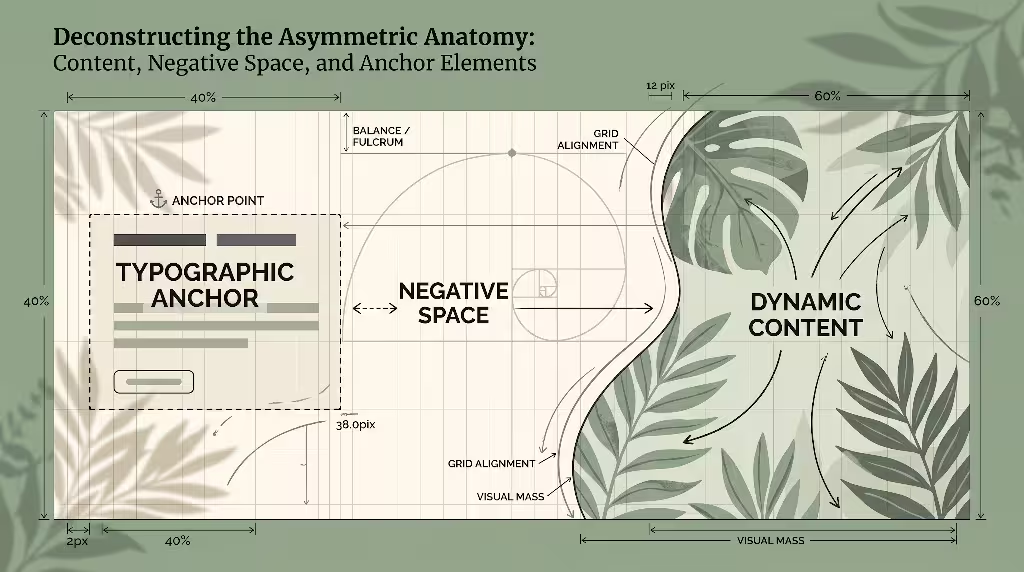
Every effective asymmetric hero is made of specific structural parts. When these parts work together, the layout feels cohesive. If they clash, the layout quickly turns into visual clutter. To optimize an asymmetric hero, you must carefully calibrate three primary elements: your typographic anchor points, your dynamic media, and your isolated calls to action.
+------------------------------------------------------------------+
|                       ASYMMETRIC HERO LAYOUT                     |
|                                                                  |
|   +--------------------------+                                   |
|   | Typographic Anchor       |       +-----------------------+   |
|   | - High visual weight     |       | Dynamic Imagery       |   |
|   | - Off-center positioning |       | - Organic shape mask  |   |
|   |                          |       | - Expansive bounds    |   |
|   | [ Primary CTA Button ]   |       |                       |   |
|   +--------------------------+       +-----------------------+   |
|                                                                  |
|   <------------- Balanced by Negative Space ------------->       |
+------------------------------------------------------------------+
Typographic Anchor Points (The Value Proposition Hub)
The typography inside an asymmetric hero acts as the foundation of your entire message. Because the layout is asymmetrical, your main headline does not need to sit dead center. Instead, an asymmetric hero often positions the main heading off-center, such as forty percent from the left margin or slightly elevated on a vertical plane. This off-center placement gives the text room to breathe and draws the reader into the narrative.
Even though the placement is non-traditional, clarity must remain the top priority. A visitor must be able to read and understand your primary headline in three seconds or less. Inside an asymmetric hero, ensure that the semantic heading structure matches standard web guidelines. Your main title must always use an HTML <h1> tag, even if its visual styling is unconventional. You can style the text using fluid typography tools like CSS clamp() to keep lines readable across all screen sizes. By separating visual scale from semantic code, your asymmetric hero remains easy to read for humans and straightforward to index for search engines.
Dynamic Imagery and Organic Masking
Photographs and illustrations inside an asymmetric hero should not be trapped inside boring rectangular boxes. Standard rectangles reinforce rigid grid lines and fight against the natural flow of an asymmetric hero. By applying modern CSS properties like clip-path or SVG masks, you can shape your visual assets into organic, flowing forms. A soft curve or an angled edge immediately softens the screen and creates a sense of movement.
When selecting imagery for an asymmetric hero, consider where the subject of the image is looking or pointing. If your hero image features a person, their gaze should point directly toward your headline or action button, not off the side of the screen. In visual psychology, people naturally look where other people are looking. Using this directional cue within an asymmetric hero turns your visual assets into practical signposts that steer attention toward your core message.
Strategic Call-to-Action (CTA) Isolation
The primary goal of most business websites is conversion, whether that means generating a sale, collecting a lead, or gaining a subscriber. In an asymmetric hero, the call-to-action button requires special protection. Because an asymmetric hero includes varied shapes, textures, and weights, a poorly placed button can easily get lost in the scenery.
To prevent this issue, utilize the isolation effect, also known as the von Restorff effect. This psychological rule states that an item that stands out from its surroundings is the most likely to be remembered and clicked. Within an asymmetric hero, isolate your primary button by surrounding it with generous whitespace. Avoid clustering secondary links, small badges, and legal text directly against the main button. Give the button a distinct, high-contrast color that is used nowhere else in the asymmetric hero. This high contrast guarantees that the button remains the undeniable conversion target.
Asymmetric Hero Section Optimization for Core Web Vitals: LCP, CLS, and INP
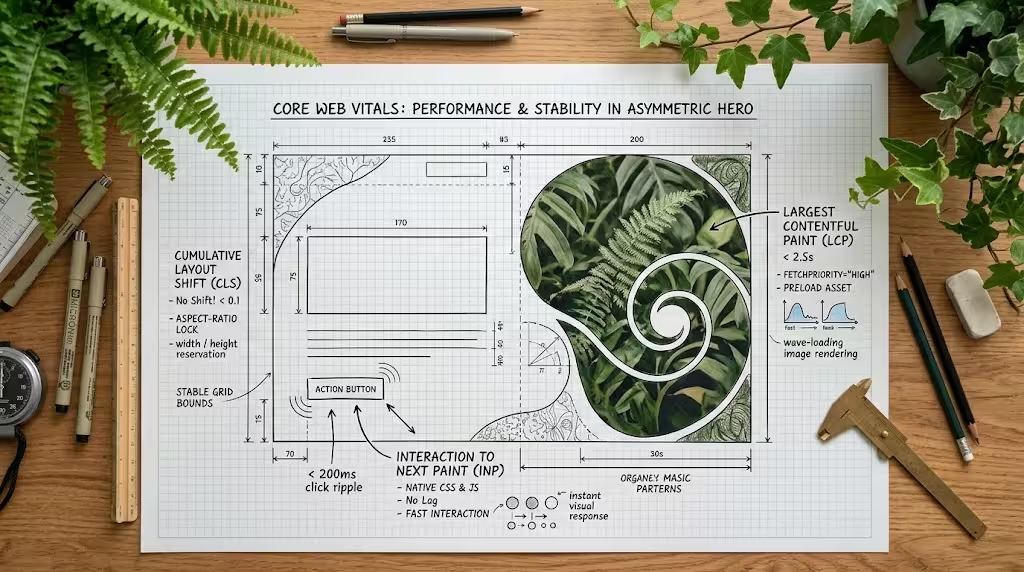
A beautiful design is useless if the website loads slowly or shifts unexpectedly while loading. Search engines place heavy importance on user experience metrics, known as Core Web Vitals. These metrics track how fast a page loads, how quickly it responds to clicks, and how stable the visual elements remain. Optimizing an asymmetric hero requires careful technical engineering to ensure top scores across all three key vitals: Largest Contentful Paint (LCP), Cumulative Layout Shift (CLS), and Interaction to Next Paint (INP).
| Metric | Target Goal | Primary Risk in an Asymmetric Hero | Core Optimization Technique |
| Largest Contentful Paint (LCP) | Under 2.5 seconds | Heavy uncompressed images or delayed CSS background graphics | Use responsive <picture> with fetchpriority="high" and image preloading |
| Cumulative Layout Shift (CLS) | Under 0.1 | Unset aspect ratios on dynamic, asymmetrical media containers | Set explicit CSS aspect-ratio and dimension attributes on all media elements |
| Interaction to Next Paint (INP) | Under 200 ms | Heavy JavaScript parallax or scroll tracking libraries | Use native CSS transforms and lightweight intersection observers |
Mitigating Largest Contentful Paint (LCP) Above the Fold
Largest Contentful Paint measures how long it takes for the largest visual element on the screen to finish rendering. In an asymmetric hero, the LCP candidate is almost always the primary featured image or the main headline text block. If your hero image takes three or four seconds to display, your performance score will drop, and impatient visitors will leave before seeing your offer.
To optimize LCP in an asymmetric hero, never use a CSS background-image for your main visual. Browsers discover images inside CSS files much later than images written directly in HTML. Instead, build your asymmetric hero using a native HTML <picture> element containing modern WebP and AVIF formats. Add the attribute fetchpriority="high" to tell the browser that this specific image must be downloaded first. You can also add a <link rel="preload"> tag in your document head. Preloading ensures that the moment a user clicks your link, the browser starts downloading the main asset for your asymmetric hero immediately.
HTML
<!-- High-priority preload for the asymmetric hero image -->
<link
  rel="preload"
  as="image"
  href="/images/hero-desktop.avif"
  type="image/avif"
  fetchpriority="high"
>
Eradicating Cumulative Layout Shift (CLS)
Cumulative Layout Shift measures visual stability. We have all experienced websites where you try to tap a button, but the page suddenly jumps, causing you to tap the wrong link. This jumping happens when browsers do not know how much space an element needs before it finishes downloading. In an asymmetric hero, where elements overlap or sit on custom grids, layout shifts can be severe if not handled correctly.
To eliminate layout shifts in your asymmetric hero, always assign explicit dimensions to your media elements. In modern web development, you can use the CSS aspect-ratio property to reserve the exact height and width of an image container. When the browser builds the layout, it reserves the necessary empty box right away. When the image finally loads, it fills that box smoothly without shifting the surrounding text or buttons. Applying aspect-ratio across all containers in your asymmetric hero ensures your CLS score stays well below the strict threshold of 0.1.
CSS
/* Reserving container space to prevent layout shifts */
.hero-visual-container {
  width: 100%;
  aspect-ratio: 16 / 9;
  overflow: hidden;
  border-radius: 2rem 0 2rem 0; /* Asymmetric organic corners */
}

.hero-visual-container img {
  width: 100%;
  height: 100%;
  object-fit: cover;
}
How Do You Optimize an Asymmetrical Hero Section for Core Web Vitals Without Ruining Page Speed?
You can optimize an asymmetric hero for speed by adopting a philosophy of lean frontend engineering. Many developers make the mistake of using heavy JavaScript libraries to calculate screen sizes and create fancy motion effects. These extra scripts block the browser, delaying user interactions and hurting your INP score.
Instead of JavaScript, rely on native browser capabilities. Build your asymmetric hero using pure CSS Grid and CSS Flexbox. These native layout engines run smoothly on the device GPU without loading extra script files. If you want subtle animations, such as a gentle floating graphic or a fade-in effect, use hardware-accelerated CSS properties like transform and opacity. By avoiding heavy external dependencies, an asymmetric hero can load just as quickly as a plain text page while delivering a far superior visual experience.
Implementing Fluid Asymmetry: CSS Grid, Flexbox, and Breakpoint Strategy
Building an asymmetric hero requires modern CSS tools. In past years, web developers had to rely on complex float hacks, negative margins, and brittle absolute positioning to achieve off-center layouts. Today, CSS Grid provides the exact mathematical control needed to align and offset elements cleanly.
+------------------------------------------------------------------+
|                    DESKTOP CSS GRID (12 COLUMNS)                 |
|                                                                  |
|   [Col 1 to 7: Headline & Text]       [Col 8 to 12: Image]       |
|   +--------------------------+        +----------------------+   |
|   | Massive Display Title    |        | Organic Media Mask   |   |
|   | Value Proposition Copy   |        | Offset Art Asset     |   |
|   | [ Primary Action Button] |        |                      |   |
|   +--------------------------+        +----------------------+   |
|                                                                  |
+------------------------------------------------------------------+
                                 |
                        (Mobile Breakpoint)
                                 v
+------------------------------------------------------------------+
|                      MOBILE LINEAR STACK                         |
|                                                                  |
|   +----------------------------------------------------------+   |
|   | Headline & Value Proposition                             |   |
|   +----------------------------------------------------------+   |
|   +----------------------------------------------------------+   |
|   | [ Primary Action Button ]                                |   |
|   +----------------------------------------------------------+   |
|   +----------------------------------------------------------+   |
|   | Cropped Focal Media Container                            |   |
|   +----------------------------------------------------------+   |
+------------------------------------------------------------------+
Modern CSS Layout Engines
The most dependable tool for crafting an asymmetric hero is CSS Grid. By setting up a twelve-column or twenty-four-column grid, you can place elements across custom spans that naturally avoid symmetrical splits. Rather than dividing twelve columns into six and six, you can assign seven columns to your text block and five columns to your visual element.
CSS
/* Responsive asymmetric hero layout using CSS Grid */
.asymmetric-hero-grid {
  display: grid;
  grid-template-columns: 1fr;
  gap: 2rem;
  align-items: center;
  padding: 4rem 1.5rem;
}

/* Desktop layout with asymmetrical column distribution */
@media (min-width: 992px) {
  .asymmetric-hero-grid {
    grid-template-columns: minmax(0, 7fr) minmax(0, 5fr);
    gap: 4rem;
    padding: 6rem 3rem;
  }
}
Using fractional units (fr) combined with minmax() functions prevents long words from breaking the layout. Furthermore, CSS Subgrid allows nested child elements inside the asymmetric hero to align perfectly with the overarching parent grid lines. This structure ensures that even when elements are placed on different visual levels, their edges maintain an underlying mathematical relationship that feels clean and deliberate.
Graceful Collapse: Mobile Art Direction vs. Desktop Asymmetry
An asymmetric hero that looks balanced on an ultra-wide desktop display will fail completely if squished into a narrow smartphone screen. On a handheld phone, horizontal space is strictly limited. Trying to maintain side-by-side asymmetrical columns on a mobile device makes text illegible and crushes images into tiny slivers.
The solution is graceful collapse through mobile art direction. When the viewport shrinks below a specific breakpoint, your asymmetric hero must smoothly transition into a focused, vertical stack. Responsive art direction means you do not simply shrink the desktop image; you serve a completely re-cropped version of the image tailored for mobile viewports.
HTML
<picture class="hero-picture">
  <!-- Square or vertical crop for smartphones -->
  <source
    media="(max-width: 767px)"
    srcset="/images/hero-mobile-square.avif"
    type="image/avif"
  >
  <!-- Wide asymmetric crop for desktops -->
  <source
    media="(min-width: 768px)"
    srcset="/images/hero-desktop-wide.avif"
    type="image/avif"
  >
  <!-- Fallback image element -->
  <img
    src="/images/hero-desktop-wide.jpg"
    alt="Detailed architectural study illustrating dynamic balance"
    width="1200"
    height="675"
    loading="eager"
    fetchpriority="high"
  >
</picture>
On mobile screens, your value proposition and action button should appear high up, allowing users to understand your offer without hunting. The image can sit directly below the button, maintaining visual interest without pushing crucial information out of view.
Does Asymmetric Hero Design Hurt Mobile Responsiveness?
No, an asymmetric hero does not hurt mobile responsiveness when engineered with modern responsive techniques. The misconception that asymmetry damages mobile usability comes from outdated design workflows where desktop layouts were frozen into fixed-width containers.
When you design with a mobile-first mindset, you plan the vertical mobile stack before creating the expanded desktop layout. By treating your asymmetric hero as an adaptable system that expands when space permits, you provide the best possible experience for every device. Mobile visitors receive a clean, fast-loading, vertically aligned layout, while desktop visitors enjoy a spacious, engaging asymmetric hero that utilizes their wider display area.
Guiding the Gaze: Controlling Attention with Biophilic Flow and Visual Weight
The real magic of an asymmetric hero lies in its ability to guide human attention. In an ordinary layout, visitors scan lazily. In an optimized asymmetric hero, every visual choice leads the visitor step by step through your story. By studying cognitive eye-tracking patterns and applying biophilic principles, we can choreograph the exact path a visitor takes across the screen.
VISUAL SCANNING PATH IN AN ASYMMETRIC HERO:

1. Entry Point [Bold Display Headline]
           \
            \ (Natural reading vector across whitespace)
             v
2. Secondary Pivot [Organic Visual Anchor / Masked Media]
             /
            / (Gaze-directed vector or organic curve)
           v
3. Action Focal Point [High-Contrast Primary CTA Button]
Eye-Tracking Paradigms in Non-Linear Layouts
Decades of usability research show that people read websites in predictable scanning shapes, such as the F-pattern and the Z-pattern. In an F-pattern, the user reads the top line, drops down a bit, scans a shorter horizontal line, and then scrolls straight down the left edge. While this scanning behavior is common on text-heavy blogs, it is bad for high-converting landing pages because it causes readers to skip content on the right side of the screen.
An asymmetric hero breaks the rigid F-pattern and replaces it with a dynamic directional vector. By placing a dominant headline in the upper quadrant and a high-contrast visual offset to the right, you encourage the eye to cross the page on a soft diagonal. From that visual asset, a subtle directional shape or gaze vector leads the eye back down to the call to action. Instead of skimming down the margin, the visitor explores the entire canvas of your asymmetric hero, taking in every important detail.
Weight Calibration Across Dissimilar Elements
Visual weight is the measure of how much an element grabs the viewer’s attention. To balance an asymmetric hero, you must calibrate visual weights across elements that have completely different shapes, sizes, and colors. A tiny element can carry as much visual weight as a huge element if its characteristics are chosen carefully.
Consider the primary factors that determine visual weight inside an asymmetric hero:
- Contrast: Elements with high contrast against their background appear significantly heavier than elements with low contrast.
- Color Temperature: Warm colors like ochre, rust, and gold advance toward the viewer and carry more weight than cool colors like sage, slate, and navy.
- Density: A block of small, tight text feels dense and heavy, while an open illustration feels light and airy.
- Scale: Larger objects naturally pull focus first, but their weight can be moderated with transparency or softer hues.
When designing an asymmetric hero, pair a dense, high-contrast headline block on one side with a larger, softer visual form on the other. This counterweight system establishes harmony. The reader does not feel pulled in competing directions; instead, they experience an orderly, organic visual rhythm.
Semantic Integrity and WCAG Compliance in Asymmetric Layouts
An asymmetric hero must be accessible to every person who visits your site, including people with vision impairments, motor difficulties, or cognitive differences. Because an asymmetric hero rearranges elements in non-standard visual patterns, developers must take special care to keep the underlying structure clean, logical, and fully compliant with the Web Content Accessibility Guidelines (WCAG).
VISUAL RENDERING VS. ACCESSIBLE DOM SEQUENCE:

Visual Presentation (Desktop Screen):
+-----------------------------------------------------------+
| [Col 7-12: Featured Graphic]   [Col 1-6: Value Text]     |
| (Media appears top right)      (Title appears top left)   |
+-----------------------------------------------------------+

Underlying DOM Order (Screen Reader & Keyboard Path):
1. <h1> Main Value Headline
2. <p> Supporting Descriptive Subtitle
3. <a> Primary Call-to-Action Link
4. <figure> Meaningful Image with Descriptive Alt Text
DOM Order vs. Visual Order
One of the most dangerous mistakes when building an asymmetric hero is decoupling the visual layout order from the underlying Document Object Model (DOM) source order. Modern CSS properties like grid-column, grid-row, and the flexbox order property allow developers to display elements on the screen in an order that is completely different from how they appear in the HTML code.
Screen readers and keyboard navigation follow the underlying HTML source code, not the visual positioning on your screen. If you place your button first in the HTML code so you can position it at the top of a desktop grid, a blind visitor will hear the button before they hear the headline explaining what the product is. In an asymmetric hero, always arrange your HTML code in logical reading order: first the main headline, then the supporting value proposition, followed by the action button, and finally the supporting visual media. Use your CSS to position the elements visually while keeping the DOM sequence clean and natural.
Color Contrast and Overlay Legibility (WCAG 2.2 AA/AAA)
Many asymmetric layouts place text partially over an image or an organic background shape. While this overlap creates depth and texture, it frequently introduces serious contrast issues. If a dark text headline crosses over both a pale background and a dark photograph, parts of the letters will disappear, failing WCAG contrast requirements.
To maintain accessibility in your asymmetric hero, check that all text meets the minimum contrast ratio of 4.5 to 1 for normal text and 3 to 1 for large headings under WCAG 2.2 AA standards. If your design requires text to overlap an image, use a protective background treatment. You can use CSS backdrop-filter to create a semi-opaque glass effect behind the text, or add a subtle linear gradient overlay to ensure strong contrast behind every single letter.
CSS
/* Adding a directional gradient scrim for text legibility */
.asymmetric-overlay-scrim {
  background: linear-gradient(
    to right,
    rgba(255, 255, 255, 0.95) 0%,
    rgba(255, 255, 255, 0.8) 50%,
    rgba(255, 255, 255, 0) 100%
  );
}
How Do You Keep an Asymmetrical Web Design Accessible to Screen Readers?
Keeping an asymmetric hero accessible comes down to strict semantic hygiene. Always use native HTML elements like <h1>, <p>, <button>, and <a> rather than generic <div> tags with click handlers. Ensure that any decorative graphics, such as organic background blobs or abstract curves, include an empty alt="" attribute or an aria-hidden="true" tag so screen readers skip them entirely.
Always test your asymmetric hero using only a keyboard. Press the Tab key repeatedly to navigate through the section. Does the focus outline move logically from the headline to the input fields and buttons? Is the focus ring clearly visible against every background color? If the keyboard focus jumps randomly across the screen, your asymmetric hero needs its DOM order realigned. Clean code guarantees an equitable experience for all users while strengthening your website’s search engine optimization.
Conversion Rate Optimization (CRO) & Testing Frameworks
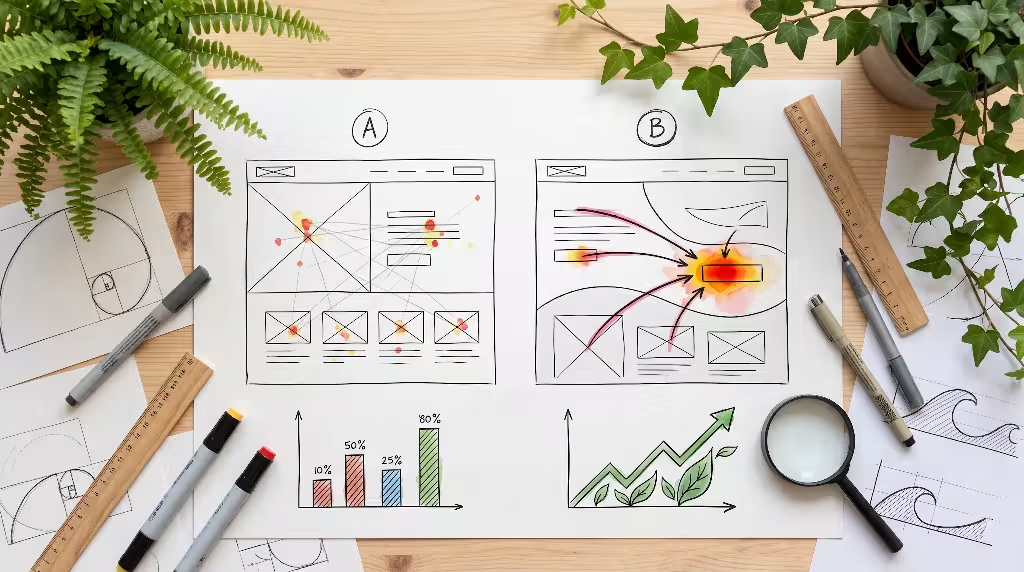
While an asymmetric hero looks sophisticated, its primary business job is to drive action. Some designers worry that departing from standard templates will confuse users and lower conversion rates. However, when conversion principles are built into the asymmetric hero from the start, it frequently outperforms standard symmetrical designs.
+------------------------------------------------------------------+
|                   A/B SPLIT TESTING VARIATIONS                   |
|                                                                  |
|   Variation A (Left Value Anchor)   Variation B (Right Gaze Flow)|
|   +-----------------------------+   +--------------------------+ |
|   | [Text Anchor]   [Image]     |   | [Image]     [Text Anchor]| |
|   |                             |   | (Gaze points left)       | |
|   | [Primary CTA]               |   |              [Primary CTA| |
|   +-----------------------------+   +--------------------------+ |
|                                                                  |
|   Primary Conversion Goal: Click-Through Rate on Primary CTA     |
+------------------------------------------------------------------+
Eliminating Decision Paralysis
A common reason landing pages fail is cognitive overload. When visitors are hit with too many choices, links, and banners at once, they experience decision paralysis and leave. In a standard split-screen hero, designers often try to fill every square inch of space, adding secondary buttons, trust badges, video popups, and testimonial snippets all above the fold.
An asymmetric hero naturally fights decision paralysis by celebrating negative space. The wide, quiet areas of an asymmetric hero give the brain time to rest and process the central offer. By stripping away non-essential clutter, the asymmetric hero focuses attention on a single, compelling value proposition. When you only ask the visitor to do one clear thing, your conversion rates increase.
A/B Testing Matrix for Asymmetric Hero Sections
Never guess whether a design works; measure it with structured experiments. When optimizing an asymmetric hero, use an A/B testing framework to compare your new asymmetric layout against your existing baseline. Run both versions at the same time to eliminate seasonal traffic shifts, and test one meaningful variable at a time.
| Testing Variable | Hypothesis | Key Measurement Metric |
| Anchor Alignment | Placing text on the left matches western reading flow, raising conversions | Form submission rate |
| Gaze Vector Direction | Pointing a model’s gaze toward the CTA button lifts interaction | Button click-through rate |
| Organic Mask vs. Rectangle | Organic curved borders lower bounce rates by feeling more welcoming | Time on page and scroll depth |
| Button Color Contrast | A warm high-contrast button in negative space gets more clicks | Primary conversion rate |
Heatmaps are invaluable when evaluating an asymmetric hero. Study scroll-depth maps and click heatmaps. Are visitors clicking your main button, or are they getting distracted by secondary visual elements? If visitors are ignoring your call to action, adjust the visual counterweights in your asymmetric hero to steer attention back toward the primary goal.
Do Asymmetric Hero Sections Convert Better Than Centered or Symmetrical Designs?
Yes, in many competitive industries, an asymmetric hero converts significantly better than centered or symmetrical designs. Testing shows that standard centered layouts often suffer from higher bounce rates because they feel generic, like an off-the-shelf template. Visitors perceive companies with custom, well-crafted layouts as more established, credible, and trustworthy.
An asymmetric hero also creates a stronger visual narrative. Because the elements guide the eye from the main value claim directly to the action button, fewer visitors get lost in the margins. When an asymmetric hero combines clear, accessible copywriting with thoughtful visual hierarchy and fast loading times, it consistently delivers higher conversion rates than outdated split-screen layouts.
Organic Harmony: Incorporating Natural Geometry and Biophilic Design
Biophilic design is the practice of connecting people to nature within human-built environments. While commonly applied in modern architecture through living walls, natural sunlight, and exposed timber, biophilic principles are just as powerful in digital design. An asymmetric hero is the perfect place to apply natural geometry, transforming a cold screen into an inviting digital experience.
FIBONACCI RATIO PROPORTIONS (1 : 1.618):
+------------------------------------------------------------------+
| Total Hero Canvas Width: 100%                                    |
|                                                                  |
| [ Left Column: ~38.2% Width ]      [ Right Column: ~61.8% Width ] |
| (Dense Text & Action Hub)          (Expansive Organic Visual)     |
|                                                                  |
| Mathematical balance mirroring the Golden Ratio in nature.       |
+------------------------------------------------------------------+
Dynamic Fibonacci Spirals and the Golden Ratio
Asymmetry does not mean throwing shapes randomly onto a screen. Without structure, asymmetry quickly feels disorganized and cheap. To make an asymmetric hero feel natural, base your layout proportions on mathematical patterns found in living systems.
The Golden Ratio, roughly 1 to 1.618, appears everywhere in nature: the spiral chambers of a nautilus shell, the seed arrangements of a sunflower, and the branching stems of woodland plants. In an asymmetric hero, you can use these proportions to establish column widths and whitespace margins. For example, instead of a 50/50 split, assign roughly 38.2 percent of the canvas to your typographic anchor and 61.8 percent to your visual media and surrounding negative space. This natural proportion creates immediate visual comfort. Even if visitors do not understand the math behind the design, their brains recognize the organic balance instinctively.
Curvilinear Boundaries and Non-Euclidean Dividers
Standard web pages are built from rectangles stacked on top of other rectangles. In biophilic theory, humans have an innate affinity for gentle, curved forms, known as biomorphic curves. Straight, sharp corners often evoke an unconscious stress response, while smooth, sweeping contours feel safe, comfortable, and inviting.
In your asymmetric hero, replace sharp bottom boundaries with gentle curvilinear dividers. You can use inline SVG shapes to create rolling hills, gentle wave crests, or soft river bends that guide the reader down into the rest of the page.
HTML
<!-- Gentle curved SVG section divider -->
<div class="hero-bottom-divider">
  <svg
    viewBox="0 0 1200 120"
    preserveAspectRatio="none"
    aria-hidden="true"
  >
    <path
      d="M0,0 C300,90 800,10 1200,60 L1200,120 L0,120 Z"
      fill="#ffffff"
    ></path>
  </svg>
</div>
This fluid transition removes the hard barrier between the hero and the rest of the content. It sparks natural curiosity, encouraging the visitor to keep scrolling down the page.
Pitfalls and Anti-Patterns in Asymmetrical Hero Optimization
While an asymmetric hero offers tremendous advantages, it is easy to make mistakes if you focus entirely on visual style without respecting engineering fundamentals. Recognizing common pitfalls early will save you hours of debugging and protect your conversion rates.
The “Unbalanced Chaos” Trap
The most frequent mistake in an asymmetric hero is confusing dynamic balance with arbitrary chaos. Designers sometimes push elements off-center just for the sake of being different, without thinking about how those pieces balance one another. They might float images across text, scatter icons randomly across the background, or leave massive, awkward holes that look like broken layout bugs.
Every asymmetric hero must have an underlying organizing principle. If an element sits off-center on the left, an intentional counterweight must exist on the right, even if that counterweight is simply a carefully measured expanse of negative space. Before launching an asymmetric hero, step back from your screen and squint your eyes. Does the layout lean heavily to one side like a sinking ship, or does it feel grounded and stable? If it feels unstable, recalibrate your visual weights until the composition sits peacefully.
The Hidden Mobile Anchor Failure
Another common problem happens when developers design an asymmetric hero for large desktop monitors and forget to verify the mobile experience. On desktop displays, overlapping text and imagery can look stunning. But if you do not adjust those styles for smaller screens, elements will collide, text will become unreadable, and your primary action button can be pushed several screen lengths down the page.
When a visitor lands on your website using a smartphone, they should not have to scroll down just to figure out what you do. In your asymmetric hero, ensure that the mobile layout displays the value proposition and primary button cleanly within the first screen view. Treat desktop asymmetry as an enhancement, not a requirement that breaks mobile usability.
Over-Engineered JavaScript Animations
Modern browsers offer rich animation possibilities, but relying on heavy JavaScript animation engines inside an asymmetric hero is a recipe for poor performance. Adding complex scroll-jacking scripts, multi-layer mouse-tracking parallax, and heavy canvas animations quickly bloats your page weight. These scripts hog device memory, drain mobile batteries, and destroy your Interaction to Next Paint scores.
Keep movement inside an asymmetric hero light, subtle, and built entirely with pure CSS. An asymmetric hero already possesses plenty of natural visual interest through its varied weights and shapes; it does not need aggressive animations to win attention. A smooth, subtle micro-interaction on button hover or a gentle initial fade-in is all you need to elevate the design without hurting performance.
Real-World Performance: Metrics, Audits, and Production Checklist
To achieve consistent results, you must measure your work with hard data. Optimizing an asymmetric hero requires combining visual audits with objective, quantitative performance testing.
+------------------------------------------------------------------+
|               PRE-LAUNCH AUDIT VERIFICATION FLOW                 |
|                                                                  |
|   1. Performance  -> LCP under 2.5s? Asset preloaded?            |
|   2. Stability    -> CLS under 0.1? Aspect-ratios explicit?      |
|   3. Accessibility-> DOM matches reading order? Contrast > 4.5?  |
|   4. Usability    -> Primary CTA above mobile fold? No jitter?   |
|                                                                  |
|                 [ APPROVED FOR PRODUCTION LAUNCH ]               |
+------------------------------------------------------------------+
Data-Driven Performance Teardowns
When auditing a live asymmetric hero, track key technical and business metrics before and after the redesign:
- Largest Contentful Paint (LCP): Target a render time of under 2.5 seconds on real mobile network connections.
- Cumulative Layout Shift (CLS): Keep layout shift scores strictly below 0.1 during the entire page load cycle.
- Interaction to Next Paint (INP): Ensure all tap and click responses execute in less than 200 milliseconds.
- Bounce Rate: Track whether the asymmetric hero reduces immediate exits compared to your old layout.
- Conversion Rate: Measure completed actions on your primary call-to-action button.
In real-world tests across varied industries, replacing a stale symmetrical template with an optimized asymmetric hero frequently produces double-digit improvements in engagement. Users spend more time reading the initial message, explore deeper into the website, and convert at higher rates because the website makes an immediate, confident first impression.
The 10-Point Pre-Launch Optimization Audit
Before publishing your next asymmetric hero, run through this comprehensive quality assurance checklist:
- Semantic DOM Sequence: Does the underlying HTML source code read logically from top headline to primary action button, regardless of visual positioning?
- Explicit Media Dimensions: Does every image, video, and vector shape carry an explicit
aspect-ratioor defined width and height attributes to stop CLS? - LCP Image Preload: Is the primary visual element preloaded in the document
<head>using<link rel="preload">andfetchpriority="high"? - Modern File Formats: Are all hero images compressed and delivered in modern AVIF or WebP formats using the HTML
<picture>tag? - No CSS Background Traps: Is the main hero image delivered through native HTML rather than hidden inside an external CSS
background-imagerule? - WCAG Contrast Ratios: Does every piece of text maintain at least a 4.5 to 1 contrast ratio against all background colors, gradients, and images?
- Mobile Viewport Priority: On mobile viewports, are the primary headline and action button immediately visible without requiring the user to scroll?
- Keyboard Accessibility: Can a user navigate smoothly through the entire asymmetric hero using only the Tab and Enter keys, with clear focus outlines visible at all times?
- Zero Heavy Script Dependencies: Is the entire layout driven by native CSS Grid and Flexbox, completely free from bulky JavaScript layout libraries?
- Clear Visual Counterweights: Does the overall composition feel balanced and harmonious, pairing dense content areas with restful negative space?
By methodically following this audit, you can launch an asymmetric hero that looks visually striking, runs lightning fast on every device, welcomes all users, and turns curious visitors into loyal customers.