
Table of Contents
The New Frontier of Decentralized Commerce
Many small business owners are feeling very frustrated with traditional social media platforms. In the past, you could post an update and expect your followers to see it. Today, major platforms use complex sorting systems called algorithms. These systems decide who sees your content based on how much you pay or how much drama your post creates. This setup makes it hard for a small business to reach its audience without spending a lot of money on ads.
Because of this issue, many business owners are looking for a better option. That option is the Fediverse, a growing network of independent social spaces. Moving your business to a decentralized platform like Mastodon offers a huge opportunity to build a real brand. It lets you talk directly to people who care about your work without a giant company blocking the view. And there are numerous Mastodon tools to help.
To succeed on this new platform, you must change how you think about marketing. Traditional platforms rely on what experts call interruption marketing. This means you buy an ad that jumps out in front of a user while they are trying to read something else. It is loud, it is expensive, and people often dislike it.
On Mastodon, you have to use relationship marketing instead. Think of the platform as a local neighborhood. You do not walk down a neighborhood street with a megaphone shouting about a sale. Instead, you talk to people, offer helpful advice, and become a trusted member of the community. When people trust you as a neighbor, they naturally want to buy from your business. This approach requires patience, but it creates deep loyalty that paid ads can never buy.
Some business owners worry that moving to an open source network will be too difficult or expensive. They think they will need to write complex code or hire a team of developers just to post an update. This is a common myth that keeps good companies away from the Fediverse. The truth is that using this network does not require deep technical knowledge. You do not need a big budget to succeed here. There are many affordable ways to manage your account and talk to your customers efficiently. By using the right software setups, you can save time and keep your daily tasks simple.
When you start exploring this space, finding the right mastodon tools is the key to saving your energy. These specialized systems help you manage your presence without losing the personal touch that the community expects. Throughout this guide, we will look at how free and low-cost software options can help you organize your daily work. We will examine how to plan your content and find your audience. By using efficient mastodon tools, you can build a strong presence without spending all your time on manual tasks. Let us dive into the details of how this network functions and how you can make it work for your budget.
Why Mastodon Requires Unique Tooling
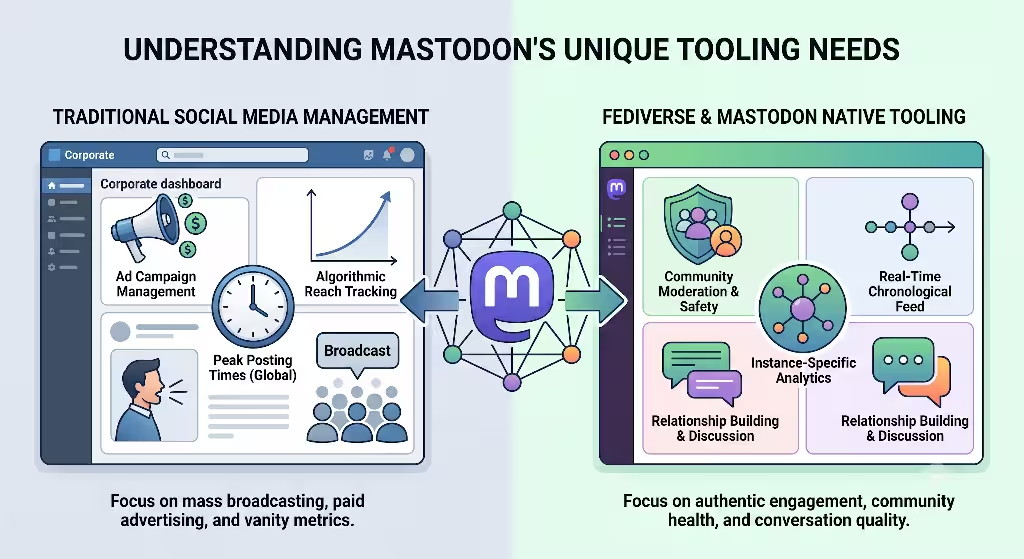
To understand why you need specific mastodon tools, you have to look at how the network is built. Traditional networks are built like a single giant building. Everyone enters through the same door, agrees to the same rules, and lives under one roof owned by one corporation. Mastodon does not work that way. It is built on a decentralized system. This means it is made up of thousands of independent servers called instances. These servers are owned by different people and groups around the world, yet they can all talk to each other.
The easiest way to understand this structure is to think about email. If you have a Gmail account, you can easily send an email to someone who uses Yahoo or Outlook. You do not need to create a new account on their platform just to talk to them. The different email systems communicate behind the scenes using shared rules. Mastodon works exactly the same way using an open system called the ActivityPub protocol. Your business can join a specific server, like one focused on tech or local commerce, but your posts can still reach users on entirely different servers. This connected web of independent servers is what people mean when they talk about the Fediverse.
Because this network is decentralized, general social media management software often fails to work correctly here. Standard corporate dashboards are built to track users across a single centralized database. They look for specific data tracking codes, track user clicks across hidden networks, and rely on paid ad systems to boost posts. Mastodon intentionally blocks these invasive tracking systems to protect user privacy. There are no corporate ad systems built into the network.
This means your traditional marketing dashboards will not show you the right data, and they cannot help you schedule content across different servers smoothly. You need native or open source mastodon tools that understand how a decentralized system reads information. Without these specific systems, you will find yourself fighting against the software instead of growing your business.
Is Mastodon a free app/platform?
This is one of the most common questions that small business owners ask when they first hear about the network. The short answer is yes, Mastodon is completely free to use. There are no monthly fees to create an account, there are no premium paywalls to unlock basic features, and you will never see an advertisement on the official network. The software itself is open source, which means the code is public and anyone can use it without paying a licensing fee.
However, for a small business, time is also a form of currency. While the network does not charge you money to log in, running a business presence manually can become costly in terms of hours spent. That is why investing your effort into the right mastodon tools makes sense. Some of these software utilities are completely free, while others charge a small monthly fee to help you automate your tasks. By using these systems, you are not paying to use Mastodon itself. Instead, you are paying for helper systems that make your workday shorter and more organized.
Top Free & Low-Cost Content Scheduling Tools
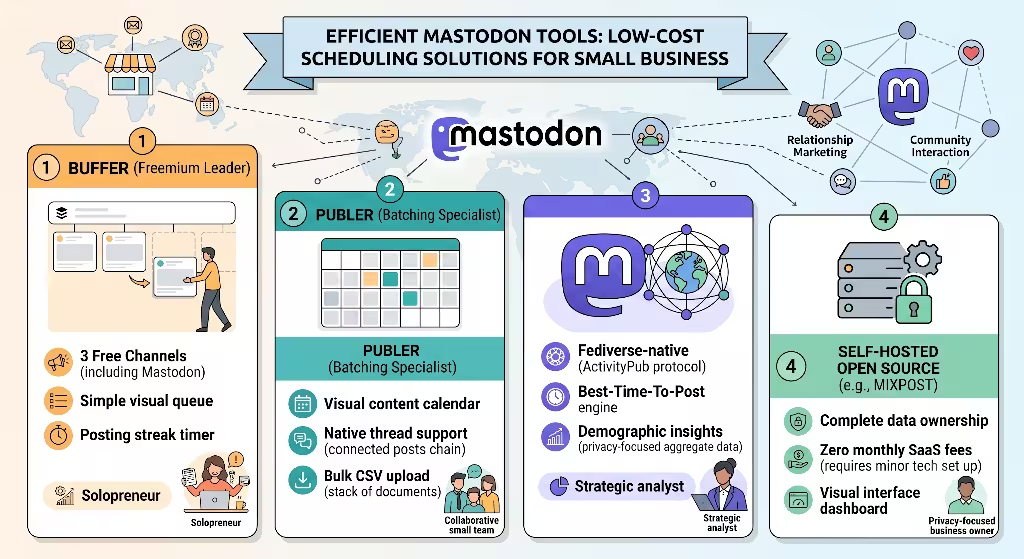
When you run a small business, you cannot spend every hour of the day sitting at your computer waiting for the perfect time to post. You need to plan your content in advance so you can focus on making products and serving clients. Content scheduling systems are essential mastodon tools for any busy operator. Let us look at the top free and low-cost options available today that support this unique network.
<Image src="image_agent_tag_1" alt="Buffer dashboard showing a scheduled post calendar and social media channel connections including Mastodon" caption="Buffer Scheduling Interface" />
1. Buffer (The Best Freemium Plug-and-Play Option)
Buffer is a well-known name in social media management, and it is one of the best mastodon tools for businesses that want a simple setup. The best part about Buffer is its generous free tier. The free plan allows you to connect up to three different channels at no cost. This means you can connect your Mastodon profile alongside two other profiles without spending a dime. It is a fantastic option for solo business owners who are just starting out and want to test the waters.
The interface is incredibly clean and easy to navigate. Buffer uses a simple queue system where you can set up specific times of day for your content to go live. Once you set those times, you can just drop your posts into the slot, and the software handles the rest automatically. It also includes a helpful feature called a posting streak, which encourages you to stay consistent with your updates. If you only need basic scheduling without complex extra features, Buffer is an excellent choice among available mastodon tools.
2. Publer (The Content Batching Heavyweight)
If your business likes to plan out a whole week or a whole month of content at one time, Publer is a heavy-duty option that remains highly affordable. Publer provides a very robust low-cost plan that is tailored for businesses that focus on content batching. Content batching is the practice of sitting down once a week to write all your updates at once, rather than writing them day by day.
Publer stands out because of its visual calendar view. You can see your entire month laid out on a grid, making it easy to see if you are posting too much or too little. It also offers excellent native support for threads, which are series of connected posts. On Mastodon, users love reading detailed threads that share deep knowledge. Publer allows you to create these connected chains easily within the scheduler. It also supports bulk uploading via a spreadsheet, making it a very efficient choice when you are comparing different mastodon tools.
3. Fedica (The Fediverse-Native Specialist)
Fedica is a highly specialized system built from the ground up to understand decentralized networks. While other software companies added Mastodon support as an afterthought, Fedica treats the Fediverse as a primary focus. This deep integration makes it one of the most powerful mastodon tools on the market for businesses that want to understand their audience deeply.
Fedica offers a functional free plan that gives you core scheduling features across multiple platforms. What makes it special is its ability to handle the specific formatting rules of decentralized spaces. It allows you to schedule polls, attach descriptive text to images for visually impaired users, and organize your posts into distinct content pipelines. Fedica also includes an intelligent publishing engine that helps you figure out when your specific followers are online and active. It is a brilliant choice if you want software that respects the unique culture of the network.
Can you schedule posts on Mastodon?
Yes, you can absolutely schedule posts on the platform. While the basic web interface of Mastodon allows you to schedule a simple post a few hours or days in advance, it does not give you a full calendar view or allow you to manage multiple types of media easily. That is why business owners turn to external mastodon tools to handle their scheduling needs.
By using an external scheduling program, you gain the ability to look at your marketing strategy as a whole. You can cross-post content to other networks if needed, manage your drafts in a safe space before they go public, and ensure that your brand stays active even when you are on vacation. Using these helper programs turns a reactive daily chore into a manageable weekly system.
Technical & Self-Hosted Solutions (For Maximum Data Privacy)
Some small businesses place a very high value on data privacy and digital independence. If your business deals with sensitive client information, or if you simply prefer not to rely on outside corporate software companies, you can use self-hosted mastodon tools. These are software programs that you install on your own private web server. They give you complete ownership over your data and cost nothing in ongoing software fees.
<Sequence>
{/* Reason: Setting up a self-hosted social tool requires a strict technical sequence to avoid security gaps and connection failures. */}
  <Step title="Acquire a Virtual Private Server" subtitle="Requires a basic cloud hosting account">
    Purchase a low-cost virtual server from a provider like DigitalOcean or Linode. This usually costs around five dollars a month and serves as the computer that runs your software.
  </Step>
  <Step title="Install an Open Source Dashboard" subtitle="Choose Mixpost or Postiz">
    Use simple terminal commands or one-click installers to deploy the open source software onto your server. This creates your private administration page.
  </Step>
  <Step title="Generate API Tokens on Mastodon" subtitle="Done inside your profile settings">
    Log into your Mastodon account, navigate to the development settings, and create a secure connection key. Paste this key into your new dashboard to link the systems safely.
  </Step>
  <Step title="Test and Schedule Your First Post" subtitle="Verify the connection works">
    Write a draft post inside your private dashboard and hit the schedule button. Check your public profile to ensure the message appears correctly without any errors.
  </Step>
</Sequence>
1. Mixpost & Postiz
Mixpost and Postiz are two incredible examples of modern, self-hosted social media management applications. They are designed to act exactly like commercial platforms, but you run them on your own private server space. For a small business with a small amount of technical comfort, these are incredible mastodon tools because they eliminate monthly subscription fees completely.
When you use a self-hosted system like Mixpost, all your drafts, scheduled posts, and client interaction records stay on your own server. No third-party company can read your data, track your marketing plans, or change their terms of service overnight. You have total control over the software environment. Both Mixpost and Postiz offer beautiful, modern interfaces that make scheduling posts, managing media libraries, and organizing calendars a joy to use.
2. Mastodon’s Native Developer API
For businesses that want the absolute lowest cost possible, you can use Mastodon’s built-in developer tools for free. Every instance includes a powerful Application Programming Interface, which is a system that allows different software programs to talk to each other directly. You do not need to be a professional programmer to use some of the basic features hidden inside this system.
By navigating to your account preferences and clicking on the development tab, you can create custom filters and automated scripts. You can use free web services to connect your business website directly to your profile. For example, you can set up a system where every time you publish a new blog post on your website, it automatically formats and publishes a beautiful update to your followers. Utilizing these built-in developer options is a fantastic way to create custom mastodon tools without spending any money.
Audience Discovery & Network Migration Mastodon Tools
One of the biggest challenges for a small business moving to a new platform is finding people to talk to. Because there are no central corporate directories or paid tracking ads to suggest your page to users, you have to actively seek out your audience. Thankfully, there are several brilliant mastodon tools designed specifically to help you find your community and move your existing customers over smoothly.
<Image src="image_agent_tag_2" alt="Diagram showing how Fedifinder scans a social profile to extract Fediverse handles for migration" caption="Audience Migration Workflow" />
1. Fedifinder & Debirdify
When you decide to open a shop on the Fediverse, you do not have to start from absolute zero if you already have a following on older social networks. Free web utilities like Fedifinder are essential mastodon tools for finding your existing community. These tools work by looking at the public profiles of people you already interact with on other spaces.
When you run Fedifinder, the software searches through the public descriptions and bios of your current connections. It looks for specific text patterns that match Fediverse addresses, which look like email addresses. The tool then builds a clean list of all your old contacts who have already moved to the new network. You can download this list as a simple file and upload it directly into your new profile. Within five minutes, you can follow hundreds of your existing customers and partners on the new platform, ensuring your new home feels busy and welcoming from day one.
2. Mastodon Hashtag Trackers
Because full-text search is often limited on decentralized networks to protect user privacy, the community relies heavily on hashtags to organize conversations. If you want people to find your business, you must use hashtags correctly, and you must know which tags your customers are watching. Using hashtag tracking utilities can give your business a massive advantage over competitors who are just guessing.
A tag search matrix allows you to monitor multiple industry keywords at the same time on a single screen. You can set up columns to watch tags related to your location, your product type, or general business help. By keeping an eye on these streams, you can spot people asking questions that your business can answer. If someone tags a post looking for a local service that you provide, you can jump into the conversation immediately with helpful advice. These discovery matrixes are some of the most effective mastodon tools for driving organic traffic to your website without spending money on traditional ads.
Analytics & Performance Tracking on a Budget

To run a successful business, you need to know if your hard work is actually producing results. You need to know which posts make people click through to your website, what topics get the most engagement, and when your audience is listening. While tracking data on a decentralized network requires more respect for user privacy, there are excellent budget-friendly mastodon tools that provide deep insights.
1. Metricool
Metricool is a brilliant analytics and management platform that offers a very complete free plan for small businesses. It connects directly to your website and your social accounts to show you a unified picture of your digital footprint. As an analytical choice among mastodon tools, Metricool is highly prized because it connects social interactions directly to web traffic patterns.
The reporting page shows you clear graphs of your follower growth, your most successful posts, and your overall engagement rates. It uses simple visual maps to show you exactly when your followers are online, helping you plan your scheduling queue perfectly. Metricool allows you to generate clean PDF reports of your data for free once a month, which is incredibly helpful if you need to show your business partners or team members how your social presence is growing over time.
2. Direct Instance Analytics
Many business owners overlook the analytical data that is already available for free inside their own server interface. Depending on the specific instance your business joins, your server administrator may provide access to a local data dashboard. These built-in utilities are fantastic mastodon tools because they require zero setup and cost absolutely nothing.
> **Privacy First Rule:** Unlike older corporate networks, data analytics on the Fediverse will never show you private user tracking data or personal histories. The focus is always on aggregate trends, meaning you see overall numbers and community movements rather than individual user tracking files.
By analyzing your server’s local trends, you can see which other servers your audience lives on. This helps you understand if you should tailor your content for a global audience or a specific regional group. You can see general activity spikes across the entire local timeline, giving you clues about when the community is most talkative. Relying on these native data points keeps your business lean, compliant with privacy laws, and deeply connected to the health of your local server.
Addressing the Core Business Questions about Mastodon Tools
To truly understand how to grow a company in this decentralized space, we need to address the deeper structural questions that business owners often worry about. Let us look at the most common questions found in search trends regarding how commercial entities interact with these open networks.
How is Mastodon different from Twitter for business?
The differences between these two platforms are structural, cultural, and financial. Traditional platforms like Twitter rely on a central company that wants to maximize the time you spend looking at ads. To do this, they use a secret algorithm that prioritizes emotional and controversial content because it keeps people clicking. For a business, this means your calm, helpful product updates are often buried unless you pay to boost them.
<Image src="image_agent_tag_3" alt="Graphic comparison showing a centralized algorithmic feed vs a decentralized chronological feed" caption="Algorithmic vs Chronological Structures" />
Mastodon has no algorithm and no paid boosting system. The feed is completely chronological, meaning users see posts in the exact order they are published. If you post an update, every single follower who is online at that moment will see it on their screen. There is no corporate filter hiding your hard work.
Furthermore, the character limit is naturally larger, usually allowing 500 characters or more per post compared to the short snippets allowed elsewhere. This changes your writing style. You do not need to use catchy, click-bait headlines. Instead, you can write complete, thoughtful paragraphs that offer real value. The culture also frowns heavily on constant sales pitches. While you can use your mastodon tools to share product links, your main focus must be on joining conversations and answering questions as a human peer.
Is Mastodon good for marketing/small business?
Yes, it is incredibly good for marketing, but only if you redefine what marketing means for your company. If your definition of marketing is blasting out identical flyers to a million random people, you will find the platform very frustrating. But if your definition of marketing is building a highly loyal group of customers who love your work and recommend you to their friends, this network is gold.
While your raw follower count on a decentralized network might look smaller than your numbers on a massive corporate site, the quality of those followers is significantly higher. Because people have actively chosen to escape spam and ads, they are much more attentive to the content they choose to follow. Small businesses often report that their conversion rates, meaning the percentage of followers who actually click a link and buy something, are much higher here than on legacy platforms. When you use your mastodon tools to maintain a consistent, helpful presence, you are building an asset that belongs entirely to your business, free from the whims of any single tech billionaire.
Quick-Reference Mastodon Tool Comparison Matrix
To help you make the best decision for your specific business budget and technical comfort, I have put together a comprehensive comparison chart. This table breaks down the top software options we have discussed so you can see at a glance which ones fit your daily workflow.
| Tool Name | Core Functionality | Price Level | Technical Skill Needed | Best For |
| Buffer | Content Scheduling | Free tier available / Paid options scale per channel | Very Low (Plug and Play) | Solo business owners managing a few profiles |
| Publer | Visual Content Batching | Low cost with excellent entry tiers | Low (Web Interface) | Teams that like to plan an entire month at once |
| Fedica | Fediverse Specialized Publishing | Robust free plan / Affordable growth tiers | Medium (Requires some platform knowledge) | Brands that want deep audience insights and poll scheduling |
| Mixpost | Self-Hosted Dashboard | 100% Free for the open source code | High (Requires server installation) | Privacy focused brands wanting zero ongoing monthly software fees |
| Metricool | Cross Platform Analytics | Generous free tier / Low cost upgrades | Low (Simple web setup) | Businesses that want to connect social data directly to web clicks |
| Fedifinder | Audience Migration | Completely Free open utility | Low (Simple web tool) | Moving an existing customer network over from older networks |
Conclusion & Actionable Next Steps
Building a successful business presence on the Fediverse does not require a massive advertising budget or a team of computer programmers. It simply requires a willingness to slow down, talk to people like a human being, and show up consistently. By selecting the right mastodon tools for your specific workflow, you can easily remove the administrative friction that makes social media management feel like a second full-time job.
Do not try to master every single software application mentioned in this guide today. That approach will only lead to feeling overwhelmed. Instead, pick one scheduling program, like Buffer or Fedica, and use it to set up a consistent, manageable routine. Combine that with a discovery tool to find your existing friends and customers who have already made the jump to decentralized spaces.
<ElicitationsGroup message="To help you execute this strategy perfectly:">
{/* Reason: The user has an outline and tool guide, but needs specific, actionable follow-ups to implement the content creation and server selection strategies. */}
  <Elicitation label="Create a templates guide for a perfect Mastodon Introduction post" query="Write a step-by-step guide with examples for a small business creating their first #Introduction post on Mastodon to maximize reach and welcomes." />
  <Elicitation label="Help me choose the right Mastodon instance for my industry" query="What are the best and most trusted Mastodon instances for small businesses, creative professionals, and tech startups to join in 2026?" />
  <ElicitationsGroup>