
Table of Contents
Auditory Biophilia in Modern Web Architecture
Most websites today act like silent movies with flashing neon signs. Designers spend months perfecting every pixel, font choice, and color palette, yet they ignore an entire human sense. They leave the browser completely mute, or worse, they drop in jarring notification chimes that make visitors hit the back button in a panic. When you look at how humans evolved, our brains never processed environments through sight alone.
In the physical world, sound tells us if a space is safe, open, or stressful. Bringing this sensory dimension online through generative AI for website nature sounds changes a flat, sterile screen into a living digital environment.
At its most basic, generative AI for website nature sounds uses artificial intelligence to create organic audio environments on the fly or on demand. Instead of playing a stiff, pre-recorded track, smart algorithms synthesize the gentle rush of wind through pine needles, water flowing over smooth river stones, distant birdsong, and soft rain tapping on leaves.
These soundscapes are built specifically for digital interfaces, adapting cleanly to how a visitor interacts with a page. By weaving these natural audio cues into web architecture, developers give visitors an immediate sense of calm and physical presence that visuals simply cannot achieve on their own.
This approach taps directly into a scientific principle called biophilia, which is our innate biological connection to the natural world. In biophilic design, we study how natural patterns affect human stress and focus. Nature is full of fractal patterns, which are shapes and rhythms that repeat at different scales without ever being identical.
Think of the branching of an oak tree or the crashing of ocean waves. When human ears hear the fractal acoustic patterns of moving water or rustling leaves, the brain recognizes a safe, familiar environment. This triggers the parasympathetic nervous system, which is the body’s natural rest and digest mode. Cortisol levels drop, heart rates steady, and mental fatigue fades away. On websites where users face high cognitive load, such as complex software dashboards, medical portals, or dense research hubs, adding website nature sounds lowers bounce rates and helps people stay focused longer.
How Generative AI Synthesizes Non-Repetitive Nature Audio

For decades, adding audio to a website meant uploading a short MP3 file and setting it to loop forever. Anyone who has spent more than five minutes listening to a standard thirty-second rain loop knows how quickly it becomes annoying. The human brain is an incredible pattern-detection machine. Once your mind catches the exact moment a recording restarts, or recognizes the same cricket chirp every twelve seconds, the illusion breaks. Instead of relaxing you, that predictable loop creates listener fatigue and irritation. Generative AI solves this problem by replacing static recordings with neural audio synthesis and procedural audio.
Neural audio synthesis relies on deep learning models trained on thousands of hours of real bioacoustic field recordings. Rather than cutting and pasting clips together, the AI learns the mathematical rules behind how wind interacts with different leaf shapes or how water droplets splash at varying depths. Procedural audio takes this a step further by using code and mathematical algorithms to build sounds in real time inside the user’s browser. When you combine generative AI with procedural rules, the resulting website nature sounds never repeat in the exact same way twice.
To make these soundscapes feel truly alive, AI engines rely on acoustic fractal geometry and stochastic modeling. Stochastic simply means randomly determined within a natural boundary. In a real forest, birds do not sing on a strict metronome beat. They call out in bursts, pause, respond to distant neighbors, and go quiet when a breeze picks up. Generative AI mimics this natural ecosystem by layering several audio elements independently:
- Base Acoustic Beds: Continuous, low-frequency textures like pink noise, soft surf, or steady airflow that mask harsh room noises.
- Mid-Ground Movement: Shifting elements like branches swaying, small eddies in a creek, or light drizzle that swells and fades over several minutes.
- Stochastic Micro-Events: Occasional, unpredictable details such as a single songbird, a distant frog, or a dry leaf skittering across a path.
Because each layer operates on its own timeline and probability curve, a visitor could leave your website open for eight hours and never hear an identical sequence. This endless variety keeps the auditory experience fresh, natural, and deeply restorative.
Top Generative AI Tools and APIs for Web Nature Soundscapes
Building a custom audio engine from scratch used to require a team of sound engineers and digital signal processing experts. Today, web creators have access to a wide range of AI tools and browser APIs that make deploying website nature sounds straightforward and affordable. Depending on your technical needs and budget, you can choose between pre-rendered text-to-audio generators or real-time browser synthesis.
Pre-rendered text-to-audio platforms allow you to type a descriptive prompt and receive high-fidelity audio stems within seconds. Tools like ElevenLabs Sound Effects and Noiz AI excel at generating clean, isolated nature textures. You can ask for “light rain falling on broad tropical leaves with no thunder” or “gentle mountain stream flowing over gravel,” and the AI produces studio-grade tracks without background microphone hiss. You can then layer these custom stems on your site.
For sites that want continuous, streaming soundscapes without managing individual files, platforms like Mubert and Tunee AI offer API-accessible generative streams. These services generate endless ambient music and nature blends tailored to specific moods, energy levels, or user activities.
For developers who want maximum interactivity and ultra-low bandwidth usage, real-time browser synthesis is the gold standard. Modern web browsers come equipped with the native Web Audio API, a powerful system that processes and synthesizes audio directly inside the user’s device. By pairing lightweight AI models or Markov chains with Web Audio API nodes like AudioWorklet, your website can generate website nature sounds using tiny snippets of code rather than heavy audio downloads.
Even better, real-time synthesis lets your website react to live data. Imagine an eco-lodge website that checks a local weather API and adjusts its background soundscape to match the real-time weather at the resort. If it is raining at the lodge, visitors hear soft rain on their screen. As a user scrolls down a long storytelling page, the audio can smoothly transition from a breezy coastal cliff at the top of the page to a quiet redwood forest near the bottom. This level of dynamic responsiveness turns passive browsing into an interactive sensory journey.
High-Impact Use Cases Across Web Verticals
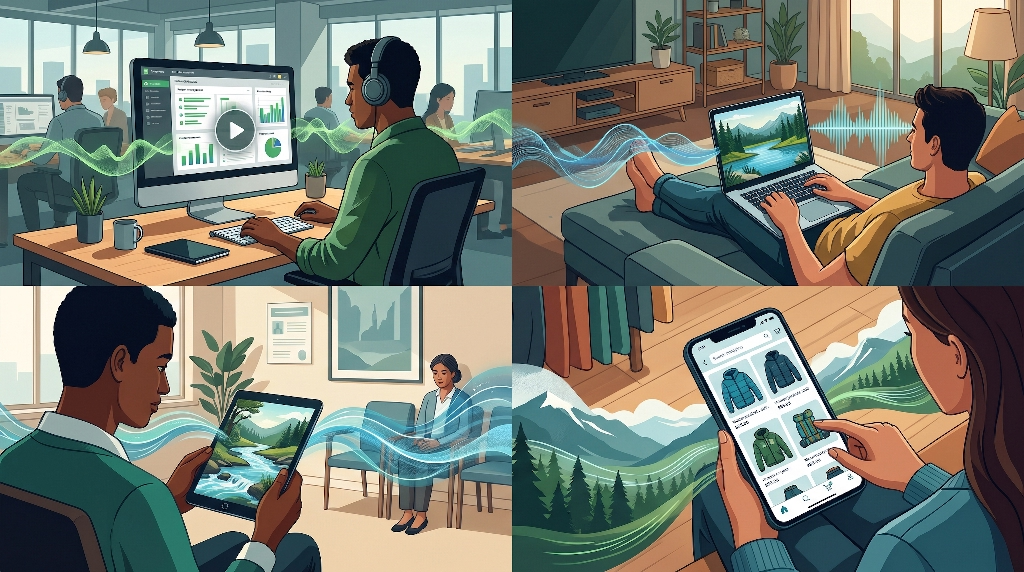
Adding website nature sounds is not a gimmick meant only for meditation apps. When thoughtfully matched to user intent, organic audio solves real business problems across many industries. Different web verticals benefit from tailored acoustic environments that support what the visitor is trying to accomplish.
SaaS and Deep-Work Platforms: Project management tools, writing apps, coding environments, and study portals require sustained mental concentration. Many users work in noisy open offices, busy cafes, or bustling homes. Offering an optional biophilic sound mixer right inside the workspace bar helps mask distracting background chatter. Soft pink noise or steady rainfall creates an acoustic blanket that improves focus, reduces tab-switching, and directly increases daily active session duration.
Hospitality, Eco-Tourism, and Real Estate: Selling a physical destination through a flat screen is always a challenge. Photos show what a place looks like, and videos show movement, but sound triggers emotional memory and spatial presence. Luxury resorts, cabin rentals, national park guides, and high-end real estate listings can use website nature sounds to transport visitors immediately. Hearing gentle waves lap against a dock or wind whisper through tall grass helps potential guests imagine themselves standing on the property, leading to higher booking conversions.
Healthcare, Teletherapy, and Wellness Portals: Patients visiting medical websites, scheduling dental appointments, or waiting in virtual teletherapy rooms often experience elevated stress and anxiety. Clinical white pages with harsh layouts only make that tension worse. Integrating calibrated biophilic soundbeds into patient portals and virtual waiting rooms helps calm the nervous system before a consultation even begins. Gentle stream sounds and low-density birdsong signal safety and care.
E-Commerce and Outdoor Gear: Online retail thrives on storytelling and brand identity. Brands selling hiking equipment, sustainable apparel, botanical skincare, or garden supplies can use subtle environmental audio to reinforce product value. When a shopper explores a winter mountaineering jacket, faint alpine wind adds atmosphere. When browsing organic herbal teas, soft morning garden acoustics deepen the sensory appeal of the brand without pushing an aggressive sales pitch.
Integrating AI Audio Without Hurting Core Web Vitals
A beautiful soundscape means nothing if it makes your website slow, laggy, or frustrating to use. Search engines like Google evaluate websites heavily on speed and responsiveness using metrics known as Core Web Vitals. If you drop massive, uncompressed audio files into your site header, your page load times will spike, your search rankings will drop, and mobile visitors will leave before hearing a single note. Smart technical architecture ensures your website nature sounds load smoothly while keeping performance scores in the green.
First, follow strict performance and payload budgets. Never use raw WAV files on a live website, as a single minute of uncompressed stereo audio can exceed ten megabytes. Instead, encode your AI-generated nature stems using modern, high-efficiency formats like Opus or AAC. Opus delivers crystal-clear spatial audio at bitrates as low as 48 to 64 kilobits per second, shrinking file sizes by up to ninety percent compared to WAV files.
Second, always lazy-load your audio assets. Your browser should prioritize rendering visible text, hero images, and interactive buttons first so your Largest Contentful Paint (LCP) stays under 2.5 seconds. Keep audio files completely out of the critical rendering path. Only fetch the audio stream from your Content Delivery Network (CDN) after the main page has finished loading, or better yet, wait until the user clicks the play button. Using HTTP range requests also allows the browser to stream audio in tiny chunks rather than downloading an entire file at once, protecting Interaction to Next Paint (INP) responsiveness.
Third, you must respect modern browser autoplay policies. Safari, Chrome, Firefox, and Edge strictly block websites from playing unmuted audio automatically when a page opens. If your code tries to force audio without permission, the browser will throw console errors and block playback entirely. Always tie your Web Audio API AudioContext initialization to an explicit user gesture, such as clicking a sound toggle icon or interacting with a welcome prompt. When the user clicks, resume the audio context smoothly and begin streaming.
UX Best Practices and Accessibility Compliance (WCAG 2.2)
Great user experience relies on giving visitors complete control over their environment. Unexpected noise is one of the fastest ways to ruin trust online. Imagine someone opening your website late at night while a baby sleeps nearby, or opening a tab during a quiet office meeting, only to have loud ocean waves blast through their speakers. Following strict UX and accessibility standards ensures your website nature sounds delight visitors rather than startling them.
User agency must always come first. Place a clear, persistent audio controller in a predictable spot, such as the top navigation bar or a fixed bottom corner. Use universally recognized icons, like a speaker or a subtle animated soundwave, paired with a clean volume slider. Visitors should be able to mute, pause, or adjust the volume at any moment without hunting through settings menus. Saving their preference in browser localStorage also ensures that if they mute the site once, it stays muted across every page they visit.
Accessibility compliance under the Web Content Accessibility Guidelines (WCAG 2.2) is equally essential, both for ethical design and legal protection. Specifically, WCAG Success Criterion 1.4.2 (Audio Control) sets strict rules for any website audio that plays automatically for more than three seconds. Even when audio is user-initiated, following these principles protects visitors who rely on assistive technology:
- Independent Volume Control: Users who are blind or have low vision rely on screen readers like NVDA, JAWS, or VoiceOver to navigate your site. If background nature audio is too loud, it drowns out the synthetic speech of their screen reader. Keep default nature audio levels low, typically around fifteen to twenty-five percent of maximum gain, and let users lower it independently of their main system volume.
- Full Keyboard Navigation: Ensure every play button, mute toggle, and volume slider can be reached using the
Tabkey and activated withEnterorSpacebar. Include clear focus indicators and descriptivearia-labelattributes so screen readers announce the exact state of the player, such as “Play forest soundscape” or “Mute background nature audio.” - Smooth Crossfading and Gain Ramping: Never cut audio off abruptly with a harsh digital click. When a user toggles sound on or off, or navigates between different sections of your site, use the Web Audio API’s
exponentialRampToValueAtTimemethod to fade the volume smoothly over one to two seconds. Gentle transitions feel organic and prevent jarring auditory spikes.
SEO and Generative Engine Optimization (GEO) Benefits of Biophilic Audio
Adding website nature sounds does not directly change your keyword density, yet it plays a powerful supporting role in both traditional Search Engine Optimization (SEO) and modern Generative Engine Optimization (GEO). Search engines and AI answer platforms constantly measure how real humans respond to a webpage after clicking a search result.
When visitors land on a page that feels calm, immersive, and pleasant to spend time on, their behavior changes measurably. They read deeper into long articles, explore more internal links, and spend significantly more time on the domain. Search algorithms track these positive engagement signals, such as higher dwell time and lower pogo-sticking rates, where users immediately bounce back to search results. Over time, strong user satisfaction signals help pages climb higher in organic search rankings.
To ensure search crawlers and AI models fully understand your audio features, you also need clean technical markup. Search bots cannot listen to audio the way humans do, so you must translate your soundscapes into structured text and metadata:
- AudioObject Schema Markup: Wrap your soundscape details in JSON-LD structured data using the
AudioObjectschema type. Include clear properties forname,description,duration,encodingFormat, andcontentUrl. This tells search engines exactly what the audio represents and connects it semantically to your page topic. - Descriptive Text and Transcripts: Provide brief, evocative descriptions alongside your audio player controls, such as “Ambient Pacific Northwest rain and cedar wind generated for reading focus.” Search crawlers index these text labels, reinforcing topical relevance around biophilic design and sensory UX.
- Clean Media Separation: Keep decorative background audio distinct from primary spoken-word content like podcasts or video tutorials so crawlers never confuse ambient soundscapes with missing speech transcripts.
Copyright, Licensing, and Ethical Sourcing of AI Nature Sounds

Using artificial intelligence to generate audio brings important legal and ethical questions that every website owner should understand. Just because a tool produces a sound in seconds does not automatically mean you have unrestricted commercial rights to stream it on a business website. Navigating copyright and licensing carefully protects your brand from costly disputes.
Start by examining training data provenance. Ethical AI audio companies train their neural networks on properly licensed field recordings, public-domain bioacoustic archives, or audio recorded by their own sound design teams. Less reputable platforms scrape copyrighted nature albums and commercial sound libraries from the internet without permission. Choosing tools with transparent, ethically sourced training datasets ensures your website supports responsible innovation and avoids potential legal fallout.
Next, verify commercial distribution rights in the terms of service of whichever AI generator you select. Free tiers on many AI audio platforms restrict outputs to personal, non-commercial projects. To use website nature sounds on a business site, e-commerce store, or client project, you generally need a paid commercial subscription that grants royalty-free web streaming rights.
It is also helpful to understand how copyright law treats purely AI-generated audio. Under current United States Copyright Office guidelines, raw audio generated entirely by an AI prompt without substantial human authorship cannot be copyrighted by you. This means you are free to use it commercially under your platform’s license, though you cannot stop someone else from generating a similar rain sound. If your brand wants proprietary, ownable audio assets, consider having a human sound designer blend, layer, and master several AI stems into a unique custom composition.
Common Questions Answered about Website Nature Sounds
Searchers exploring biophilic web audio often ask practical questions about setup, licensing, site speed, and effectiveness. Including clear, direct answers to these common queries helps readers make fast decisions while positioning your content for search engine featured snippets.
How do I add AI-generated nature sounds to my website?
To add AI-generated nature sounds to your website, first generate seamless audio stems using an AI sound tool like ElevenLabs or Mubert. Compress the files into lightweight Opus or MP3 formats, upload them to a fast CDN, and connect them using an HTML5 audio element or the Web Audio API with an opt-in mute toggle.
Are AI-generated nature sounds royalty-free for commercial websites?
Most reputable AI audio platforms provide royalty-free commercial licenses when you subscribe to a paid plan. Always review the platform’s terms of service to confirm web streaming rights are included, and choose generators trained on ethically licensed field recordings to avoid third-party copyright claims.
Do background nature sounds slow down website SEO and page speed?
Background nature sounds will not slow down your website or hurt SEO if you implement them properly. By using compressed Opus files, lazy-loading audio only after a user clicks play, and streaming via a Content Delivery Network, you protect Core Web Vitals like Largest Contentful Paint and keep page speeds fast.
What are the best nature sounds for website user focus and relaxation?
Psychoacoustic research shows that steady pink noise, gentle rainfall, flowing forest streams, and sparse morning birdsong work best for focus and relaxation. These fractal acoustic patterns mask harsh indoor distractions without sudden volume spikes, helping lower cortisol and keep website visitors calm and engaged.
Step-by-Step Implementation Checklist and Future Outlook
Before pushing your new biophilic audio experience live, run through a thorough pre-launch audit. Skipping even one technical or UX detail can turn a thoughtful design upgrade into a frustrating obstacle for visitors. Use this practical checklist to verify your setup:
- Opt-In Default State: Confirm that audio never plays automatically on initial page load and only starts after a clear user click.
- File Format and Bitrate Check: Verify that all pre-rendered audio files use compressed Opus or AAC formats at 64 kbps or lower, with total initial page weight unaffected.
- Lazy-Loading Verification: Inspect your browser network tab to ensure audio streams do not download until triggered by the user.
- WCAG 2.2 Accessibility Test: Navigate the entire page using only a keyboard and a screen reader to confirm the audio toggle is labeled, focusable, and balanced below screen reader speech volume.
- Crossfade Testing: Toggle the soundscape on and off rapidly and switch between pages to ensure smooth volume ramping without clicks or pops.
- Mobile Battery and Data Check: Test playback on mobile Safari and Chrome to confirm that audio pauses cleanly when the user locks their phone screen or switches apps.
- Schema Markup Validation: Run your page URL through a rich results testing tool to verify your
AudioObjectstructured data parses with zero errors.
Looking ahead, the intersection of artificial intelligence, psychoacoustics, and web engineering is moving toward truly adaptive digital spaces. Over the next few years, website nature sounds will evolve far beyond simple play and pause buttons. As wearable devices and browser APIs advance, opt-in wellness platforms will be able to adjust soundscape tempo and frequency density subtly based on user interaction pace or time-of-day circadian rhythms.
Spatial audio powered by WebXR and binaural rendering will also allow visitors wearing headphones to feel three-dimensional depth, hearing a breeze pass gently from left to right as they explore virtual showrooms and digital parks. By adopting thoughtful, accessible biophilic audio today, you build websites that feel less like cold machines and more like welcoming, restorative places to spend time.