
Table of Contents
Every natural habitat has a memory written into the genetics of its wild plants. When a swamp milkweed grows along the tidal marshes of coastal Massachusetts, its internal clock matches the local spring warmth, the autumn frost, and the native bees that wake up in May. Move that same named species from the deep South to New England, and the plant often breaks bud too early or blooms after the local pollinators have completed their life cycles.
Standard e-commerce platforms do not understand this biological reality. Most online stores treat plants like manufactured books, shirts, or appliances. They categorize living things by broad hardiness zones or simple flower colors. For growers, landscape architects, and home gardeners doing true habitat restoration, this generic structure causes significant problems.
Modern digital architecture must reflect biological reality. By designing an online native plant nursery around geographic origin and regional adaptations, we create digital systems that support real conservation. At the center of this work is ecotype filtering. When we build website architecture around ecotype filtering, we connect digital data structures to local ecology. A successful nursery website does not just sell a plant by its Latin name. It provides clear provenance, maps local seed zones, and guides customers to the exact genetic stock adapted to their specific dirt and climate. Implementing ecotype filtering transforms a standard shopping cart into an ecological restoration engine.
The Taxonomic Dilemma: Why Standard E-Commerce Architecture Fails Native Nurseries
Standard e-commerce platforms rely on simple attributes. A customer picks a shoe size, a color, and a brand. When standard web development agencies build a plant nursery store, they copy this basic catalog model. They set up simple filters for sun exposure, soil moisture, and United States Department of Agriculture (USDA) plant hardiness zones.
This simple model fails because USDA hardiness zones only measure the average lowest winter temperature. A zone 6 in the high desert of Utah shares the same average winter minimum temperature as a zone 6 in the humid mountains of Pennsylvania. Yet a butterfly weed native to Utah will quickly rot and die in the wet clay soils and heavy rainfall of Pennsylvania.
Standard online systems group these completely different plants under a single product page. When a website ignores genetic origin, customers buy plants that cannot thrive in their local ecosystem. True biological restoration requires precise local genetics. This is why ecotype filtering is required. With ecotype filtering, a website stops treating plants as static commodities.
Without ecotype filtering, nurseries face high plant return rates, poor customer reviews, and wasted stock. Even worse, planting non-local genetics can dilute wild plant populations through genetic pollution. Building a platform centered on ecotype filtering solves this problem at the database level.
+-------------------------------------------------------------------+
|               Standard Store vs. Ecotype Architecture             |
+-------------------------------------------------------------------+
| Standard Store Architecture:                                      |
| [Species Name] -> [Pot Size] -> [Price]                           |
| (Fails to capture genetic origin, rainfall adaptation, or soil)   |
|                                                                   |
| Ecotype-Driven Architecture:                                      |
| [Taxon Entity] -> [Seed Lot Provenance] -> [EPA Ecoregion Polygon]|
|   \-> [Hydrology / Soil Matrix] -> [Dynamic Inventory Unit]       |
+-------------------------------------------------------------------+
Defining True Botanical Provenance

Botanical provenance defines the exact geographic source where parent seeds were collected from wild, self-sustaining native populations. It represents thousands of years of natural selection. In the native plant trade, there are three distinct types of plant material that must be separated in the database:
- Wild-Type Local Ecotypes: Plants grown from open-pollinated seed collected from wild populations within a defined ecological region. These plants hold the full genetic diversity needed to adapt to changing local weather.
- Open-Pollinated Seed Production Fields: Plants grown from wild seed that are planted in agricultural rows to scale up seed production. These maintain genetic diversity if managed carefully.
- Clonal Cultivars (Nativars): Plants selected for human aesthetic traits, like unusual flower colors or compact growth, and cloned through cuttings or tissue culture. These plants have zero genetic diversity and may alter nectar chemistry or flower shapes in ways that harm native insects.
       [ WILD POPULATION ]
               │ (Collected under permit)
               ▼
       [ SEED LOT PROVENANCE ] (Tracked by EPA Level IV Code)
               │
       ┌───────┴────────────────────────┐
       ▼                                ▼
[ LOCAL ECOTYPE STOCK ]       [ AGRICULTURAL SEED PLOT ]
(High genetic diversity)      (Scaled open pollination)
       │                                │
       └───────────────┬────────────────┘
                       ▼
        [ ECOTYPE FILTERING ENGINE ]
When customers shop for ecological restoration projects, they require verified wild-type genetics. A complete digital system must distinguish between these three categories. By setting up ecotype filtering, the nursery website allows users to screen out cultivars and select the exact wild seed lineage they need. Provenance is not just a marketing note in the product description. In a modern nursery website, provenance acts as a primary database key that powers every layer of ecotype filtering.
The Technical Challenge: Reconciling Linnaean Taxonomy with Spatial Ecology
Designing a botanical database requires merging two completely different systems of human knowledge: Linnaean taxonomy and spatial ecology.
Linnaean taxonomy is hierarchical and tree-like. It organizes life from family down to genus, species, and subspecies:
Family → Genus → Species → Subspecies / Variety
For example, the common purple coneflower follows this linear path:
Asteraceae → Echinacea → Echinacea purpurea
Spatial ecology does not follow a neat linear tree. Nature is organized by fluid, overlapping geographic polygons defined by geology, hydrology, elevation, and climate. The Environmental Protection Agency (EPA) organizes North America into four nested levels of ecoregions:
- Level I: Coarse continental divisions, such as the Eastern Temperate Forests.
- Level II: Broad regional ecological zones, like the Southeastern USA Plains.
- Level III: Regional landscape units, like the Northern Piedmont.
- Level IV: Fine-scale local ecosystems, like the Triassic Lowlands or Piedmont Uplands.
A single plant species can grow across dozens of different Level III and Level IV ecoregions. A website cannot simply treat an ecoregion as a standard product tag. If an architect attaches twenty different ecoregions as flat tags on a single plant product page, the search engine becomes confused. The system cannot tell which physical plant in the greenhouse came from which ecoregion.
To make ecotype filtering work properly, the web database must link specific inventory batches back to distinct seed collection points and geographic polygons. This technical challenge requires a relational database design.
Database Schema and Geographic Information Systems Integration
To run fast ecotype filtering, the site needs a relational database paired with Geographic Information Systems (GIS) capabilities. Using a standard relational database management system like PostgreSQL with the PostGIS spatial extension provides the power needed to calculate geographic data in real time.
The database must separate the general species profile from the physical plant being sold. A species page holds general botanical facts, such as standard height, flower color, and wildlife value. The inventory table holds the physical plants living in pots at the nursery. Connecting these two records are the seed collection records and ecoregion polygons.
Through this structure, ecotype filtering queries run smoothly. When a user enters their location, the database matches the user to an ecological polygon and instantly checks which plants in stock belong to that exact zone.
+--------------------------------------------------------------------------+
|                        RELATIONAL DATABASE SCHEMA                        |
+--------------------------------------------------------------------------+
|  TABLE: plants_taxon                                                     |
|  - taxon_id (PK, UUID)                                                   |
|  - scientific_name (VARCHAR) -> e.g., "Asclepias tuberosa"               |
|  - family_name (VARCHAR)     -> e.g., "Apocynaceae"                      |
|  - common_name (VARCHAR)     -> e.g., "Butterfly Weed"                   |
+--------------------------------------------------------------------------+
                                    │ 1
                                    │
                                    │ N
+--------------------------------------------------------------------------+
|  TABLE: seed_lots                                                        |
|  - seed_lot_id (PK, UUID)                                                |
|  - taxon_id (FK -> plants_taxon.taxon_id)                                |
|  - ecoregion_level4_id (FK -> ecoregions_level4.code)                    |
|  - maternal_count (INT)                                                  |
|  - harvest_year (INT)                                                    |
|  - origin_coordinates (GEOMETRY(Point, 4326))                            |
+--------------------------------------------------------------------------+
                                    │ 1
                                    │
                                    │ N
+--------------------------------------------------------------------------+
|  TABLE: inventory_units                                                  |
|  - sku (PK, VARCHAR)                                                     |
|  - seed_lot_id (FK -> seed_lots.seed_lot_id)                             |
|  - container_size (VARCHAR)  -> e.g., "1-Gallon", "Deep Plug"            |
|  - stock_quantity (INT)                                                  |
|  - propagation_type (ENUM)   -> "Seed-Grown", "Vegetative"               |
+--------------------------------------------------------------------------+
Relational Data Modeling for Native Plants
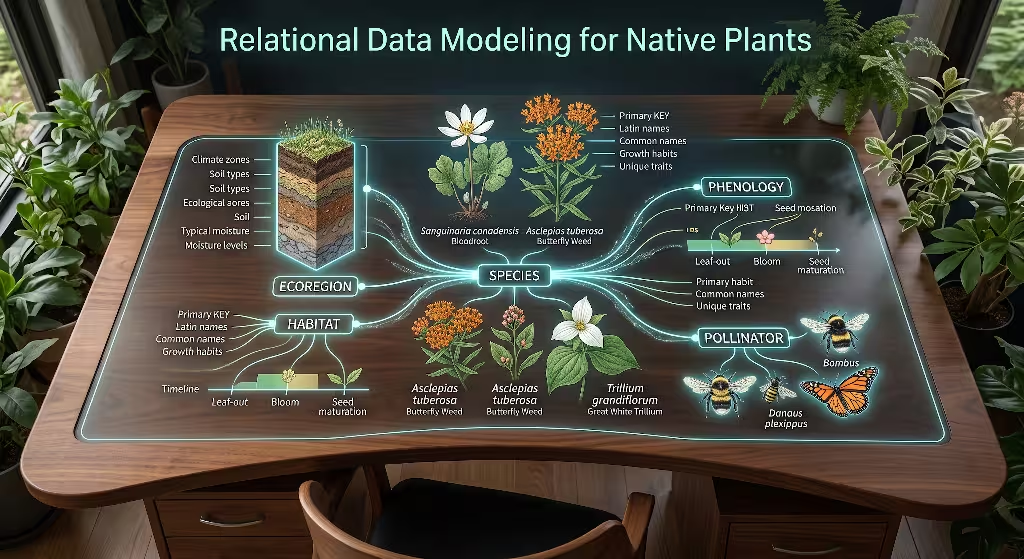
Let us look closely at how the database tables interact during an ecotype filtering session.
The plants_taxon table stores standard botanical data. This table does not change often. It contains the accepted botanical nomenclature, author citations, growth habits, and general moisture ranges.
The seed_lots table captures the exact biological origin. Every time nursery staff or certified seed collectors gather seed in the wild, they record a new seed lot. This record includes the exact coordinates of the wild stand, the estimated number of parent plants sampled to guarantee genetic diversity, and the EPA Level IV ecoregion code.
The ecoregions_level4 table contains the official shapefiles and multi-polygon geometries provided by government geological surveys.
The inventory_units table holds the real items available for purchase. Each row represents a group of pots sitting on a specific bench in the greenhouse. It points directly to a seed lot ID.
When a customer uses ecotype filtering on the front end of the website, the database does not search through flat text strings. It executes an inner join across these four tables. This ensures that every plant returned by the ecotype filtering engine has verified genetic provenance.
Spatial Query Optimization with PostGIS
Running spatial calculations on every page load can slow down a website if the queries are poorly designed. If ten thousand shoppers visit a nursery site during the spring planting rush, running complex point-in-polygon calculations on raw vector shapefiles will overload the web server.
PostGIS allows developers to index geographic shapes using spatial bounding boxes and spatial indices known as R-trees. To optimize ecotype filtering, the site should convert user inputs (like a 5-digit ZIP code or browser coordinates) into a standardized geographic point:
User Location: P = (Longitude}, Latitude)
The database uses the spatial operator ST_Contains to match the point P with the corresponding Level IV ecoregion polygon:
SQL
SELECT
    p.scientific_name,
    p.common_name,
    inv.sku,
    inv.container_size,
    inv.stock_quantity,
    eco.ecoregion_name_l4,
    eco.ecoregion_code_l4
FROM plants_taxon p
JOIN seed_lots sl ON p.taxon_id = sl.taxon_id
JOIN inventory_units inv ON sl.seed_lot_id = inv.seed_lot_id
JOIN ecoregions_level4 eco ON sl.ecoregion_level4_id = eco.ecoregion_code_l4
WHERE ST_Contains(eco.geom, ST_SetSRID(ST_Point(-71.0589, 42.3601), 4326))
  AND inv.stock_quantity > 0;
This spatial query runs in a few milliseconds because the spatial index eliminates 99% of North America before doing the exact polygon calculation. By optimizing spatial queries, ecotype filtering delivers instant search results without making customers wait.
Faceted Search Logic and Ecotype Filtering Engine

Faceted search allows shoppers to narrow down a large list of items by picking multiple attributes at the same time. On a standard clothing website, a user checks boxes for “Size 10,” “Blue,” and “Sneakers.” In our ecological model, the faceted engine operates on biological constraints.
Building an ecotype filtering engine requires clean state management. When a user checks a box to filter by their local ecoregion, the engine must immediately update the other available facets. For example, if a user selects a coastal sand plain ecoregion, the engine should automatically grey out wetland-only species that do not occur in that region.
+--------------------------------------------------------------------------+
|                     FACETED SEARCH SELECTION LOGIC                       |
+--------------------------------------------------------------------------+
| USER INPUT: Location (ZIP / Geolocation)                                 |
|      │                                                                   |
|      ▼                                                                   |
| [ Resolve to EPA Ecoregion: Level IV Code 59c ]                          |
|      │                                                                   |
|      ├──────────────────────────────────────────────────────┐            |
|      ▼                                                      ▼            |
| [ Filter Available Taxa ]                           [ Update Facets ]    |
| - Matches in stock from 59c                         - Soil: Sandy, Loam  |
| - Fallback matches from 59 (Level III)              - Sun: Full, Partial |
|                                                     - Moisture: Dry/Mesic|
|      │                                                      │            |
|      └──────────────────────────┬───────────────────────────┘            |
|                                 ▼                                        |
|             [ RENDER DYNAMIC PRODUCT GRID VIEW ]                         |
+--------------------------------------------------------------------------+
The ecotype filtering engine must process selections in a clear order of operations:
- Spatial Boundary Validation: The engine resolves the user’s geographic target.
- Taxonomic Fetch: The system selects all plant taxa that have inventory matching that geographic boundary.
- Environmental Attribute Intersection: The list is narrowed by sunlight, soil moisture, and site conditions.
- Availability Confirmation: Any plant with an inventory count of zero is hidden or marked as back-orderable based on seasonal seed cycles.
Using ecotype filtering this way prevents customers from ordering plants that will fail on their site.
Multi-Dimensional Faceting Matrix
To create a natural shopping experience, our ecotype filtering interface must organize botanical attributes into an intuitive matrix. The matrix groups attributes into primary, secondary, and tertiary layers:
| Layer | Attribute Category | Database Fields | Purpose in Ecotype Filtering |
| Primary | Ecoregion & Provenance | EPA Level III/IV, County, Seed Zone | Ensures biological adaptation to local climate and photoperiod. |
| Secondary | Site Conditions | Soil Moisture, Light Level, Soil pH | Matches physical yard conditions (e.g., dry shade vs. wet sun). |
| Tertiary | Ecological Function | Keystone Status, Host Plant, Bloom Season | Helps gardeners build complete pollinator corridors and food webs. |
When these attributes work together within the ecotype filtering engine, users can find answers to complex ecological questions with three mouse clicks. A user can request:
Ecoregion 59c (Coastal) + Dry Sandy Soil + Monarch Butterfly Host Plant
The ecotype filtering engine instantly narrows hundreds of products down to local wild-type Asclepias tuberosa harvested from coastal sand dunes. This precision is the main goal of modern nursery site design.
Algorithmic Fallbacks for Out of Stock Ecotypes
Native plant propagation takes time. A nursery cannot simply manufacture another batch of local ecotype plants when a wild seed collection runs out. Seeds must be collected in autumn, cold-stratified in damp sand for 60 to 120 days to break dormancy, and grown out over several months.
Because inventory is variable, an ecotype filtering engine needs an intelligent fallback algorithm. When a customer searches for a plant from their exact Level IV ecoregion and that item is sold out, the website should not display a dead end. Instead, the ecotype filtering system calculates biological distance.
       [ USER REQUEST: LEVEL IV ECOREGION 59c ]
                         │
                         ▼
             { Is Local Stock Available? }
              /                         \
           (Yes)                        (No)
            /                             \
    [ Render 59c Stock ]           [ RUN FALLBACK ALGORITHM ]
                                          │
                                          ▼
                               { Check Parent Level III (59) }
                                /                           \
                             (Found)                    (Not Found)
                              /                               \
                    [ Render Level III Stock ]     [ Calculate Floristic ]
                                                   [ Similarity Distance ]
                                                              │
                                                              ▼
                                                   [ Recommend Nearest ]
                                                   [ Ecoregion Lineage ]
The fallback system uses a tiered approach:
- Tier 1 (Exact Match): Seed origin matches the user’s Level IV ecoregion (e.g., 59c).
- Tier 2 (Regional Match): Seed origin matches the broader parent Level III ecoregion (e.g., 59).
- Tier 3 (Floristic Neighborhood): Seed origin comes from an adjacent ecoregion that shares similar soil chemistry, annual precipitation, and minimum temperatures.
When presenting a fallback option, the ecotype filtering interface must be honest with the user. The website should clearly state:
“Exact Level 4 ecotype (59c) is currently sold out. Showing stock from adjacent Level 3 zone (59), collected 38 miles away.”
This level of transparency builds trust with professional restoration ecologists and conservation buyers.
Client-Side versus Server-Side Execution
When building an ecotype filtering system, web developers must decide where the code runs: in the user’s web browser (client-side) or on the web hosting server (server-side).
Client-side execution uses modern JavaScript libraries to filter plants directly on the user’s device. When a customer clicks a checkbox, the page updates instantly without reloading. This feels very fast for the customer. However, downloading a complete botanical catalog containing thousands of seed records, GIS boundaries, and high-resolution images can slow down mobile phones on cellular connections.
Server-side execution builds the complete web page on the server before sending the finished HTML to the user. This is better for search engine crawlers because Google can easily read the text without executing complex JavaScript. However, refreshing the whole page on every filter click can feel slow for human shoppers.
The best solution for ecotype filtering is a hybrid approach known as server-side pre-rendering with client-side hydration:
+--------------------------------------------------------------------------+
|                  HYBRID RENDERING LIFECYCLE (SSR + HYDRATION)            |
+--------------------------------------------------------------------------+
| 1. Search Engine Crawler / Initial Browser Request                       |
|    │                                                                     |
|    ▼                                                                     |
| [ Server executes PostGIS query and builds complete static HTML ]        |
|    │                                                                     |
|    ▼                                                                     |
| [ Fast First Contentful Paint (FCP) + Search Engine reads pure HTML ]    |
|                                                                          |
| 2. Browser hydrates page with lightweight JavaScript                     |
|    │                                                                     |
|    ▼                                                                     |
| [ User clicks filter checkbox -> Instant JSON update without page reload]|
+--------------------------------------------------------------------------+
Using this hybrid pattern, ecotype filtering delivers the fastest performance for both search engines and human users.
Technical SEO: URL Routing, Canonicalization, and Crawl Budget Protection
Search engine optimization (SEO) for a native plant nursery requires careful technical planning. An ecotype filtering interface can easily create tens of thousands of unique URL combinations by mixing and matching different filters:
/plants?ecoregion=59/plants?ecoregion=59&soil=sand/plants?ecoregion=59&soil=sand&sun=full/plants?soil=sand&ecoregion=59/plants?sun=full&ecoregion=59&soil=sand
If search engine bots try to crawl every single variation of these parameters, they will waste their crawl budget on duplicate pages. This causes index bloat and lowers the website’s search rankings.
To protect search engine visibility, the website must use strict URL routing rules alongside its ecotype filtering system. The site must generate clean, human-readable URLs for high-value search terms while using parameter control on minor filter variations. Clean URL design helps search engines recognize the site as an authority on native plants and regional genetics.
Faceted Navigation Indexation Strategy
Not every filtered page should be indexed by search engines. A successful ecotype filtering strategy defines which page types are made public to search engines and which are hidden behind meta tags.
       [ INCOMING URL REQUEST FROM SEARCH BOT ]
                         │
                         ▼
        { Is URL a single high-value facet? }
        (e.g., /ecoregions/level-3/59-coastal/)
              /                         \
           (Yes)                        (No: Multi-attribute mix)
            /                             \
   [ Return Status: 200 ]          [ Return Status: 200 ]
   [ Robots: INDEX, FOLLOW ]       [ Robots: NOINDEX, FOLLOW ]
   [ Canonical: Point to Self ]    [ Canonical: Point to Base Category ]
We can organize the site’s indexation rules with a clear indexing table:
| Page Type | Example URL Pattern | Robots Tag | Canonical Tag Target |
| Main Taxon Hub | /species/asclepias-tuberosa | index, follow | Self |
| Ecoregion Hub | /ecoregions/level-3/59-coastal/ | index, follow | Self |
| Ecoregion + Species | /ecoregions/59/asclepias-tuberosa | index, follow | /species/asclepias-tuberosa |
| Complex Multi-Facet | /shop?eco=59c&soil=wet&sun=shade | noindex, follow | /ecoregions/level-3/59-coastal/ |
| Internal Sorting | /shop?eco=59&sort=price_asc | noindex, follow | /ecoregions/level-3/59-coastal/ |
By managing indexation this way, ecotype filtering provides landing pages for search engines without creating duplicate content traps.
Managing Parameter Bloat
Parameter bloat happens when a website creates thousands of useless URLs that show the exact same products in different orders. For example, if a user filters by sunlight first and ecoregion second, the URL might read ?sun=full&eco=59. If they click ecoregion first, the URL becomes ?eco=59&sun=full. To a search engine crawler, these look like two different web pages.
To prevent parameter bloat in your ecotype filtering system:
- Enforce URL Parameter Ordering: Always write code that alphabetizes parameters before the URL is requested (e.g., forcing
?eco=59&sun=fullevery time). - Use Google Search Console URL Parameter Controls: Configure crawl settings to tell search engines that specific parameters only change sorting, not page content.
- Use the
noindex, followMeta Tag on Deep Filter Strings: Allow search bots to discover new plant pages through links without indexing thin, multi-filter pages. - Implement Clean Path Routing: Rewrite important filter combinations into static folder paths, such as
/native-plants/new-england-coastal/perennials/.
Keeping parameters organized ensures that search engines focus on your most authoritative botanical content.
Breadcrumb Architecture
Breadcrumbs are the small text links found at the top of a product page that show the user where they are in the website hierarchy (e.g., Home > Perennials > Milkweeds). In a native plant nursery, breadcrumbs should communicate both taxonomic hierarchy and geographic lineage.
A standard breadcrumb structure only tracks website folders. An ecological breadcrumb structure reflects physical nature.
[ Home ]
   └── [ EPA Level III: Northeastern Coastal Zone (59) ]
          └── [ Wild-Type Perennials ]
                 └── [ Asclepias tuberosa (Seed Source: Barnstable County) ]
When building breadcrumbs for ecotype filtering, use Schema.org structured data markup (BreadcrumbList). This code helps search engines display rich navigation paths directly inside search engine results:
JSON
{
  "@context": "https://schema.org",
  "@type": "BreadcrumbList",
  "itemListElement": [
    {
      "@type": "ListItem",
      "position": 1,
      "name": "Home",
      "item": "https://example-native-nursery.com/"
    },
    {
      "@type": "ListItem",
      "position": 2,
      "name": "Northeastern Coastal Zone (Ecoregion 59)",
      "item": "https://example-native-nursery.com/ecoregions/59-coastal"
    },
    {
      "@type": "ListItem",
      "position": 3,
      "name": "Asclepias tuberosa (Ecotype 59c)",
      "item": "https://example-native-nursery.com/species/asclepias-tuberosa"
    }
  ]
}
This rich snippet tells both human readers and search engines that your ecotype filtering structure is built on validated ecological data.
Structured Data and Schema.org Implementation for Provenance
Search engines do not instinctively know the difference between a cloned cultivar and a wild-collected native plant. We must use structured data markup to explain these ecological details. Structured data uses the vocabulary from Schema.org, written in JSON-LD format, embedded directly into the page code.
By combining Product, Taxon, and Place schemas, we can describe genetic provenance in language search engines understand.
JSON
{
  "@context": "https://schema.org",
  "@graph": [
    {
      "@type": "Product",
      "@id": "https://example-native-nursery.com/plants/asclepias-tuberosa-59c#product",
      "name": "Butterfly Weed (Local Ecotype 59c)",
      "description": "Wild-type Asclepias tuberosa grown from seed collected in Barnstable County, Massachusetts. Adapted to coastal sandy soils.",
      "sku": "ASC-TUB-59C-1GAL",
      "offers": {
        "@type": "Offer",
        "price": "14.50",
        "priceCurrency": "USD",
        "availability": "https://schema.org/InStock",
        "itemCondition": "https://schema.org/NewCondition"
      },
      "additionalProperty": [
        {
          "@type": "PropertyValue",
          "name": "EPA Ecoregion Level IV",
          "value": "59c - Cape Cod and Islands"
        },
        {
          "@type": "PropertyValue",
          "name": "Propagation Method",
          "value": "Open-Pollinated Wild Seed"
        },
        {
          "@type": "PropertyValue",
          "name": "Genetic Provenance Distance",
          "value": "Under 25 Miles from Coast"
        }
      ]
    },
    {
      "@type": "Taxon",
      "@id": "https://example-native-nursery.com/plants/asclepias-tuberosa-59c#taxon",
      "name": "Asclepias tuberosa",
      "taxonRank": "https://schema.org/species",
      "parentTaxon": "Asclepias",
      "alternateName": "Butterfly Weed"
    }
  ]
}
When search engine robots read this markup, they can verify the accuracy of your ecotype filtering system. This helps your nursery show up in rich search carousels, voice searches, and local restoration queries.
Biophilic UI and UX: Translating Ecological Patterns into Digital Interfaces
Biophilic web design brings natural patterns, visual harmony, and living systems into digital interfaces. When designing a user interface (UI) for a native plant nursery, the visual design should look and feel like the natural world.
Instead of presenting users with gray, boxy drop-down menus, an ecological interface uses natural forms:
- Interactive Geographic Maps: Users click on a clean vector map of regional watersheds or ecoregions rather than typing text into empty search bars.
- Living Color Palettes: Use earthy, high-contrast colors inspired by native plant communities (moss greens, rich loam browns, deep river blues) that meet strict web accessibility guidelines.
- Specimen-Focused Photography: Show the whole plant lifecycle across seasons, including early spring shoots, summer blooms, autumn seed pods, and winter structure.
- Provenance Badges: Display clear, visual visual markers (like a leaf or seed badge) that highlight local genetic origin right on the product card.
+--------------------------------------------------------------------------+
|                  BIOPHILIC PRODUCT CARD WIREFRAME                        |
+--------------------------------------------------------------------------+
|  [ SPECIMEN PHOTOGRAPH ]                                                 |
|  (Shows summer bloom + inset thumbnail of seed head)                     |
|                                                                          |
|  Asclepias tuberosa (Butterfly Weed)                                     |
|  * Provenance: Barnstable County, MA                                     |
|  * Ecoregion: Level IV (59c - Cape Cod / Islands)                        |
|                                                                          |
|  [ [ECOTYPE BADGE: LOCAL SEED] ]  [ [KEYSTONE HOST PLANT] ]              |
|                                                                          |
|  Soil: Sandy / Well-Drained           Light: Full Sun                    |
|  Moisture: Dry to Mesic               Height: 2 - 3 Feet                 |
|                                                                          |
|  [ In Stock: 48 Quarts ] -> [ $12.00 ]                                   |
|  [ + ADD TO RESTORATION ORDER ]                                          |
+--------------------------------------------------------------------------+
When biophilic visual design pairs with ecotype filtering, shopping online feels less like browsing a warehouse and more like exploring a native plant sanctuary.
Commonly Asked Questions about Ecotype Filtering
Google search results often feature a “People Also Ask” (PAA) box containing common questions. An authoritative nursery website should answer these questions clearly within its main content and dedicated blog clusters. Integrating these answers directly strengthens your search authority and improves your ecotype filtering landing pages.
What is an ecotype in native plants, and why is it important for restoration?
An ecotype is a distinct population of a plant species that has genetically adapted over thousands of years to the specific environmental conditions of a local geographic area. These adaptations include tolerance to local soil types, winter low temperatures, seasonal rainfall patterns, and precise timing with native pollinator emergence.
Using plants with verified local genetics in habitat restoration ensures that the plantings survive unexpected weather swings and provide the exact nectar, pollen, and leaves required by local insects and wildlife.
How do I filter native plants by ecoregion instead of hardiness zone?
To filter plants by ecoregion, enter your postal ZIP code or geographic coordinates into an online store that supports ecotype filtering. The site maps your location to an EPA Level III or Level IV Ecoregion polygon rather than a broad USDA hardiness zone.
This spatial lookup filters the plant list to show only those species and seed lots collected from wild parent populations within your same ecological boundary.
What is the difference between a wild ecotype and a nativar?
A wild ecotype is grown directly from open-pollinated seed collected from wild native stands, preserving complete genetic diversity. A nativar is a native plant that has been bred or selected by humans for specific visual traits (such as double flowers, unusual leaf colors, or dwarf size) and then cloned through cuttings.
Nativars lack genetic diversity and can have altered flower shapes or nectar chemistry that make them difficult for native bees and specialist butterflies to use.
How does seed provenance impact native plant survival rates?
Seed provenance directly determines how well a plant handles local climate extremes. Plants grown from seeds harvested in your local ecoregion break dormancy at the correct time in spring and prepare for winter dormancy in response to local day-length cues.
Non-local seed sources often break bud too early during mid-winter warm spells and suffer severe freeze damage, leading to lower overall survival rates.
+--------------------------------------------------------------------------+
|                  SEMANTIC CONTENT CLUSTER ARCHITECTURE                   |
+--------------------------------------------------------------------------+
|                        [ CORE PILLAR PAGE ]                              |
|           "Complete Guide to Native Plant Ecotypes and GIS"              |
|                                  │                                       |
|        ┌─────────────────────────┼─────────────────────────┐             |
|        ▼                         ▼                         ▼             |
|  [ SUB-PAGE 1 ]            [ SUB-PAGE 2 ]            [ SUB-PAGE 3 ]      |
|  "EPA Ecoregion          "Wild Seed vs.            "Restoration Site     |
|   Taxonomy Explained"     Nativar Cultivars"        Design with PostGIS" |
|        │                         │                         │             |
|        └─────────────────────────┼─────────────────────────┘             |
|                                  ▼                                       |
|               [ ECOTYPE FILTERING CATALOG LANDING HUBS ]                 |
+--------------------------------------------------------------------------+
Inventory Management, Batch Tracking, and Dynamic Stock Allocation
Managing native plant inventory is more complicated than tracking manufactured products. Living plants transition through distinct developmental stages: unstratified seed, stratified germinating flats, bare-root plugs, and fully rooted container stock.
To keep ecotype filtering accurate, the inventory management system must track plants in biological batches. Every nursery bench holds a specific seed lot tied to a unique collection permit and harvest date.
[ WILD SEED HARVEST ] (Batch Tag: LOT-2025-59C-01)
         │
         ▼
[ COLD STRATIFICATION ] (Stored at 34°F for 90 Days)
         │
         ▼
[ GERMINATION PLUG TRAYS ] (Stage: Emergence / Unrooted)
         │
         ▼
[ POTTED CONTAINER BENCH ] (Stage: Saleable Stock -> SKU: ASC-59C-1G)
         │
         ▼
[ ECOTYPE FILTERING ENGINE DISPLAYS REAL-TIME LIVE INVENTORY ]
When plants are potted up into one-gallon containers, the inventory system updates their status from “growing” to “saleable.” If a late spring frost damages a specific greenhouse bay, the nursery staff updates that batch record, and the ecotype filtering engine immediately updates the website stock counts. This real-time synchronization prevents over-selling limited wild seed lots.
Core Web Vitals, Edge Performance, and Vector GIS Assets
A slow website frustrates users and lowers search engine rankings. Google evaluates websites using Core Web Vitals, which measure page load speed, responsiveness, and visual stability:
- Largest Contentful Paint (LCP): How fast the main content loads (Target: under 2.5 seconds).
- Interaction to Next Paint (INP): How quickly the page responds when a user clicks a button or filter (Target: under 200 milliseconds).
- Cumulative Layout Shift (CLS): How much the page layout moves around while loading (Target: under 0.1).
Loading complex GIS maps for ecotype filtering can hurt these performance metrics if not managed properly. Shapefiles containing detailed county boundaries and ecoregion borders are often several megabytes in size.
To maintain fast loading speeds:
- Convert Shapefiles to Vector Tiles (TopoJSON / Mapbox Vector Tiles): Simplify polygon borders by removing unneeded vertices. This reduces file sizes by up to 90% without losing ecological accuracy.
- Serve Map Data from Edge Content Delivery Networks (CDNs): Cache geographic files at server locations close to the user to reduce latency.
- Use Modern Image Formats (AVIF / WebP): Compress herbarium specimen photos and plant gallery images so they load quickly on mobile devices.
- Reserve Layout Space for Map Elements: Set explicit width and height dimensions on interactive map containers to prevent layout shifting during page load.
By following these performance guidelines, ecotype filtering delivers instant responsiveness even on slow mobile networks in rural restoration areas.
Architectural Audit Checklist and Deployment Blueprint
Before launching a native plant nursery website with ecotype filtering, web developers and nursery managers should complete a thorough technical audit. Use this structured checklist to ensure all biological, architectural, and SEO requirements are met:
===========================================================================
               ECOTYPE FILTERING SYSTEM DEPLOYMENT CHECKLIST
===========================================================================

[ ] 1. DATABASE & GIS INTEGRATION
    [ ] PostgreSQL and PostGIS extensions installed and configured.
    [ ] EPA Level III and Level IV ecoregion boundary shapefiles loaded.
    [ ] Spatial indexes (GIST) applied to all geometry columns.
    [ ] Seed lot table correctly linked to plant taxonomy records.

[ ] 2. SEARCH & FILTERING LOGIC
    [ ] Point-in-polygon queries successfully resolve user ZIP codes to ecoregions.
    [ ] Multi-attribute faceting correctly combines ecoregions, moisture, and sunlight.
    [ ] Tiered fallback algorithm presents adjacent seed lots when exact ecotypes sell out.
    [ ] Filter selections update available facet states dynamically without errors.

[ ] 3. TECHNICAL SEO & CRAWL BUDGET
    [ ] Static, clean URL paths generated for top-level ecoregion hubs.
    [ ] Robots meta tag set to 'noindex, follow' on complex, multi-parameter filter URLs.
    [ ] Self-referential canonical tags applied to primary taxon and ecoregion pages.
    [ ] BreadcrumbList schema implemented with geographic and taxonomic hierarchy.

[ ] 4. STRUCTURED DATA (JSON-LD)
    [ ] Schema.org Product markup includes SKU, price, and stock status.
    [ ] Schema.org Taxon entity nested with accepted botanical nomenclature.
    [ ] Provenance metadata (EPA code, seed origin) stored in additionalProperty fields.
    [ ] Structured data passes Google Rich Results validation tests with zero errors.

[ ] 5. USER EXPERIENCE & PERFORMANCE
    [ ] Map tiles simplified and served via edge CDN nodes.
    [ ] Interactive filter response time (INP) stays under 200 milliseconds.
    [ ] Specimen imagery compressed in WebP/AVIF formats with responsive srcset attributes.
    [ ] Mobile touch targets for filter buttons measure at least 48 by 48 pixels.
===========================================================================
Connecting biological reality with clean software design is the future of the native plant industry. When we replace generic e-commerce templates with specialized spatial databases and clear user interfaces, we do more than just sell plants. We build digital infrastructure that preserves local biodiversity, supports native pollinators, and helps restoration professionals heal fragmented ecosystems one verified local seed at a time. Through careful database planning, fast spatial queries, thoughtful SEO, and responsive visual design, building a platform around ecotype filtering sets a high standard for ecological commerce on the modern web.