
Imagine standing in the middle of a dense, ancient forest in Vermont. If you want to look behind a large fern, you simply reach out your hand and push the frond aside. You do not need to read a manual to understand how to do this. You do not need to type a code into a command line, nor do you need to click a drop-down menu labeled “Actions” and select “Move Fern.” You simply act, and the environment responds. This is the ultimate goal of technology: to feel as natural as the physical world.
As a scientist with a background in biology and web design, I view the evolution of user interfaces much like the evolution of a species. We started with the primitive, rigid structures of the Command Line Interface (CLI), where humans had to speak the machine’s language. Then, we evolved into the Graphical User Interface (GUI), most notably with the first Apple computer, which gave us visual symbols like windows and folders to help us understand the digital space. Now, we are entering the era of the Natural User Interface (NUI).
This shift is not just about new gadgets or fancy screens. It is a fundamental change in how humans connect with information. While Graphical User Interfaces rely on learned symbols and metaphors, like a trash can icon for deleting files, Natural User Interfaces leverage the skills you were born with, such as touching, speaking, and gesturing. At Silphium Design, we see this as a move toward “biophilic design” in technology. We are trying to build user interfaces that mimic the organic flow of nature, reducing the mental barrier between your intent and the computer’s action.
Table of Contents
Defining the Core Concepts
To understand where we are going, we must first understand the tools we use every day. The world of user interfaces is dominated by two major species: the GUI and the NUI.
What is a Graphical User Interface (GUI)?
The Graphical User Interface, or GUI, is likely what you are using to read this article right now on a desktop or laptop computer. It is built on a concept called the WIMP model. This stands for Windows, Icons, Menus, and Pointers.
When the GUI was invented, computer scientists had a difficult problem. They needed to explain to regular people how to manage digital data inside a computer chip. Their solution was brilliant but artificial. They decided to copy the real world office environment. This is why your screen is called a “desktop.” It is why you put documents into “folders.” It is why you throw things away in a “recycle bin.”
These are metaphors. There is no actual folder inside your computer; it is just a cluster of code. But the GUI uses these visual symbols to help you create a mental map of the system. To use these user interfaces, you usually need a mouse and a keyboard. You move the mouse on your physical desk, and a cursor moves on the vertical screen. This is an indirect action. You are operating a remote control to manipulate the pixels on the screen.
What is a Natural User Interface (NUI)?
A Natural User Interface breaks the glass wall. It removes the mouse and keyboard from the equation. The goal of a NUI is to make the interface invisible. When you use a touchscreen on a tablet or smartphone, you are using a NUI. When you ask a smart speaker to play music, you are using a NUI.
The defining trait of these user interfaces is that they use innate human capabilities. You do not need to learn that a “pinch” gesture makes things smaller; it mimics the physical action of squeezing something. If you want to scroll down a page, you flick it upward, just like sliding a piece of paper across a table.
From a biological perspective, this is closer to how our brains evolved to interact with the world. We evolved to manipulate physical objects with our hands and to communicate with our voices. NUIs try to honor that biology rather than forcing us to learn the artificial language of the computer.
Technical Comparison: Natural vs. Graphical User Interfaces

When we look under the hood of these user interfaces, we find distinct differences in how they function and how they affect the user.
Interaction Mechanics
The primary difference lies in how you make things happen. In Graphical User Interfaces, the interaction is indirect. You are always one step removed from the content. If you want to draw a picture in a GUI program, you hold a plastic mouse, move your hand horizontally, and watch a line appear vertically on a screen. Your hand is disconnected from the ink.
In Natural User Interfaces, the interaction is direct. If you want to draw on a tablet, you touch the screen where the line should appear. If you want to resize a photo, you touch the photo. This creates a much stronger cognitive connection. It feels less like operating a machine and more like manipulating a physical object. This directness is a key principle in biophilic design, as it mimics the immediate feedback we get from nature.
Learning Curve and Accessibility
Think about how long it takes a child to learn to use a mouse. They often struggle to coordinate their hand movement with the cursor on the screen. Graphical user interfaces have a learning curve because they rely on symbols. You have to learn that a small icon of a floppy disk means “save,” even though most children today have never seen a real floppy disk.
In contrast, Natural user interfaces are often intuitive. I have seen toddlers who cannot read yet pick up an iPad and immediately know how to swipe through photos. They know that touching something usually pauses it or opens it. Because NUIs rely on movements we use in real life, the barrier to entry is much lower. This makes technology accessible to a wider range of people, from very young children to the elderly who might find a mouse and keyboard intimidating.
Context Sensitivity
Graphical user interfaces tend to be static. If you open a word processor, the toolbar is always there at the top of the screen. It shows you every possible tool you might need, whether you are using them or not. This can be overwhelming. It is like having every tool in your garage spread out on your workbench at once.
Natural user interfaces are context-sensitive. They are organic. They adapt to what you are doing. If you are reading a book on a tablet, the menus disappear so you can focus on the text. They only reappear if you tap the screen. This reduces “cognitive load,” which is the amount of mental effort used in working memory. By hiding unnecessary controls, NUIs allow the user to focus entirely on the task at hand, much like how a predator focuses entirely on its prey without distraction.
Hardware Dependencies
The hardware required for these user interfaces differs significantly. A GUI requires a screen, a pointing device (mouse/trackpad), and a text input device (keyboard). It is a stationary setup.
A NUI requires sensors. To make a computer understand a wave of your hand or a voice command, it needs cameras, microphones, accelerometers, and touch-sensitive glass. It requires more complex processing power to interpret these “fuzzy” human inputs. A mouse click is a clear binary signal (on or off), but a voice command can have accents, background noise, and different volumes. The computer has to work much harder to understand a Natural User Interface.
Advantages and Disadvantages
As with any evolutionary adaptation, there are trade-offs. Neither of these user interfaces is perfect for every situation.
Graphical User Interface (GUI): The Pros and Cons

The biggest advantage of Graphical user interfaces is precision. When you need to edit a spreadsheet with thousands of tiny cells, or write a complex line of code, nothing beats the pixel-perfect accuracy of a mouse pointer. The mouse allows for fine motor control that a fat finger on a glass screen cannot match.
Also, GUIs have a standard “grammar.” Almost every program has a “File” menu in the top left corner. Once you learn this standard, you can use almost any program.
However, the disadvantage is the abstraction. You are always aware you are using a computer. The interface stands between you and your work. It can feel rigid and mechanical, which can stifle creativity in some contexts.
Natural User Interface (NUI): The Pros and Cons
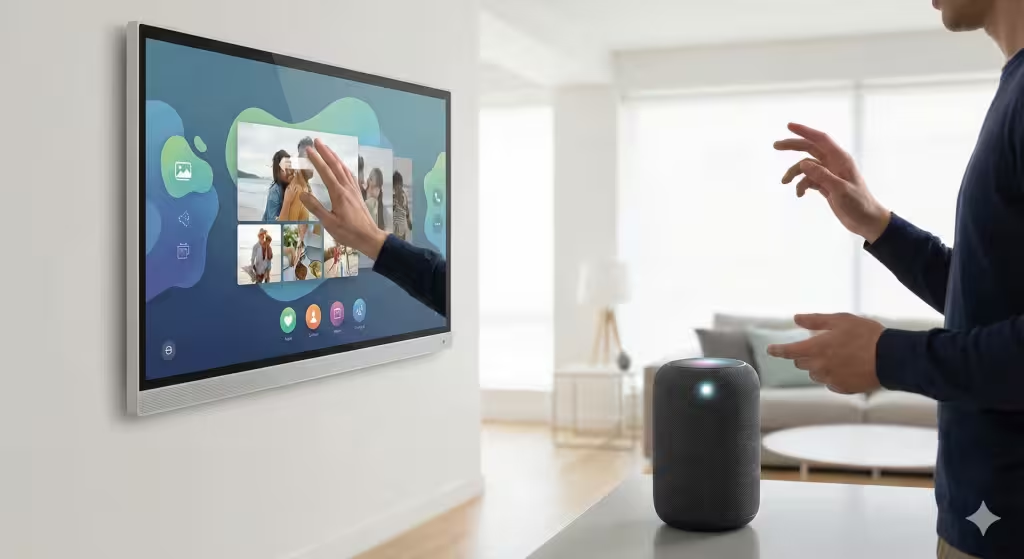
The main advantage of Natural user interfaces is immersion. Because the controls are invisible, you feel closer to the content. It is more fun and engaging. This is why NUIs have taken over the gaming and entertainment world. It feels magical to wave your hand and have a screen react.
But NUIs have a physical cost. There is a phenomenon known as “Gorilla Arm.” If you have to hold your arms up to touch a vertical screen or wave at a camera for a long time, your arms get tired. It is physically exhausting.
Furthermore, NUIs lack a standard grammar. A “swipe left” in one email app might delete a message, but in another app, it might archive it. In a dating app, it means “no.” This lack of consistency can be frustrating for users. Without visual menus, users sometimes have to guess what gestures are available. This is called a lack of “discoverability.”
Biophilic Design in UI: Bridging the Gap
At Silphium Design, my work focuses on integrating nature into the digital world. This goes beyond just putting pictures of leaves on a website. It is about how the website feels and behaves. This is where the study of user interfaces becomes a study of biology.
Biophilic design seeks to satisfy our innate need to affiliate with nature. When we design user interfaces, we can look to natural systems for inspiration. A Natural User Interface is inherently more biophilic because it follows the laws of physics.
Fractal Patterns and Flow
In nature, things rarely move in straight, rigid lines. A leaf falling from a tree floats and sways. Water flowing in a stream curves around rocks. When we design modern user interfaces, we try to replicate this physics.
When you scroll through a list on your phone, it does not stop instantly when you lift your finger. It coasts to a stop, carrying momentum. If you scroll to the end of the list, it might bounce slightly, like a rubber band. These are organic behaviors programmed into the code. They make the digital object feel like it has mass and weight. This provides a sense of comfort and familiarity to the human brain, which evolved to predict the physics of the real world.
The Invisible Interface
The ultimate goal of biophilic design in user interfaces is to reduce friction. In a forest, there is no interface between you and the experience. You simply exist in the space. We want websites and applications to feel the same way.
By using NUI principles, like voice commands and touch, we can remove the clutter of buttons and menus. This creates a “calm technology.” It allows the user to enter a state of flow, similar to the meditative state one might find while gardening or walking in the woods. We are seeing more user interfaces that use “white space” (or negative space) to let the content breathe, mimicking the openness of a landscape rather than the cramped grid of a spreadsheet.
Common Questions About Interfaces
In my research on search engine trends, I see many people asking specific questions about these technologies. It is important to address them to fully understand the landscape of user interfaces.
What is the main difference between GUI and NUI?
The main difference is the input method. A GUI uses hardware like a mouse and keyboard to manipulate visual metaphors (windows, icons). A NUI uses natural human behaviors like touch, gestures, and voice to interact directly with the content. One is indirect and learned; the other is direct and intuitive.
Is NUI the future of UI design?
Yes, but it will not completely replace the GUI. We are moving toward a “post-WIMP” era where user interfaces are more spatial and immersive, especially with the rise of Virtual Reality (VR) and Augmented Reality (AR). However, for tasks requiring high precision and text entry, like coding or writing a novel, the keyboard and mouse (GUI) remain superior tools. We will likely see a hybrid future where we use both.
Can a website be a Natural User Interface?
A website itself is usually viewed through a browser (which is a GUI), but the design of the website can incorporate NUI principles. For example, websites designed for mobile devices rely heavily on touch, swipe, and pinch gestures. Modern web design is moving away from tiny buttons and toward large, touch-friendly areas and gesture-based navigation, making the web feel more like a natural environment.
Future Trends: The Symbiosis of AI and NUI

As we look to the future, the evolution of user interfaces is merging with the explosion of Artificial Intelligence (AI). This symbiosis will create interfaces that feel almost alive.
Predictive Interfaces
Imagine a user interface that knows what you want before you ask for it. This is the promise of AI. In nature, an ecosystem adapts to changes instantly. AI can make our user interfaces adaptive. Instead of you searching for a menu item, the AI will analyze your behavior and present the button you need right when you need it.
This connects back to the concept of “intent.” In a traditional GUI, you have to translate your intent into a series of clicks. With AI-driven NUIs, you might just speak a sentence or look at an object, and the system understands your intent. The interface becomes a partner rather than a tool.
Ambient Computing
We are moving toward “Ambient Computing,” where the computer disappears entirely into the environment. This is the ultimate expression of a Natural User Interface. Your smart home sensors, your watch, and your car all work together to create an ecosystem of information.
In this future, you do not “log in” to a computer. You simply walk into a room, and the room responds to you. The lights adjust to your circadian rhythm (a key biophilic principle), the music plays based on your mood, and your schedule is read aloud. The world itself becomes the interface. This mirrors the biological reality where an organism is constantly in communication with its environment without ever “typing a command.”
Conclusion
The journey from the blinking cursor of a command line to the fluid touch of a tablet represents a profound shift in technology. We are moving away from forcing humans to think like machines and toward teaching machines to understand humans.
Graphical user interfaces served a vital role in the history of computing. They democratized information and gave us the visual tools to organize our digital lives. They are the filing cabinets and typewriters of the digital age, reliable, precise, and necessary for structured work.
However, Natural user interfaces represent the return to our roots. They acknowledge that we are biological beings who learn through touch, movement, and sound. They bring an organic fluidity to technology that aligns perfectly with the principles of biophilic design.
At Silphium Design, we believe the best user interfaces are the ones you do not notice. They are the ones that feel as natural as a conversation or a walk in the woods. As we continue to refine these technologies, we must ensure they serve to connect us more deeply with our work and each other, rather than acting as a barrier. The future of design is not just about pixels and code; it is about respecting the human animal and the natural world we inhabit.
If you are looking to update your digital presence, I encourage you to look at your current website or application. Does it feel like a machine? Or does it flow like a living thing? By embracing the principles of Natural user interfaces, we can create digital experiences that are not only easier to use but also healthier for the human mind.