
Imagine walking into a forest. When you want to look at a flower, you do not type a command into a keyboard that says “look down.” You do not move a plastic mouse on a pad to shift your view. You simply move your head. You reach out your hand. You touch the petals. The interaction is seamless. It is invisible. There is no barrier between your intent and your action. This is the ultimate goal of computer science, and it is realized through what we call a natural user interface.
For decades, we have been forced to learn the language of machines. We memorized commands. We learned to double-click. We learned that “Ctrl+C” means copy. We trained our brains and our muscles to work in ways that are not natural to our biology. But the tide is turning. We are now entering an era where machines are finally learning to speak the language of humans.
A natural user interface is a system where the interaction is intuitive. It relies on innate human behaviors. We use touch, speech, gesture, and even our gaze. We move away from artificial control devices like the mouse and keyboard. As a specialist in biophilic design, I view this as a necessary evolution. Biophilia is the innate human tendency to seek connections with nature. When we design websites and software that behave like the natural world, we reduce stress. We make things easier to use.
This article will explore the depths of this technology. We will look at how it started and where it is going. We will see how a natural user interface is not just a feature, but a revolution in how we exist in a digital world. It is the shift from command-based systems to intent-based experiences. We are moving toward a world where the interface disappears, leaving only the connection.
Table of Contents
The Evolution of Interface: From Text to Instinct
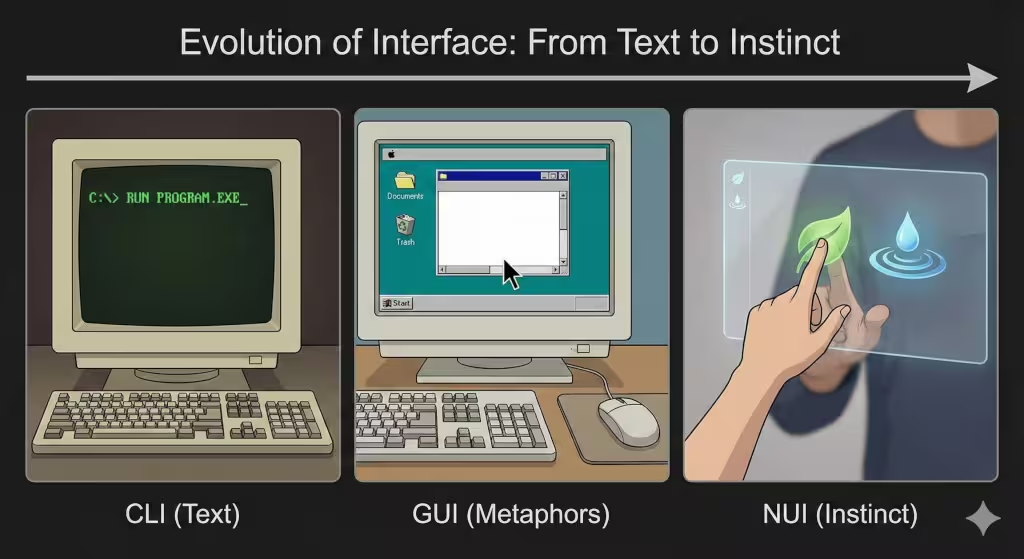
To understand where we are going, we have to look at where we have been. The history of how humans talk to computers is a history of removing layers of abstraction. We are constantly trying to get closer to the machine.
The Command Line Interface (CLI)
In the beginning, there was the Command Line Interface. This was the era of abstraction and memorization. If you wanted the computer to do something, you had to type a specific code. It was like learning a very difficult foreign language. There were no pictures. There were no icons. It was just text on a black screen.
This was efficient for the computer, but it was very hard for the human. It required high cognitive load. That means your brain had to work very hard just to operate the tool. You could not just “use” the computer; you had to study it. This is the opposite of a natural user interface. It is completely artificial.
The Graphical User Interface (GUI)
Then came a massive leap forward. We entered the era of metaphors. This is the Graphical User Interface, or GUI. This is what most people use today on their laptops.
The GUI uses symbols to represent things. We have a “desktop.” We have “files” and “folders.” We have a “trash can.” These are metaphors, which is called skeuomorphism. There is no real trash can inside your computer. But by using these pictures, it made it easier for people to understand. We use a mouse to move a pointer. This was better than typing code, but it is still not truly natural. In the real world, if you want to move a paper, you grab it. You do not slide a plastic device on a table to move a remote arrow to drag the paper. The GUI is a bridge, but it is not the destination.
The Natural User Interface (NUI)
Now, we arrive at the natural user interface. This is the era of intuition and direct manipulation. In a natural user interface, the user becomes the controller. The learning curve is almost zero.
Think about a tablet. If a toddler wants to move a picture, they put their finger on it and slide it. They did not need to read a manual to know how to do that. It is instinct. A natural user interface takes advantage of skills we have evolved over millions of years. We know how to point. We know how to speak. We know how to grab. By using these skills, the technology feels invisible.
Core Modalities of NUI
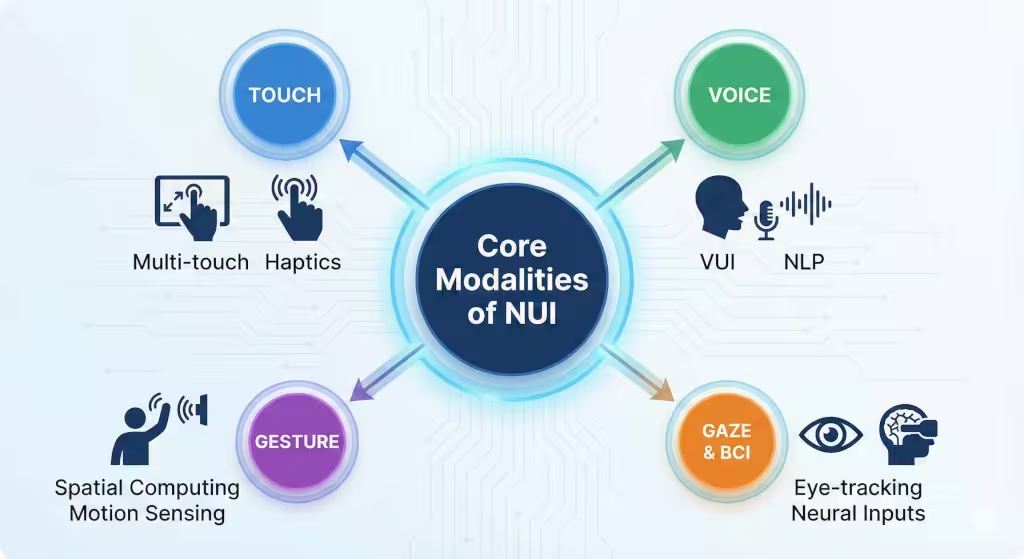
A natural user interface is not just one thing. It is a collection of different technologies that work together to understand us. Let’s break down the main ways these interfaces work.
Touch (Haptics & Multi-touch)
Touch is perhaps the most common form of natural user interface we see today. But it goes far beyond just tapping a screen.
Modern touch screens use multi-touch technology. This allows us to use multiple fingers at once. We pinch to zoom in. We rotate two fingers to turn an image. These are gestures that mimic how we manipulate physical objects. If you hold a sheet of rubber and stretch it, it expands. Pinch-to-zoom mimics this physical reality.
But for touch to be truly natural, it needs feedback. This is where haptics come in. Haptics is the science of touch feedback. When you press a real button, you feel a click. When you type on a glass screen, you often feel nothing. This disconnects the brain. A good natural user interface uses vibrations to trick your brain into feeling texture or resistance. This confirms your action without you needing to look. Haptics are often felt on smartphones through vibration.
Voice (VUI – Voice User Interface)
Speaking is the most natural way humans share information. A Voice User Interface allows us to control computers with conversation.
In the past, voice control was rigid. You had to say exact phrases. But now, thanks to Natural Language Processing (NLP), computers understand context. You can ask, “Do I need an umbrella?” and the computer checks the weather and tells you “Yes, it is raining.”
This creates a hands-free natural user interface. It is biophilic because it mimics the social structure of a tribe. We ask for help, and we receive an answer. It removes the physical barrier entirely.
Gesture Recognition
Gesture recognition allows the computer to see you. It uses cameras and sensors to track your body in space. This is often called spatial computing.
Imagine you are giving a presentation. Instead of clicking a mouse, you wave your hand in the air to swipe the slide away. The computer sees your hand move and reacts. This is a very powerful natural user interface. It allows for “minority report” style interactions where you are conducting data like an orchestra conductor.
Gaze and Brain-Computer Interfaces
The frontier of the natural user interface is the eyes and the brain. Eye-tracking technology knows where you are looking. If you look at an icon and blink, that could select it. This is incredibly fast because your eyes move faster than your hands.
Even further out is the Brain-Computer Interface (BCI). This reads electrical signals from your brain. You think about moving a cursor, and it moves. While this sounds like science fiction, it is the ultimate conclusion of the natural user interface. It creates a direct link between thought and digital action, removing the physical body from the equation entirely.
Biophilic Design and NUI: Designing for the Human Animal
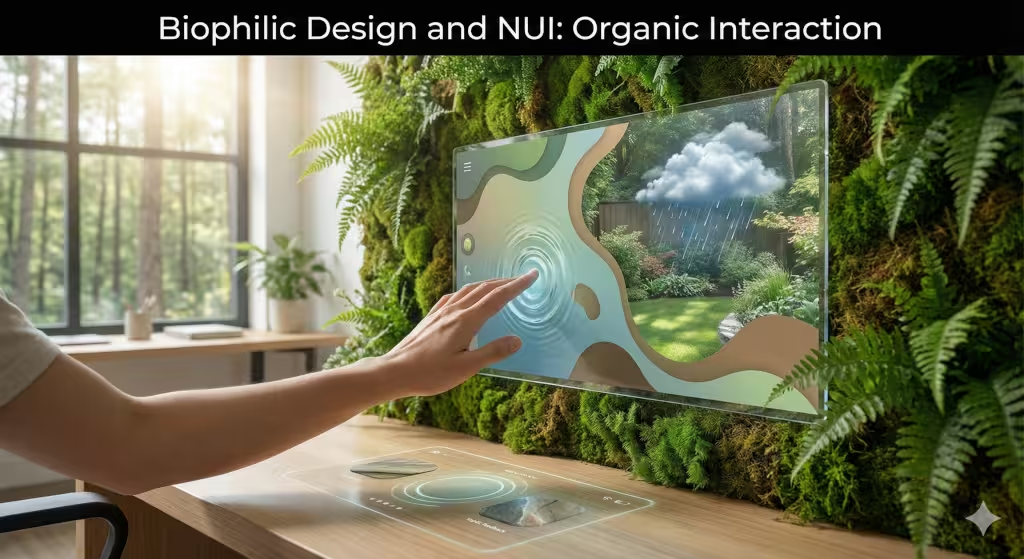
As an expert in biophilic design, I see a deep connection between nature and the natural user interface. Biophilic design is about creating spaces that function like natural habitats. NUI is about creating software that functions like the physical world.
Cognitive Load Reduction
In nature, we do not have to think about how to walk or how to breathe. It happens automatically. Good design should be the same. Every time a user has to stop and think “how do I do this?”, the illusion breaks.
A natural user interface reduces cognitive load. It removes the “friction” of translating human intent into machine code. This is similar to how a biophilic office full of plants reduces mental fatigue. When the interface acts naturally, our brains relax. We become more creative and productive because we are not fighting the tool.
Organic Feedback Loops
In the wild, every action has a reaction. If you step on a dry leaf, it crunches. If you touch water, it ripples. This is an organic feedback loop.
Digital interfaces often lack this. A natural user interface must restore it. When you delete a file, it should “poof” away like smoke or slide off the screen like a paper. When you scroll, the list should have “inertia,” it should keep moving and slowly stop, just like a spinning wheel. These physics-based animations are not just for show. They help our primate brains understand what is happening. They provide a sense of weight and substance to digital objects.
Spatial Awareness and AR
We are 3D creatures living in a 3D world. Yet, for a long time, our computers were flat 2D screens. This is unnatural.
Augmented Reality (AR) is a type of natural user interface that overlays digital content onto the real world. It respects our spatial awareness. If you are using a navigation app, an arrow might appear on the actual street in front of you. You do not have to look down at a map and then translate that to the road. The information is integrated into your environment. This is the essence of biophilic technology, it enhances the environment rather than blocking it out.
Benefits and Challenges of NUI
While the natural user interface is the future, it is not without its problems. We must look at both the good and the bad.
Benefits: Intuitive Learning and Immersion
The biggest benefit of a natural user interface is that it lowers the barrier to entry. You do not need a degree in computer science to use it. A grandmother who has never used a computer can pick up an iPad and turn the pages of a digital book. A child can talk to a smart speaker.
This democratizes technology. It makes powerful tools available to everyone. It also creates immersion. When the interface disappears, you are left alone with the content. Whether you are designing a building or playing a game, the natural user interface keeps you in the “flow state.”
Challenges: The “Gorilla Arm” Effect
There is a famous problem in the world of gesture interfaces called the “Gorilla Arm” effect. This happens when you have to hold your arms up in the air to control a screen for a long time.
Human arms are not meant to be held out horizontally for hours. They get heavy. They get tired. While a mouse allows you to rest your wrist, a gesture-based natural user interface can be physically exhausting. Designers have to figure out how to make gestures subtle and small to avoid this fatigue.
Lack of Standards
Everyone knows how a keyboard works. It is a standard. But with a natural user interface, there are no strict rules yet. One app might want you to swipe left to delete. Another app might want you to swipe left to save.
If you wave your hand at a screen, what happens? Does it scroll? Does it close? Without standards, users can get confused. We need to develop a universal language of gestures that works across all devices.
False Positives
A keyboard only types when you press a key. But a camera is always watching. A microphone is always listening. This leads to false positives.
You might be talking to a friend and say a word that sounds like a command. The natural user interface might wake up and interrupt you. You might wave at a fly and the computer thinks you want to change the song. The system needs to be incredibly smart to understand the context and intent, not just the raw input.
Common Asked Questions about Natural User Interfaces
Many people often ask the same questions about this topic. Here are the answers.
What are the 3 natural user interfaces?
The three primary pillars of a natural user interface are Touch, Voice, and Gesture.
- Touch: Using fingers on a surface (swiping, pinching).
- Voice: Using speech commands (talking to assistants).
- Gesture: Moving the body in space (waving, pointing). While gaze and brain inputs are emerging, these three are the standard today.
Is VR a natural user interface?
Yes, Virtual Reality (VR) is a powerful example of a natural user interface, specifically when it uses hand tracking and “6 Degrees of Freedom” (6DoF). If you are in VR and you reach out to grab a virtual cup by making a fist, that is NUI. However, if you are in VR but using a game controller with buttons, that is a mix of NUI and traditional GUI.
What is the difference between GUI and NUI?
The main difference is the layer of abstraction.
- GUI (Graphical User Interface): Uses metaphors (windows, icons, menus) and indirect control devices (mouse, keyboard). You learn the interface to do the task.
- NUI (Natural User Interface): Uses direct action (touching, asking, looking). You bypass the interface to do the task directly. NUI relies on what you already know how to do as a human.
Future Trends: The Invisible Interface
Where is the natural user interface going next? As technology advances, it will become even more biophilic. It will become part of the ecosystem of our lives.
Ambient Computing
Ambient computing is the idea that technology should be like the air, everywhere, but invisible. You will not carry a device. The room itself will be the computer.
You will walk into a room and simply speak or gesture, and the environment will react. Screens will be woven into fabrics or projected onto surfaces only when needed. This is the ultimate natural user interface because it removes the hardware entirely. The world becomes the interface.
AI-Driven Context Awareness
Future interfaces will use Artificial Intelligence to predict what you want. A truly natural user interface will know you are cold and turn up the heat without you asking. It will see that you are cooking and automatically project a recipe onto the counter.
This shifts the dynamic from “user commands computer” to “computer anticipates user.” It is a symbiotic relationship, much like the relationships found in nature.
Conclusion
We are living through a massive shift in technology. We are leaving the age of the keyboard and entering the age of the natural user interface. This is not just about cool gadgets. It is about making technology more human.
By using touch, voice, and gesture, we are designing systems that respect our biology. We are creating tools that work the way we work. As we move forward, the best technology will be the kind you cannot see. It will be fluid, organic, and intuitive.
The ultimate natural user interface is one where the user forgets they are using an interface at all. They just exist, act, and create. This is the harmony between man and machine that we are striving for. It is the digital world, designed by nature.