
Table of Contents
The Fediverse Is Not Twitter 2.0
When marketing teams first arrive on the Fediverse, they often bring an old playbook that was built for legacy social media platforms. I see this happen every single week in my work at Silphium Design. A company creates an account on Mastodon, posts three press releases, tags twenty unrelated topics, and wonders why nobody is interacting with their content. Worse yet, some brands find their domain blocked by major servers within forty-eight hours.
Understanding this network requires a look at both computer science and human sociology. Traditional social networks rely on central servers and engagement algorithms. Those platforms are designed to hold attention by showing people whatever causes the strongest emotional reaction. Mastodon runs on a completely different model. It is built on an open protocol called ActivityPub, which connects thousands of independent servers into a shared network known as the Fediverse. There is no central company in charge, no corporate board selling your data, and no black-box algorithm deciding who sees your posts.
Because the technical architecture is different, the social rules are different too. The Fediverse functions much like a digital gift economy. People gather here to share useful knowledge, build open software, support independent art, and have real conversations. When a company walks into this environment and acts like a billboard, the community reacts with swift resistance. Traditional broadcast marketing feels like an intrusion into a community space.
If you want your business to grow here, you have to learn how this ecosystem works. You cannot simply copy what you do on other networks. Brands that take the time to understand the technology and respect the culture can build deep brand loyalty and drive high-quality website traffic. Avoiding basic mastodon mistakes is the first step toward building real equity on the Fediverse. By aligning your technical setup, your design standards, and your social interactions with the values of the network, your brand can thrive. Let us examine the most critical mastodon mistakes you need to avoid and explore the exact strategies that will help you succeed.
+-----------------------------------------------------------------------------+
|                     TRADITIONAL PLATFORMS vs. MASTODON                      |
+-----------------------------------------------------------------------------+
| Feature             | Legacy Social Networks    | Mastodon / Fediverse      |
+---------------------+---------------------------+---------------------------+
| Network Structure   | Centralized Walled Garden | Decentralized ActivityPub |
| Feed Ranking        | Algorithmic Optimization  | Strict Reverse Chronology |
| Discovery System    | Paid Ads & Viral Trends   | Hashtags & Organic Boosts |
| Identity Trust      | Paid Subscription Badges  | Open HTML rel="me" Links  |
| Community Culture   | Extractive & Commercial   | Cooperative Gift Economy  |
+---------------------+---------------------------+---------------------------+
Picking the Wrong Home Instance and Disregarding Server Rules
The first decision your company makes is choosing where your account lives. On Mastodon, there is no single website where everyone signs up. Instead, there are thousands of independent servers, known as instances. Each server runs its own copy of the Mastodon software, sets its own rules, pays for its own hosting costs, and manages its own moderation team.
One of the most damaging mastodon mistakes a brand can make is signing up on the first server they find without reading its local code of conduct. Many popular community servers explicitly ban commercial activity and corporate marketing in their rules. If you register your business on an instance dedicated to open-source software development or digital art, and that server has a strict non-commercial rule, the server admin will suspend your account. This is one of those mastodon mistakes that can instantly ruin your reputation before you even get started.
                      +-----------------------------+
                      |   Your Brand Organization   |
                      +--------------+--------------+
                                     |
             +-----------------------+-----------------------+
             |                                               |
             v                                               v
+---------------------------+                   +---------------------------+
|   Dedicated Self-Hosted   |                   |  Third-Party Cooperative  |
|         Instance          |                   |          Instance         |
|  (social.yourbrand.com)   |                   |   (e.g., mastodon.social) |
+-------------+-------------+                   +-------------+-------------+
              |                                               |
  Total Governance Control                        Shared Server Rules
  Zero Risk of External Eviction                  Subject to Admin Moderation
  Direct Domain Authority                         Potential Commercial Limits
You have two primary paths for setting up your brand presence:
- Host Your Own Dedicated Instance: For established businesses, running an instance on your own subdomain (such as
social.yourbrand.com) is the gold standard. Running your own server gives you total control over your data and policies. You never have to worry about getting banned by a third-party server administrator. - Join a Commerce-Friendly Public Instance: If you do not want to manage server infrastructure, you must select an instance that explicitly permits commercial accounts and business discussions. Large general servers like
mastodon.socialallow brand accounts as long as they follow general network etiquette.
When you join an existing server, read the “About” page carefully. Check the moderation rules, the local timeline topics, and the list of blocked servers. Joining a server with a bad reputation can cause other servers to block your posts automatically. Researching server policies helps your team prevent costly mastodon mistakes that could isolate your brand from your target audience.
Overlooking Decentralized Verification via rel=”me” Metadata
On centralized networks, verification usually means paying a monthly subscription or submitting corporate documents to a central office to receive a blue checkmark. Because Mastodon has no central authority, many marketers assume verification does not exist here. Believing you cannot verify your identity is one of the classic mastodon mistakes that weakens trust in your brand.
Mastodon uses an open web standard for verification based on the HTML rel="me" attribute. This system proves identity through two-way linking between your Mastodon profile and your official company website. When you configure this link properly, Mastodon displays your website URL in a bright green box on your profile with a checkmark next to it. This visual signal tells every user on the network that your account is legitimately owned by the organization operating that website.
+---------------------+                          +---------------------+
|   Mastodon Profile  |                          |   Company Website   |
|   Metadata Field:   |                          |   HTML Header/Body: |
|                     |  ==== 1. Link To Site => |                     |
| https://example.com |                          | <a rel="me" href=   |
|                     |  <= 2. Confirms Match == | "https://instance/  |
|  [ GREEN CHECKBOX ] |                          | @brand">Mastodon</a>|
+---------------------+                          +---------------------+
Setting up this verification requires two simple steps:
- Add your website URL to one of the four metadata fields in your Mastodon profile settings.
- Place a link back to your Mastodon profile on your website, making sure to include the
rel="me"attribute inside the link tag.
HTML
<!-- Example of a verified backlink to place on your website footer or press page -->
<a href="https://mastodon.social/@YourBrandName" rel="me">
  Follow us on Mastodon
</a>
When you save your profile, your Mastodon server visits your website and searches for a link pointing back to your profile containing that rel="me" tag. Once it confirms the match, your profile displays the verified green badge.
Skipping this setup is one of the easiest mastodon mistakes to avoid. Without this verified link, community members may suspect your account is an unauthorized impersonator or an unmonitored bot. Taking ten minutes to configure this code protects your brand name and establishes immediate credibility.
Burst Posting and Breaking the Chronological Timeline

Centralized social feeds use algorithms to rearrange posts based on predicted user engagement. If you post five updates in five minutes on an algorithmic platform, the system spreads them out across user feeds over several hours. Mastodon does not use an engagement algorithm. Every timeline on the platform updates in strict reverse chronological order.
Posting multiple updates in rapid succession, known as burst posting, is one of the most frustrating mastodon mistakes a brand can commit. When you publish four or five promotional posts back to back, your updates fill up the entire screen of your followers. Instead of seeing a diverse mix of thoughts from everyone they follow, your audience sees an uninterrupted wall of your marketing messages.
POOR CADENCE: BURST POSTING (Negative Experience)
[09:00 AM] Post 1: Product Announcement
[09:02 AM] Post 2: Customer Case Study
[09:04 AM] Post 3: Discount Coupon Code
[09:05 AM] Post 4: Blog Link
-> Result: Takes over user screens, triggering instant mutes and unfollows.

RECOMMENDED CADENCE: SPACED POSTING (Positive Experience)
[08:30 AM] Morning Insight: Technical tip or industry discussion
[01:15 PM] Afternoon Share: Case study with descriptive context
[06:00 PM] Evening Resource: Helpful community link or open discussion
-> Result: Reaches different time zones cleanly without crowding the feed.
When users see their chronological timeline flooded, their immediate reaction is to mute or unfollow the offending account. In severe cases, users will report your profile to their server moderator for timeline spamming.
To prevent these mastodon mistakes, establish a steady, spaced-out publishing schedule:
- Space your standalone posts at least two to three hours apart throughout the business day.
- If you have a long series of related thoughts to share, publish them as a connected reply thread rather than individual standalone posts.
- Keep your daily posting volume modest, focusing on one to three high-quality contributions per day.
Respecting the chronological timeline shows your audience that you understand how the platform works. Avoiding timeline-flooding mastodon mistakes keeps your followers happy and ensures your content is welcomed rather than muted.
Blind Automation and Unformatted Cross-Posting
Many marketing teams try to save time by setting up automated tools that take posts from other networks and copy them directly to Mastodon. While automation can be helpful when handled thoughtfully, unformatted cross-posting is one of the most visible mastodon mistakes you can make on the Fediverse.
When you copy posts directly from other networks without adjusting the formatting, several technical elements break down:
- Broken User Handles: An account handle like
@MarketingProthat works on another network will either point to nobody or tag an entirely unrelated person on Mastodon. - Mutilated Media: Images cropped for different aspect ratios often look distorted or cut off important text.
- Missing Alternative Text: Automated tools frequently drop image descriptions, which alienates users who rely on assistive technology.
- Broken Platform Jargon: Referencing platform-specific terms like “retweet” or “sub-tweet” signals that your brand does not care about the local community.
+-----------------------------------------------------------------------------+
|                      CROSS-POSTING ARTIFACT BREAKDOWN                       |
+-----------------------------------------------------------------------------+
| Element           | Unformatted Automated Feed    | Native Mastodon Format  |
+-------------------+-------------------------------+-------------------------+
| Account Handles   | @johndoe (Broken or wrong)    | @[email protected]|
| Character Length  | Truncated with ellipsis (...) | Full 500+ character post|
| Visual Media      | Cropped, missing Alt-Text     | Clean aspect, rich Alt  |
| Platform Language | "Retweet this thread!"        | "Boost to share!"       |
| Hashtag Style     | #marketingtips (Flat text)    | #MarketingTips (Camel)  |
+-------------------+-------------------------------+-------------------------+
Automated cross-posting sends a clear message that your company is only interested in broadcasting messages, not building relationships. Fediverse users notice these visual errors instantly and will ignore your links.
If your team must use scheduling software, use applications that support native Mastodon formatting. Write copy specifically for the Fediverse, check that all user handles point to the correct federated addresses, and ensure your team logs in regularly to answer replies. Eliminating lazy automation mastodon mistakes will make your brand look professional, attentive, and genuinely invested in the community.
Neglecting Accessibility Standards with Missing Alt-Text and Lowercase Hashtags
Accessibility is a foundational value of the Fediverse community. Many of the early adopters, developers, and active contributors across Mastodon are disabled individuals who helped establish strict cultural expectations for digital inclusion. Neglecting basic accessibility standards is among the most serious mastodon mistakes a brand can make.
The two most critical accessibility practices on Mastodon are writing alternative text for images and using CamelCase for all hashtags.
                         ACCESSIBLE HASHTAG FORMAT

     [ #socialmediamarketing ]                [ #SocialMediaMarketing ]
                 |                                        |
                 v                                        v
   Screen reader reads as one long          Screen reader recognizes capitals
     unintelligible mashed word               and reads every word clearly
           (INACCESSIBLE)                             (ACCESSIBLE)
Writing Meaningful Image Alt-Text
Every time you upload an image, infographic, video, or screenshot, you must provide alternative text describing the visual elements. This description allows blind and visually impaired users using screen readers to understand your content.
On Mastodon, users regularly refuse to boost or interact with posts that contain images lacking alt-text. In fact, many users run automated tools that remind them if they are about to boost an image without a description. To avoid these mastodon mistakes, describe the essential information, text, and context contained in the image clearly and concisely.
POOR ALT-TEXT: "Graphic for our new product"
EFFECTIVE ALT-TEXT: "A promotional banner displaying our new analytics dashboard on a laptop screen. The header reads 'Real-Time Insights Without Tracking Cookies' above a bright green 'Learn More' button."
Formatting Hashtags with CamelCase
When creating hashtags, always capitalize the first letter of each individual word inside the tag. This formatting technique is called CamelCase (for example, #ContentMarketingTips instead of #contentmarketingtips).
Screen-reading software uses capital letters to recognize where words begin and end. When all letters are lowercase, screen readers often pronounce the entire tag as an indecipherable string of sounds. Writing flat, lowercase hashtags is one of those small mastodon mistakes that creates major barriers for users with visual impairments.
Making your content accessible shows your audience that your brand values all community members. Taking these simple steps prevents common mastodon mistakes and ensures your message reaches the widest possible audience.
Treating the Timeline Like a Billboard and Skipping Content Warnings

On conventional social platforms, marketing copy is designed to jump out and disrupt the user experience. Bright graphics, sensational headlines, and aggressive sales pitches are common tools for grabbing attention. On Mastodon, treating the public feed like a highway billboard is one of the quickest mastodon mistakes to earn your brand a wave of user blocks.
Mastodon includes a built-in feature known as Content Warnings, often abbreviated as CW. A Content Warning lets you add a short text label above your post, while placing the main body of the message behind an expandable drop-down box. Readers can see the topic of your post and choose whether to click and read the full message.
+-----------------------------------------------------------------------------+
|                     CONTENT WARNING INTERFACE STRUCTURE                     |
+-----------------------------------------------------------------------------+
|                                                                             |
|  [ CW Label: Product Update & Special Offer ]                 [ Show More ] |
|                                                                             |
|  .........................................................................  |
|  (Content hidden until the user clicks to expand the box)                   |
|                                                                             |
|  "We just released Version 2.4 of our open-source editor! Here is what's    |
|   new in this release, along with a discount code for our hosted tier..."   |
|                                                                             |
+-----------------------------------------------------------------------------+
Many corporate marketing teams view Content Warnings as a form of censorship and avoid using them. This misunderstanding represents one of the most common mastodon mistakes. On the Fediverse, Content Warnings are viewed as an act of politeness and respect for user autonomy.
Using Content Warnings for promotional announcements, lengthy opinion pieces, technical discussions, and sensitive topics actually improves user engagement. When you give people control over what they read, they appreciate your transparency.
Consider using Content Warnings in situations such as:
- Promotional Offers: Label your post with
CW: Commercial OfferorCW: Product Launch. - Long Technical Posts: Label your post with
CW: Long Discussion on Cloud Infrastructure. - Heated Industry Debates: Label your post with
CW: Commentary on Industry Regulation.
By using Content Warnings thoughtfully, you avoid disruptive mastodon mistakes and build a reputation as a polite, community-minded organization.
Violating the 80/20 Value-to-Promotion Ratio
A social media account that does nothing but post product links, press releases, and discount codes will not succeed on Mastodon. In a community with no paid ads, accounts grow entirely through organic boosts. If your content provides no value to the person reading it, they have no reason to boost your post to their own followers.
Failing to balance promotional material with useful content is one of the most damaging mastodon mistakes for long-term growth. When every post asks the audience to buy something, sign up for a demo, or visit a landing page, users tune out your messages.
                     THE 80/20 FEDIVERSE CONTENT MATRIX

       +-------------------------------------------------------------+
       | [ 80% ] COMMUNITY VALUE, EDUCATION & INDUSTRY INSIGHTS      |
       | - Technical tutorials and troubleshooting guides            |
       | - Analysis of open-source trends and industry developments  |
       | - Answers to community questions and active discussions     |
       | - Behind-the-scenes engineering and design processes        |
       +-------------------------------------------------------------+
       | [ 20% ] DIRECT PROMOTIONAL CONTENT                          |
       | - New product announcements and major feature releases      |
       | - Case studies and customer transformation stories          |
       | - Special offers, event invitations, and webinar links      |
       +-------------------------------------------------------------+
To build a loyal following, follow the 80/20 framework:
- Eighty Percent Value: Dedicate eighty percent of your content to educating, helping, and entertaining your audience without asking for anything in return. Share technical tips, analyze industry trends, answer questions, and highlight open-source projects.
- Twenty Percent Promotion: Reserve twenty percent of your posts for your commercial offerings, product launches, webinars, and sales campaigns.
When you consistently provide valuable information, you build trust and goodwill. When you do share a promotional post, your audience will be far more receptive to your message. Correcting promotional mastodon mistakes transforms your account from an ignored corporate feed into a respected industry resource.
Relying on Algorithmic Tag Stuffing Instead of Curated Search Context
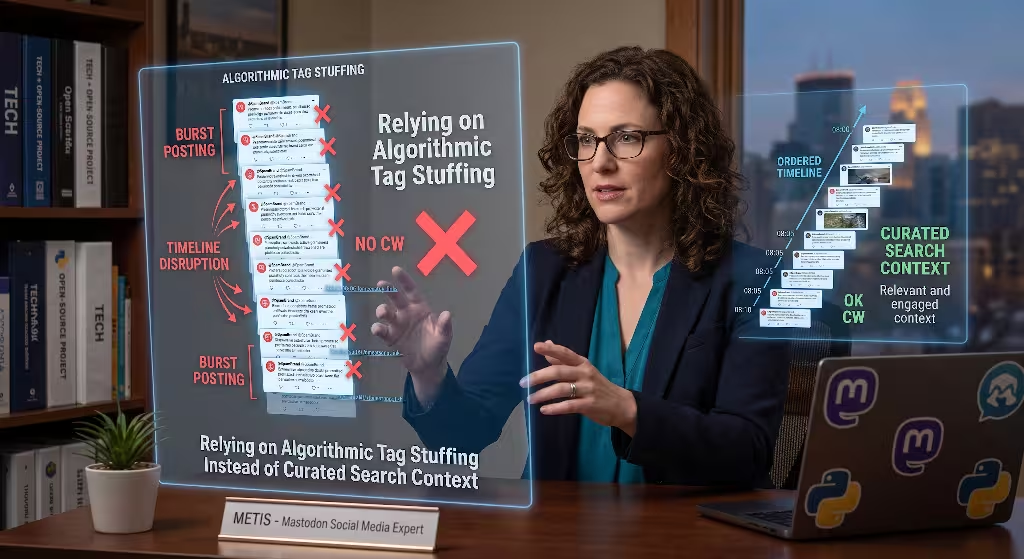
On legacy networks, marketers often place twenty or thirty hashtags at the bottom of a post to manipulate discovery algorithms. Doing this on Mastodon is another one of those easily spotted mastodon mistakes that harms your brand image.
Mastodon uses hashtags as its primary search and discovery mechanism. Unlike platforms that index every word in every public post by default, Mastodon historically relies heavily on hashtags to organize topics. When you add a hashtag to your post, you are submitting that post to a curated topic directory.
INACCESSIBLE AND SPAMMY TAG BLOCK (Avoid)
#marketing #tech #business #growth #saas #sales #b2b #strategy #tips #news
#software #innovation #trends #leadership #success #startup #entrepreneur

CURATED AND INTENTIONAL TAGGING (Recommended)
We just open-sourced our deployment pipeline configuration for distributed
teams. Check out our technical writeup on optimizing container build times.

#DevOps #SystemAdministration #OpenSourceSoftware #WebDevelopment
When you overload a post with dozens of generic hashtags, several negative things happen:
- Your post looks like spam, which discourages users from reading your core message.
- Your post gets indexed in irrelevant search feeds, annoying people looking for specific discussions.
- Server administrators may flag your account for search manipulation.
The most effective approach is to select three to five highly relevant, CamelCase hashtags that describe the exact subject of your post. If your post is about web performance optimization, use #WebPerformance, #FrontEndDev, and #PageSpeed. Avoid generic tags like #Awesome or #MustRead. Avoiding tag-stuffing mastodon mistakes keeps your posts clean, professional, and easy to find for interested readers.
Hard-Selling Instead of Building in Public
Traditional corporate communications rely on polished press releases, executive quotes, and carefully scrubbed marketing language. On the Fediverse, this style of communication feels distant and uninviting. Relying on corporate speak rather than transparent communication is one of the classic mastodon mistakes made by enterprise brands.
Fediverse users value honesty, craft, and technical transparency. They want to hear from the engineers, designers, and writers who actually make the products. The brands that achieve the highest engagement on Mastodon are those that practice “building in public.”
+-----------------------------------------------------------------------------+
|                     CORPORATE SPEAK vs. BUILDING IN PUBLIC                  |
+-----------------------------------------------------------------------------+
| Corporate Approach (Low Engagement) | Build in Public (High Engagement)     |
+-------------------------------------+---------------------------------------+
| "Silphium Design is proud to        | "We spent the last three weeks        |
| announce our world-class, paradigm- | refactoring our database indexing to  |
| shifting data analytics solution    | cut query times by 40%. Here is a breakdown|
| that empowers modern enterprises to | of what failed during our first three |
| achieve maximum digital synergy."   | tests and the simple fix that worked."|
+-------------------------------------+---------------------------------------+
Building in public means sharing your journey with your audience, including:
- Explaining the technical challenges your engineering team solved this week.
- Sharing the design decisions and user research behind a new interface layout.
- Writing honest post-mortems when an outage or software bug occurs.
- Asking the community for feedback on upcoming features before writing code.
When you pull back the curtain and show the real work happening behind your brand, people form a genuine connection with your organization. Moving away from corporate speak and avoiding conversational mastodon mistakes helps you build a community of enthusiastic supporters.
Free-Riding on Server Infrastructure Without Giving Back
Because Mastodon is free to use, many companies treat it like any other commercial platform, assuming hosting costs are someone else’s problem. Overlooking the real infrastructure costs required to run a federated server is one of the most short-sighted mastodon mistakes a business can make.
Independent servers are funded by volunteer administrators, community donations, and non-profit organizations. When your brand uploads high-resolution images, video files, and hundreds of posts to an independent server, your content uses bandwidth, memory, and disk storage that someone is paying for out of their own pocket.
                      INDEPENDENT SERVER FUNDING MODEL

  +-------------------------------------------------------------------------+
  | Server Administrator (Volunteer Time + Personal Funds)                  |
  +------------------------------------+------------------------------------+
                                       |
                   +-------------------+-------------------+
                   |                                       |
                   v                                       v
     +---------------------------+           +---------------------------+
     |   Community Donations     |           | Corporate Account Activity|
     | (Patreon, Open Collective)|           | (Media Hosting + Storage) |
     +---------------------------+           +---------------------------+
                   |                                       |
                   +-------------------+-------------------+
                                       |
                                       v
                     +-----------------------------------+
                     | Monthly Server Infrastructure Bill|
                     +-----------------------------------+
If a commercial enterprise uses a community-funded server for marketing without contributing to operating costs, server administrators will notice. Admins may eventually decide to close commercial accounts or restrict media uploads to protect their hosting budgets.
You can support the network infrastructure through several practical methods:
- Contribute via Open Collective or Patreon: If you host your account on a community server, make a regular monthly donation to the administrator’s hosting fund.
- Sponsor Open-Source Development: Provide financial contributions to the development of Mastodon or client applications used by the community.
- Host Your Own Dedicated Server: Cover your own infrastructure costs by running your own server, which takes the financial burden off community volunteers.
Contributing to the ecosystem protects you from reputational mastodon mistakes and demonstrates that your business is a responsible member of the Fediverse.
Frequently Asked Questions about Mastodon Mistakes
Marketing leaders often have specific technical and operational questions when planning their Fediverse strategy. Here are clear answers to the most common questions regarding mastodon mistakes and Fediverse marketing.
+-----------------------------------------------------------------------------+
|                     FREQUENTLY ASKED QUESTIONS SUMMARY                      |
+-----------------------------------------------------------------------------+
| Question                          | Core Strategic Takeaway                 |
+-----------------------------------+-----------------------------------------+
| Can brands run paid ads?          | No. Growth comes from organic boosts    |
|                                   | and value-driven technical content.     |
+-----------------------------------+-----------------------------------------+
| How does verification work?       | Through open HTML rel="me" tags on your |
|                                   | website, not paid subscription badges.  |
+-----------------------------------+-----------------------------------------+
| Is Mastodon suited for B2B?       | Highly suited for technical, open-      |
|                                   | source, SaaS, and creative businesses.  |
+-----------------------------------+-----------------------------------------+
| Is automated posting allowed?     | Yes, but it requires native formatting  |
|                                   | and active human interaction.           |
+-----------------------------------+-----------------------------------------+
| What causes server defederation?  | Aggressive spam, scraping user data,    |
|                                   | and violating local server rules.       |
+-----------------------------------+-----------------------------------------+
Can Brands Advertise on Mastodon?
Mastodon has no centralized advertising system, sponsored post auctions, or paid discovery algorithms. You cannot pay a server administrator to insert your ad into a user’s chronological feed. Visibility on Mastodon is earned entirely through organic engagement, valuable contributions, and community boosts.
Brands succeed by producing informative content that users choose to share with their own followers. This setup prevents low-quality advertising and rewards organizations that invest in real relationships.
How Do Brands Get Verified on Mastodon?
Verification on Mastodon is free and open to everyone through the HTML rel="me" metadata standard. You do not need to submit government documents or pay a monthly fee.
To verify your account:
- Add your website URL to your Mastodon profile metadata fields.
- Add a link pointing to your Mastodon profile on your website, including the
rel="me"attribute inside the link code.
Once your server confirms that both links point to each other, a green checkmark appears on your profile next to your website URL.
Is Mastodon Good for B2B and B2C Marketing?
Mastodon is effective for B2B companies, especially those in software development, cloud infrastructure, cybersecurity, design, publishing, and open-source technology. The Fediverse audience includes many senior engineers, system administrators, researchers, and technology executives.
For B2C brands, success depends on your industry. Businesses that focus on privacy, sustainability, ethical commerce, and open standards see high engagement, while brands relying on fast-fashion sales and mass advertising may struggle to find traction.
Can Brands Automate Their Mastodon Posting?
You can use scheduling tools and API integrations to publish content on Mastodon, but your automated posts must be formatted specifically for the platform.
Automation becomes a problem when brands use basic cross-posting tools that break user handles, drop image descriptions, and ignore replies. If you schedule posts, make sure your team logs in regularly to respond to questions, engage in conversations, and maintain human connections.
What Causes an Entire Server to Block or Defederate a Brand?
Server administrators have the authority to block specific user accounts or cut off communication with an entire external server. This process is known as defederation.
The most common causes of defederation include:
- Sending mass unsolicited commercial direct messages to users.
- Scraping user profile data and posts without explicit consent.
- Flooding public timelines with repetitive, low-value promotional spam.
- Ignoring server moderation notices and violating local server policies.
When an instance defederates your server, every user on that instance loses the ability to see your posts, follow your account, or visit your profile. Avoiding spammy mastodon mistakes is essential for maintaining an open connection to the wider Fediverse.
The Fediverse Brand Blueprint: A Practical Execution System
To help your team avoid these mastodon mistakes, follow this comprehensive three-phase execution plan for launching and managing your brand presence on the Fediverse.
+-----------------------------------------------------------------------------+
|                     THREE-PHASE IMPLEMENTATION TIMELINE                     |
+-----------------------------------------------------------------------------+
| Phase 1: Foundation (Weeks 1-2)                                             |
| [X] Select server or deploy dedicated instance                              |
| [X] Configure bi-directional rel="me" verification                          |
| [X] Establish accessibility standards and alt-text guidelines               |
+-----------------------------------------------------------------------------+
| Phase 2: Community Integration (Weeks 3-6)                                  |
| [X] Begin active listening and monitoring industry hashtags                 |
| [X] Implement the 80/20 value-to-promotion publishing cadence               |
| [X] Participate in relevant community discussions without selling          |
+-----------------------------------------------------------------------------+
| Phase 3: Sustainable Growth (Weeks 7+)                                      |
| [X] Publish detailed build-in-public technical content                      |
| [X] Support host server infrastructure via community funding                |
| [X] Track privacy-friendly referral traffic and conversions                 |
+-----------------------------------------------------------------------------+
Phase 1: Technical Foundation and Profile Setup
Before publishing your first post, ensure your technical infrastructure and account settings are configured properly:
- Select Your Server Location: Decide whether to launch a dedicated brand instance (such as
social.yourcompany.com) or create an account on an established, commerce-friendly public instance likemastodon.social. - Set Up HTML Verification: Add your website address to your profile metadata and add a reciprocal
<a href="your-profile-url" rel="me">link on your company’s website to earn the green verified badge. - Complete Profile Information: Write a clear, friendly bio explaining what your organization does. Use CamelCase hashtags in your bio to help users discover your account through profile searches.
- Establish Accessibility Guidelines: Train your social media team on writing descriptive image alt-text and using CamelCase formatting for all hashtags.
Phase 2: Content Strategy and Community Engagement
Once your profile is set up, focus on building positive relationships across the network:
- Follow the 80/20 Content Framework: Ensure eighty percent of your posts share helpful industry insights, technical tutorials, and open-source updates, leaving twenty percent for direct product announcements and company news.
- Space Out Your Publishing Cadence: Space your posts two to three hours apart to avoid flooding the chronological timeline. Publish complex thoughts as connected threads rather than individual posts.
- Use Content Warnings Appropriately: Place promotional offers, event announcements, and lengthy commentaries behind clean Content Warning labels to respect user autonomy.
- Engage in Real Conversations: Spend fifteen minutes each day replying to questions, boosting valuable posts from industry peers, and participating in discussions without pushing your products.
Phase 3: Measurement, Privacy, and Infrastructure Support
Evaluate your success using metrics that respect community values:
- Track Privacy-Friendly Conversions: Monitor website traffic from Mastodon using clean, privacy-respecting analytics tools or privacy-safe UTM parameters on your links.
- Evaluate Interaction Quality: Measure success by the quality of replies, meaningful discussions, and boosts from respected community members, rather than relying strictly on raw follower numbers.
- Support Server Administrators: If you use a community-hosted instance, set up a recurring monthly donation on Open Collective or Patreon to help pay for server bandwidth and hosting storage.
+-----------------------------------------------------------------------------+
|                     FEDIVERSE CAMPAIGN AUDIT CHECKLIST                      |
+-----------------------------------------------------------------------------+
| Item to Verify                                           | Status | Notes   |
+-----------------------------------------------------------------------------+
| 1. Profile verified via two-way HTML rel="me" link       | [  ]   |         |
| 2. Instance rules reviewed for commercial compliance     | [  ]   |         |
| 3. All images include thorough, descriptive Alt-Text     | [  ]   |         |
| 4. Every hashtag formatted using proper CamelCase        | [  ]   |         |
| 5. Standalone posts spaced at least 2 hours apart        | [  ]   |         |
| 6. Content Warnings applied to promotional updates       | [  ]   |         |
| 7. Feed maintains at least 80% non-promotional value     | [  ]   |         |
| 8. Postings include 3 to 5 targeted hashtags             | [  ]   |         |
| 9. Dedicated team member assigned to answer replies      | [  ]   |         |
| 10. Financial contribution made to host instance admin   | [  ]   |         |
+-----------------------------------------------------------------------------+
Building an enduring presence on Mastodon requires leaving behind old broadcast habits and embracing the cooperative spirit of the Fediverse. When you steer clear of these common mastodon mistakes, you will discover an engaged, thoughtful audience eager to connect with businesses that respect their community, their time, and their digital independence.
Suggested Next Steps for Implementation
- Account Audit: Review your existing Mastodon profile metadata, website backlinks, and recent post history against the audit checklist above.
- Accessibility Review: Check that your design and content teams have standard operating procedures in place for image descriptions and CamelCase hashtags.
- Content Planning: Draft your next ten Mastodon updates using the 80/20 value-to-promotion ratio, including appropriate Content Warnings and targeted tags.