
The internet is often billed as a place where time stands still. A website usually looks exactly the same at noon on a hot July Tuesday as it does at midnight on a snowy December Saturday. As a natural scientist and web designer, I see this as a fundamental flaw in how we build our digital world.
Humans are biological creatures. We are not static data points. We have internal clocks and rhythms that are deeply connected to the world outside our windows. When we spend hours staring at screens that ignore these rhythms, we create a subtle kind of stress in our brains. This is why we need to talk about examples of design reflecting the season and how to build them.
At Silphium Design LLC, we do not just make websites look pretty. We our science knowledge and experience to make them work better for the human mind. My background in biology tells me that we need “temporal grounding,” which is a fancy way of saying we need to know what time of year it is to feel safe and focused. My background in web design tells me we can automate this using code. True design reflecting the season is not just about putting a picture of a pumpkin on your homepage in October. That is decoration. Real design is about changing the light, the layout, and the code itself to match the energy of the user.
In this article, we will explore the science and the code behind this concept. We will look at how the brain reacts to seasonal changes and how your website can help. We will look at color, code, and content. We will discuss how design reflecting the season can help you rank better on search engines like Google. We will move beyond simple holidays and look at the deep connection between nature and the internet. By the end, you will understand how to turn a static webpage into a living ecosystem.
Table of Contents
The Biological Imperative: Circadian and Circannual Rhythms
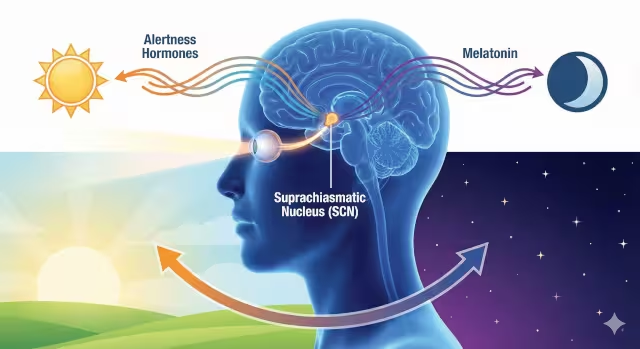
To understand why we need design reflecting the season, we first have to look at the human brain. Deep inside your brain, there is a small bundle of nerves called the suprachiasmatic nucleus, or SCN. You can think of this as your body’s master clock. It uses light from your eyes to tell your body what time it is and what season it is. This is called your circadian rhythm (for the day) and your circannual rhythm (for the year).
When our eyes see the bright, blue-tinted light of summer, our master clock releases hormones that make us alert and energetic. When we see the warmer, dimmer light of winter, our bodies prepare for rest and conservation. This is a survival mechanism that has existed for thousands of years. However, modern screens emit a constant, bright blue light. This confuses our master clock. It creates a state of “eternal noon.”
Implementing design reflecting the season helps fix this disconnection. When a website adjusts its brightness and colors to match the time of year, it reduces the cognitive load on the user. Cognitive load is the amount of brainpower it takes to complete a task. When a digital environment feels natural, our brains do not have to work as hard to filter out the conflicting signals. This leads to users staying on your site longer and feeling happier while they are there. This is the core of biophilic design. It is about respecting the biology of the user.
Vernacular Biophilia: Localization Over Generalization
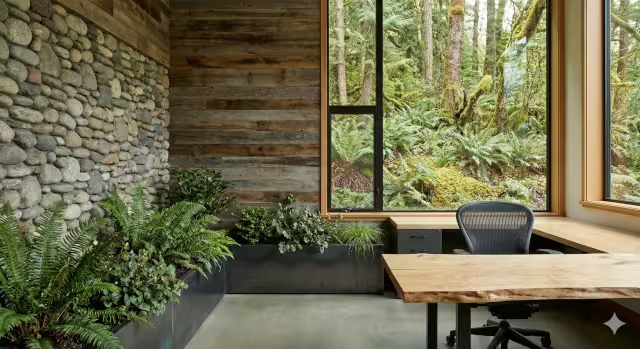
One of the biggest mistakes in web design is being too generic. Designers often use stock photos that have nothing to do with the real world of their users. For example, using a picture of a bright red maple leaf to represent autumn is a standard choice. But what if your user lives in San Diego or Phoenix? In those places, autumn does not look like a red maple leaf. It might look like dry grass or subtle changes in succulents. In other words, it does not resonate with people in all places.
To create authentic design reflecting the season, we must look at “vernacular biophilia.” Vernacular means “local language.” In design, it means using the plants, weather, and light that actually exist in the user’s location. A website for a company in Vermont should use images of pine trees and snow in the winter. A website for a company in Florida might focus on the shift in humidity or the blooming of citrus.
We can use technology to help with this. We can use a visitor’s IP address to guess their general location. Then, we can serve them images that match their specific reality. This makes the design reflecting the season feel personal. It tells the user, “I know where you are, and I understand your world.” This builds trust. When a user sees a website that mirrors their own window, they feel understood. This specific attention to detail is what separates a generic template from a high-end biophilic experience.
The Color Psychology of Time and Spectral Shifts
Color is not just art. Color is mathematics and chemistry. Different colors act as signals to our hormone systems. As we discussed, blue light suppresses melatonin, which is the hormone that makes you sleepy. Red and amber light allows melatonin to flow.
In the summer, the sun is high in the sky. The light is intense and has a high “color temperature.” This means it has more blue wavelengths. Good design reflecting the season for summer should use high-contrast colors. Whites should be bright. Blues should be crisp. This mimics the high energy of the season.
In the winter, the sun is lower in the sky. The light has to travel through more atmosphere, which scatters the blue light and leaves us with warmer, golden tones. Winter design should reflect this. You should not use a stark, blinding white background in December. It can feel harsh and glaring, like a fluorescent light in a dark room. Instead, you should shift your background to a soft cream or a warm grey.
We can use a math equation to calculate the relative luminance, or brightness, of a color. The formula looks like this: $L = 0.2126R + 0.7152G + 0.0722B$. By changing the red, green, and blue values in our code, we can lower the $L$ value slightly for winter modes. This reduces glare. It creates a digital environment that feels like sitting by a fire rather than sitting under a spotlight. This use of spectral shifts is a powerful tool in design reflecting the season.
Technical Architecture: The “Living” Codebase
Now, let us talk about how to build this. Being a web designer, I know that manual updates are a pain. You do not want to have to log in to your website every three months to change the colors by hand. We need to build a “living” codebase that changes itself.
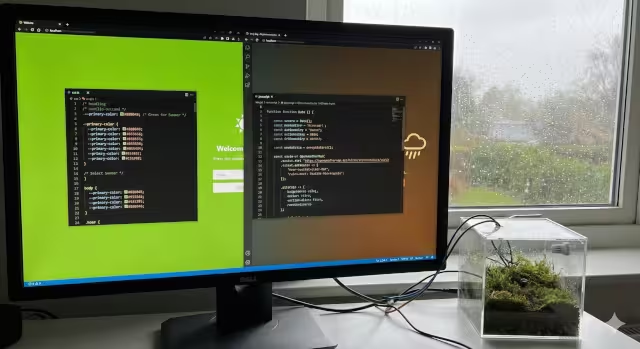
The best tool for this is something called CSS Variables, or Custom Properties. In your website’s code, you define your main colors in one place, usually at the very top. You might have a variable called --primary-color.
We can write a small piece of Javascript, which is a programming language that runs in the browser. This script checks the date on the user’s computer. If the date is between June and August, the script tells the CSS to make --primary-color a bright summer green. If the date is in January, it changes that variable to an icy blue or a warm pine green.
This is a perfect example of design reflecting the season because it is automatic. The website is responding to the calendar just like a tree responds to the sun. We can get even more advanced by connecting to a weather API. An API allows two computer programs to talk to each other. Your website could ask a weather service, “Is it raining where this user is?” If the answer is yes, your website could automatically switch to a “rainy day” theme with darker colors and cozy fonts. This is the future of the internet.
Dynamic Content Strategy and Microcopy
Design is not just about colors and shapes. It is also about words. The text on your website, which we call copy, should also change to match the season. This is often overlooked in design reflecting the season.
In the spring, people are often in a mindset of “new beginnings.” They want to clean, organize, and start fresh. Your buttons and headlines should use action verbs. Words like “Start,” “Grow,” “Refresh,” and “Launch” work well. The tone should be optimistic and fast.
In the winter, people tend to “cocoon.” They want to feel safe, warm, and secure. Your text should slow down. You might use words like “Secure,” “Plan,” “Gather,” and “Rest.” A button that says “Get Started Now” in July might work better if it says “Plan Your Future” in December.
Changing your text for design reflecting the season also helps with Search Engine Optimization (SEO). Search engines like Google love fresh content. If they see that your website is changing its text every few months, they know the site is active. They call this “Query Deserves Freshness.” It tells the search engine that you are taking care of your digital garden. This can help you rank higher in search results.
UX/UI Dynamics: Behavioral Layout Shifts
User Experience (UX) and User Interface (UI) refer to how a person uses a website and how the buttons and menus are laid out. Just as our energy levels change with the seasons, our browsing habits change too.
In the summer, people are often outside. They are using their mobile phones. They are in a hurry. They want information fast. A good design reflecting the season for summer respects this. The layout should be simple. You might use “cards” – small blocks of information that are easy to swipe through. You should apply Hick’s Law, which states that the more choices you give someone, the longer it takes them to decide. In summer, keep the choices low.
In the winter, statistics show that desktop computer usage often goes up. People are indoors. They have more patience to read long articles (like this one). They are willing to explore deeper into a website. Your winter layout can be denser. You can show more related articles. You can use deeper menus. You can encourage what we call “deep dwelling.” Adapting your layout is a very advanced form of design reflecting the season, but it is highly effective. It matches the tool to the user’s behavior.
Sensory Depth: Non-Visual Seasonal Cues
When we think of web design, we usually just think of visual things. But the internet can engage other senses too. Biophilic design encourages us to use every tool available to connect with nature.
Audio is a controversial topic in web design, but when done right, it adds value. Imagine a subtle toggle button in the corner of the screen. In the spring, it could play a very quiet loop of birdsong. High-frequency sounds like birds chirping are naturally alerting. They wake up the brain. This fits the energy of the season. In the winter, the sound could be the low, white noise of wind through pine needles. This is calming and helps with focus. This is a great example of design reflecting the season that goes beyond the screen.
We can also imply texture. We cannot actually touch a website, but we can use “skeuomorphism.” This is a design style that mimics real-world materials. In the summer, your background might have a very faint texture that looks like linen or cool stone. In the winter, you might add a subtle grain that looks like felt or wool. This tricks the brain into recalling the sensation of touch. It adds a layer of warmth or coolness that supports the visual design reflecting the season.
SEO Implications and Entity Association
At Silphium Design LLC, we spend a lot of time monitoring search trends. Incorporating design reflecting the season is a powerful strategy for SEO. It allows you to target what we call “long-tail keywords.” These are specific phrases that people search for.
People might search for “seasonal user experience” or “winter website trends.” If your site is actively discussing and demonstrating these changes, you become an authority. You can also use something called “Structured Data.” This is a special code that talks directly to Google. You can use it to tell Google about seasonal events, changing opening hours, or special seasonal offers.
Search engines try to understand the relationships between things. These are called “entities.” If your website connects the entity of “Web Design” with the entity of “Nature” and “Seasons,” Google starts to see you as a holistic resource. It distinguishes you from spammy sites that just duplicate content. By using design reflecting the season, you are signaling quality. You are showing that a human is behind the screen, caring for the content.
Sustainability and Performance: The Eco-Season
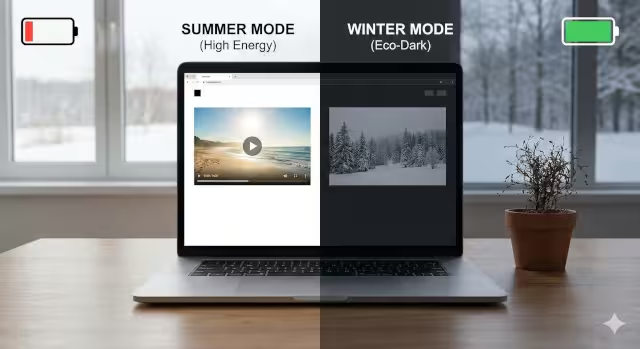
Nature is efficient. It does not waste energy. A tree drops its leaves in winter to save resources. Our websites should do the same. We can look at design reflecting the season through the lens of sustainability.
In the winter, energy grids are often taxed by heating demands. We can help by designing “Winter Modes” that are Dark Modes. On modern OLED screens, dark colors use less electricity than bright white colors. By defaulting your site to a darker theme in the winter months, you are actually saving battery life for your users and reducing the carbon footprint of your website.
We should also think about data. Large video files take a lot of energy to download. If you know that internet speeds might be slower in certain areas due to winter storms, or that users are conserving data while traveling in summer, you can adjust what you load. Good design reflecting the season might mean not auto-playing a massive video in the background during months when bandwidth is precious. This is “Eco-Web Design,” and it aligns perfectly with the cycles of nature.
Conclusion and Future Trends
We have covered a lot of ground. We have looked at biology, physics, coding, and psychology. The core message is simple: the internet should not be a dead zone. It should be a living extension of our world. Design reflecting the season is the tool we use to build that bridge.
As we move forward, Artificial Intelligence (AI) will make this even easier. Soon, we might have generative AI that creates a unique hero image for every single user, based on the exact weather outside their window at that exact moment. The website will not just reflect the season; it will reflect the moment.
For now, you can start small. adjust your colors. Change your copy. Respect the rhythm of the year. When you implement design reflecting the season, you are not just making a website. You are creating a habitat. You are making a place where human beings can feel natural, comfortable, and understood. That is the goal of Silphium Design LLC, and it should be the goal of every designer who cares about their users.