If you are reading this post, you are probably already familiar with Mastodon and have realized something important: Mastodon is not Twitter. It is not X. It is definitely not LinkedIn. Having used and analyzing the “Fediverse,” that massive, interconnected network of social servers, and I can tell you that bringing your big-tech habits here is a recipe for disaster.
You might be outgoing, curious, and ready to connect, but on Mastodon, your enthusiasm needs a strategy. The biggest mistake brands make is treating the timeline like a billboard they can spam. On platforms like X or Facebook, you have to fight an algorithm. You have to post constantly just to get a tiny slice of attention.
But here? There is no algorithm. There is only the community, which you are speaking to.
If you mess up your posting frequency, you don’t just get lower reach; you get blocked. You get “defederated,” which means entire servers stop listening to you. That sounds scary, but do not worry! I am here to guide you. We are going to dive deep into posting frequency, etiquette, and the technical quirks of ActivityPub so you can build a brand that people actually want to follow.
We will cover everything from how many times to post a day to the secret art of using Content Warnings to increase your posting frequency safely. Let’s get your brand federated and fabulous.
Table of Contents
Understanding the Mastodon Landscape

Before we can even talk about your specific posting frequency, you have to understand the ground you are standing on. Mastodon is built differently. It is not one website; it is thousands of websites (called “instances” or servers) talking to each other.
The Three Timelines
On other sites, there is one main feed. On Mastodon, there are three. Your posting frequency affects each one differently:
- Home Timeline: This shows posts from people a user explicitly follows. It is chronological. If you post at 3:00 AM, your follower sees it between the 2:59 AM post and the 3:01 AM post. If you have a high posting frequency, you dominate this feed, which can annoy people.
- Local Timeline: This is the danger zone for brands. This feed shows everything posted by everyone on that specific server. If you join a small server and have a manic posting frequency, you will flood the Local Timeline. The locals will hate you. They will block you.
- Federated Timeline: This is the firehose. It shows everything your server knows about from the rest of the world. Your posting frequency matters less here because the volume is so high, but it is still visible to moderators.
The “No Algorithm” Reality
This is the most technical part I will share today. Most social networks use a “black box” algorithm to decide what you see. If you post ten times, the algorithm might only show your best one.
Mastodon uses the ActivityPub protocol, which delivers messages strictly in order. If you decide your posting frequency should be ten times an hour, every single one of those ten posts gets delivered. There is no filter to save you from looking spammy. This is why posting frequency is the number one variable you must control.
Optimal Posting Frequency for Brands
So, what is the magic number? I have analyzed traffic data and user sentiment across major instances like mastodon.social and fosstodon.org. The consensus for 2025 is clear: Quality over Quantity.
The Golden Rule: 1 to 3 Posts Per Day
For most brands, a posting frequency of one to three posts per day is the sweet spot.
- 1 Post Per Day: This is safe. It keeps your account active. It shows you are alive. It is respectful of the Local Timeline.
- 2-3 Posts Per Day: This is optimal for growth. It allows you to hit different time zones (more on that later).
- 4+ Posts Per Day: You are entering risky territory. Unless you are a news organization breaking real-time stories, a posting frequency this high often leads to muted accounts.
The “Burst” Warning
Never, ever “burst” post. Burst posting is when you send out five tweets (or “toots” in Mastodon) in ten minutes. On X, this works because the algorithm scatters them. On Mastodon, a high burst posting frequency creates a “wall of text” in the timeline.
Imagine a user scrolling their phone. If they see your logo five times in a row, they feel spammed. They will click “Mute.” Once they mute you, your posting frequency becomes zero to them forever.
Consistency vs. Volume
Your posting frequency should be consistent. Posting five times on Monday and zero times on Tuesday is bad practice. The Fediverse values reliability. Pick a posting frequency you can sustain, like one good post every morning, and stick to it.
Timing Matters: When to Post
Since there is no algorithm to dig up your old posts from yesterday, your posting frequency must be tied to the clock. If you post when your audience is asleep, you might as well have not posted at all.
Global vs. Local Audiences
Where is your audience? If you are a local coffee shop in Minneapolis, your posting frequency should align with Central Time mornings. But if you are a global software brand, you need to spread your posting frequency out.
- Morning Window (EST/UTC): Captures the US East Coast and Europe’s afternoon.
- Evening Window (EST): Captures the US West Coast and early Asian risers.
By splitting your posting frequency into these two windows, you double your visibility without annoying any single user group.
The Weekend Opportunity
Here is a secret: The Fediverse loves weekends. On LinkedIn, brands go silent on Saturday. On Mastodon, that is when the engineers, artists, and writers are most active.
Consider adjusting your posting frequency to include Saturday and Sunday. You might find that a lower posting frequency on weekends (just one post) gets higher engagement than your weekday posts because the timeline moves slower.
Content Types & Their Frequency
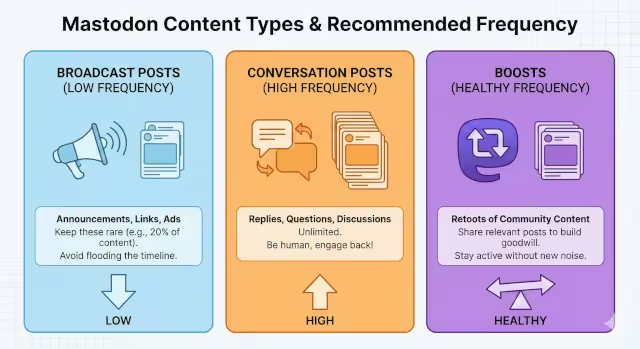
Not all posts are created equal. You should categorize your content and assign a different posting frequency to each type.
Broadcast vs. Conversation
- Broadcast Posts (Announcements, Links): Keep the posting frequency for these low. Maybe 20% of your total. These are “taking” value from the network.
- Conversation Posts (Replies, Questions): Your posting frequency here can be unlimited. If someone replies to you, reply back! High reply posting frequency is good. It shows you are human.
Boosts (The Mastodon Retweet)
Boosting is powerful. If you boost a post, it appears on your profile. You should have a healthy boosting posting frequency. Boost your customers. Boost open-source projects. Boost news relevant to your industry.
A high boosting posting frequency takes the pressure off you to create original content. It also builds goodwill. It says, “We are listening, not just talking.”
Visuals and Alt Text
Every time you post an image, you must add Alt Text (descriptions for the visually impaired). If you have a high posting frequency of images but zero Alt Text, you will get called out. The culture here demands accessibility. If you cannot take the time to write Alt Text, you should lower your posting frequency until you can.
The Secret Weapon: Content Warnings (CWs)
This is the tool that can save your brand. A Content Warning (CW) acts like a wrapper or a “Read More” button. It hides the text of your post behind a clickable label.
How CWs Affect Posting Frequency
If you want to post five times a day, but you are worried about annoying people, use a CW.
- Scenario: You are live-blogging a conference.
- Bad Strategy: Posting 20 times in the open timeline. Everyone hates you.
- Good Strategy: Posting 20 times, but every post has a CW labeled “Live Updates: Silphium Design Conf.”
People who care will click. People who don’t care will just see a small line of text and scroll past. Using CWs allows you to increase your posting frequency significantly without being disruptive.
Etiquette for Sales
If you are posting a direct ad (“Buy our new shoe!”), put it behind a CW labeled “Shop” or “Promotion.” It seems counter-intuitive, why hide your ad?, but users appreciate the choice. They are more likely to respect your brand (and tolerate your posting frequency) if you let them opt-in to the marketing.
Brand Etiquette & “The Rules”
Every server has a set of rules. You can usually find them on the server’s “About” page. Ignoring these while maintaining a high posting frequency is a quick way to get banned.
Read the Room
Some servers strictly forbid “Brand Accounts.” If you join one of those, your posting frequency should be zero, because you shouldn’t be there. Find a business-friendly server (like mastodon.social or others specific to your industry).
Hashtag Strategy
Hashtags are the only way to search on many parts of Mastodon.
- Use CamelCase: Write #SocialMedia, not #socialmedia. It helps screen readers.
- Don’t Spam Tags: Do not use 30 hashtags. It looks ugly and desperate. Use 3 to 5 relevant tags.
- Frequency: You can use hashtags in every post, but vary them. If your posting frequency for the tag #TechNews is ten times a day, you are clogging that search result.
Don’t Auto-Crosspost
I see this often. A brand connects their X account to Mastodon so every tweet automatically posts here.
- Why it fails: Tweets often have @mentions that don’t exist on Mastodon. They lack Alt Text. They are often formatted poorly.
- The Result: It looks like a robot is vomiting on the timeline. If your posting frequency is high and it’s all auto-posted garbage, you will be blocked.
Advanced Tactics: Navigating the Fediverse

Once you have mastered the basic posting frequency, you can use advanced features to fine-tune your presence.
The “Unlisted” Option
Mastodon has four privacy settings: Public, Unlisted, Followers-Only, and Direct.
- Public: Goes to all timelines.
- Unlisted: Visible to anyone who visits your profile, but does not go to the Local or Federated timelines.
Pro Tip: If you are writing a thread (a series of connected posts), make the first post Public, and all subsequent posts Unlisted. This keeps your thread readable but prevents your posting frequency from flooding the public feeds. This is a massive courtesy that power users love.
Defederation Risks
I mentioned this earlier. If your instance (server) thinks you are spamming, they can ban you. But it gets worse. If the admin of your server allows you to spam, other servers might block your entire server.
Your posting frequency impacts the reputation of your home instance. Be a good neighbor.
Tools for Scheduling
You don’t have to be awake 24/7. You can use tools to manage your posting frequency.
- Native Scheduling: Mastodon has a built-in scheduler. Use it!
- Third-Party Apps: Tools like Buffer or Fedica support Mastodon. They help you space out your content so your posting frequency remains steady, not bursty.
Measuring Success (Beyond Vanity Metrics)
On X, you chase “Likes.” On Mastodon, “Favorites” (the star icon) do nothing. They don’t boost the post. They are just a quiet “nice job” from a user.
Engagement Rate
The real currency here is the Boost and the Reply.
- Boosts: This puts your content in front of new eyes.
- Replies: This creates community.
If you have a high posting frequency but zero replies, you are talking to a wall. Lower your posting frequency and spend that time replying to others.
Traffic Sources
Since you cannot rely on viral algorithms, you must track click-throughs to your website. Use UTM parameters on your links. You might find that a lower posting frequency with better captions drives more traffic than high-frequency spam.
Sentiment Analysis
Read the replies. Are people angry? Are they asking you to use CWs? Are they welcoming you? Adjust your posting frequency based on this feedback immediately. The feedback loop on Mastodon is very fast.
Common Questions asked about Mastodon Posting Frequency
I often get asked specific questions about how this all works. Let’s tackle them.
How often should a business post on Mastodon?
Aim for 1-3 times per day. This posting frequency keeps you visible without being annoying.
Does Mastodon have an algorithm for brands?
No. It is strictly chronological. Your posting frequency and timing are the only factors controlling when you are seen.
Can I use hashtags on Mastodon for marketing?
Yes, but use them sparingly. 3-5 tags are best. Overusing them does not help your reach and looks spammy.
What is the best time to post on Mastodon?
It depends on your audience, but generally, mornings (8-10 AM) and evenings (6-8 PM) in your target time zone work best.
Is it okay for brands to boost their own posts?
Yes! Since there is no algorithm, boosting your own post from 4 hours ago gives it a second life for people who missed it. This is a legitimate way to manage your effective posting frequency.
Conclusion
Navigating the Fediverse can feel like learning a new language. You have to unlearn the bad habits from the “bird site” and relearn how to be a member of a community.
Remember, your posting frequency is a signal. A balanced posting frequency signals respect, competence, and value. A chaotic or high posting frequency signals spam, desperation, and ignorance.
As a brand, your goal is to add value to the timeline, not to conquer it. Use Content Warnings for the noisy stuff. Use Unlisted posts for threads. And most importantly, listen more than you talk.
Here is your next step: I want you to go look at your last 5 posts. Did they have Alt Text? Did you reply to anyone? If you haven’t posted yet, plan your first week with a simple posting frequency of one post per day at 10:00 AM. Start slow, build trust, and welcome to the Fediverse!