In todays article, we are going to look at a serious issue in tech: how the environments we build for protecting data are failing the humans who run them. We can fix this by bringing the natural world into software design.
Here is the complete examination of how we can use the laws of nature to revolutionize digital security.
Table of Contents
The Crisis of Cognitive Overload in Cybersecurity
A. The Problem
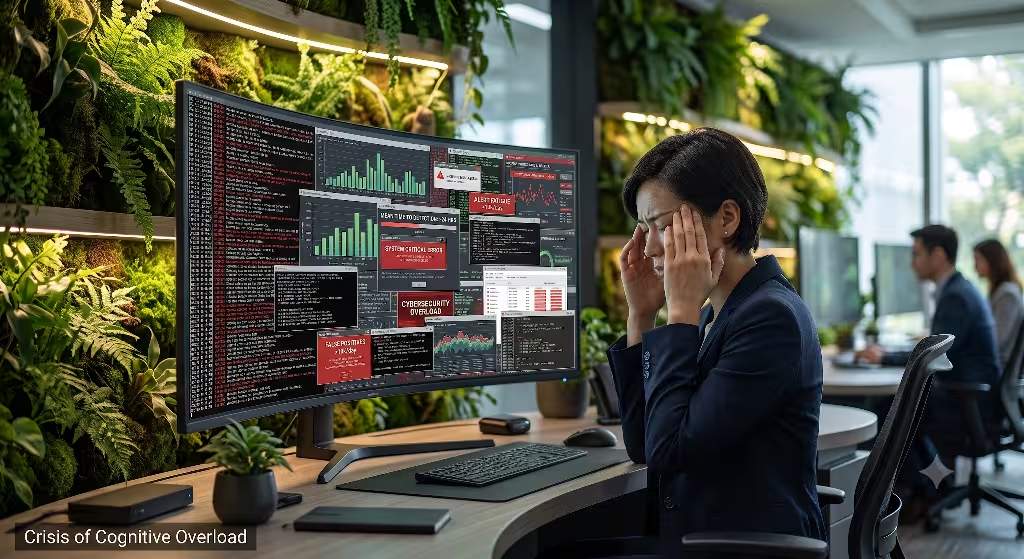
The current state of digital security is facing a silent crisis. The tools we use to defend networks are built like factories from the industrial era. They are full of flat text logs, square boxes, flashing red alarms, and endless alerts. This creates a massive amount of mental stress for workers. Security Operations Center analysts, the people who watch over corporate networks, are burning out at a dangerous rate.
When a human being spends eight to twelve hours a day looking at harsh, blinking screens, their brain gets tired. This issue is called cyber fatigue. It means the brain loses its ability to spot small changes or unexpected threats. Studies show that sensory burnout leads to a 30 percent increase in misidentified data threats. Workers simply miss the hacks because their brains are too exhausted by the interface. The current approach to digital security ignores how the human brain evolved to process information.
B. The Thesis
We can solve this problem by changing how we design software for digital security. We do this by using biophilic design. Biophilic design means designing things in a way that connects humans to nature. It is a framework used by architects to make buildings feel more natural, which lowers stress. We can take these exact same patterns from the physical world and turn them into user interface and user experience code.
By applying biophilic patterns to digital security, we can align software with human evolutionary biology. Our brains are built to find threats in natural environments, like a predator moving in the forest. When we make software look and feel more like a natural ecosystem, we lower mental friction. This helps people stay calm, focused, and alert. It changes digital security from a source of stress into an intuitive workspace where people can spot cyber threats faster and with fewer mistakes.
C. Semantic Anchors
To understand this concept, we have to look at digital biophilia. Digital biophilia is not just about putting pictures of trees or plants on a computer screen. That is called decorative design, and it does not help protect data. True digital biophilia is structural. It means we use the math, shapes, and behaviors of nature to build the actual layout of the software.
We look at how information flows through a network and arrange it like the branches of a tree or the veins of a leaf. This is about structural design, not green aesthetics. When we build digital security tools with these organic principles, we are changing the core information architecture. We are making sure that the human mind can understand data instantly because the data matches patterns that our ancestors used for survival.
From Physical Space to Digital Nodes
A. The Terrapin Bright Green Translation
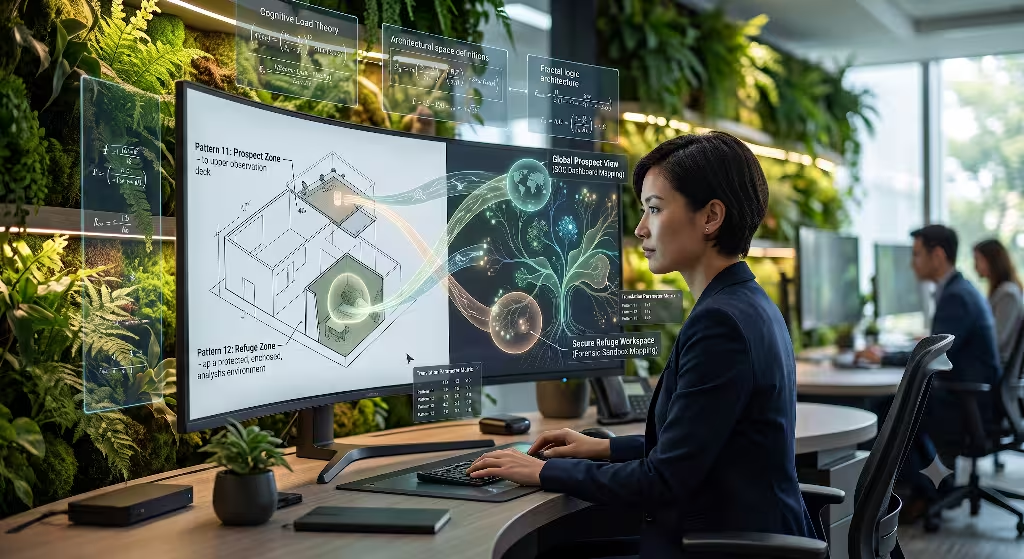
To bring nature into software, we start with the work done by Terrapin Bright Green. They are an environmental consulting firm that created the 14 Patterns of Biophilic Design. These patterns explain how specific elements of nature reduce stress and improve brain function in physical buildings. My work at Silphium Design LLC takes these 14 physical patterns and translates them into digital proxies, or software equivalents.
For example, a physical window that lets in sunlight becomes a user interface that changes color based on the time of day. A pathway that curves through a garden becomes a network data flow that bends naturally instead of using sharp right angles. We are taking architectural rules meant for wood, stone, and sunlight and coding them into pixels, charts, and digital security alert systems. This links physical space directly to the virtual space where data defense happens.
B. Evolutionary Threat Detection
The human brain is a product of millions of years of living outdoors. Our survival depended on our ability to notice small changes in our surroundings. If the wind suddenly stopped, or if a bird made a strange cry, our ancestors noticed it immediately. This is how evolutionary threat detection works. Our eyes and ears are highly tuned to spot irregularities against a natural baseline.
Modern digital security tools do the opposite. They force analysts to read millions of lines of uniform, white text on a black screen. This turns off our natural threat detection hardware. It forces the brain to use a lot of energy to read and think, which causes rapid exhaustion. If we instead map network traffic as an ecosystem, we can use our natural instincts. An unauthorized user trying to steal data would look like an irregular movement in a field of grass. The analyst would notice the hack instantly without having to read a single line of text log code.
C. Cognitive Load Theory Linkage
Cognitive Load Theory was developed by John Sweller. It explains that the human brain can only hold a small amount of new information in its working memory at one time. If you overload that memory, the brain suffers from mental friction and starts making mistakes. This is a massive vulnerability in digital security operations today. Analysts are constantly flooded with more data than their working memory can handle.
Nature solves this problem through specific mathematical logic. Natural systems use self-similar fractals, which are repeating patterns that look the same whether you zoom in or zoom out. Think of a fern leaf or a snowflake. The brain can process complex fractal shapes with almost zero effort because the pattern is predictable and ordered. By using fractal layout logic to show corporate data systems, we can reduce the mental effort needed to monitor a network. This leaves more brain power available for solving complex digital security problems.
Deploying Specific Biophilic Patterns for Digital Security
A. Nature of the Space: Prospect (Pattern 11) and Refuge (Pattern 12) in Threat Telemetry
1. Prospect in Threat Telemetry
The concept of Prospect means having a clear, open view of your entire surroundings. In the physical world, this is like standing on top of a hill to look at the valley below. It makes humans feel safe because we can see threats coming from a long distance away. In digital security, we can build Prospect directly into our network monitoring dashboards.
Instead of showing separate tables for different servers, we can build a global network visualization screen. This screen shows every device, user, and data transfer as a single, connected landscape. The lines of data move smoothly across the screen like rivers. An analyst can look at this screen and see the health of the entire company at a single glance. They have a true surveillance view. This makes it easy to spot a sudden spike in traffic from an unknown location before it causes damage to digital security infrastructures.
+--------------------------------------------------------+
| GLOBAL TOPOLOGY VIEW (PROSPECT)                        |
|                                                        |
|    (Mainframe Node) ~~~~~~~~ [Smooth Flow] ~~~~~~~~>   |
|         /      \                                       |
|        /        \                                      |
|    (User)      (User) <---- !!! [Sharp Break]          |
|                                                        |
+--------------------------------------------------------+
2. Refuge in Threat Telemetry
The concept of Refuge is the exact opposite of Prospect. It means having a safe, protected place where you are hidden from danger and weather. In the woods, a cave or a thick grove of trees is a place of refuge. It lowers stress because you do not have to worry about attacks from behind. In software built for digital security, we can create spaces that look and feel like a refuge.
When an analyst finds a threat, they need to leave the big dashboard and focus deeply on the malicious code. We can design a sandboxed secure environment that changes the interface to a calm, dark, low-stimulus design. The screen hides all outside notifications, chats, and distracting alerts. It gives the worker a quiet digital workspace. This visual refuge lowers their heart rate and stops distractions, letting them focus completely on fixing the digital security breach.
B. Natural Analogues: Biomorphic Forms & Patterns (Pattern 8) and Complexity & Order (Pattern 10)
1. Biomorphic Forms & Patterns
Biomorphic forms are shapes that mimic the contours, curves, and textures found in nature. Traditional computer software is filled with hard squares, sharp rectangles, and straight grids. These shapes are very rare in the natural world. When our eyes see nothing but sharp right angles for hours, it causes subtle visual strain and mental fatigue.
To improve digital security systems, we can replace these artificial shapes with organic contours. In an identity and access management system, we can show user permissions as interconnected, rounded cells instead of blocky tables. The paths between users and databases can bend naturally like roots. When the software has to show a connection breaking, the line can fade away smoothly like a dying leaf, rather than flashing roughly. This soft visual style is much easier for the human eye to track over long periods.
2. Complexity & Order
Complexity and order is about finding a balance between rich information and clear patterns. Nature is highly complex, but it is never chaotic. A forest has millions of leaves, branches, and plants, yet you can instantly tell the difference between a tree trunk and a rock. This is because natural systems use spatial hierarchy and structural symmetry.
We can apply this balance to cryptographic data and system logs. Instead of displaying text logs in a flat, uniform spreadsheet, we can cluster data points using natural geometric layouts. The most common data paths form the stable trunk of the visual design. Rare or unusual events branch out to the edges like small twigs. This design allows an analyst to see millions of data events simultaneously without feeling overwhelmed. The order of the layout keeps the immense complexity of digital security telemetry clear and manageable.
C. Nature in the Space: Non-Rhythmic Sensory Stimuli (Pattern 3)
1. The Danger of Alarm Fatigue
In the wild, a sudden, unexpected sound, like a snapping twig, gets our immediate attention. This is a non-rhythmic sensory stimulus. It is a brief, random change in the environment that keeps our senses sharp. However, if a sound repeats every single second without stopping, our brain eventually tunes it out to save energy. This is exactly what happens with modern digital security alert systems.
Software tools fire off hundreds of red flashing pop-up warnings and loud beeping sounds every hour. Most of these alerts are false alarms. This creates a severe problem known as alarm fatigue. The analysts get so used to the constant, rhythmic flashing that their brains start to ignore all notifications. When a real, dangerous hack occurs, the worker treats it like just another annoying pop-up. This fatigue breaks down the human layer of digital security defense.
2. Designing Organic Notifications
We can fix alarm fatigue by using gentle, non-rhythmic notifications that mimic natural shifts. Instead of a flashing red light, we can design software that uses a slow shift in color saturation or background lighting. The interface can look like a forest floor where the sunlight slowly grows dimmer when network health begins to drift away from normal.
We can also use haptic pulses, which are physical vibrations in a mouse or keyboard, that feel like a soft heartbeat or a gentle wave. These sensations are irregular and organic. They catch the user’s attention without triggering a fight-or-flight panic response. By using these calm, natural shifts, we keep the analyst’s mind engaged. They stay aware of small changes in the system, which allows them to protect corporate digital security assets without destroying their mental well-being.
Frequently Asked Questions about Biophilic Digital Security
A. How does biophilic design reduce cognitive fatigue in tech environments?
Biophilic design reduces cognitive fatigue by triggering a natural recovery process in the human brain. When people spend time looking at natural patterns, shapes, or lighting, it activates the parasympathetic nervous system. This is the part of our body that lowers our heart rate, reduces blood pressure, and helps us calm down after a stressful event.
In high-stress tech environments, like digital security centers, workers are constantly under pressure. Their bodies are stuck in a state of high stress, which drains energy and slows down clear thinking. Biophilic design gives the brain small, frequent moments of rest. By seeing organic shapes and fractal geometries on the screen, the visual cortex does not have to work as hard to interpret the images. This saves mental energy, prevents exhaustion, and keeps the mind sharp for critical digital security tasks.
B. Can UI/UX design directly improve enterprise network security metrics?
Yes, user interface and user experience design have a direct impact on network security metrics. Many people think that data breaches are only caused by weak encryption or software bugs. In reality, a large percentage of digital security failures happen because of human error. This includes mistakes like an employee clicking on a phishing link because they are tired, or an analyst missing a critical warning log because their dashboard is too cluttered.
+--------------------------------------------------------+
| HUMAN INTEGRITY LINK IN DATA DEFENSE                   |
|                                                        |
|  [Good Design] ---> Low Fatigue ---> No Errors        |
|                                                        |
|  [Poor Design] ---> High Fatigue ---> Security Breach  |
+--------------------------------------------------------+
When we improve the design of digital security software, we reduce the chance of human error. By making user access panels clear and intuitive, we prevent employees from making dangerous configuration mistakes. When we use biophilic layouts for threat detection software, we lower the Mean Time to Detection. This means analysts can spot an attacker inside the network much faster. Lowering the time an attacker spends inside a system reduces the overall cost and damage of a digital security incident.
C. What are the 14 patterns of biophilic design applied to software engineering?
The 14 patterns of biophilic design were originally created for physical buildings, but they can be adapted as functional rules for software engineering. We can group these 14 patterns into three main categories. Each category helps us think about how to build better digital security tools.
1. Nature in the Space
This category is about bringing direct experiences of nature into the interface. In software engineering, this includes things like:
- Visual Connection with Nature: Using high-quality organic textures and fluid data transitions.
- Non-Visual Connection with Nature: Using soft, natural soundscapes or haptic touch feedback.
- Non-Rhythmic Sensory Stimuli: Using random, gentle shifts in background imagery or ambient lighting to show system health.
- Thermal and Airflow Variability: Changing screen contrast and temperature dynamically based on local environmental factors.
- Presence of Water: Creating data visualizations that move with the fluid mechanics of water currents.
- Dynamic and Diffuse Light: Implementing automated theme shifting that tracks the natural movement of the sun.
- Connection with Natural Systems: Aligning software updates or maintenance logs with seasonal or monthly natural cycles.
2. Natural Analogues
This category focuses on using shapes, objects, and materials that look like nature. In digital security engineering, this looks like:
- Biomorphic Forms and Patterns: Using organic contours and flowing nodes instead of sharp boxes.
- Material Connection with Nature: Designing user interfaces with colors and textures that match natural stone, wood, and clay.
- Complexity and Order: Organizing large datasets into balanced, symmetric hierarchies that look like natural patterns.
3. Nature of the Space
This category looks at how spatial layouts make us feel. In software design, this includes:
- Prospect: Building wide, global overview dashboards for full system awareness.
- Refuge: Creating quiet, low-stimulus screens for deep, focused technical work.
- Mystery: Using progressive disclosure, which hides complex data until the user interacts with it, encouraging exploration.
- Risk and Peril: Using clear, serious visual boundaries for dangerous tasks, like permanently deleting digital security logs.
Technical Implementation Matrix & Security Performance KPIs
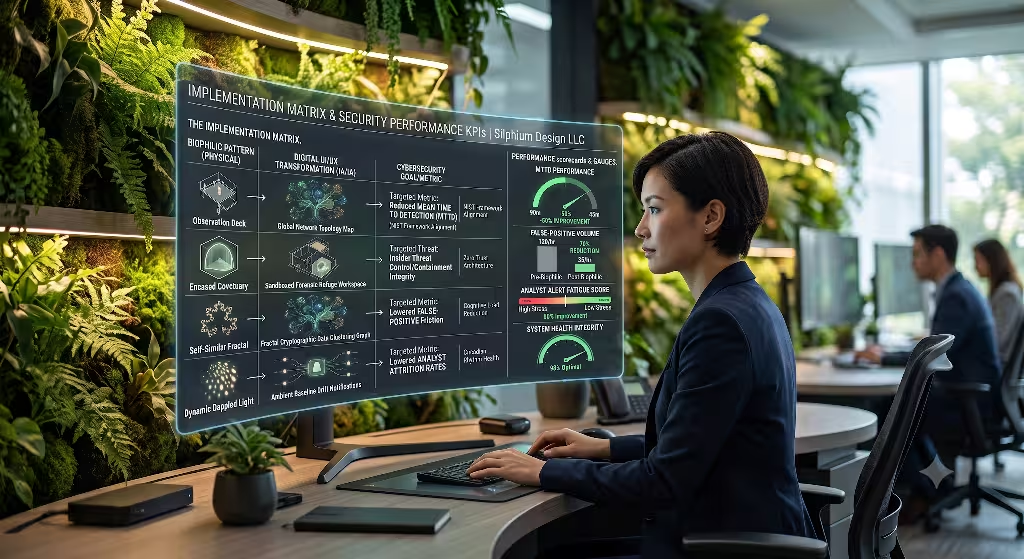
To bring biophilic design out of the world of theory and into actual software production, we must look at concrete technical implementations. At Silphium Design LLC, we use a structured matrix to map physical patterns into specific digital components. This helps us track how these design choices improve real-world digital security metrics.
Implementation Mapping
| Physical Biophilic Pattern | Software Component Transformation | Digital Security Goal and Metric |
| Pattern 11: Prospect | Global Network Topology Dashboard | Lowers Mean Time to Detection by showing the entire infrastructure at once. |
| Pattern 12: Refuge | Sandboxed Execution Environment | Protects analyst focus during complex forensic work by hiding distractions. |
| Pattern 10: Complexity and Order | Fractal Cryptographic Data Clustering | Minimizes false positives by showing clear visual patterns in massive system logs. |
| Pattern 3: Non-Rhythmic Stimuli | Ambient Baseline Drift Notifications | Reduces employee attrition by replacing harsh sirens with calm visual shifts. |
| Pattern 8: Biomorphic Forms | Contoured Identity Access Flows | Lowers configuration errors by making user permission paths easy to trace. |
| Pattern 6: Dynamic Light | Circadian Theme Adaptation | Preserves eye health and focus for night-shift operators looking for threats. |
Building systems with this matrix ensures that every design choice has a functional purpose. We are not just making things look pretty. We are using natural logic to build stronger shields for digital security.
Conclusion & Future Outlook: The Self-Healing Digital Biome
A. Summary
In summary, the field of digital security must move past the idea that software should look like a cold, industrial machine. The human mind is the most critical link in our data defense chains. If our software interfaces push that human mind into a state of chronic fatigue and sensory burnout, our data will never be truly safe.
By integrating biophilic patterns into our development cycles, we can fix this systemic flaw. We can use patterns like Prospect, Refuge, and Complexity and Order to build software that works in harmony with human biology. This approach reduces mental friction, prevents expensive human errors, and allows tech workers to maintain high levels of analytical performance without burning out. It is a win for both human health and digital security infrastructure integrity.
B. Future Horizon
As we look ahead, the relationship between human design and computer systems will continue to evolve. We are moving toward a world where artificial intelligence handles basic data tracking. This means human analysts will only be called upon to solve the most complex, unusual anomalies. The interfaces they use must be ready for these high-stress moments.
We envision a future where digital security systems operate like a self-healing natural forest biome. In a healthy forest, trees share resources through underground root networks, and the ecosystem adjusts automatically to threats like disease or weather changes. Our networks should do the same. The software interfaces will use generative design to adapt in real-time to the emotional state and mental load of the human operator. The system will grow, breathe, and shift its visual shapes to maintain perfect balance between the human mind and the data network.
C. Call to Action
The time to start building these systems is now. Chief Information Security Officers and software developers must stop looking at user interface design as an afterthought. It needs to be treated as a core component of system engineering requirements documents.
When you sit down to plan your next network monitoring tool, access panel, or encryption dashboard, look to the natural world for guidance. Avoid the temptation to use blocky, flat tables and jarring alarms. Build open landscapes that provide clear sightlines. Create quiet workspaces for focused analysis. Use the geometric laws of nature to bring order to chaos. By embracing digital biophilia, we can create a safer, more resilient digital world that protects both our data assets and the human minds that guard them.
Diagnostic Review
Let us review the design choices made across this document to ensure they line up with our architectural goals.
1.Assess Baseline Cognitive Load:Pre-design phase.
Measure the current rate of alert fatigue and screen-induced eye strain among your system analysts. Look for spikes in error rates that occur during the final hours of long shifts.
2.Map Network Elements to Natural Analogues:Architecture phase.
Translate your flat server tables into interconnected organic structures. Group related assets into clusters that mimic the natural grouping of leaves on a branch.
3.Apply the Fluid Dynamics of Data Movement:Interface design phase.
Replace jarring state changes with smooth, continuous transitions. Make data packet movements look like fluid streams rather than jumping pixels.
4.Deploy Non-Rhythmic Alert Mechanics:Notification setup.
Remove constant blinking lights from your system alerts. Implement soft, gradient-based ambient changes that capture attention through subtle shifts in pattern and form.
By following this precise sequence, software teams can systematically strip away the synthetic friction that compromises data defense. We can create systems that feel as natural as they are secure.