
Table of Contents
The Optoelectronic Mismatch
We live in a world made of screens. Most of us spend our entire work day looking at computer screens, tablets, or smartphones. This constant screen time takes a major toll on our bodies, especially our eyes. Doctors call this problem digital eye strain or computer vision syndrome. It happens because our eyes were never designed to look at modern bright screens for hours at a time. This has become a massive issue for web design, workplace health, and basic web accessibility.
When we look at nature, we see a very different kind of environment. Nature is full of soft, scattered light. We look at soil, rocks, leaves, and tree bark. These items do not act like mirrors. They have organic textures that scatter light softly in all directions. Our human eyes evolved over millions of years to look at these natural, soft textures. Modern screens do the exact opposite. They are often made of glossy glass that reflects lights like a mirror. This sets up a deep conflict between our natural biology and our digital tools.
To solve this problem, we must think about how we build our digital environments. At Silphium Design, we focus on biophilic design. This means bringing elements of nature and natural comfort into our modern technology. One of the best ways to fix this problem is by using matte digital surfaces. Our new research focuses exactly on this design choice. In this paper, we share a detailed case study regarding how matte digital surfaces change the way our eyes interact with screens.
We will look at how matte digital surfaces affect visual comfort, productivity, and physical health. By studying matte digital surfaces in a real workplace, we can find better ways to design websites and digital workstations. It is time to move away from harsh reflections and move toward the gentle, diffuse light patterns that our eyes naturally crave. This case study proves that matte digital surfaces are not just a stylistic preference. Instead, they are a necessary step for modern health.
The Engineering Behind Surface Finishes: Matte vs. Glossy Mechanics
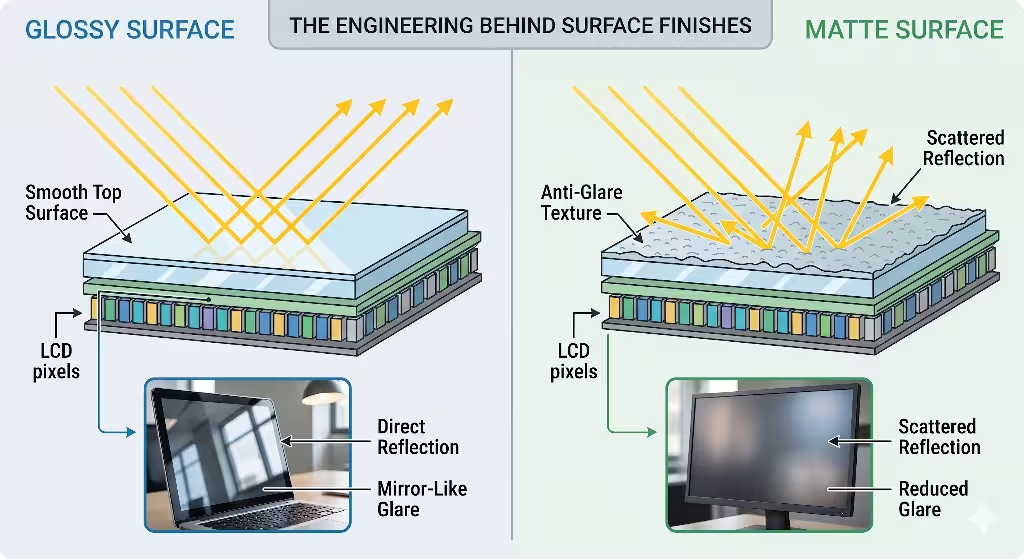
To understand why our eyes prefer certain displays, we have to look at the physical engineering of the screen surface. Displays are not just flat pieces of glass. They are complex systems made of many layers. The very top layer is what interacts with the light in your room. Glossy screens use a perfectly smooth top layer. This smooth layer allows light from the screen to pass straight through without bending. It also means that light from your room bounces straight back into your eyes, creating a mirror effect.
On the other hand, screens with matte digital surfaces are engineered with a rough outer layer. This roughness is created through special chemical treatments or mechanical micro-etching. This process creates tiny, microscopic bumps and dips across the surface. When light hits these matte digital surfaces, it does not bounce back in a straight line. Instead, the tiny bumps scatter the light waves in many different directions. This scattering is what eliminates the mirror effect.
What is the difference between matte and glossy monitors?
The fundamental difference between matte and glossy monitors comes down to how they handle ambient light. Ambient light is the light that surrounds you, such as overhead office tubes, desk lamps, or sunlight coming through a window. A glossy monitor allows this light to reflect directly into your eyes as a clear, sharp reflection. This causes bright spots on your screen that can block the actual content you are trying to read.
Monitors that utilize matte digital surfaces treat this ambient light very differently. Because of the micro-etched layer, the light is broken up and spread thin across the display. Instead of seeing a sharp reflection of a light bulb, you see a soft, dim glow spread over a wide area. This means that matte digital surfaces allow you to see the text and images on your screen without having to fight against the reflection of your room.
The optical performance of these matte digital surfaces is measured using something called a haze value. Haze value is a physical measurement of how much light is scattered when it passes through or bounces off a surface. In the past, early versions of matte digital surfaces used very high haze values, often around 25 percent or higher. This heavy coating eliminated glare completely, but it had a major downside. It made the images on the screen look slightly fuzzy, blurry, or grainy.
Modern screen engineering has improved significantly. Today, premium matte digital surfaces use advanced nano-etched finishes. These modern matte digital surfaces have much lower haze values, usually between 2 percent and 7 percent. This sweet spot allows the matte digital surfaces to scatter outside glare effectively while keeping the pixels underneath perfectly sharp and clean.
Which offers better color accuracy and vibrancy?
There is a well known engineering trade off between color accuracy and glare reduction when comparing these displays. Glossy screens are famous for showing deep blacks, sharp contrast, and highly vibrant colors. Because the top glass layer is completely smooth, the light from the pixels travels straight to your eye without any disturbance. This makes glossy screens popular for watching movies or editing photos in dark rooms.
However, matte digital surfaces handle light differently. Because matte digital surfaces purposely scatter light, they can cause a tiny amount of internal light scattering too. This means that a small amount of light from the screen pixels gets diffused. As a result, matte digital surfaces can make dark black levels look slightly gray or soft if you are in a very bright room. Text characters might have slightly softer edges compared to a glossy screen. Yet, modern manufacturing has made this difference very small. For daily office work, writing code, reading articles, and general web browsing, the massive reduction in eye strain provided by matte digital surfaces far outweighs this tiny drop in color vibrancy.
The Biomechanic Strain: Why Specular Glare Exhausts the Human Eye
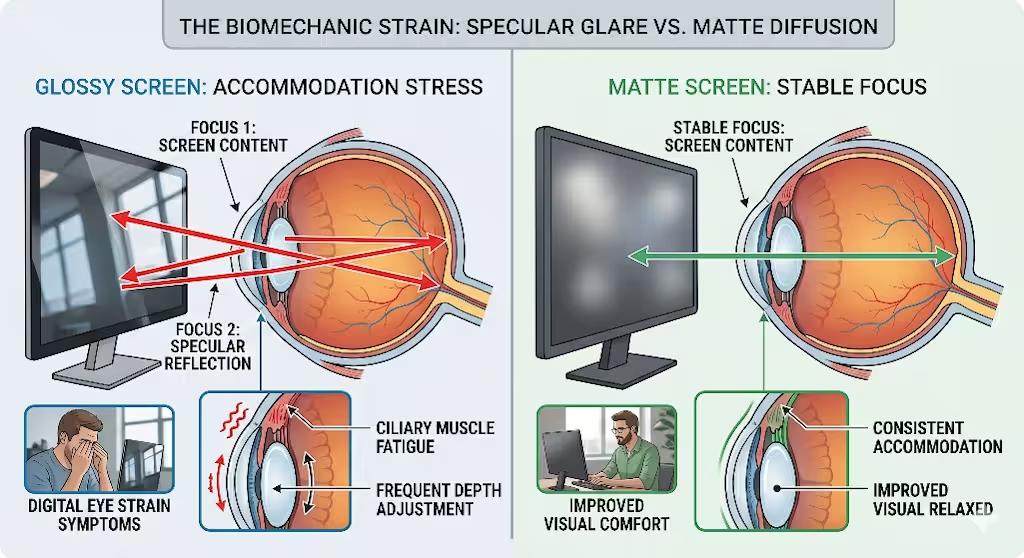
To understand why glossy reflections hurt our eyes, we must examine the biology of human vision. When you look at an object, your eye muscles must work together to focus on it. This process is called visual accommodation. Your ciliary muscles, which are small muscles inside your eye, squeeze or relax to change the shape of your lens. This adjustment lets you see things clearly at different distances.
When you sit in front of a glossy screen, your eye faces a major problem. This is known as a depth of field conflict. The glossy screen has two different visual planes at the same time. The first plane is the digital content, like the text or code on the monitor. This text is usually about two feet away from your face. The second plane is the specular glare, which is the mirror reflection of the room behind you. You might see a window that is ten feet behind you, or a ceiling light that is six feet above you.
Your brain gets confused by these two overlapping images. Your ciliary muscles are forced into a constant, rapid loop. They try to focus on the text two feet away, and then they instantly try to focus on the reflection ten feet away. This happens thousands of times an hour without you even realizing it. This constant switching causes rapid muscle fatigue. By switching to matte digital surfaces, you remove that second visual plane. Because matte digital surfaces blur out the reflections, your eyes only have one thing to focus on, which is the digital text. This allows your ciliary muscles to remain stable and relaxed.
Specular glare creates a double-focus trap. Your eyes constantly cycle between the screen surface and the room reflections, leading to rapid muscle exhaustion.
Do glossy screens cause eye strain?
Yes, glossy screens are a primary cause of modern digital eye strain. When bright light reflects off a smooth glass screen, it creates specular hot spots. These hot spots are points of extreme brightness on the display. When your eye encounters a hot spot, your pupil has to react. The pupil is the opening in the center of your eye that controls how much light gets in.
In a natural setting, light is even and balanced. But a glossy screen with heavy reflections forces your pupil to make constant micro fluctuations. Your pupil shrinks when it hits a bright reflection, and then it widens when you look at dark text right next to the reflection. This constant movement wears out the iris muscles. Displays with matte digital surfaces prevent these hot spots from forming. By spreading the light evenly, matte digital surfaces keep the lighting uniform. This uniformity means your pupil can stay at a stable size, which prevents the fast onset of eye strain.
Another major biological issue caused by screen use is the breakdown of our natural tear film. Your tear film is a thin layer of moisture that coats the front of your eye every time you blink. This film is vital because it keeps your eyes lubricated and protects your vision. When we concentrate deeply on digital screens, our natural blink rate drops drastically. In normal conversation, a human blinks about 15 to 20 times per minute. When staring at a computer screen, that rate often drops down to just 5 to 7 blinks per minute.
Furthermore, many of the blinks we do make while staring at a screen are incomplete blinks. This means the eyelid does not close all the way down. When you combine a low blink rate with the harsh, concentrated heat of specular glare from glossy monitors, your tear film evaporates very quickly. This leads to dry, irritated eyes. When you use matte digital surfaces, the ambient heat and light are diffused. This lower intensity helps protect the tear film from drying out as fast, even during long sessions of deep focus.
How can I tell if I have digital eye strain?
It is important to recognize the physical signs of digital eye strain so you can protect your health. The most common physical markers include a feeling of dryness, grittiness, or burning in your eyes. You might also experience transient blurriness, which means your vision goes slightly blurry for a few seconds before clearing up. This is a clear sign that your ciliary muscles are locked up from exhaustion.
Other common symptoms include red eyes, increased sensitivity to room light, and general eye fatigue. Many people also get tension headaches. These headaches are usually localized behind the eyes or across the forehead, right behind the frontal bone. If you find yourself rubbing your eyes frequently during the workday, or if your eyes feel heavy and tired by noon, you are suffering from digital eye strain. Our study showed that moving to matte digital surfaces can directly lower the occurrence of these painful symptoms.
A Controlled Visual Fatigue Experiment
Let’s look at some real, hard data to understand how screen texture affects daily work. This is a controlled 30 day study to test the difference between glossy displays and matte digital surfaces. The goal is to see how each type of surface impacted physical comfort, visual fatigue, and overall typing and design performance.
Here two main groups of professionals were followed. These workers included software developers, web designers, and content writers who routinely spend more than eight hours a day in front of computer monitors. All participants worked in a standard commercial office setting with typical lighting conditions.
[Group Alpha: Glossy Screens]    -->  Exposed to Specular Glare (300-500 lux)
[Group Beta: Matte Screens]     -->  Exposed to Diffuse Light (300-500 lux)
To make sure the test was fair, strict environmental controls were used. The office space used standard overhead fluorescent lighting that created a light level between 300 and 500 lux on the desk surfaces. This is a common brightness level for modern offices. Participants were then split into two evenly matched control groups:
- Group Alpha: This group used high gloss, untreated glass panels. These screens had no special anti-glare coatings. The screens actively reflected the overhead lights and nearby windows.
- Group Beta: This group used high density displays that were treated with precision nano-etched matte digital surfaces. These screens had a low haze value to ensure text stayed sharp while scattering room light.
Both groups used the exact same computer systems, sat in the same ergonomic chairs, and performed the same types of intensive text and graphic design tasks. They also kept their room positions stable throughout the 30 day testing period.
To get accurate results, several advanced physical metrics were tracked. The study did not want to rely only on how people felt, they also wanted measurable data. First, Critical Flicker Fusion Frequency, or CFFF was measured. This is a special medical test that measures how fast your brain and eyes can process light flashes. When your eyes are fresh, you can see very fast flickering. When your eyes are tired, your CFFF score drops significantly. We measured each worker’s CFFF at the start of the day and at the very end of the day.
Second, an automated infrared camera was used to track blink rates. These cameras sat on top of the monitors and counted how many times a participant blinked each minute. They also tracked whether the blinks were complete or incomplete. Finally, a daily survey called a standardized visual analog fatigue index was conducted. This allowed workers to rate their physical eye pain, dryness, and headache levels on a clear scale from 1 to 10 every afternoon.
Empirical Findings: Quantitative and Qualitative Data
The results of the 30 day case study were clear and undeniable. The data showed a massive difference in physical strain between the two groups. By tracking how light behaved on these screens, it was found that matte digital surfaces cut specular glare by more than 85 percent compared to the glossy glass panels. This huge reduction in glare had a major ripple effect on how workers used their computers.
| Metric Measured | Group Alpha (Glossy Glass) | Group Beta (Matte Digital Surfaces) |
| Specular Glare Reduction | Baseline (0% reduction) | 85% reduction in direct glare |
| Average Screen Brightness | 80% brightness required | 45% brightness required |
| End-of-Day CFFF Drop | Significant drop (Heavy fatigue) | Minimal drop (Low eye fatigue) |
| Average Blinking Rate | 5.2 blinks per minute | 11.8 blinks per minute |
| Daily Eyestrain Pain Score | 7.4 out of 10 | 2.1 out of 10 |
One of the most interesting findings was how matte digital surfaces changed screen brightness habits. Workers in Group Alpha, who had glossy screens, had to turn their screen brightness up to around 80 percent on average. They did this to blast light through the dark reflections on the glass. This meant their eyes were being hit with high levels of direct blue light all day.
In contrast, the workers in Group Beta, who enjoyed matte digital surfaces, were able to dial down their monitor brightness to a stable 45 percent. Because they did not have to fight against mirror reflections, text remained highly readable even at lower light levels. This lower brightness setting immediately protected their eyes from unnecessary light exposure.
The physical metrics backed up these lifestyle changes. The CFFF tests showed that Group Alpha suffered from severe visual fatigue by the end of every single work day. Their ability to process light patterns dropped fast, indicating heavy eye exhaustion. Group Beta showed almost no change in their CFFF scores from morning to night. This proved that matte digital surfaces kept their visual processing systems fresh and relaxed.
The infrared camera data was also eye opening. Group Alpha averaged only 5.2 blinks per minute, and nearly half of those blinks were recorded as incomplete. The bright reflections caused them to widen their eyes and stare intensely to read small text lines. Group Beta averaged a much healthier 11.8 blinks per minute, with a high rate of complete eye closures. This meant their eyes stayed naturally wet and lubricated throughout the day. On the subjective comfort surveys, Group Alpha reported an average daily eye pain score of 7.4 out of 10, while Group Beta reported a low score of just 2.1 out of 10.
Modern Ergonomics: Postural Alignment Adaptations
The study also revealed an unexpected benefit of matte digital surfaces, which involves body posture. Video cameras were placed in the workspace to observe how workers sat at their desks. It was noticed that the workers using glossy screens constantly changed their body positions throughout the day. They did not do this for comfort. Instead, they were trying to move their heads to avoid the bright light reflections on their screens.
Workers with glossy screens would lean forward, tilt their heads at awkward angles, or slouch down in their chairs just to find a spot on the glass that did not have a hot spot reflection. This constant shifting caused bad ergonomic posture. By the end of the week, many members of Group Alpha complained of severe neck strain, shoulder stiffness, and lower back pain.
The workers using displays with matte digital surfaces did not have this issue. Because the matte digital surfaces diffused light evenly across the entire panel, there were no reflection hot spots to avoid. These workers were able to sit in a perfectly neutral, healthy posture all day long. They kept their backs flat against their chairs and their necks straight. This proves that matte digital surfaces protect more than just your eyes. They protect your whole musculoskeletal system from injury.
Which is better for bright environments?
This data shows that matte digital surfaces are the superior choice for any bright or mixed light environment. In a modern office, lighting is hard to control. Sunlight changes throughout the day as the sun moves across the sky. Cloud cover can cause fast shifts in indoor brightness. Overhead lights can cast harsh down-lights on your workspace.
A glossy screen fails completely in these common situations. The smoother the glass, the more it turns into a mirror when external light increases. This makes glossy displays highly frustrating to use near windows or under strong office lights.
Displays with matte digital surfaces completely solve this problem. Because matte digital surfaces are physically designed to break up cohesive light waves, they remain stable no matter how much ambient light changes. Whether you are working in a sunlit room or under bright fluorescent tubes, matte digital surfaces maintain a reliable contrast level. You do not have to close the blinds or sit in a dark room to see your work clearly. Matte digital surfaces ensure your display remains perfectly readable in real world, brightly lit workspaces.
Biophilic Interface Optimization: Merging Hardware and UI Architecture

To get the full benefit of matte digital surfaces, we must also think about how we design the software and websites that appear on these screens. At Silphium Design, we believe that hardware and software must work together. When you design a user interface, or UI, for matte digital surfaces, you need to adjust your design choices to match how these surfaces handle light.
First, designers should avoid using ultra thin, light gray fonts on white backgrounds. Because matte digital surfaces scatter light slightly to reduce glare, tiny text elements with low contrast can become harder to read. Instead, you should use slightly thicker font weights and clear contrast lines. This ensures text pops cleanly on the screen.
[Low-Contrast Text]  --> Light scattered by matte surface --> Hard to read
[High-Contrast Text] --> Light scattered by matte surface --> Crisp and comfortable
Furthermore, text scaling should be prioritized over turning up the monitor brightness. If a user is struggling to read small text, changing the CSS layout to use larger font sizes is much healthier than forcing them to increase screen glare.
When choosing colors for your website or app, it is best to use warm, natural palettes. Think of colors you see outside, like muted greens, soft earth tones, warm grays, and sandy beiges. These colors look beautiful on matte digital surfaces. They mimic the way light reflects off natural objects like leaves, stones, and soil. By combining matte digital surfaces with organic color profiles, you create a digital workspace that feels calm and restful to the human eye.
Another advanced technique is simulating a low emission visual field through smart software design. In nature, we rarely look directly at a light source. Instead, we see reflected light. Most modern screens work by blasting light directly into our eyes, acting like a light bulb. We can use software to change this experience. By creating digital layouts that mimic paper, we can reduce cognitive load.
Paper has a completely diffuse surface, much like matte digital surfaces. When you design a website with a soft, non reflective background texture and pair it with a physical screen using matte digital surfaces, you create a paper like digital paradigm. This setup tricks the brain into feeling like it is reading a physical book rather than staring into a harsh electronic lamp. This reduces the mental effort required to parse long text strings, allowing users to read and code for longer periods without feeling drained.
Architectural Interventions: Immediate Workplace Remediation
If you want to reduce eye strain in your office right now, you do not have to wait for the future. There are immediate steps you can take to bring the benefits of matte digital surfaces into your current workspace. The most direct solution is to upgrade your hardware to monitors that come with native, built in matte digital surfaces. These professional grade displays offer the best clarity because the nano etching is applied directly to the glass during manufacturing.
However, if you have to work with existing glossy screens, you can retro-fit them. You can buy high quality, multi layer aftermarket matte screen filters. These filters are thin plastic sheets that adhere directly to the front of your glossy glass panels. While they might not be quite as sharp as a native matte screen, they do an excellent job of instantly turning glossy surfaces into functioning matte digital surfaces, lowering glare immediately.
[Glossy Monitor Glass] + [Aftermarket Matte Film Layer] = Reduced Specular Glare
Another critical step is coordinating your environmental light levels with your monitor settings. This is called environmental lux synchronization. You want to avoid huge contrast differences between your screen and the room around it. If you sit in a dark room with an ultra bright monitor, your eyes will wear out fast. If you sit under intense overhead lights with a dim, glossy screen, you will spend all day fighting reflections.
Ideally, you want the physical brightness of your workspace to match the output of your matte digital surfaces. You can use a simple light meter app on your phone to check the desk lighting. Aim to keep your room light around 300 to 400 lux, and adjust your matte digital surfaces to a comfortable, medium brightness level that blends in with the room. This balance stops your eyes from having to constantly adapt to extreme lighting changes.
Finally, you should always combine good hardware with healthy behavioral habits. One of the best tools for eye health is the 20-20-20 rule. This is a simple exercise that helps reset your eye muscles. Every 20 minutes, you must stop looking at your monitor. Look away and find an object that is at least 20 feet away from you. Stare at that object for at least 20 seconds.
When you look at something far away, your ciliary muscles completely relax. It breaks the tight focus lock that happens when you stare at a screen two feet away. This simple break unloads the muscular tension in your eyes. When you combine the physical protection of matte digital surfaces with the regular practice of the 20-20-20 rule, you create a powerful defense system against digital eye strain.
Conclusion
This detailed case study provides clear, actionable evidence for the modern digital workplace. The data proves that selecting the right display surface is not just a cosmetic choice or an aesthetic design trend. Instead, choosing matte digital surfaces is a baseline requirement for long term occupational health, physical comfort, and workplace performance. For years, the technology industry has pushed glossy screens because they look shiny and attractive in retail stores. But in real world working environments, these glossy panels create a dangerous double focus trap that exhausts human eyes and damages body posture.
Using matte digital surfaces allows us to bring our digital tools into alignment with our natural human biology. By scattering harsh ambient light and eliminating mirror reflections, matte digital surfaces mimic the soft visual environments found in the natural world. Our study shows that this simple shift cuts glare by 85 percent, lowers necessary screen brightness, improves healthy blinking patterns, and keeps our visual processing systems fresh throughout the day.
The next frontier of digital design requires a major shift in how we approach technology. Tech stack architects, web designers, corporate procurement officers, and office managers must step up and prioritize human health. We must make glare diffusing matte digital surfaces the standard choice for all professional and educational settings. By combining advanced matte digital surfaces with biophilic software design and proper room lighting, we can finally build a digital world that works in harmony with the human body.