
At Silphium Design LLC, we see the internet not as a series of cold boxes, but as a digital landscape that should breathe. Many websites today look like plastic. They feel empty.
However, the human brain is wired to love the natural world. We call this biophilia. It is the reason you feel calm in a forest but stressed in a windowless room. My job is to bring that forest to your screen. When we talk about how to add bark, stone, or leaf textures to websites, we are talking about more than just a background image. We are talking about creating a digital space that feels alive. We are moving away from the flat, boring designs of the past. We are building a future where your screen has depth and soul.
This article will show you how to use modern tools to make your site feel like a part of the earth.
Table of Contents
The Neurobiology of Digital Surfaces

To understand why we use bark, stone, or leaf textures, we have to look at how our brains work. For millions of years, humans lived outside. Our eyes are used to seeing patterns that are not perfect. In nature, nothing is a perfectly straight line or a flat color. When you look at a tree, you see a complex pattern of ridges. When you look at a rock, you see cracks and colors that change. These are called fractals. Our brains find these patterns very relaxing.
When a website is too flat, it can feel “wrong” to our subconscious mind. By learning how to add bark, stone, or leaf textures, you are helping your visitors feel at home. This lowers their stress. It makes them stay on your page longer. In the world of SEO, we call this dwell time. If people stay longer because your site feels natural, search engines will think your site is better. Using bark, stone, or leaf textures is not just about art. It is about biology. It is about making a connection between the user and the digital environment.
We are seeing a big change in how people use the internet in 2026. People are tired of fake things. They want things that feel real. If you can master the use of bark, stone, or leaf textures, you will stand out. You are giving the user a “tactile” experience. That means it feels like they could reach out and touch the screen. This sense of touch is very powerful. It builds trust. If your site looks like it was grown rather than built, people will feel a deeper bond with your brand. This is the heart of what we do at Silphium Design LLC.
The Science Behind Bark, Stone, and Leaf Architectures
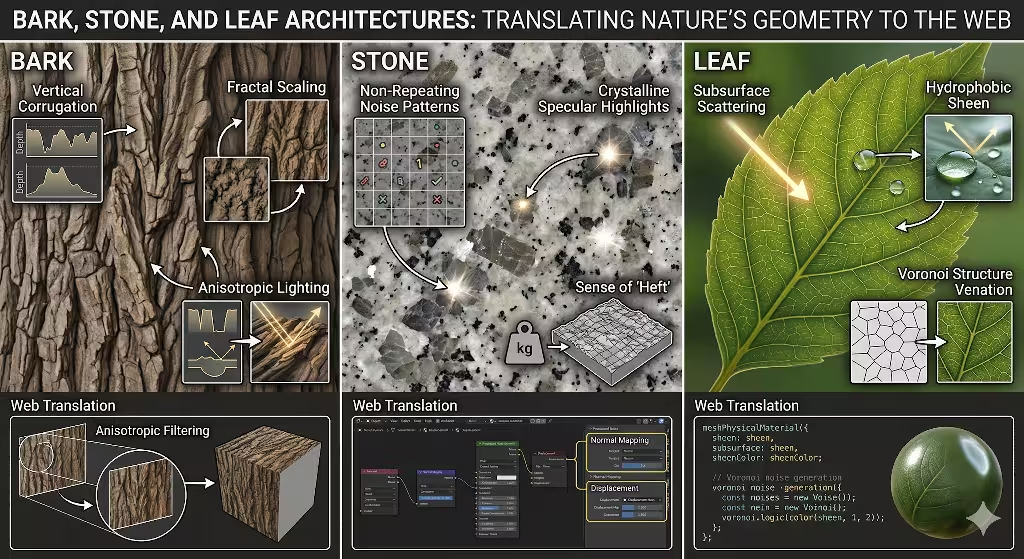
If you want to know how to add bark, stone, or leaf textures to your site, you must first study the items themselves. You cannot just pick a random photo. You need to understand the “math” of nature. Each of these three elements has a different structure. For an example, you can look at the Landscape Design Studio that was completed by Silphium Design.
Bark is all about vertical lines. But these lines are not straight. They are wavy. They have deep shadows and high peaks. This is called corrugation. When light hits bark, it creates a lot of contrast. If you want to use bark, stone, or leaf textures that look real, you have to think about how the light would hit a tree. You need to show the rough parts and the smooth parts.
Stone is different. Stone is about weight. It is about noise. When we talk about noise in design, we mean small dots and changes in color. Stone has a “crystalline” look. This means it has tiny spots that shine when the light hits them just right. To use bark, stone, or leaf textures properly, your stone patterns should not repeat too often. If a person sees the same crack in the stone over and over, the magic is gone. It starts to look fake.
Leaves are the most complex. A leaf is not just a green shape. It has veins. These veins follow a pattern called a Voronoi structure. It looks like a map of tiny cells. Also, leaves have something called subsurface scattering. This is a fancy way of saying that light can go through them. If you hold a leaf up to the sun, it glows. When you are learning how to add bark, stone, or leaf textures, you should try to mimic this glow. It makes the leaf look soft and thin instead of hard and flat.
How to Incorporate These Textures
Method 1: CSS and SVG Filter Primitives
Now we get to the coding part. Many people think you need a huge image file to show bark, stone, or leaf textures. That is not true. In fact, large images make your site slow. Slow sites are bad for SEO. Instead, we can use something called SVG filters.
SVG stands for Scalable Vector Graphics. These are tiny files that use math to draw shapes. We can use a tool called “feTurbulence.” This tool creates random clouds of color. If you set it up correctly, it can look exactly like the grain of a piece of wood or the rough surface of a rock. By using code to create bark, stone, or leaf textures, your site will load very fast.
We also use “feDisplacementMap.” This takes a flat shape and “pushes” it around. It creates the bumps you see on a tree. You can layer these filters on top of each other. For example, you can take a brown box and apply a turbulence filter to make it look like a cedar plank. This is a very smart way to use bark, stone, or leaf textures. It is clean code. It is easy for search engines to read. It also works on every screen size. Whether someone is on a phone or a big TV, the texture will look sharp because it is made of math, not pixels.
Method 2: High Res Asset Optimization
Sometimes, code is not enough. Sometimes you need a real photo to get the best bark, stone, or leaf textures. If you use a photo, you must be careful. In 2026, we do not use old formats like JPEG if we can avoid them. We use AVIF.
AVIF is a new way to save images. It makes the file very small but keeps the colors very bright. This is perfect for bark, stone, or leaf textures. For example, a stone texture has many tiny details. An old JPEG would make those details look blurry or “blocky.” AVIF keeps them sharp.
You should also use the “picture” tag in your HTML. This allows you to show a small image to someone on a phone and a big image to someone on a computer. This is called responsive design. If you want to know how to add bark, stone, or leaf textures that don’t break your site, this is the way. You can even use a technique called “art direction.” This means you might show a close up of some bark on a phone, but a wide shot of a whole tree on a desktop. This makes sure the bark, stone, or leaf textures always look great, no matter what.
Method 3: WebGL and 3D Displacement Maps
If you want to be a real expert, you have to look at WebGL. This is a way to use the power of a computer’s graphics card inside a web browser. With WebGL, your bark, stone, or leaf textures can actually move.
Imagine a website where you move your mouse, and the light on a stone background changes. Or imagine a leaf that ripples when you click it. This is done with something called a displacement map. You use a black and white image to tell the computer which parts of the texture are high and which parts are low. White parts stick out. Black parts sink in.
When you use bark, stone, or leaf textures in 3D, you create a very deep feeling. This is what we call an “immersive” site. It feels like a video game, but it is just a website. My work at Harvard taught me that the math behind these 3D maps is quite simple once you learn it. You are just telling the computer where to put the shadows. This makes your bark, stone, or leaf textures look like you could actually feel the ridges with your fingers.
Common Questions Answered About Natural Textures
People often wonder how to keep these designs from becoming a mess. One common question is: How do I make web textures look realistic without slowing down my site? The answer is to use “tileable” images. This means the left side of the image matches the right side. You can use a small image and repeat it like wallpaper. If you do this well, you can have bark, stone, or leaf textures that cover a whole page but only use a tiny bit of data.
Another question is: Can I use CSS for bark patterns? Yes, you can. You can use “linear gradients” to make stripes. Then you use the SVG filters we talked about earlier to make those stripes look rough. This is a great way to build bark, stone, or leaf textures without using any images at all. It is 100% code. This is the “gold standard” for modern web design.
A third question is: What is the best file format for natural textures in 2026? As I said before, AVIF is the best for photos. For patterns made of lines, use SVG. If you use the right format for your bark, stone, or leaf textures, your site will be fast and beautiful. Search engines like Google love fast sites. This means your biophilic design will actually help you rank higher in search results.
Accessibility and Readability: The Biophilic Balance
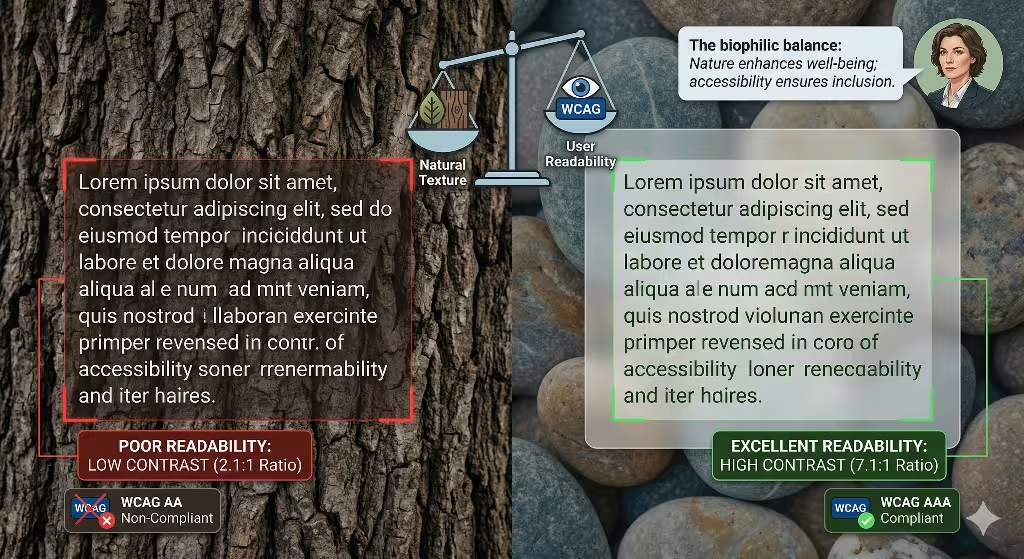
This is a very important part. You cannot just put bark, stone, or leaf textures everywhere and hope for the best. If you put dark text on a dark bark background, no one can read it. That is a big mistake. We must follow accessibility rules. These are called WCAG standards.
To keep your bark, stone, or leaf textures and still have a site people can read, you need “contrast.” One trick we use is called “glassmorphism.” This is when you put a blurry, semi-clear box over the texture. The texture still shows through, but the area behind the text is smooth. This makes it very easy to read. Another method is to lighten or darken the background to gain more contrast.
When you are using bark, stone, or leaf textures, you also have to think about people who are colorblind. Some people cannot tell the difference between green leaves and brown bark. You should use different shapes and light levels so that the textures still look different to them. A good designer knows that beauty should not stand in the way of function. You want your bark, stone, or leaf textures to enhance the site, not make it harder to use.
Performance and Core Web Vitals for SEO
In 2026, Google looks at something called Core Web Vitals. They want to see how fast your site loads and how stable it is. If you add heavy bark, stone, or leaf textures, your score might go down. To prevent this, we use a technique called “lazy loading.”
Lazy loading means the computer only downloads the images when the user scrolls down to see them. If you have a stone texture at the bottom of your page, why download it at the start? This keeps the “Initial Load” very fast.
We also use a setting called “decoding=async.” This tells the browser to work on the image in the background. It won’t stop the rest of the page from loading. This is vital when you are using complex bark, stone, or leaf textures. You want the user to see the text and buttons right away. The beautiful bark, stone, or leaf textures should appear just a split second later. This keeps the “Interaction to Next Paint” score very high. A high score means a happy user and a happy search engine.
Step by Step Implementation Guide
So, how do you start? Here is a simple way to add bark, stone, or leaf textures to your project today. To start, it is helpful to choose leaves that are not too veiny.
First, find a high quality texture. I suggest looking for a “Seamless” stone or leaf image. Second, convert that image to the AVIF format. This will save you a lot of space. Third, use CSS to set that image as a background.
Fourth, if the image is too busy, add a “backdrop-filter” in your CSS. This can blur the texture slightly so it stays in the background. Fifth, test your site on a phone. Make sure the bark, stone, or leaf textures don’t make the page jump around.
If you want to go further, try adding an SVG filter to your bark, stone, or leaf textures. You can find many free tools online that generate the code for you. Just copy and paste it into your HTML. By following these steps, you can turn a boring site into a biophilic masterpiece. You are not just a coder anymore. You are a digital gardener. You are using bark, stone, or leaf textures to build a better web.
The Future of Tactility
The internet is changing. We are moving away from the “flat” era. People want to feel a connection to the world around them, even when they are looking at a screen. By using bark, stone, or leaf textures, you are giving them that connection. You are making a site that feels warm, solid, and real.
At Silphium Design LLC, we believe that the best design is the one that respects nature. Whether you are using bark, stone, or leaf textures to tell a story or to make a brand feel more “organic,” you are doing important work. You are making the digital world a little more human.
Remember to always balance your bark, stone, or leaf textures with clean code and high performance. A beautiful site is only good if people can actually use it. Use the tools we talked about today. Use SVG filters. Use AVIF images. Use WebGL if you want to be fancy. But most of all, look at the world around you. The best ideas for bark, stone, or leaf textures aren’t found in a book. They are found in the woods, in the mountains, and in your own backyard. Go outside, look at a tree, and then bring that feeling back to your computer. That is how you create a site that truly stands out.
Why Local SEO Benefits from Biophilic Design
You might wonder what bark, stone, or leaf textures have to do with local search. It is simple. Local businesses want to feel like they belong to their community. If you are a landscaper in Vermont, your site should look like Vermont. It should have the bark, stone, or leaf textures that people see when they walk outside their front door.
When a local user sees familiar textures, they feel a sense of “place.” This builds a local brand better than any logo ever could. Using bark, stone, or leaf textures that match your local area makes your business feel authentic. It shows you care about the details. And in 2026, details are everything. Search engines are getting better at understanding the “feel” of a site. They can tell when a site is using high quality, original bark, stone, or leaf textures instead of cheap stock photos.
By investing time into your bark, stone, or leaf textures, you are investing in your brand’s future. You are telling your customers that you are a real person in a real place. You aren’t just an AI bot living in a cloud. You are part of the earth. And that is a message that everyone can understand, no matter their age or education.
Technical Details for the Curious Designer
If you want to dive deeper into how to add bark, stone, or leaf textures, let’s talk about light. In nature, light usually comes from above. This is called “Global Illumination.” When you design your bark, stone, or leaf textures, make sure the shadows are consistent. If the shadow on your bark goes down, but the shadow on your stone goes up, the user’s brain will get confused.
You can use “CSS Variables” to control the light across your whole site. This way, if you change the “sun” position, all your bark, stone, or leaf textures will update at once. This keeps your design “cohesive.” It means everything fits together.
Also, consider the “Scale” of your bark, stone, or leaf textures. If the leaf pattern is too big, it looks like a giant monster leaf. If it is too small, it just looks like green noise. You have to find the “Human Scale.” This is the size that things appear when you are standing right in front of them. Using the right scale for your bark, stone, or leaf textures makes the site feel comfortable and safe.
Final Thoughts on Biophilic Coding
To finish, I want you to think about the power of the natural world. We have the technology to build anything we want. We should use that technology to build things that make us happy. Using bark, stone, or leaf textures is a small step toward a more beautiful internet.
It takes a little more work to use bark, stone, or leaf textures correctly. You have to think about file sizes. You have to think about code. You have to think about how people read. But the reward is a site that people love. They won’t just visit your site. They will remember it. They will tell their friends about the site that felt like a walk in the park.
I hope you feel inspired to go out and explore the beauty of the natural world and add some bark, stone, or leaf textures to your next project. The world is full of beauty. Let’s make the internet full of beauty, too. At Silphium Design LLC, we will be right here with you, watching the digital forest grow.
Make sure to keep practicing. Try different bark, stone, or leaf textures. See which ones work best for your brand. There is no “right” way to do nature. Nature is messy, and that is why it is beautiful. Your site can be a little messy too. As long as it feels real, you are on the right path.
Go find some inspiration in the bark, stone, or leaf textures of the real world. Your screen is waiting for a touch of life.